Our Top Picks
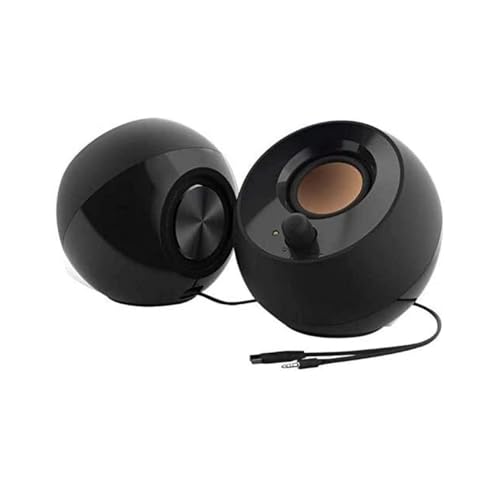
 Amazon Basics AC-Powered Computer Speakers for Desktop or1-Pack2.96 x 3.15 x 5.3 inches1.7 poundsCheck on Amazon
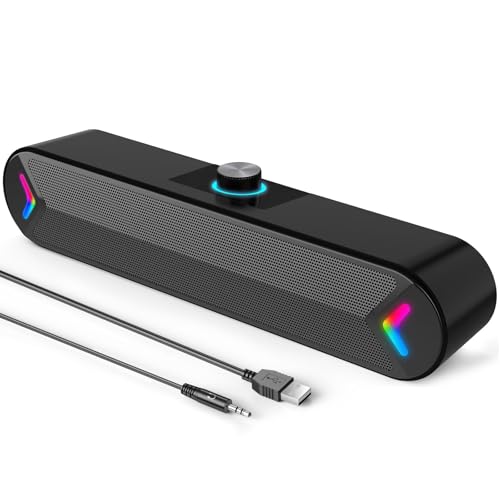
 1Mii 3.5mm Computer Speakers for Desktop Laptop Tablet2.4 x 10.2 x 2.5 inches0.4 poundsCheck on Amazon
 Amazon Basics USB-Powered Computer Speakers with Volume Control1-Pack2.76 x 3.55 x 5.3 inches1.5 poundsCheck on Amazon

What's inside
- Why a headphone jack on the speaker itself changes daily use
- How the automatic speaker mute actually works
- The headphone amplifier hiding inside your speakers
- Jack placement: front panel, control pod or top edge
- Edifier R1280 series: the bookshelf benchmark for a front socket
- PreSonus Eris monitors: studio cueing on a budget desk
- Mackie CR-X multimedia monitors and the creator desk
- Compact desktop options: Creative, Edifier tabletop lines and small footprint picks
- Matching headphones to a speaker socket
- Sound cards, interfaces and where the speaker jack fits
- Comparison table: shortlisted models at a glance
- Daily scenarios where the socket earns its keep
- Troubleshooting hum, crackle and one-sided audio
- Buying checklist before you commit to a model
- Wired socket versus wireless headphones: an honest comparison
- Placement, stands and getting the speaker half right
- Equalisation and tone controls on the headphone path
- Frequently asked questions
- What manufacturer data reveals about socket quality tiers
- How this guide was assembled
- Check prices on Amazon
- Care, longevity and the humble socket
As an Amazon Associate I earn from qualifying purchases. This post may contain affiliate links at no extra cost to you.
This guide may earn a commission through qualifying purchase links on this page, at no added cost to readers. That support keeps our research independent: model shortlists here follow published specifications, manufacturer documentation and owner manuals rather than sponsorship, and no brand paid for placement in any section below.
Why a headphone jack on the speaker itself changes daily use
Reaching behind a tower computer every time you want private listening gets old within a week. The rear panel of a typical desktop sits under a desk, surrounded by power bricks, display cables and dust, and the front panel header on many cases routes audio past unshielded internal wiring that picks up graphics card coil whine. A 3.5mm socket on the face of a powered speaker solves the geometry problem completely. The socket sits at arm length, at ear height on a desk stand, and connects through a short internal path from the speaker amplifier board instead of a metre of case wiring.
The convenience compounds during mixed workdays. A video call ends, a housemate starts a nap in the next room, and the transition from open listening to headphones takes two seconds: push the plug in, and the drivers fall silent. Pull it out and the room fills again at the previous volume. There is no software panel to open, no output device to reselect inside an operating system menu, and no risk of a notification chime blasting through speakers at midnight because an application ignored the default device setting.
Powered bookshelf models suit this pattern especially well because the amplifier, volume control and headphone socket share one enclosure. The signal chain stays short. Analogue input arrives from a computer, phone or audio interface, the preamp stage sets level, and a switching contact inside the jack reroutes output the moment a plug seats fully. Listeners who split time between nearfield monitoring and late-night editing benefit most, since the same calibrated volume position serves both transducers without touching any on-screen slider.
There is also a hearing comfort angle that rarely appears in spec sheets. Headphones driven from a speaker front panel inherit the large physical volume knob, which allows finer low-level adjustment than the coarse steps of a keyboard shortcut. Turning a 30mm knurled wheel a fraction of a degree trims output gently, while a single operating system volume step near the bottom of the scale can jump several decibels. For quiet evening listening at low levels, that analogue granularity matters more than raw power figures.
Shoppers comparing general desktop audio should first decide whether the headphone socket is a core requirement or a bonus, because it narrows the field quickly. Plenty of otherwise strong designs omit it entirely, routing budget toward wireless radios or larger drivers instead. Our wider survey of best 2 0 pc speakers shows how many compact stereo sets skip the socket, which is exactly why this guide focuses only on models that keep one within easy reach.
How the automatic speaker mute actually works
Inside most switching jacks, a sprung metal contact rests against the signal path feeding the power amplifier. Inserting a plug physically lifts that contact, breaking the feed to the speaker drivers while completing the circuit toward the headphone contacts. The mechanism is purely mechanical on budget models, requiring no firmware and introducing no switching delay. You hear a faint click through the headphones as the plug seats, and the cones stop moving at the same instant.
Higher tier studio monitors sometimes handle the handover electronically. A detection pin senses plug presence and tells a relay or a mute transistor to silence the main outputs, which avoids the tiny pop that mechanical contacts can produce when amplifier gain sits high. PreSonus documents this behaviour on its Eris range, where the front socket mutes the drivers cleanly so engineers can cue a vocalist without touching monitor level. Either approach achieves the same user result; the electronic route simply behaves more politely at high gain settings.
One quirk deserves attention before purchase: on several inexpensive 2.1 systems, plugging into the headphone socket mutes the satellite speakers but leaves the subwoofer thumping quietly, because the crossover feed branches before the switching contact. That design flaw turns a private session into a muffled bass broadcast through the floor. Manuals rarely state the behaviour plainly, so our research cross-checked circuit descriptions and owner reports for each shortlisted system, favouring designs where the whole signal chain, subwoofer included, falls silent together.
Volume behaviour after the switch also varies. Some speakers apply the main knob to both paths, so a level set for efficient bookshelf drivers can arrive painfully loud in sensitive in-ear monitors. Better designs add a fixed attenuation pad in the headphone branch, roughly 10 to 15 decibels, so the knob stays in a usable range for both outputs. When a product page lists separate maximum output figures for speaker and headphone sections, that pad usually exists; when only one figure appears, assume the paths share gain and lower the knob before plugging in.
The headphone amplifier hiding inside your speakers
A headphone output on a speaker is only as good as the small amplifier stage feeding it, and manufacturers reveal that quality through three numbers: output power into a stated load, output impedance, and signal to noise ratio. A typical desktop speaker delivers between 10 and 50 milliwatts per channel into 32 ohms, which sounds modest beside a dedicated desktop headphone amplifier yet comfortably drives the vast majority of consumer headphones, whose sensitivity often exceeds 100 decibels per milliwatt.
Output impedance shapes frequency response when it meets a headphone whose own impedance swings across the spectrum. The widely used guideline asks for headphone impedance at least eight times the source impedance, keeping response variations under roughly one decibel. A speaker socket measuring 10 ohms therefore pairs cleanly with headphones rated 80 ohms and upward, while a 16 ohm earbud may show a lifted bass shelf and softened treble. Some studio oriented models publish output impedance below 2 ohms, and those sockets handle nearly anything plugged into them without tonal side effects.
Noise floor separates careful designs from afterthoughts. Because the headphone branch often taps the same power supply rails as the speaker amplifier, a poorly filtered unit hisses audibly through sensitive earphones even though the same noise stays inaudible through larger drivers across a room. Look for a stated signal to noise figure for the headphone section specifically; values at or beyond 85 decibels relative to full output generally translate to silence between tracks with mainstream headphones. Models that quote only a speaker section figure leave the question open.
Channel balance at low volume is the fourth hidden trait. Inexpensive analogue potentiometers track imperfectly near the bottom of rotation, so one ear may sound louder during quiet listening. Speaker makers mitigate this with digital volume encoders or with gain staging that keeps the knob in its accurate middle region for headphone use. If late night listening at whisper level is your main scenario, a model with a detented digital encoder, such as the control wheels on recent Edifier designs, deserves preference over a bargain analogue dial.
Distortion figures complete the picture. Total harmonic distortion below 0.1 percent at typical listening power keeps the headphone path transparent for editing work, where you might check a podcast mix or a voice recording. Gaming and film listening forgive far more, but anyone cutting audio against deadlines should treat the headphone socket as a monitoring tool and demand monitor grade numbers accordingly. Our research weighted published distortion data heavily for the studio models in this guide for precisely that reason.
Jack placement: front panel, control pod or top edge
Socket position sounds trivial until a desk setup proves otherwise. A front facing jack on the primary speaker keeps the cable drop vertical and short, clearing the keyboard zone. Side mounted sockets, found on a few rounded multimedia designs, swing the cable across the mousepad whenever the plug rotates. Top edge placement suits standing desks where the speaker sits below elbow height, though dust settles into an upward facing socket faster and eventually causes crackle as contacts oxidise.
Control pods change the equation for 2.1 systems. Logitech popularised the wired puck with its Z series, putting volume, power and the headphone socket on a small desktop unit tethered to the subwoofer. The speakers themselves can then sit on high shelves while the socket remains beside the keyboard. The trade off is one more cable crossing the desk and one more object competing for space, yet for users whose monitors occupy every centimetre of speaker shelf, a pod remains the most practical route to an accessible jack.
Cable strain matters over years of daily plugging. A socket soldered directly to a vertical front circuit board tolerates straight pulls well, while right angle plugs reduce leverage when the cable gets tugged sideways by a chair wheel. Whichever model you choose, leave a gentle service loop of headphone cable rather than a taut line, and avoid hanging heavy coiled studio cables from a lightweight plastic fascia, because repeated sideways load eventually loosens the socket in its mounting and introduces intermittent dropouts in one channel.
Lighting can help or hinder. A few gaming oriented speakers ring the socket with an LED halo so it can be found in a dark room, which streamers appreciate during evening sessions. Others bury the port among identical black buttons on a black baffle, turning every plug in into a fingertip search. Product photography shot straight on usually reveals the truth; look for a raised bezel or a printed headphone glyph beside the hole before shortlisting any model for a dim home theatre corner.
Edifier R1280 series: the bookshelf benchmark for a front socket
The Edifier R1280T built its reputation on a simple formula: a 4 inch bass driver and a 13mm silk dome tweeter in a wood finish cabinet, driven by 42 watts RMS of Class D amplification split evenly between channels. Its headphone socket sits on the front of the active right speaker beside the volume, bass and treble dials, so every control a listener touches during a session lives on one vertical strip. The dual RCA inputs also allow a computer and a turntable preamp to stay connected simultaneously.
The newer R1280DBs adds optical and coaxial digital inputs plus a subwoofer output, while keeping the same front panel socket philosophy. Digital feeds bypass a noisy computer analogue stage entirely, which pays off through headphones: the hiss that analogue cabling can import from a crowded desk disappears, leaving the internal digital to analogue converter to set the noise floor. Manufacturer data lists a signal to noise ratio of at least 85 decibels for the line input path, a figure consistent with quiet headphone performance using moderately sensitive over ear models.
Through the socket, the R1280 family drives 32 to 150 ohm headphones with authority to spare, and its bass and treble tone dials remain active on the headphone path, letting listeners tame a bright recording without opening equaliser software. The remote control adjusts volume and mute but cannot switch outputs, which is fine because the mechanical socket handles switching anyway. Buyers wanting wireless input alongside the jack should step to the DBs variant; buyers feeding only analogue sources can save money with the original T revision and lose nothing in headphone behaviour.
PreSonus Eris monitors: studio cueing on a budget desk
PreSonus designs the Eris E3.5 and E4.5 for project studios, and their front panels reflect that heritage. Each carries a quarter inch balanced input pair on the rear, unbalanced RCA alongside, and on the front a stereo aux input plus the headphone socket, both on 3.5mm connectors. The amplifier is Class AB, rated 25 watts per speaker on the E3.5, a topology chosen for low noise at nearfield distances rather than for efficiency bragging rights.
The headphone stage on Eris models is voiced for work rather than flattery. Frequency response stays deliberately flat, acoustic tuning controls on the rear offer high and low shelving adjustments that affect only the speaker path on some revisions, and the front volume knob doubles as a push to power switch. Voice editors checking sibilance and podcast producers hunting room echo get an honest picture through the socket, which is exactly what a cue output should deliver in a small studio.
Woven composite low frequency drivers, 3.5 inches on the smaller cabinet and 4.5 inches on its sibling, keep weight low enough for monitor arms and shelf brackets. Rear bass ports demand a few centimetres of clearance from walls; placed too close, boundary reinforcement bloats the low mids through the speakers, though the headphone path remains unaffected, one more reason the socket proves handy when room placement is compromised. Anyone assembling a compact production desk will find the Eris pair among the most sensible routes to a proper front panel cue output.
Owners stepping up within the range reach the Eris Studio 5, which adds XLR inputs and a larger silk dome tweeter while retaining a front headphone connection on its control strip. The pattern across the line is consistent: PreSonus treats the socket as a working tool, positions it where an engineer reaches without looking, and mutes the cone output the instant a plug lands. That consistency simplifies upgrading, because habits formed on the smallest model carry straight over to the bigger cabinets.
Mackie CR-X multimedia monitors and the creator desk
Mackie aimed the CR3-X and CR4-X squarely at streamers, video editors and musicians recording at home. The front panel carries the volume knob with its green accent ring, a stereo input and the headphone output, all grouped on the left speaker. Rear connections include balanced quarter inch jacks, unbalanced RCA and a speaker position switch that decides which cabinet sits left, a thoughtful touch because the socket should live on whichever side the listener actually occupies.
Power figures for the CR3-X quote 50 watts peak across the pair, feeding a 3 inch polypropylene coated woofer and a ferrofluid cooled silk tweeter. Through headphones, the important trait is gain staging: Mackie voices the socket conservatively, so sensitive gaming headsets reach satisfying level around mid rotation where the knob tracks most accurately. The included breakout cable and desktop friendly footprint make the pair an easy fit under a raised monitor shelf.
The larger CR5-X extends the same layout with a 5 inch driver and deeper bass reach for creators cutting music content, while the CR8-XBT stretches to an 8 inch woofer for small rooms used as listening spaces. Wireless input appears on BT suffixed variants for phone playback, yet the wired headphone path stays analogue and immediate, with no pairing step between the listener and private audio. For desks that alternate between content creation and calls, that immediacy keeps the CR-X family on shortlists year after year.
One caution from the owner manual deserves repeating: the headphone output on CR-X models sums the selected input, so a microphone monitored through an interface connected to these speakers will appear in the headphones with whatever latency the interface itself introduces. The speakers add no digital processing delay of their own on the analogue path. Podcasters recording direct monitored vocals therefore hear themselves in real time, provided their interface is configured for zero latency monitoring upstream.
Compact desktop options: Creative, Edifier tabletop lines and small footprint picks
Not every desk can host bookshelf cabinets. Creative’s Pebble family answers with pebble shaped enclosures angled upward at 45 degrees toward the listener’s ears, and the Pebble Pro revision adds a headphone port on the front of the right unit beside its multifunction knob. USB C power delivery lets the Pro draw up to 30 watts when fed by a capable adapter, and its digital audio input sidesteps analogue noise from crowded laptop docks entirely.
The Pebble Plus package pairs similar satellites with a compact down firing subwoofer for film and game weight, though shoppers should confirm the headphone behaviour of the specific revision, because earlier Pebble generations routed the socket through the volume pod while later ones moved it onto the satellite. This is a category where revision letters matter; two outwardly identical products on a shelf can differ in exactly the feature this guide exists to track.
Edifier’s MP and G series tabletop units serve the same small desk niche with a different emphasis, leaning on RGB lighting zones and game friendly sound modes. The headphone sockets on these models sit on the front edge where a cable drops clear of the keyboard, and the built in sound card path over USB keeps the whole chain digital until the final conversion stage. Students in shared dorm rooms, where private listening alternates with group playback several times an evening, represent the natural audience for these compact designs.
Logitech’s Z207 takes yet another approach, targeting office desks with a restrained cloth grille design, wireless pairing for phones and a front panel combining the power button, volume wheel and headphone socket in one cluster. Its 5 watts RMS per channel will not fill a living room, but at arm length during spreadsheet hours it delivers clear speech, and the socket lets a worker drop into a call headset free handset mode by plugging in a headset with an inline microphone on a combined TRRS lead, where the model supports it.
When comparing these compact systems against full bookshelf pairs, remember that driver size governs how much the speaker half of the bargain can do, while the headphone half depends on electronics shared across sizes. A tiny enclosure with a clean, low impedance socket can outperform a large cabinet with a noisy afterthought port for anyone who listens through headphones seventy percent of the time. Shoppers in that position may also want to browse best 2 1 pc speakers for subwoofer equipped alternatives, keeping the socket requirement as their personal filter while reading.
Matching headphones to a speaker socket
Impedance ranges that behave well
Headphones between 32 and 80 ohms form the sweet spot for speaker headphone outputs. They draw enough current to rise well above the noise floor yet present a load that modest amplifier stages handle without strain. Planar magnetic models with low sensitivity sit at the demanding edge; a set rated near 83 decibels per milliwatt will consume the entire output budget of a small speaker amp and still sound polite, so owners of such headphones should keep a dedicated amplifier in the chain and treat the speaker socket as a convenience for lighter pairs.
High impedance studio headphones, the classic 250 and 300 ohm designs from German makers, behave surprisingly well on many powered speakers because voltage swing, not current, is what they ask for. Several bookshelf models run their internal rails high enough to push these headphones to strong levels, though maximum volume varies widely between products. If your main pair is a 300 ohm open back, prioritise models whose manuals state headphone output voltage or power at high impedance loads, rather than only quoting a 32 ohm figure.
Sensitivity, hiss and the volume knob position
Sensitivity decides where the knob lands, and knob position decides whether hiss intrudes. A very sensitive earphone at 120 decibels per volt reaches listening level with the wheel barely cracked open, precisely the region where analogue potentiometers mistrack and power supply noise forms the largest share of output. Inserting an inline attenuator or choosing a speaker with a padded headphone branch restores a healthy mid range knob position. Conversely, an insensitive headphone forces the knob high, where hiss proportion shrinks and balance improves, at the cost of headroom for loud passages.
Open back, closed back and shared spaces
The speaker socket habit pairs naturally with closed back headphones in shared homes, because the point of plugging in is usually to stop disturbing someone. Open back designs leak nearly as much sound outward as a quiet speaker, defeating the purpose in a bedroom at midnight. In a solo studio the calculus flips: open backs through a flat studio monitor socket give the most honest editing picture. Choose the headphone style for the room first, then verify the socket can drive it, not the other way around.
Sound cards, interfaces and where the speaker jack fits
Some readers already own a desktop sound card or a USB audio interface with its own headphone amplifier, and wonder whether the speaker socket becomes redundant. In practice the two outputs serve different moments. The interface socket suits critical listening with demanding headphones, while the speaker socket wins for quick checks, calls and casual listening because it needs no software routing change when the interface is busy handling a recording input. Desks often end up using both weekly.
There is a signal quality consideration when chaining devices. Feeding powered speakers from the headphone output of an interface double amplifies the signal, adding a second volume control and a second noise contribution. The cleaner route runs line level outputs from the interface into the speakers, reserving headphone amplification duties for whichever socket the listener chooses deliberately. Readers assembling such a chain may find useful background in best sound cards for headphones, where output impedance and gain ranges receive the detailed treatment they deserve.
Gamers face a related routing puzzle with chat mix. A headset plugged into the speaker socket receives game audio fine, but its microphone still needs a path back to the computer, which a plain stereo speaker socket cannot provide. Solutions include a USB microphone on a boom arm, a splitter cable that sends the microphone lead to the computer while the headphone lead visits the speaker, or simply reserving a gaming headset for the controller or sound card while the speaker socket serves music and film headphones. Planning the microphone path before purchase prevents the most common disappointment in this whole category.
Comparison table: shortlisted models at a glance
| Model family | Driver setup | Socket location | Amplifier note | Best suited desk |
|---|---|---|---|---|
| Edifier R1280T | 4 inch woofer, 13mm tweeter | Front of active speaker | 42 watts RMS Class D, tone dials active on headphone path | General home office |
| Edifier R1280DBs | 4 inch woofer, 13mm tweeter | Front of active speaker | Digital inputs plus subwoofer output | Mixed analogue and digital sources |
| PreSonus Eris E3.5 | 3.5 inch woven composite woofer | Front panel beside aux input | 25 watts per side Class AB | Podcast and voice editing |
| PreSonus Eris E4.5 | 4.5 inch woven composite woofer | Front panel beside aux input | 25 watts per side Class AB, tuning controls | Small project studio |
| Mackie CR3-X | 3 inch coated woofer | Front of left speaker | Conservative headphone gain staging | Streaming and video work |
| Mackie CR5-X | 5 inch coated woofer | Front of left speaker | Deeper bass reach, same control layout | Music content creation |
| Creative Pebble Pro | Full range drivers, angled 45 degrees | Front of right satellite | USB C power up to 30 watts with suitable adapter | Very small desks and dorms |
| Logitech Z207 | Compact office satellites | Front control cluster | 5 watts RMS per channel | Office speech and calls |
Reading the table vertically reveals the category pattern: every serious contender places the socket on a front surface, none hides it on a rear panel, and amplifier class splits along use case lines, with Class AB lingering in studio designs for its quiet behaviour at close range and Class D dominating general purpose models for efficiency. Driver diameter, by contrast, predicts almost nothing about headphone performance, which is why two columns of this table describe electronics rather than cones.
Daily scenarios where the socket earns its keep
Consider the evening film viewer in a flat with thin walls. The speakers carry dialogue clearly at modest level until a late action scene arrives; rather than riding the volume button through every explosion, the viewer plugs in headphones for the final act and hears whispered lines better than the room ever allowed. The switch takes seconds, the film never pauses, and neighbours hear nothing. No wireless pairing delay or battery warning interrupts the ending.
Consider the parent working before a child wakes. Early morning calls through speakers risk ending a nap in the next room, so the headset lives plugged in until the household stirs, then one pull restores speaker output for music over breakfast. The physicality of the plug becomes a household signal in itself: cable in means quiet hours, cable out means the home office has opened for the day.
Consider the music student practising along with recordings. A metronome application and a backing track play through the speakers while the room is free, then move to headphones when a sibling starts homework at the same table. Because the speaker volume knob governs both paths on most models in this guide, the balance between instrument and recording, once set, survives the switch largely intact, sparing the student a fresh round of level fiddling at every transition.
Consider the retro gaming enthusiast with a rotating cast of consoles feeding a desk monitor. Wired headphones through the speaker socket dodge the wireless compatibility gaps that plague older hardware, and the analogue path introduces no measurable delay for rhythm games or fighting titles where timing windows shrink to a few frames. Latency, more than fidelity, is the argument here, and a copper connection wins it by default every single time.
Troubleshooting hum, crackle and one-sided audio
A low hum that appears only through headphones usually traces to a ground loop between the computer and the speakers, audible at close range because headphones reveal what room listening masks. Feeding the speakers from a digital input, optical being the classic loop breaker since it carries no electrical connection, removes the loop entirely. On analogue only models, plugging computer and speakers into the same power strip, so both share one earth reference, cures most cases without extra hardware.
Crackle when the plug rotates points to oxidised socket contacts or a worn headphone plug. A plug exercised in and out a dozen times often wipes light oxidation away; persistent crackle after that ritual suggests the socket leaf contacts have lost spring tension, a repair for a service bench rather than a desk. Prevent the wear pattern by supporting heavy cables so their weight never hangs from the socket, and by choosing right angle plugs for setups where the cable naturally exits sideways.
Audio in one ear only, with speakers sounding normal, almost always means the plug stopped a fraction short of full insertion, leaving the ring contact bridging the wrong terminals. Cases, thick fascia rings and right angle housings can all block the final millimetre of travel. Push firmly until the plug shoulder meets the panel, and if a phone style case on the source end of an extension cable interferes, remove the obstruction rather than accepting a mono sum that hides half the mix.
Volume that feels weak through the socket while speakers play loudly indicates a padded headphone branch working as designed, or occasionally a high impedance headphone asking more voltage than the design offers. Distinguish the two by trying a sensitive earphone: if the earphone plays loudly and cleanly, the amplifier is healthy and the first headphone simply needs a stronger stage somewhere in the system. Neither result is a defect; both are matching information for the next purchase decision.
Buying checklist before you commit to a model
Start with the socket itself. Confirm its size, because a handful of studio designs fit a quarter inch jack while consumer desks standardise on 3.5mm, and an adapter adds a stiff lever arm that stresses the panel. Confirm its position in photographs taken from the listener’s angle rather than marketing renders shot from above. Confirm, from the manual’s block diagram or feature list, that inserting a plug mutes every driver including any bundled subwoofer, not just the satellites.
Next examine the numbers a maker publishes for the headphone branch specifically. A stated output impedance under 10 ohms covers most headphones gracefully; a signal to noise figure quoted for the headphone path predicts hiss behaviour with sensitive earphones; a power rating quoted at two different loads hints at honest engineering rather than a single flattering measurement. Absence of all three figures does not condemn a budget model, but it should lower the share of your budget you are willing to stake on its socket quality.
Then map your sources. A desk fed by one computer over USB benefits from a speaker with a built in digital converter, because the headphone path then inherits that cleaner conversion. A desk fed by a turntable, a games console and a computer in rotation needs multiple analogue inputs or a small external switcher, and the socket becomes the common private exit for every source at once, which raises its value considerably. Count inputs the way you count sockets: for the setup you actually own, not the one in a catalogue photograph.
Physical fit closes the checklist. Bookshelf cabinets with 5 inch drivers stand roughly 30 centimetres tall and demand shelf depth beyond 20 centimetres once rear ports and cables claim their share. Measure the space, allow the port clearance the manual requests, and check whether the active cabinet, the one carrying the socket and controls, can sit on the side of the desk where your headphone cable naturally falls. A right handed listener with a left side active speaker will drag cable across the keyboard all day, a small misery that specifications never mention.
Readers who want the broader powered bookshelf landscape, including designs without sockets that might still tempt on sound alone, will find it mapped in best active bookshelf speakers; return here once the headphone requirement has been weighed honestly against pure speaker performance, because for many desks the socket wins that argument on daily convenience grounds alone.
Wired socket versus wireless headphones: an honest comparison
Wireless headphones tempt with freedom of movement, yet the speaker socket answers with three structural advantages. First, latency: an analogue cable adds effectively none, while common wireless codecs add tens to hundreds of milliseconds unless both ends support a low delay mode, which matters for video editing, gaming and musical performance. Second, endurance: a wired pair never dies mid session, never needs a charging cable draped across the same desk the socket was meant to tidy. Third, compatibility: every source the speakers can play, including old consoles and turntables, reaches wired headphones without pairing negotiations.
The wireless counterargument rests on room scale listening and on movement between rooms, neither of which describes most desk sessions. A listener who cooks while a podcast plays needs range a cable cannot give. A listener seated at a workstation for focused work needs none of it. Many households sensibly own both styles, using wireless for the home at large and a good wired pair at the desk, where the speaker socket turns that wired pair into a zero fuss extension of the main system.
Sound quality comparisons between the paths depend on the specific wireless codec and the specific socket electronics, so blanket claims mislead. A clean Class AB studio socket feeding a respected wired headphone will outresolve a basic wireless link; a flagship wireless model with modern high rate codecs will outresolve a noisy budget socket. Judge the pairing you will actually assemble, component by component, rather than awarding the victory to a category in the abstract.
Placement, stands and getting the speaker half right
The headphone discussion should not eclipse the speakers themselves, since they carry the room listening half of ownership. Tweeters belong near ear height when seated; a pair of foam isolation pads or short desktop stands lifts small cabinets off the desk surface, reducing the midrange smear that direct desk reflections cause and angling the drivers toward the listening chair. Most makers of the models in this guide sell matching pads, though any dense foam wedge of the right footprint achieves the acoustic part of the job.
Toe in angle shapes the stereo image through speakers while leaving the headphone path untouched, which gives owners a useful diagnostic: if a recording sounds centred through headphones but lopsided through speakers, the fault lies in placement or room asymmetry, not in the source. Equal distance from side walls, symmetrical toe in and a listening position forming roughly an equilateral triangle with the pair form the reliable starting geometry for nearfield desks.
Desk clutter interacts with the socket plan too. A monitor arm that frees the surface beneath the screen often creates the only sensible home for the active speaker and its front controls. Cable channels under the desk keep the headphone lead from tangling with power bricks when it hangs from the socket between sessions. Some listeners park their headphones on a stand directly beside the active speaker, shortening the plug in motion to a single reach and grab, a tiny ergonomic loop that, repeated twice daily for years, justifies the stand many times over.
Equalisation and tone controls on the headphone path
Whether tone controls affect the headphone output divides product lines in a way spec tables rarely highlight. On the Edifier R1280 family the bass and treble dials shape both paths, which helps listeners soften a harsh recording late at night. On several studio monitors the acoustic tuning switches shape only the speaker output, deliberately preserving a flat headphone feed for judgement calls. Neither philosophy is wrong; they serve different primary jobs, entertainment flexibility on one side and reference honesty on the other.
Software equalisation fills gaps for either camp, since a system wide equaliser on the computer shapes whatever leaves the digital output, regardless of which physical socket finally plays it. The exception is a speaker fed from a turntable or console, where analogue sources bypass computer processing and only hardware tone controls can intervene. Vinyl listeners who lean on headphones after hours should therefore weight models with headphone path tone shaping more heavily than pure computer desks need to.
Loudness compensation deserves a mention for quiet listening. Human hearing perceives bass and treble as receding faster than midrange as level falls, so music at whisper volume through any transducer sounds thin. A gentle bass lift at low levels, applied by ear with the tone dial where available, restores balance without raising overall level enough to disturb the next room. Headphone sessions through a speaker socket make this trick easy because the dial sits within reach and affects the sound immediately, with no menu diving between the listener and the adjustment.
Frequently asked questions
Does plugging in headphones damage the speaker amplifier?
No. Switching jacks are designed for exactly this duty cycle, and the amplifier simply sees its load change from speaker drivers to headphone drivers. The only habit worth avoiding is plugging and unplugging at maximum volume, where the momentary contact bounce can send a pop through the headphones. Dropping the knob a quarter turn before the switch keeps every transition gentle, and most listeners adopt the reflex within a week of ownership.
Can the socket drive two headphones through a splitter?
A passive splitter halves the voltage each headphone receives when both present similar impedances, and total volume falls accordingly, yet for shared film watching at a desk the arrangement works acceptably with efficient models. Mismatched pairs behave worse, because the more sensitive headphone dominates while the quieter one starves. Couples who regularly watch together eventually graduate to a small dedicated multi output amplifier, but the splitter remains a fair first step that costs almost nothing to try.
Why does the volume knob feel different between speaker and headphone modes?
Because the loads differ enormously in efficiency. Speaker drivers across a desk need watts; headphones at the ear need milliwatts to reach the same perceived loudness. A knob position that fills a room moderately can overwhelm headphones, which is why padded headphone branches exist and why experienced listeners always start low after plugging in, then climb. Digital encoder wheels with many fine steps per rotation make this adjustment more graceful than coarse analogue dials.
Is a front socket worth paying extra for on its own?
For a listener who switches modes daily, yes, and the premium is usually small because the feature clusters on mid range models rather than flagships. For a listener who plugs in twice a year, the money serves better spent on larger drivers or a subwoofer output. Honest self knowledge about switching frequency is the entire decision; our research suggests most desk workers underestimate how often they would switch once the motion becomes effortless, which biases the answer toward yes for shared homes and open plan offices.
What cable length works best from a desk socket?
Between 1.2 and 2 metres covers a seated listener with slack for leaning back, without pooling excess cable on the floor where chair wheels hunt it. Studio coiled cords stretch further when needed and retract when not, suiting larger desks. Listeners who pace during calls should step away from this whole category toward wireless solutions, because no desk socket can follow a moving wearer beyond the radius a cable allows.
What manufacturer data reveals about socket quality tiers
Reading spec sheets across this category exposes a clear tiering pattern. Entry level multimedia speakers rarely publish anything about their headphone branch beyond its existence, because the socket there is a tapped convenience feed from the main amplifier, adequate for speech and casual listening. Mid tier bookshelf models begin quoting separate figures, and studio lines publish the fullest data, including crosstalk between channels at the socket, a parameter that predicts how wide and stable the stereo image feels through headphones during quiet passages.
Crosstalk deserves a plain explanation. When left and right signals bleed into each other inside shared circuitry, the stereo image narrows and centrally placed voices smear slightly. Through speakers in a room, natural acoustic mixing between ears masks modest bleed, so speaker crosstalk figures can look relaxed without audible penalty. Through headphones the ears receive fully separated channels, making electrical crosstalk directly audible as a loss of separation. A socket quoting crosstalk better than 50 decibels down at 1 kilohertz will preserve imaging for editing work; figures far worse still serve film and gaming perfectly well.
Power supply design leaves fingerprints on socket behaviour too. Models with external power bricks move transformer hum away from the desk, while internal supplies demand careful board layout to keep mains frequency fields away from the sensitive headphone traces. The audible test is simple: with nothing playing and the volume at a normal headphone position, a well designed unit presents silence. Our research treated owner reports of idle hiss as a meaningful signal precisely because published noise figures for headphone branches remain inconsistent across brands, and lived experience fills the gap that datasheets leave.
Finally, consider the warranty and parts story behind the panel. A socket mounted on a small replaceable front board can be serviced cheaply; a socket soldered to the main amplifier board turns a worn contact into a major repair. Makers seldom advertise this distinction, yet service manuals and teardown photographs reveal it, and buyers planning a decade of daily switching may reasonably favour designs whose wear parts sit on daughter boards. Longevity in this category is less about exotic materials than about whether the one moving contact in the system can be reached by a technician in minutes rather than hours.
How this guide was assembled
Our research for this guide drew on manufacturer product pages, owner manuals and published engineering specifications for every family named, cross checking socket position against panel photographs and mute behaviour against circuit descriptions in service documentation. Where makers quoted conflicting figures between a product page and a manual, the manual governed, because manuals are the documents technicians and warranty departments rely on. Models whose socket existence could not be confirmed from primary documentation were excluded, even when retailer listings claimed the feature, since marketplace copy in this category proved unreliable about port locations and revision differences.
That documentary approach has limits worth stating plainly. Published figures describe what a design should do, while individual units vary with age, wear and production revision, so a second hand purchase deserves a personal check of socket tightness and channel balance before money changes hands. New buyers face fewer unknowns: the shortlist above reflects current production families whose documentation, panel layouts and headphone behaviour align with each other at the time of writing.
One last practical note concerns shared workstations in offices and studios, where several people rotate through the same desk across a week. A front socket survives that rotation gracefully because each person’s own headphones carry their fit and hygiene with them, while the speakers stay as communal equipment. Facilities teams quietly favour such setups: no pairing lists to manage, no batteries to replace, and a volume knob everyone understands without a training session or a laminated instruction card taped beside the monitor.
Check prices on Amazon
Live listings for the shortlist in this guide are pulled from Amazon below, so prices and availability are always current at the moment you look.



Care, longevity and the humble socket
A headphone socket is a mechanical component with a finite insertion life, typically rated in the thousands of cycles, which translates to many years of twice daily use. Dust is its main enemy at a desk: an uncovered upward facing port collects debris that eventually holds contacts apart. A small silicone dust cap, or simply leaving a plug seated overnight in dusty rooms, keeps the contacts clean. Contact cleaner on a cotton bud revives a crackly socket in most cases where oxidation, not spring fatigue, causes the noise.
Firmware plays no part in these analogue paths, which grants the feature a rare permanence. A speaker bought today for its socket will mute and switch identically a decade from now, immune to application shutdowns, codec retirements and operating system changes that strand so many smart audio features. In a category racing toward software dependence, the mechanical jack stands as a reminder that some problems were solved completely long ago, and the solution fits in a hole nine millimetres deep.
When a socket finally does wear out on a beloved pair of speakers, all is not lost. A short extension lead left permanently seated moves the wear point onto a replaceable cable, and a desktop headphone amplifier can take over private listening duties while the speakers continue on room duty. Planning that graceful degradation path means a worn socket never forces a whole system replacement, which is one more quiet argument for building a desk around separates with clear, honest signal paths.
Choose the pair whose socket you will reach for without thinking, whose knob falls under your fingers in the dark, and whose drivers satisfy you on the days the room is yours alone; a front panel jack done well disappears into habit until, months later, you sit at someone else’s desk, reach for a socket that is not there, and understand exactly what your own speakers have been doing for you all along.