What's inside
- Key Takeaways
- Quick Picks
- How We Chose These Picks
- How Do You Get a True Surround Signal Out of a PC?
- Why Is the Centre Channel the Hardest-Working Speaker You Own?
- What Is the Difference Between True Surround and Virtual Surround?
- How Do the Six Routes to Surround Compare?
- How Do Games and Films Use the Rear Channels Differently?
- What Is the First Fortnight With a True 5.1 System Like?
- How Do You Place Five Speakers and a Subwoofer in a Real Room?
- What Does the Subwoofer Do in a 5.1 System That It Does Not Do in 2.1?
- How Do You Calibrate a 5.1 System Without a Laboratory?
- Is Upgrading From 2.1 to 5.1 a Step or a Leap?
- What Should a Console Owner Know Before Choosing Between the Two Linked Systems?
- How Do Rear Stands, Mounts and Shelves Change the Result?
- What Mistakes Do Surround Buyers Make?
- What About Music in Surround — the Sixth Listener’s Question?
- How Long Will a 5.1 Investment Stay Current?
- What Is the Sensible Way to Buy Into a Thinning Category?
- What Is the Cheapest Honest Way to Hear Whether Surround Suits You?
- Final Recommendation
- How Does a Shared or Rented Room Change the Answer?
- What Do Streaming Services and Games Actually Send?
- What About the Neighbours, the Lease and the Sleeping House?
- Frequently Asked Questions
- Related Guides
As an Amazon Associate I earn from qualifying purchases. This post may contain affiliate links at no extra cost to you.
widgetverdict.com is reader-supported. When you buy through links on our site, we may earn an affiliate commission.
Where to buy: only two systems in this guide carry links, because only two could be verified against clean, current listings — the Logitech Z906 and the SteelSeries Arena 9, linked at their names below. The other four are covered in prose, several of them because the honest state of this market is that listings come and go, bundles change and some famous names have quietly left the category. Makers’ stores and authorised dealers are the dependable routes for the prose entries.
The best 5 1 pc speakers are a rarer species than the search suggests, and this guide begins by admitting it. True 5.1 for a computer — five satellite speakers and a subwoofer, fed a genuine surround signal from the PC — was once a thriving category. It has thinned to a handful of serious systems, because soundbars absorbed the living room, headphones absorbed the competitive desk, and most buyers who want surround now build it around a television and a receiver. What remains is a small, high-quality field: two current systems we can link with confidence, and a penumbra of receiver-based packages and legacy designs that a complete guide must discuss even when it cannot link them.
What the format still offers, nothing else at a desk quite does: a helicopter that actually crosses the room, rain that falls behind you, a game’s world rendered as a place rather than a picture. The price of that magic is the most demanding setup in this entire series of guides — five speakers to place, wires to run, a surround signal to extract from a PC that may or may not want to provide one. This guide treats that price honestly, explains how each system pays it differently, and tells you plainly when the wiser purchase is a 2.1 system or a receiver instead.
Key Takeaways
- The true 5.1 PC category is thin: two current, verifiable systems anchor this guide, and the rest are receiver packages or legacy designs discussed in prose.
- The Logitech Z906 remains the benchmark — THX-certified, with its own Dolby Digital and DTS decoding and inputs for everything.
- The SteelSeries Arena 9 is the modern answer: USB surround from the PC and wireless rear speakers that delete the worst cable run.
- Your PC’s output decides feasibility — a surround feed needs USB, optical or a motherboard with the full set of analogue surround jacks.
- Rear-speaker placement is the real cost of the format; a room that cannot host rears cannot host 5.1, whatever the box promises.
- Receiver-based packages such as the Yamaha and Onkyo sets below are the step up when the PC shares a room with a television.
Quick Picks
| Pick | Badge | Why it earns its place |
|---|---|---|
| Logitech Z906 | Best 5.1 PC system overall | Built-in decoding, THX certification and inputs for PC, console and TV at once. |
| SteelSeries Arena 9 | Best modern gaming surround | USB 5.1 from the PC with wireless rears and a software suite for tuning. |
| Logitech Z606 | Best budget surround (prose-only) | A simpler 5.1 system with Bluetooth, for rooms learning whether surround suits them. |
| Klipsch Reference Theater Pack 5.1 | Best speaker-only package (prose-only) | Five compact Klipsch satellites and a wireless subwoofer, awaiting your receiver. |
| Yamaha YHT-5960U | Best receiver bundle (prose-only) | A complete receiver-and-speakers home theatre that a PC can join by HDMI. |
| Onkyo HT-S3910 | Best compact theatre bundle (prose-only) | Another receiver-led package for rooms where the PC is a guest, not the host. |
How We Chose These Picks
The first filter was definitional, and it removed most of the internet’s answers. A pick here must reproduce five discrete channels and a low-frequency channel from a PC source — not upmix stereo and call the echo surround, not hide a soundbar’s virtualisation behind a channel count. That standard leaves the Z906 and the Arena 9 as the category’s current, verifiable citizens, and we say so without embarrassment: a short honest list serves a reader better than a long padded one.
The prose places were allocated to the three honest detours around the category. The Z606 represents the budget end of true 5.1, for buyers testing whether surround suits their room before committing. The Klipsch Theater Pack represents the speaker-package route, where the satellites are excellent and the amplification is your receiver’s problem. And the Yamaha and Onkyo bundles represent the gravitational truth of surround in this decade: most of it now orbits a receiver and a television, with the PC attending by HDMI. A reader whose real question is “surround, somehow, in this room” deserves all three detours mapped.
We also weighted the unglamorous determinants of surround happiness: whether the system decodes the formats games and films actually send, whether the centre channel — the hardest-working speaker in any 5.1 rig — is a real speaker or an afterthought, and whether the rear channels can be placed without a building project. On those measures the two linked systems divide the modern field between them, and the rest of this guide is an extended explanation of that sentence.
How Do You Get a True Surround Signal Out of a PC?
This is the question the category lives on, and it has three answers. The first is USB: the Arena 9 presents itself to the computer as a surround device and takes the whole 5.1 feed down one cable, which is why it is the path of least resistance for a modern gaming PC. The second is digital optical or coaxial from the PC to a system with its own decoding — the Z906’s home ground — where the PC must be able to send an encoded Dolby Digital or DTS stream for games and films to arrive as genuine surround rather than stereo. The third, oldest answer is analogue: a motherboard or sound card with the full fence of colour-coded jacks, one pair per channel group, feeding a system with matching inputs — the Z906 again accepts these, a courtesy newer designs increasingly skip.
Each route has a trap worth naming. USB surround is clean but ties the system to computers; a console cannot follow it without help. Optical is universal but depends on the PC’s ability to encode game audio in real time, which not every machine does — films with pre-encoded tracks are easy, games are the test. Analogue is the most compatible and the most cable-heavy, and it makes the PC’s own conversion quality part of the sound. Read your motherboard’s rear panel before you read any product page in this category: the ports you own decide which of these systems can even apply for the job.
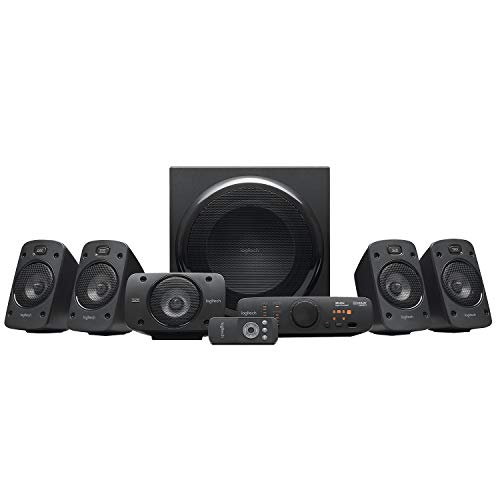
Logitech Z906 — Best 5.1 PC system overall
The Z906 is the last of the great all-in-one surround systems and it knows it. Five satellites, a substantial subwoofer housing the amplification, a control console with a proper display, and a remote — and inside, the feature that defines it: decoding for Dolby Digital and DTS, so the system itself interprets the surround streams that films and consoles send, rather than begging the source to do the work. THX certification underwrites the output, which is room-filling in the full sense: this is a system that can serve a living room, not merely a desk, and thousands of households use it as exactly that.
Its input panel is a museum of good decisions — multiple optical and coaxial digital inputs, the full analogue surround fence for a PC, stereo inputs for everything else — which means the PC, the console and the television can all live on it simultaneously, switched from the sofa. For the PC specifically, that versatility is the answer to every signal question the previous section raised: whatever your machine can send, the Z906 can accept. The centre channel is a real speaker with real dialogue authority, and the subwoofer has the depth film mixes assume.
The costs are the format’s costs, undiluted: five satellites to place, speaker wire to run to the rears, a subwoofer with genuine floor presence, and a design language from an earlier, more angular era of electronics. It offers no wireless anything and no software suite. What it offers instead is the most complete, most proven surround system a PC can plug into — the benchmark against which the category’s thinning is measured.
- Layout: five satellites plus subwoofer, control console and remote
- Decoding: Dolby Digital and DTS built in
- Inputs: multiple optical, coaxial, full analogue surround and stereo
- Certification: THX-certified output
Strengths
- Decodes surround itself — the PC’s limitations stop mattering.
- Input panel hosts PC, console and TV simultaneously.
- Output and centre-channel authority serve a whole living room.
Trade-offs
- Fully wired rears mean a real installation project.
- No wireless features and no tuning software.
- Design and footprint belong to a bigger-room era.
Best for: film-led rooms where the PC is one of several sources. Not suited for: renters who cannot run wire, or desks wanting surround without installation.
Ownership of the Z906 has a rhythm its long production run created: because the system has been stable for so long, its knowledge base is the deepest in the category — every motherboard quirk, every console setting, every room problem has been met and documented by someone before you. That invisible asset is part of what a benchmark is. Buyers stepping into surround for the first time are rarely told that the community around a product is a feature; with the Z906 it demonstrably is, and it shortens every troubleshooting evening the format occasionally requires.

SteelSeries Arena 9 — Best modern gaming surround
The Arena 9 is the category redesigned by people who had read its obituaries. Its insight is that the rear cable run — the wire across the room that killed a thousand surround dreams — could simply be deleted: the rear satellites are wireless, linking to the system without a cable crossing the floor, while the front three and the subwoofer stay near the desk where cables are easy. One USB connection to the PC carries the whole 5.1 feed. The two-way front satellites bring the clarity the Arena line is known for, RGB lighting keeps the gaming desk’s theatre, and SteelSeries’ Sonar software provides the tuning and routing layer, including the game-and-chat discipline competitive players need.
In play, the effect is the one the format promises: a world that extends behind the chair. Positional cues gain a rear hemisphere that no processing of two speakers fully fakes, and single-player games acquire weather. The wireless rears need power — wireless in speakers means no signal cable, not no cable at all — so each rear still wants a socket within reach, a detail the photographs omit and the planning must not.
Against the Z906 it trades universality for focus: it is a PC-first system, happiest with a gaming machine, less interested in hosting a television’s whole ecosystem, and its total output suits a room rather than a hall. For the reader whose surround ambitions begin and end at the gaming desk, it is the most sensible 5.1 system currently made — the category’s future, if the category has one.
- Layout: two-way front satellites, centre, wireless rears, subwoofer
- Connection: single USB feed carries the 5.1 signal from the PC
- Software: Sonar suite with channel routing and tuning
- Lighting: RGB on the front stage
Strengths
- Wireless rears delete the format’s worst installation problem.
- One USB cable from PC to full surround.
- Two-way fronts keep dialogue and cues precise.
Trade-offs
- Rear speakers still need mains power each.
- PC-first design; less of a living-room hub than the Z906.
- Premium pricing for the wireless convenience.
Best for: gaming rooms that can place rears but cannot wire them. Not suited for: television-centred setups or halls needing maximum output.
The Arena 9 also deserves credit for a decision its rivals in the wider market declined to make: it treats the PC as the theatre’s centre rather than apologising for it. No HDMI pass-through theatre, no television-first menus — the system’s whole design assumes a gaming machine, a desk and a player, and serves that triangle with a coherence the universal systems cannot match. In a category that thinned partly because its makers chased the living room and lost both rooms, that focus is the Arena 9’s real innovation, and the wireless rears are merely its most visible one.
Logitech Z606 — Best budget surround (prose-only)
The Z606 is the Z906’s humbler sibling: a true 5.1 layout — five satellites, a subwoofer, the full analogue surround fence for a PC — simplified for a lower tier, with Bluetooth added so the phone can visit. It does not decode the digital formats itself, so it leans on the PC to send it six channels of analogue audio, which most surround-capable motherboards can do. What it offers is the genuine geometry of surround — sound behind you, a centre for dialogue — at an entry cost, for rooms conducting the experiment of whether 5.1 suits their life.
We cover it in prose because its listing could not be verified cleanly at the time of writing. As an experiment it is well designed: if the experiment succeeds, its owner upgrades with knowledge; if the rears end up as ornaments, the lesson was bought at the format’s lowest honest price. Its sound is a clear tier below the Z906 in output and refinement, and it should be bought as a beginning rather than a destination.
- Layout: five satellites plus subwoofer
- Inputs: analogue surround fence plus Bluetooth
- Decoding: none — the PC supplies six channels
- Role: the format’s entry experiment
Strengths
- True surround geometry at the class’s entry tier.
- Bluetooth covers casual listening between sessions.
- Simple analogue connection suits older surround motherboards.
Trade-offs
- No decoding; depends entirely on the PC’s surround outputs.
- Output and refinement sit a tier below the Z906.
- Unverified listing — source it carefully.
Best for: first surround experiments on a budget. Not suited for: film rooms wanting decoded digital feeds.
Klipsch Reference Theater Pack 5.1 — Best speaker-only package (prose-only)
The Theater Pack is the hi-fi world’s answer to the same question: five compact Klipsch satellites with the family’s horn-loaded clarity, plus a subwoofer that connects to a receiver wirelessly. It contains no amplification and no decoding, because it assumes a receiver — the component this category’s all-in-one systems were invented to avoid. Paired with one, the result is the finest sound in this guide: satellite quality a clear class above the powered systems, dialogue with Klipsch projection, and an upgrade path that continues for years, one component at a time.
For a PC reader, the honest framing is that this is a home-theatre purchase the PC joins by HDMI into the receiver, not a PC peripheral. We include it in prose — its listing unverified at our standard — because many readers who search for PC surround are actually building a room, and for them this package plus a competent receiver is the destination the all-in-one systems are a shortcut to. Shortcuts have their place; so does knowing where the road ends.
- Layout: five passive satellites plus wireless subwoofer
- Requirement: a surround receiver to drive it
- Character: horn-loaded clarity, hi-fi satellite quality
- Role: the receiver-route destination
Strengths
- The best satellites in this guide, full stop.
- Wireless subwoofer eases the hardest placement.
- Component upgrade path lasts for years.
Trade-offs
- Useless without a receiver — the true cost is the pair.
- Not a PC peripheral; the PC attends by HDMI.
- Unverified listing at our standard.
Best for: room builders pairing it with a receiver. Not suited for: desk-only buyers wanting one box and done.
Yamaha YHT-5960U — Best receiver bundle (prose-only)
Yamaha’s home-theatre-in-a-box bundles a proper AV receiver with a matched 5.1 speaker set, and in doing so represents where the centre of surround gravity now sits. The receiver brings the decoding, the room calibration and the HDMI switching; the PC becomes one input among several, which for a living room is exactly the correct hierarchy. MusicCast and streaming features serve the household’s other listening, and the whole arrangement is calibrated with a microphone ritual the all-in-one systems skip.
Its presence in a PC-speakers guide is diagnostic rather than competitive: if your reading of this page keeps drifting toward the television, the seating and the films you watch with other people, this bundle — discussed in prose, its configurations varying too much for a single verified listing — is the honest recommendation. The PC loses its throne and gains a very good seat.
- Layout: AV receiver plus matched 5.1 speaker set
- Features: full decoding, room calibration, HDMI switching
- PC role: one HDMI input among several
- Role: the television-centred route
Strengths
- A real receiver out-decodes and out-switches any all-in-one.
- Room calibration tunes the system to your actual space.
- Serves the whole household’s sources, not just the PC.
Trade-offs
- The largest total commitment of money and space here.
- Setup is a project with menus, not a plug-in.
- The PC is a guest; desk-first buyers should look above.
Best for: living rooms where film night is a household event. Not suited for: a single desk in a bedroom.
Onkyo HT-S3910 — Best compact theatre bundle (prose-only)
Onkyo’s bundle plays the same receiver-led strategy at a more compact scale: a receiver with modern decoding and a matched speaker set sized for smaller rooms. For the PC reader it offers the same trade as the Yamaha with a smaller footprint — the computer joins by HDMI, the television takes the centre of the room, and the surround experience is a home theatre’s rather than a peripheral’s. Owners value the brand’s straightforward setup and the way the system flatters film dialogue, the channel that decides whether a bundle feels cinematic.
A note of diligence this guide owes you: at the time of writing, clean listings for this model were scarce enough that replacement accessories were easier to find than the system itself — which is why it stands here in prose, and why any buyer hunting it should verify they are purchasing the complete bundle from an authorised source. The category’s thinning, documented throughout this article, is visible in miniature in that single fact.
- Layout: compact AV receiver plus matched 5.1 speakers
- Features: modern format decoding, small-room scale
- PC role: HDMI guest input
- Role: the compact television-centred route
Strengths
- Receiver-grade decoding in a smaller-room package.
- Dialogue-forward tuning flatters film nights.
- A complete bundle removes component-matching guesswork.
Trade-offs
- Listings are scarce; verify the complete bundle before paying.
- Still a room project, not a desk accessory.
- Prose-only here for verification reasons.
Best for: smaller living rooms building a first true theatre. Not suited for: desk setups or impatient buyers.
Why Is the Centre Channel the Hardest-Working Speaker You Own?
In a film mix, the centre channel carries nearly all the dialogue and much of the on-screen action, which makes it the speaker your satisfaction actually lives in — and the one budget systems most often cheapen. A weak centre announces itself as the familiar modern complaint: effects thunderous, voices buried, a hand permanently on the volume control, riding quiet scenes up and explosions down. Both linked systems here treat the centre with respect — the Z906’s is a full satellite in its own right, the Arena 9’s a two-way design — and that respect is a large part of why they anchor the guide while thinner rivals, with a token centre or none, do not appear.
The centre also anchors the front stage for games: the character you are talking to, the engine of the car you are driving, the narrator of everything. When judging any surround system — in a shop, in the first week at home — judge it by a conversation before you judge it by an explosion. Explosions are easy; every system in the shop can produce one. A voice that stays clear, centred and human at low volume while a score moves around it is the expensive trick, and it is the one you will use every single evening.
What Is the Difference Between True Surround and Virtual Surround?
True surround is geometry: speakers physically placed around the listener, each fed its own channel, so that a sound mixed behind you is emitted behind you. Virtual surround is perception: processing that persuades two speakers, or a bar, to suggest that envelopment using timing and tonal cues. The suggestion can be remarkably good — the gaming systems elsewhere on this site build whole reputations on it — but it remains a suggestion, strongest for one centred listener and weakest for everyone else in the room.
This guide insists on the distinction because the keyword’s promise is the geometry. A reader who buys a virtual system expecting rear speakers has been mis-sold, and a reader who buys true 5.1 should know what the extra installation purchases: envelopment that survives a second seat, effects with real addresses, and a centre channel that is a place rather than an illusion. Virtual processing still has a role here — the Arena 9’s software can enhance stereo sources — but it is the garnish on a true system, not a substitute for one.
How Do the Six Routes to Surround Compare?
| System | Type | Surround feed | Rear wiring | Listing |
|---|---|---|---|---|
| Logitech Z906 | All-in-one, decoding | Optical, analogue, digital | Wired | Linked |
| SteelSeries Arena 9 | All-in-one, PC-first | USB | Wireless (power still needed) | Linked |
| Logitech Z606 | All-in-one, budget | Analogue fence | Wired | Prose-only |
| Klipsch Theater Pack | Speakers only | Via your receiver | Wired; sub wireless | Prose-only |
| Yamaha YHT-5960U | Receiver bundle | HDMI | Wired | Prose-only |
| Onkyo HT-S3910 | Receiver bundle | HDMI | Wired | Prose-only |
The table is the category’s biography in six rows: the all-in-one idea at three altitudes, then the receiver world that has been absorbing surround’s centre of gravity for a decade. Your room, your sources and your tolerance for installation choose the row; the rest of this guide exists to make that choice informed.
How Do Games and Films Use the Rear Channels Differently?
A film’s rears are mostly atmosphere with occasional punctuation: rain, crowds, a city’s room tone, and then — rationed for effect — the helicopter, the door behind the hero, the scare. A game’s rears are a sensorium: continuous positional information the player acts on, from footsteps in a corridor to weather systems moving across a map. That difference explains the two linked systems’ temperaments. The Z906, film-bred, excels at scale and envelopment; the Arena 9, game-bred, excels at the clarity and software discipline that keep rear information legible under a stream of chat.
It also explains a common disappointment: the new owner who tests a film system with a quiet drama and concludes the rears are broken. They are not broken; the mix is honest. Judge rears by content that uses them — a game’s open world, a film’s set piece — and judge the system as a whole by the dialogue test from the centre-channel section. Both examinations, passed, mean the rig is doing the two jobs surround exists to do.
What Is the First Fortnight With a True 5.1 System Like?
Day one is carpentry: stands, wire, the discovery that one rear position has no socket and that the subwoofer’s ideal home is occupied by a bookcase. Day two is calibration and the first film, which for most owners is the moment the project justifies itself — a mix they have heard in stereo for years suddenly acquiring a behind. The rest of the fortnight is quieter education: learning which games mix their rears generously and which barely visit them, discovering that one streaming service sends proper surround and another sends stereo in a trench coat, and adjusting the centre level exactly once more, upward, because everyone does.
By the end of it the system has either become the room’s weather — unnoticed, essential — or it has revealed a mismatch of room or habit that the return window still covers. That is the honest rhythm of this category, and planning for it (buy from a seller whose returns respect an installation’s timescale) is part of buying well. The owners who skip the fortnight’s education and judge by the first evening’s action scene are the ones who sell surround systems second-hand, cheaply, to the patient.
How Do You Place Five Speakers and a Subwoofer in a Real Room?
Begin with the front three, because they carry the film. Left and right flank the screen at ear height, angled toward the seat; the centre sits immediately above or below the screen, as close to its centre line as furniture allows, tilted toward the listeners — the centre is the dialogue speaker, and every degree of care spent on it returns in every scene. The subwoofer goes where the earlier guides in this series taught: near the front, off the corner, calibrated by a voice.
The rears are where honesty is required. They belong behind or beside the listening position, roughly at ear height or a little above, angled inward — not on the desk, not in a cupboard, not omitted while the system pretends. A room whose seating backs onto a wall can still host rears on stands or mounts at the wall’s edges; a room with nowhere behind the seat at all is a 2.1 or 3.1 room, and no purchase changes its geometry. The Arena 9’s wireless rears solve the cable problem, not the placement problem — they still need their positions, and their power sockets. Walk the room with a tape measure before ordering anything in this guide; surround is the one category where the room votes first.
What Does the Subwoofer Do in a 5.1 System That It Does Not Do in 2.1?
It gains a second job. In a 2.1 system the subwoofer extends the satellites’ range, playing the bass the small cabinets cannot. In a 5.1 system it still does that — the crossover work — and it also owns a dedicated channel of its own, the “.1” in the name: the low-frequency effects track, a separate feed in film and game mixes reserved for the events meant to be felt. Explosions, impacts and engines live there at levels the music channels never ask for, which is why a surround subwoofer needs headroom a stereo one does not, and why the Z906’s substantial unit is a specification rather than a luxury.
The practical consequence is a calibration subtlety unique to the format: the effects channel has its own level relationship to the rest, set by the mix, and owners who tame the subwoofer globally for music sometimes starve the effects they bought the system for. Set the crossover bass by voice and piano as the earlier section taught, then audition one honest set piece and adjust the system’s effects balance — where the model exposes it — rather than the master subwoofer level. Two jobs, two judgements; conflating them is the quiet cause of many a surround system that is somehow both boomy and thin.
How Do You Calibrate a 5.1 System Without a Laboratory?
Set the distances before the levels: every system here, or its software, wants to know how far each speaker sits from your seat, because it delays the near speakers so all channels arrive together — the trick that makes five boxes sound like one space. Then set levels with a dialogue scene: the centre a touch proud, the fronts balanced by a voice panned across them, the rears present in ambience and invisible in conversation. A phone’s sound-level app, held at the seat while test tones play, gets the fronts and centre within a whisker of matched.
Finish with the subwoofer crossover ritual from the earlier guides — a voice and a piano, the bass present as foundation and absent as location — and then leave the calibration alone for a fortnight. Surround systems invite endless adjustment because they offer endless adjustment; the discipline of a settled setup is what lets a film, rather than a settings menu, occupy the evening. Receiver bundles automate much of this with their calibration microphones, which is one of their genuine advantages and worth saying in the all-in-ones’ hearing.
Is Upgrading From 2.1 to 5.1 a Step or a Leap?
A leap, and buyers should budget for it as one — in money, in installation and in the room’s cooperation. Nothing from a 2.1 system carries over except the listening habits: the satellites are different, the amplification is different, the signal path must be re-audited from the PC’s ports outward. The honest comparison is not between two products but between two commitments. A 2.1 system is an appliance; a 5.1 system is a room project with an appliance at the end of it.
That framing protects buyers in both directions. The reader whose room, lease or patience will not sustain the project should take the finest 2.1 system in this series and feel no deficiency — its guides exist because that answer is complete for most desks. The reader who can sustain it gets the one experience no smaller format counterfeits. What nobody should do is buy 5.1 as a casual upgrade and install it as one; the format punishes casualness with exactly the disappointments — decorative rears, buried dialogue, upmixed mush — that fill its unfair reputation.
What Should a Console Owner Know Before Choosing Between the Two Linked Systems?
The console is the fork in this guide’s road. A PlayStation or Xbox feeding a television is a digital source with encoded surround in its film and game mixes, and the Z906 was built for exactly that citizen: optical in, decoding on board, the PC accommodated alongside by analogue or digital. The Arena 9’s USB heart belongs to the PC; a console can be accommodated through the television’s outputs and workarounds, but the system’s design centre never moves. Households whose surround ambitions include a console on the same screen should weight that asymmetry heavily — it is the single most common reason a delighted PC buyer becomes a frustrated living-room one.
The mirror-image warning applies to the pure PC player: the Z906’s universality is bought with an installation and an interface from an earlier era, and its charms are wasted on a desk that will never host a second source. Each linked system is the correct answer to a different household’s question, which is why this guide refuses to demote either to a runner-up.
How Do Rear Stands, Mounts and Shelves Change the Result?
The rear speakers’ furniture is part of their sound. A rear on a stand at ear height, angled at the seat, does the job the mix assumes; the same speaker on a high shelf fires over the listeners’ heads and turns positional cues into weather, while one buried on a low bookcase behind a sofa fires into upholstery and arrives as a rumour. Wall mounts solve the shelf problem elegantly where a lease permits them, and the wireless rears’ freedom from signal cable makes stand placement a matter of power sockets rather than wire paths — the practical reason so many Arena 9 rooms succeed where wired attempts stalled.
Front speakers have their own furniture rules, simpler but stricter: the centre must not live inside a closed cabinet, where its dialogue will arrive pre-muffled, and the front pair should not be pushed to the screen’s edges on a wide desk merely because the desk is wide. Keep the front stage no wider than the seating geometry supports, and the image stays locked to the screen where every mix expects it.
What Mistakes Do Surround Buyers Make?
The first is buying channels before checking outputs — discovering after delivery that the PC offers no surround path the system accepts. Audit your ports first; the section on signal routes above is the checklist. The second is rear speakers as decoration: placed on the desk beside the fronts, they create a wide stereo with delusions, and the buyer concludes surround is a gimmick when the geometry was never attempted. Third, shoppers compare the Z906’s age against it, not noticing that its longevity is the certification of the category — the design persists because the fundamentals were completed. Fourth, buyers let a game upmix stereo to all channels and judge the format by the echo; true surround content — a film’s encoded track, a game’s native mix — is the only fair examination.
What About Music in Surround — the Sixth Listener’s Question?
Music is the content 5.1 systems are worst at discussing, because most recordings are stereo and the honest playback of a stereo recording is through the front pair and the subwoofer — a mode every system here provides. Upmixing stereo music to all channels is a matter of taste: it can feel spacious in a large room and artificial at a desk, and the systems differ in how gracefully they do it. Our advice is to let music be stereo, let the subwoofer keep its job, and reserve the full array for the content mixed for it.
The exception is the growing shelf of genuinely multichannel music — concert films, surround-mixed albums, live recordings where the rears carry the hall. For those, a true 5.1 rig is not a luxury but the correct instrument, and owners who discover that shelf tend to become the format’s most stubborn defenders. If your listening includes it, weight the Z906’s decoding and the receiver bundles’ format support heavily, because they, not the gaming layer, will be serving your favourite evenings.
How Long Will a 5.1 Investment Stay Current?
Surround’s channel layout has been stable for a generation — the 5.1 in this guide’s title is the same 5.1 your oldest discs assume — and that stability is the format’s financial virtue. What evolves is everything around the layout: decoding standards gain new dialects, connections rotate, streaming services change their delivery. The systems best armoured against that drift are the ones with their own decoding and the broadest input panels — the Z906’s design philosophy, and the receiver bundles’ entire reason to exist. A USB-first system ties its fate more closely to the PC’s, which is a reasonable bet for a gaming rig that is itself replaced on a cycle.
The buyer’s rule follows: match the system’s horizon to the room’s. A permanent room deserves the decoding all-in-one or a receiver route; a gaming desk that evolves with its PC can take the Arena 9’s modernity at face value. Either way, the speakers themselves — five cabinets and a subwoofer, correctly placed — will still be the correct geometry when everything feeding them has been replaced twice.
What Is the Sensible Way to Buy Into a Thinning Category?
Buy the citizens, not the ghosts. The two linked systems are current products with living support, documentation and stock; the prose entries are routes to research, not carts to fill impulsively. Where a model in this field has been discontinued or its listings have decayed into accessories and remnants — a fate this guide documented in the Onkyo’s case — the second-hand and old-stock markets demand the diligence of the earlier value guide: complete boxes, working remotes and consoles, and a listening test with a voice before money moves.
And buy for the room you have measured, at the commitment you have honestly counted. The category’s thinness has one generous side effect: the surviving systems are the distilled best of a competitive era, so a buyer today chooses between two excellent answers and several honest detours, with none of the mediocre middle that once filled the shelves. Scarcity, in this one case, has done the shortlisting for you.
What Is the Cheapest Honest Way to Hear Whether Surround Suits You?
Borrow the geometry before buying it. A weekend experiment costs nothing: place any two spare speakers — an old stereo pair, a borrowed set — behind your seat, feed them from a borrowed or budget source alongside your existing front setup, and play a game or film mixed for surround. The result will be crude, unmatched and uncalibrated, and it will still answer the only question that matters, which is whether your room and your ears want a rear hemisphere at all. If the crude version moves you, the Z606’s honest experiment or the Arena 9’s full commitment will delight you; if it leaves you cold, the finest 2.1 system in this series is your answer and you have saved the format’s full price finding out.
Final Recommendation
For a PC-first room, the choice is a dialogue between two excellent answers: the SteelSeries Arena 9 if your surround life is gaming, your rears cannot be wired, and one USB cable sounds like civilisation; the Logitech Z906 if the PC shares the room with a television and consoles, and decoding everything forever sounds like peace of mind. Take the Z606 route to experiment cheaply, and take the receiver routes — Klipsch’s pack, Yamaha’s and Onkyo’s bundles — when you realise, honestly, that you are building a theatre rather than upgrading a desk. The category is thin because its promise is demanding; for the room that can keep the promise, nothing else in this series of guides sounds like it.
How Does a Shared or Rented Room Change the Answer?
It changes the installation, which in this category changes everything. The renter’s enemies are cable runs and wall fixings, and the Arena 9 was practically designed by those enemies: wireless rears on stands need no channels cut and no wire taped across a doorway, and the whole rig can leave with the tenant. The Z906 in a rental is a commitment to surface-run cable and cable covers — achievable, and many owners do it happily, but it should be chosen knowingly.
Shared rooms add the second seat problem. Surround calibrated for one chair serves a sofa’s centre best and its ends approximately; households that watch together should calibrate for the middle of the actual seating and accept the format’s sweet spot as a sweet region. Receiver bundles with proper calibration microphones handle multi-seat compromises most gracefully, which is one more reason the television-centred routes keep absorbing this category’s family buyers.
What Do Streaming Services and Games Actually Send?
Less uniformly than their menus suggest, and the knowledge prevents misdirected blame. The major film services send proper encoded surround on most headline content, which the Z906 decodes natively and a receiver handles trivially; the same services on a PC browser may send only stereo, because browser support for surround is the weak link in the whole chain — the dedicated app or a console is often the reliable pipe. Games on PC are generally the best citizens, mixing true 5.1 natively when the output device declares itself correctly, which is precisely what the Arena 9’s USB presentation does.
The buyer’s takeaway is a testing order: verify the pipe with known surround content before judging the speakers, and suspect the application before the hardware. A system cannot reproduce channels it never receives, and half the disappointment in this category is a stereo feed wearing a surround system’s clothes.
What About the Neighbours, the Lease and the Sleeping House?
Surround’s effects channel is the most neighbour-mobile sound in domestic audio, because low frequencies travel through structure in a way dialogue never will. The disciplines from the smaller formats apply with interest: subwoofer off the shared wall where the room allows, a night level agreed with yourself before the film starts, and the centre-forward balance that lets a film stay intelligible at volumes a building forgives. Both linked systems provide the controls for that civility; the Z906’s remote makes it a sofa habit rather than a walk.
None of this should deter the flat-dweller from the format — it should schedule them. Surround at considerate levels loses surprisingly little, because envelopment is a matter of placement more than pressure, and the rear hemisphere whispers as effectively as it shouts. Buy the geometry, respect the building, and the system stays welcome for the decade it was built to serve.
Frequently Asked Questions
Do I need a sound card for 5.1 on a modern PC?
Usually not. The USB route needs nothing but a port, the optical route needs a port many motherboards already provide, and the analogue route needs the jack fence that gaming boards commonly include. A sound card becomes relevant only for older or minimal machines lacking all three — check the rear panel before assuming the expense.
Can my PC actually output 5.1 surround?
Most gaming PCs can, by one of three routes: USB to a system like the Arena 9, optical to a decoding system like the Z906, or the analogue jack fence found on many motherboards. Check your rear panel and your audio settings; laptops vary more and may need the USB route.
Are wireless rear speakers truly wireless?
The signal is wireless; the power is not. Each rear speaker still needs a mains socket. That removes the long signal run across the room — the installation’s worst part — but plan the sockets as part of the placement.
Is 5.1 worth it for gaming, or is it a film feature?
Both, differently. Films use surround for envelopment; games use it for information — footsteps, weather and threats in the rear hemisphere. Competitive players often still prefer headsets, but for single-player worlds a true 5.1 rig is the most immersive audio a desk can offer.
Why are only two systems linked in this guide?
Because only two true 5.1 PC systems met our listing-verification standard at the time of writing. The category has genuinely thinned; we would rather show you the real market, prose entries and all, than pad the list with soundbars wearing a channel count.
Can I start with the front three channels and add rears later?
With the all-in-one systems, the rears are part of the design and the system expects them; running without them is a stereo or 3.1 compromise, not a growth path. The receiver routes are the genuine grow-as-you-go option, since a receiver will drive a front stage today and accept rears when the room allows. Choose your route by whether growth or completeness matters more.
Should I buy a receiver bundle instead of a PC system?
If the room’s centre is a television and the PC is one source among several, yes — the Yamaha and Onkyo routes will serve the household better. If the desk is the room’s centre, the Z906 or Arena 9 keeps the PC where it belongs: in charge.
One last encouragement for the reader still standing at the category’s edge: every owner of a great surround room was once a person with a tape measure and a doubt. The format asks more than any other in this series, and it repays more — a room that sounds like the places your games and films describe. Measure honestly, choose between the two citizens or the receiver road with your eyes open, and the first evening a mix crosses the room behind you, the installation weekend will already feel cheap at the price.
Related Guides
For the smaller formats this guide keeps recommending as honest alternatives, see 2.1 speakers judged on overall value, gaming speakers with spatial processing, ceiling speakers for a 5.1 home theatre and stereo desktop speakers.


