What's inside
- Key Takeaways
- Quick Picks
- How We Chose These Picks
- What Does a 65W-Class Chip Actually Ask of a Cooler?
- How Do You Know Whether Your Current Cooler Is Enough?
- The Best CPU Coolers for the Ryzen 3600, Pick by Pick
- How Do the Six Compare for This Chip?
- How Do You Swap a Stock Cooler for a Tower Without Drama?
- What Happens to a 3600 Build Over the Years That Follow?
- How Should You Set a Fan Curve Specifically for This Processor?
- What Are the Most Common Mistakes When Cooling a 3600?
- Final Recommendation
- Frequently Asked Questions
- Related Guides
As an Amazon Associate I earn from qualifying purchases. This post may contain affiliate links at no extra cost to you.
widgetverdict.com is reader-supported. When you buy through links on our site, we may earn an affiliate commission.
Where to buy: each of the six coolers here links to a verified Amazon listing, including the stock-class baseline many 3600 owners already own, so you can compare an upgrade against the cooler in your machine today.
The best cpu coolers ryzen 3600 owners can buy start from a happy fact: the Ryzen 5 3600 is one of the easiest modern processors to cool. A 65W-class chip from AMD’s Zen 2 generation, it rewards almost any competent aftermarket tower with low temperatures and near-silence, which means this guide is not really about survival. It is about refinement — about replacing the adequate with the enjoyable, about headroom for warm rooms and long sessions, and about choosing a cooler that will still make sense when the beloved 3600 eventually hands its socket to a successor.
That last point shapes the whole list. The 3600 sits on the AM4 platform, and every pick here mounts AM4 while most also cover AM5 and current Intel sockets, so an upgrade bought for this chip can travel forward into the next build. One pick is the exception that proves the guide’s honesty: the AMD Wraith Stealth, the stock-class cooler many 3600 processors shipped beside, included as the baseline. If your machine already runs one and its temperatures and noise satisfy you, this guide’s first service is telling you that you may not need to buy anything at all.
For everyone else — the owners whose stock cooler spins up audibly during games, whose compact case traps summer heat, whose 3600 now lives in a media PC that must whisper — the five aftermarket picks span the sensible range: a famous budget dual-tower, a legendary single tower refreshed, a low-noise dual-tower with a 260W rating, the same famous dual-tower in black, and a new single-tower design with dual fans and a name full of geometry. Each is argued on its own evidence below.
It is worth pausing on how unusual this processor’s position is. Most chips are cooled under a kind of anxiety — will it throttle, will it roar, will the summer defeat it — and their cooler guides read as risk management. The 3600 retired that anxiety years ago and kept working, which is why its owners form something closer to a readership than a market: people maintaining a machine they like, in no hurry, choosing parts the way you choose things for a house you expect to stay in. This guide was written for that reader. Every pick in it assumes the machine matters beyond its benchmark, and that the best upgrade is the one that makes a liked machine quieter, calmer and ready for whatever its long life does next.
Key Takeaways
- The Ryzen 5 3600 is a 65W-class chip, so every aftermarket pick here cools it with large reserves to spare.
- The stock Wraith Stealth is included honestly as the baseline; satisfied owners may need no upgrade at all.
- Dual-tower picks turn that reserve into near-silence, since their fans rarely need to work hard for this processor.
- Most picks also mount AM5 and Intel sockets, letting a cooler bought for the 3600 serve the next platform too.
- Noise, not temperature, is the real upgrade most 3600 owners are buying, and fan quality decides it.
- Case height and memory clearance remain the two physical checks, even for a chip this undemanding.
Quick Picks
| Pick | Badge | Why it earns its place |
|---|---|---|
| Thermalright Peerless Assassin 120 SE | The definitive upgrade | Six heatpipes and dual towers that cool the 3600 almost without audible effort, then follow you to AM5. |
| Cooler Master Hyper 212 Black II | The classic single tower | Four heatpipes, a 120mm PWM fan and 152mm height in the most famous cooler silhouette ever sold. |
| ID-COOLING FROZN A620 PRO SE | The quiet powerhouse | Dual towers, six pipes, a 260W rating and a stated 27.2dB(A) maximum for silence-first owners. |
| AMD Wraith Stealth | The stock baseline | The slim aluminium cooler many 3600s shipped with, judged honestly as the starting point of the scale. |
| Thermalright Peerless Assassin 120 SE Black | The black edition | The same six-pipe dual-tower substance in an all-black finish for dark-themed AM4 builds. |
| Cooler Master V4 Alpha 3DHP | The new geometry | A single tower with dual PWM fans and Cooler Master’s 3DHP heatpipe design, the list’s freshest idea. |
One more scenario recurs in this chip’s ownership and deserves a direct answer: the second-hand build. The 3600 is now a staple of the used market, bought in complete systems whose histories are unknown, and its new owners routinely ask whether the cooling needs attention before anything else. The checklist is short. Listen to the fan for bearing roughness at low speed, watch temperatures during a long game for any slow climb that suggests dust or tired compound, and confirm the cooler is seated firmly rather than rocking on a corner. A machine that passes those three checks needs nothing; a machine that fails any of them has told you exactly which section of this guide to read first, and the fix is almost always one of the six names above rather than a new processor.
How We Chose These Picks
The selection began with the processor’s actual character rather than with the coolers’ reputations. A 65W-class chip does not need heroic hardware, so candidates were judged on what an upgrade is really purchasing for a 3600: quiet, headroom for hot rooms and boost behaviour, installation ease on AM4’s mounting pattern, and a future beyond AM4. Coolers that could not beat the stock baseline meaningfully on at least two of those measures were set aside, however impressive their specifications looked in isolation.
The baseline itself earned its place by a different route. Millions of 3600 owners know the Wraith Stealth’s sound and temperatures from daily life, so including it converts this guide from a sales list into a measuring instrument: every other pick can be understood as a distance from the cooler already in the reader’s machine. That is also why the Wraith’s section argues its genuine virtues — its slimness, its simplicity, its zero cost to those who own it — before its limits, because an honest baseline must be allowed to win where it wins.
The remaining five were spread deliberately: two editions of the segment’s defining dual-tower for different colour themes, a low-noise dual-tower rival, the classic single tower that has cooled two generations of Ryzen chips, and a new dual-fan single tower representing where the category is heading. Where listings state a rating, a height or a noise figure, those numbers appear in the relevant pick’s own section and nowhere else as decoration.
What Does a 65W-Class Chip Actually Ask of a Cooler?
Less than its reputation among upgraders suggests, and understanding that is the key to spending wisely here. At stock settings the 3600 draws modest power and produces heat that a small tower sheds without drama; even its boost behaviour, which lets the chip chase higher clocks when thermal room allows, stays within the comfortable reach of every aftermarket pick in this guide. The practical consequence is liberating: with this processor, you are not buying cooling capacity at all. You are buying the manner in which the cooling happens.
That manner has three faces. The first is acoustic: a larger cooler holds the chip’s temperature with its fans turning slowly, and slow fans are quiet fans, so capacity converts directly into calm even when the capacity itself is never needed. The second is thermal headroom for the room rather than the chip — a 3600 in a 30-degree summer room, inside a compact case under a desk, asks noticeably more than the same chip in a cool office, and reserves answer that difference without the fan ever hurrying. The third is boost generosity: a cooler that holds temperatures low lets the processor sustain its higher clocks more of the time, so the upgrade can return a small, real performance courtesy alongside the quiet.
What the chip does not ask for is liquid, and this guide’s air-only list reflects that plainly. A radiator would cool a 3600 perfectly well and teach its owner nothing except that the pump costs more than the problem did. The sensible money for this platform lives exactly where this list lives: in good towers, honestly sized.
How Do You Know Whether Your Current Cooler Is Enough?
Run the machine the way you actually use it and listen before you measure. If your 3600’s stock cooler is inaudible from your chair during your games, your temperatures sit comfortably below the chip’s limits, and the fan’s pitch never enters your awareness during calls or films, then your cooler is enough, and this guide’s most useful sentence for you is the one that says so. Upgrading from contentment buys specifications, not satisfaction.
The owners who benefit are easy to recognise because their complaints name sounds and moments: the cooler that surges when a game loads a new area, the whine that rides under a film’s dialogue, the summer afternoon when the fans settle at a speed that makes the whole desk feel busy. Those are fan-curve and capacity problems that a larger tower solves structurally, by moving the same air more slowly. A simple test helps decide: if your machine’s noise rises and falls with the action on screen, the cooler is living at the edge of its ability, and the picks below are the cure. If its note is low and constant, you already own the cure’s effect.
One more honest check concerns the case rather than the cooler. A 3600 in a sealed, dusty enclosure with a clogged intake will run warm under any tower, and ten minutes with a brush and a filter rinse sometimes delivers half the upgrade for free. Do that first, live with the machine for a week, and then let this guide argue for the rest.
Room temperature deserves a paragraph of its own in a guide for this chip, because the 3600’s long service has carried it into every climate and housing situation imaginable, including student rooms that bake in summer and garden offices that freeze in winter. A cooler’s job is measured against the air it breathes: the same tower that idles a 3600 silently in a cool study will work perceptibly harder in a hot attic room, through no fault of its own. Owners diagnosing a machine that grew louder over a summer should suspect the season before the hardware, and owners choosing between the single and dual towers in a warm climate have the simplest tiebreaker in this guide — reserves are bought precisely for the rooms that need them.
There is a companion point about the graphics card, the 3600’s usual partner in noise. In many gaming builds the card, not the processor, sets the acoustic ceiling, and an owner who upgrades the CPU cooler expecting silence may discover the card’s fans were the sound all along. The honest sequence is to identify the loudest component first — a finger gently stopping a fan for a second during a game tells you more than any forum — and then spend where the noise actually lives. If it lives in the processor’s cooler, this guide is your remedy; if it lives in the card, let this guide wait until it does.
The Best CPU Coolers for the Ryzen 3600, Pick by Pick

Thermalright Peerless Assassin 120 SE — The definitive upgrade
If the 3600 has a canonical aftermarket partner, this is it. The Peerless Assassin 120 SE brings six heatpipes with AGHP technology, dual towers and dual 120mm PWM fans running to 1550 rpm — hardware that, against a 65W-class chip, operates in a state of permanent relaxation. The fans that would work respectably hard on a flagship processor merely stroll on a 3600, and the result is the quality owners actually buy this cooler for: a gaming session in which the machine’s loudest component is no longer its processor cooling, by a wide margin.
The strategic virtue is the socket list. AMD AM4 and AM5 are both covered, alongside Intel LGA1700, 1150, 1151, 1200 and 1851, so this single purchase spans the owner’s present and their most likely futures — an AM5 upgrade keeps the cooler, an Intel switch keeps the cooler. For a platform as long-lived as AM4, whose owners upgrade in stages across years, a cooler that never has to be re-bought is worth more than its specification table can express, and the Peerless Assassin’s enormous installed base means its AM4 mounting routine is documented in more build logs than any rival’s.
The conditions are physical. Dual towers ask for case width and a glance at memory height beside the front fan, and the assembly is larger than a 3600 strictly needs — a fact this guide states cheerfully, because the excess is precisely what the buyer is purchasing: silence and a future, sold as fin area. If your case accepts it, no other pick here ends the question of cooling a 3600 as completely.
There is a social dimension to this cooler in the AM4 community that a new buyer inherits free of charge. Because so many 3600 and 5000-series owners run this exact tower, every question about it — fan orientation, memory pairing, curve settings, the order of bracket screws — has a findable answer written by someone with your processor in your situation. Hardware with a folklore is easier to own than hardware without one, and no cooler in this guide carries more folklore per fin than this one.
It also reframes the machine’s future conversations. With cooling settled at this level, the next upgrades — a faster AM4 chip with more cores, then eventually an AM5 board — stop requiring a cooling chapter in their planning. Owners underestimate how pleasant that is until they experience it: the cooler becomes part of the case’s furniture, transferred in the mind from the parts list to the premises, and premises are not re-litigated.
- Heatpipes: 6, AGHP technology
- Fans: dual 120mm PWM, up to 1550 rpm
- Layout: dual tower
- Sockets: AMD AM4/AM5, Intel LGA1700/1150/1151/1200/1851
- Role: the definitive, future-proof upgrade
Strengths
- Capacity so far beyond the chip that quiet becomes the default state.
- AM5 and Intel coverage lets the cooler outlive the 3600 itself.
- Mature mounting and a vast owner base make installation a known routine.
Trade-offs
- Larger than this processor requires, asking case width smaller builds lack.
- Front fan and tall memory need the standard clearance check.
- Two fans mean two power leads to route for a very simple job.
Best for: a 3600 owner who wants the cooling question closed permanently, with silence now and AM5 later.
Not suited for: a slim case whose width cannot accept a dual-tower’s stance.

Cooler Master Hyper 212 Black II — The classic single tower
The Hyper 212 name has cooled more processors than any other in history, and the Black II edition is its current form: four heatpipes, a 120mm PWM fan, a 152mm height, an all-black finish and support for AMD AM5 and AM4 with Intel LGA1851 and 1700. For a 3600, this is the proportionate upgrade — a single tower sized to the chip’s actual appetite, from the company that essentially invented the category of the affordable tower cooler.
Proportion is the argument. Where the dual towers buy silence through excess, the Hyper 212 buys adequacy with elegance: it holds a 3600 at comfortable temperatures with its fan in the civilised middle of its range, installs in minutes with Cooler Master’s refined bracket, and leaves the case’s interior uncluttered for the next upgrade. Owners of mid-size cases and modest builds will find its 152mm height an easier fit than the flagship towers, and its black finish disappears into dark interiors exactly as intended.
The classic’s limits are the classic’s age showing in company it now keeps. A single fan and four pipes cannot match the dual towers’ reserves, so in a hot room or a sealed case its fan will be the first in this guide to make itself heard, and its socket list, while current, is narrower than the Thermalright picks’. None of that diminishes what it is: the safe, known, sensibly sized answer, bought by people who measure an upgrade by how completely it solves their actual problem rather than by how much hardware it adds.
The Hyper 212’s longevity carries a hidden benefit for a chip of the 3600’s age: mounting fluency. This cooler has been fitted to AM4 boards in every case shape the market has produced, and its clearances, bracket behaviour and fan position are known quantities rather than experiments. A builder upgrading a five-year-old machine at a kitchen table, possibly with the board staying in the case, will feel that maturity as a calm half hour rather than a research project.
It is also the pick that best respects a machine in balance. Many 3600 systems are honest mid-range builds — a capable graphics card, sensible memory, nothing theatrical — and a cooler of theatrical scale can look and feel like a misunderstanding of the machine’s character. The Black II upgrades such a system the way a good pair of tyres upgrades a family car: noticeably, appropriately, and without pretending to be a different vehicle.
- Heatpipes: 4
- Fan: 120mm PWM
- Height: 152mm
- Finish: black
- Sockets: AMD AM5/AM4, Intel LGA1851/1700
Strengths
- Proportionate size and price for the 3600’s real thermal appetite.
- Refined mounting from the maker that defined the category.
- 152mm height fits mid-towers the flagships crowd.
Trade-offs
- Single fan’s reserves run out first in hot rooms and sealed cases.
- Socket list is current but narrower than the Thermalright pair.
- No lighting or display character for showcase builds.
Best for: a 3600 in a mid-tower whose owner wants a proven, proportionate step up from stock.
Not suited for: a silence-obsessed build in a warm room, where dual towers’ reserves are the point.

ID-COOLING FROZN A620 PRO SE — The quiet powerhouse
The FROZN A620 PRO SE is the pick for the 3600 owner whose upgrade motive is stated in one word: quiet. A dual-tower design with six heatpipes, dual 120mm fans, a stated maximum noise of 27.2dB(A) and a maker’s rating of 260W, standing 157mm tall — against this processor, those figures describe a cooler that will spend its life at the bottom of its range, where its published acoustic ceiling becomes almost academic. ID-COOLING tuned this model explicitly for low noise, and the 3600 is the chip that lets that tuning shine without ever being tested.
Its 157mm height is the tallest here, a condition mid-towers meet easily and compact cases should verify. Socket coverage is complete for the purpose — Intel LGA1851, 1700, 1200 and 115X with AMD AM5 and AM4 — and the easy-installation language in its listing reflects a mounting system designed to be unremarkable, which is the highest compliment a bracket can earn. In a living-room 3600 build, a home studio or a bedroom machine, this is the cooler that disappears most completely from its owner’s awareness.
The honest counterweight is that its virtues are wasted on owners who cannot hear the difference. If your machine lives under a desk in a busy household and the stock cooler’s successor merely needs to be competent, the Hyper 212 or the Wraith’s own adequacy serves you for less deliberation. The FROZN is for the listener: the owner who notices fans the way other people notice a dripping tap, and who will hear this cooler’s restraint every single day as a small, renewed pleasure.
The 260W rating deserves translating into 3600 terms. It means the cooler was designed to shed roughly four times this processor’s class of heat, and a heat exchanger working at a quarter of its design load with two fans sharing the duty is an exchanger whose fans can be governed almost entirely by courtesy rather than necessity. Owners can set a curve so conservative that the fans effectively idle through gaming, accepting temperatures that are merely excellent instead of maximal, and gain a machine whose loudest event is the graphics card’s own fans deciding to participate.
That makes this pick the natural partner for the 3600’s second careers. These chips retire into media PCs, home servers and parents’ desktops, roles where the machine sits in shared space and runs for years. A cooler bought for the gaming years that then serves the quiet years without modification is a purchase that keeps justifying itself, and the FROZN’s tuning reads as if it were designed with exactly that biography in mind.
- Heatpipes: 6
- Fans: dual 120mm, stated maximum 27.2dB(A)
- Maker’s thermal rating: 260W
- Height: 157mm
- Sockets: Intel LGA1851/1700/1200/115X, AMD AM5/AM4
Strengths
- Low-noise tuning plus dual-tower reserves make it the quietest route here.
- Published acoustic ceiling shows the maker’s priorities plainly.
- Full current socket coverage protects the purchase across upgrades.
Trade-offs
- Tallest pick in the guide, so compact cases must measure first.
- Its refinement is lost on owners in noisy rooms.
- Dual towers are substantial hardware for a 65W-class chip.
Best for: a 3600 in a quiet room — studio, bedroom, living room — where fan character is the whole purchase.
Not suited for: a case with less than 157mm of cooler clearance above the socket.

AMD Wraith Stealth — The stock baseline
Every scale needs its zero, and the Wraith Stealth is this guide’s. AMD’s slim stock-class cooler — an aluminium heatsink with a 3.93-inch fan on a 4-pin connector, in a low-profile downdraft form for AM4 — shipped beside enormous numbers of Ryzen processors, and a great many 3600 owners reading this guide are listening to one as they read. Judged as what it is, it has real virtues: it is already paid for, it fits every case ever made for AM4, it asks nothing of memory clearance, and it cools a 3600 at stock settings within the chip’s limits, as it was designed to do.
Its limits are equally real and are the reason the aftermarket exists. The small aluminium stack has no heatpipes and little thermal mass, so the fan must respond quickly and audibly to load changes; owners know its signature as a rising note during games and a busy character under sustained work. In a warm room or a restrictive case, that character becomes the machine’s dominant sound. The Wraith is not a bad cooler. It is a minimal one, specified to a cost, and it performs exactly to that specification.
Why list it for sale at all? Because some readers arrive needing one: a second-hand 3600 bought without its cooler, a replacement for a Wraith whose bearing has tired, a slim build where its profile is genuinely the right shape. For them this listing is the correct, honest part. For everyone else, its role in this guide is measurement: it is the sound and the temperature you have now, and every other pick’s section can be read as the distance from here.
Context flatters the Wraith more than its reputation suggests. It was specified for a processor sold at a price that included it, in an era when the rival camp charged separately for coolers of similar modesty, and it allowed a generation of builders to assemble complete machines without a cooling decision at all. The 3600’s legend as the people’s processor rests partly on that completeness. Owners replacing one should do so with respect for what it made possible, the way you respect a first car: its limits are real, and so is its place in the story.
It also remains the right answer in one modern scenario worth naming: the truly tiny build. In enclosures where even a small tower cannot stand, the Wraith’s downdraft profile cools a 3600 at stock settings in a space nothing else in this guide can enter. Slimness is a specification too, and on that single line of the table the baseline beats every flagship here — which is precisely why honest guides keep baselines on the page.
- Design: aluminium heatsink, downdraft
- Fan: 3.93-inch, 4-pin connector
- Platform: AMD AM4
- Profile: slim, stock class
- Role: the baseline every upgrade is measured from
Strengths
- Already owned by many 3600 buyers, making its cost exactly nothing.
- Slim profile fits every AM4 case and clears every memory kit.
- Perfectly adequate for the chip at stock settings in a ventilated case.
Trade-offs
- No heatpipes, so the fan works audibly harder under load changes.
- Little thermal reserve for hot rooms or restrictive enclosures.
- AM4 only, with no path to a future platform.
Best for: the 3600 owner whose current temperatures and noise already satisfy, or a slim build needing the stock shape itself.
Not suited for: an owner chasing quiet, whose complaint this cooler is usually the cause of.

Thermalright Peerless Assassin 120 SE Black — The black edition
The SE Black is the definitive upgrade wearing the other uniform: six heatpipes, dual towers and dual PWM fans, finished entirely in black, with the same platform breadth — AMD AM4 and AM5, Intel LGA1150, 1151, 1200, 1700 and 1851. Nothing in its engineering argument differs from its silver sibling’s, and this guide will not pretend otherwise; the difference is the room it belongs in. Dark builds — black case, black board, smoked glass — are as considered an aesthetic as white ones, and a bright tower in their centre is the same interruption a black tower makes in a white build.
There is one practical shade of difference worth noting: an unlit black dual tower is the most visually recessive flagship here, letting a graphics card’s design or a memory kit’s lighting hold the window’s attention. Owners assembling a stealth workstation around their 3600 — a machine meant to be powerful and unnoticed — will find this pick’s character exactly aligned, and its fans’ behaviour on this chip, strolling where others hurry, completes the impression of a machine that never raises its voice.
Choose between the two Peerless editions purely by theme, then, and choose either with confidence. The conditions are the family’s conditions: case width for the twin towers, a memory clearance glance, two fan leads to route. What the black finish adds is coherence; what it never subtracts is the substance that made the design this platform’s default recommendation.
Black builds have their own lighting logic that this edition serves quietly. With no light of its own, the tower becomes the dark ground against which memory lighting, a graphics card’s accents and case fans compose the picture, and compositions need ground as surely as they need figures. Owners who have watched a bright silver tower hijack their carefully tuned dark interior will understand the black edition not as a colour variant but as a different theory of the window, one in which the cooler is the frame rather than the painting.
Practically, the black finish also forgives the small scuffs of installation and years of dusting that bright finishes record, which suits a workstation that gets maintained on a schedule rather than admired on one. Combined with the platform breadth it shares with its sibling, the SE Black is the pick for the owner whose 3600 machine is a tool first and a portrait second — and who still wants the portrait to look intentional when the panel comes off.
- Heatpipes: 6
- Fans: dual PWM
- Layout: dual tower, black finish
- Sockets: AMD AM4/AM5, Intel LGA1150/1151/1200/1700/1851
- Role: the definitive upgrade for dark builds
Strengths
- Full flagship substance in a finish that completes dark-themed builds.
- Visually recessive, letting other components hold the window.
- Same cross-platform future-proofing as its silver sibling.
Trade-offs
- No lighting for owners who want the tower to perform visually.
- Dual-tower dimensions still govern case and memory checks.
- Functionally identical to its sibling, so the choice is purely thematic.
Best for: a blacked-out 3600 build that wants flagship quiet without a bright centrepiece.
Not suited for: a white or brightly lit build, where its darkness becomes the interruption.
Cooler Master V4 Alpha 3DHP — The new geometry
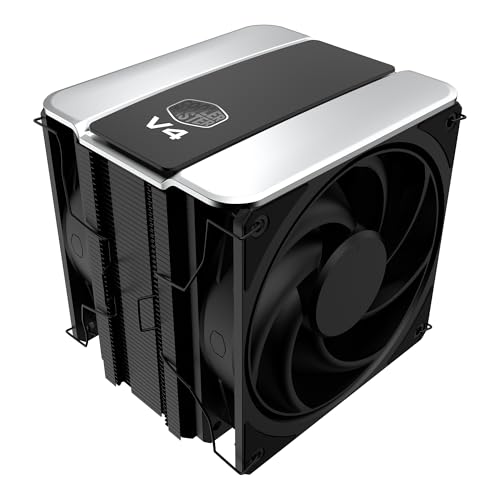
The V4 Alpha 3DHP is the list’s glimpse of where single towers are heading: Cooler Master’s 3DHP heatpipe design in a single-tower body cooled by dual PWM fans. The push-pull pairing on one stack borrows the dual towers’ airflow trick without their width, which makes this pick interesting precisely where the flagships are awkward — narrower cases and boards where a twin-tower stance crowds the memory or the first slot. Cooler Master, having defined the classic single tower with the Hyper line, is here arguing that the form still has new ideas in it.
For the 3600 the proposition is comfortable headroom in a slimmer silhouette. Dual fans share the work at moderate speeds, the single stack keeps installation and clearance simple, and the processor’s modest appetite means this cooler, like the others, will rarely be asked for its best. Owners who enjoy owning the newer idea — and who may carry it to a future platform within its socket support — get both novelty and substance in the same box.
The caution is the newcomer’s caution. A fresh design has a shorter owner history than the Hyper 212’s decades or the Peerless Assassin’s millions, so its long-term folklore — bearing life, mounting quirks, support across future sockets — is still being written. Buyers who prize the proven above the promising should choose accordingly within this guide. Buyers who like their hardware to embody an idea will find the 3DHP’s argument genuinely appealing, and the 3600 is a forgiving chip on which to enjoy it.
The dual-fan single stack has one more subtle virtue for this processor: responsiveness without drama. Two fans on a modest stack can hold a curve that answers the 3600’s quick boost excursions with small, brief speed changes shared between them, rather than one fan’s larger swings. Owners sensitive to changing pitch more than to steady volume — a common and under-discussed preference — often find push-pull singles easier to live with than their specifications predict, and this is the pick in the guide that serves that sensitivity.
There is also a pleasure in buying the current idea while it is current. The Hyper 212’s buyers in its early years were doing exactly that, and the design they backed became the classic the same buyers now recommend from memory. The V4 Alpha may or may not follow that arc, but its engineering is a genuine attempt rather than a badge, and the 3600 — undemanding, forgiving, long-lived — is the ideal processor to enjoy the attempt on.
- Design: single tower, 3DHP heatpipe technology
- Fans: dual PWM
- Maker: Cooler Master V4 Alpha line
- Role: the new-geometry single tower
- Fit: slimmer than dual towers for crowded boards
Strengths
- Dual fans on a single stack give airflow headroom without twin-tower width.
- Fresh heatpipe design from a maker with deep category history.
- Simple clearance story for boards where flagships crowd.
Trade-offs
- New design with a shorter long-term owner record than the classics here.
- Single stack’s fin volume still trails the dual towers’ reserves.
- Two fan leads to route despite the single-tower footprint.
Best for: a 3600 in a narrower case whose owner wants modern dual-fan airflow without dual-tower bulk.
Not suited for: a buyer who values a decade of owner folklore over a newer idea.
How Do the Six Compare for This Chip?
| Pick | Layout | Fans | Future platforms | Character for a 3600 |
|---|---|---|---|---|
| Peerless Assassin 120 SE | Dual tower, 6 pipes | Dual | AM5 and Intel | Definitive quiet and headroom |
| Hyper 212 Black II | Single tower, 4 pipes | Single | AM5 and Intel | Proportionate classic |
| FROZN A620 PRO SE | Dual tower, 6 pipes | Dual | AM5 and Intel | Silence-first powerhouse |
| Wraith Stealth | Aluminium downdraft | Single small | AM4 only | The honest baseline |
| Peerless Assassin 120 SE Black | Dual tower, 6 pipes | Dual | AM5 and Intel | Flagship for dark builds |
| V4 Alpha 3DHP | Single tower, 3DHP | Dual | Per listing | New geometry, slim stance |
The table’s story is that the chip forgives every choice and rewards several. The baseline is adequate, the classic is proportionate, the new geometry is clever, and the three dual towers convert surplus capacity into the two things 3600 owners actually upgrade for: silence today and a cooler that survives tomorrow’s platform.
How Do You Swap a Stock Cooler for a Tower Without Drama?
Warm the machine for a few minutes before switching it off; warm compound releases its grip more willingly. The AM4 socket’s famous hazard is the processor lifting out with the cooler, held by dried paste, so free the Wraith with a gentle twist rather than a straight pull, and lift slowly. Once the old cooler is off, clean the heat spreader with isopropyl alcohol until it looks bare, check that no pins were disturbed, and let the surface dry while you study the new cooler’s bracket.
AM4 mounting on modern towers is a civilised routine: backplate, standoffs, brackets, then the tower seated with screws tightened in a cross pattern, a little at a time. Apply a pea-sized amount of compound at the centre and let pressure spread it. Fit the tower before the board returns to a tight case if space is short, connect the fan to the CPU header, and confirm the fan blows toward the rear exhaust. The whole exchange, done patiently, takes less time than the game download that usually occasions it.
Finish in the BIOS with a fan curve that reflects the upgrade’s purpose: gentle at desktop temperatures, patient through the gaming band, and with full speed reserved for temperatures this chip, under these towers, may never reach. The curve is where the new quiet is actually authored, and five minutes there completes what the hardware began.
What Happens to a 3600 Build Over the Years That Follow?
The 3600 has already outlived the lifespan its launch audience expected, and its owners’ plans tend to unfold in stages that a wise cooler purchase anticipates. The first stage is the gaming years, where the chip is the system and quiet under load is the upgrade that matters. The second stage arrives with a graphics card or processor swap within AM4 — the platform’s later, faster chips drop into the same boards — and here the dual towers’ reserves stop being surplus and become the point, since a stronger AM4 processor asks meaningfully more of its cooler while the Wraith class falls behind entirely.
The third stage is the afterlife: the 3600, retired from the main desk, becomes the media PC, the home server, the machine in the spare room or the relative’s house. In that life its cooler should be the part nobody thinks about — no pump to age, no fan bearing at the edge, no software to maintain. Air towers are the only cooling that truly fits a decade-long afterlife, and the picks here with standard fans and cross-platform brackets are the ones that will still be serviceable when the chip’s third owner inherits it. Buying for the whole biography, rather than for this year’s benchmark, is the habit that separates the 3600’s happiest long-term owners from its serial upgraders.
How Should You Set a Fan Curve Specifically for This Processor?
The 3600’s temperature behaviour has a quirk every owner notices: its readings hop. The chip’s sensors report quick spikes as boost engages for brief tasks, and a fan curve tied naively to those spikes will surge constantly in response to events that need no cooling at all. The cure is to build the curve around sustained temperature rather than instantaneous readings — use the motherboard’s averaging or delay options where offered, keep the fan at a flat, gentle speed through the chip’s ordinary working band, and let the serious slope begin only where a game or a render would hold the temperature for minutes.
With the dual-tower picks, that philosophy can be taken almost to an extreme: a curve that barely moves until temperatures most 3600 workloads never reach, secure in the knowledge that the fin mass absorbs the transients the fans ignore. With the single towers, a slightly more responsive middle keeps temperatures tighter at little acoustic cost. Either way, judge the result from your chair during your loudest real activity, not from a stress test’s artificial worst case. A curve tuned for the life the machine actually lives will always sound better than one tuned for a benchmark it runs once.
What Are the Most Common Mistakes When Cooling a 3600?
The first is overspending on the wrong axis: buying liquid or an enormous flagship for capacity’s sake when the chip needed only calm, then discovering the pump or the bulk annoys more than the stock fan did. This guide’s dual towers are already the generous end of sensible. The second mistake is the opposite economy — deciding the Wraith is fine while it audibly surges through every game, because a problem you hear daily is a problem worth the modest price of fixing.
The third mistake is the AM4 removal accident described above, pulling a cold stock cooler straight up and bending pins; warm, twist, lift. The fourth is forgetting that a cooler upgrade is the perfect moment to clean the case’s filters and intake, without which the new tower breathes the same choked air as the old one. And the fifth is buying a cooler that strands itself on AM4 when the same money buys one that follows you to AM5 — the future-proofing in this list is free, and leaving it unclaimed is the quietest waste in the whole upgrade.
Finally, a word about timing the purchase. Owners often ask whether to cool the 3600 properly now or to wait and buy a cooler with the next platform. The cross-platform picks in this guide dissolve that dilemma: bought today, the same tower cools the 3600 through its remaining years and then mounts the AM5 or Intel board that replaces it, so the quiet is enjoyed immediately and the money is spent once. Waiting, by contrast, buys nothing except more evenings with the stock fan’s voice. When a single purchase serves both the present machine and its successor, the present is the right time to make it.
Final Recommendation
Start by acquitting or convicting your current cooler honestly. If the Wraith Stealth satisfies you, keep it and spend the money where you will feel it. If it does not, the Peerless Assassin 120 SE is the definitive answer for most owners — silver for bright builds, black for dark ones — with the FROZN A620 PRO SE as the silence-first alternative and the Hyper 212 Black II as the proportionate classic. The V4 Alpha 3DHP serves narrower cases with modern flair. Every aftermarket road here leads to the same destination: a 3600 that runs cool, boosts generously and stops being the sound of the room.
Fit it warm, twist the old cooler free, set a patient curve, and enjoy the peculiar satisfaction of an upgrade whose success is measured in how completely you stop noticing it. The 3600 earned its long life by being easy to live with; the right cooler simply lets the whole machine share that quality.
Memory and case, the two physical checks this guide keeps returning to, deserve their final word in combination, because in real 3600 builds they interact. The mid-towers these systems usually live in accept every height here, but their memory slots sit close enough to the socket that a dual tower’s front fan and a tall kit of RGB memory negotiate the same few millimetres. Sliding the fan up its clips by the width of a finger is the standard, harmless resolution, and it costs a degree or two at most. Knowing that in advance turns the most common installation surprise of this entire upgrade into a shrug, which is where this guide would like all of its readers’ surprises to end up.
Frequently Asked Questions
Is the stock Wraith Stealth actually bad for the 3600?
No. It cools the chip within its limits at stock settings, exactly as designed, and many owners use one happily for years. Its weakness is character rather than competence: with no heatpipes and little mass, its fan responds quickly and audibly to load changes, which is the complaint that sends owners to this guide. Judge it by your own ears before replacing it.
Will a better cooler make my 3600 faster?
Modestly, at the margins. The 3600 boosts higher and longer when temperatures allow, so a cooler that holds temperatures low can sustain the chip’s best clocks through long sessions where the stock cooler might let heat trim them. Expect composure and consistency rather than a transformation; the larger wins are acoustic.
Can I keep my cooler when I upgrade from the 3600 to AM5?
With five of these six picks, yes. The Peerless Assassin editions, the Hyper 212 Black II and the FROZN A620 PRO SE all list AM5 support alongside AM4, so the cooler unbolts from the old board and mounts the new one. Only the Wraith Stealth is AM4-bound, one more reason it is the baseline rather than the recommendation.
Do I need to remove the motherboard to fit a tower?
Usually not. Most cases have a cutout behind the socket that lets the AM4 backplate be fitted with the board in place, and modern brackets are designed for in-case installation. Slim or older cases without the cutout may require the board to come out, which is a nuisance rather than a difficulty, and a good moment to clean everything anyway.
How much thermal compound should I use on a 3600?
A pea-sized amount at the centre of the heat spreader is the reliable standard for this socket; the cooler’s mounting pressure spreads it across the surface as you tighten in a cross pattern. More is not better — excess merely squeezes out at the edges — and a thin, even film is what efficient contact actually looks like.
Is liquid cooling worth it for a Ryzen 3600?
For cooling alone, no. The chip’s modest heat is handled by every tower here with reserves, and a radiator adds a pump, tubes and cost to solve a problem this processor does not present. Liquid becomes a design choice — for an open, exhibit-style interior — rather than a cooling necessity, and should be bought honestly on those terms if it is bought at all.
Should I enable any special settings after fitting a bigger cooler?
Nothing is required, but two touches repay the minute they take. Set the fan curve described in this guide so the new capacity expresses itself as quiet rather than as merely lower numbers, and confirm the motherboard’s fan header is set to PWM mode for the new fan. Beyond that, the chip needs no persuasion: it will use the thermal room you have given it on its own, boosting as its design intends.
Keep the Wraith you remove, by the way, in the motherboard’s box with its screws. A spare stock cooler is the kind of part that rescues a friend’s build on a Sunday, tests a second-hand board on a workbench, or returns your own machine to service while a tower is away being replaced. Parts drawers are built out of such small foresight, and few parts earn their drawer space as reliably as a working AM4 stock cooler.
Related Guides
Owners ready to spend at the top of the cooling world will find the liquid flagship class compared in our roundup of the best high performance cpu water coolers. Budget-minded upgraders should weigh the value shelf in our guide to the best cpu coolers under 35 before deciding, and anyone whose 3600 lives in a compact case will find its natural companions among the best downdraft cpu coolers.
Related guides
- Best 3.0 Qualcomm Quick Chargers: QC 3.0 Adapters That Still Earn Their Outlet
- Best Time Machine Compatible Hard Drives: Mac-Ready and Reformatted Picks
- Best 3D Mechanical Engineering Laptops: Certified Workstations for CAD and Simulation
- Best Tattoo Printers: Thermal Stencil Machines for Clean, Lasting Transfers


