What's inside
- Key Takeaways
- Quick Picks
- How We Chose These Picks
- How Do the Six Compare Side by Side?
- What Does Native 4K Actually Mean — and What Is Pixel-Shift?
- How Do You Build a Room Worthy of a Native 4K Panel?
- Lamp or Laser at the Native Tier — Which Ownership Suits You?
- What Mistakes Do Native 4K Buyers Make?
- Final Recommendation
- Frequently Asked Questions
- Related Guides
As an Amazon Associate I earn from qualifying purchases. This post may contain affiliate links at no extra cost to you.
widgetverdict.com is reader-supported. When you buy through links on our site, we may earn an affiliate commission.
Native is the most abused word in projection, and this guide exists to defend it. A native 4K projector carries a panel — an imaging device — with a true 3840×2160 pixel grid, every pixel physically present, every pixel addressed. The best native 4k projectors are therefore a small and identifiable aristocracy: machines built on JVC’s D-ILA panels or Sony’s SXRD panels, the two reflective technologies that put genuine 4K resolution into home theatres. Every one of the six picks in this guide states a native 4K panel in its listing title, in those terms or their equivalent, and that statement — not a badge, not a compatibility claim — is the price of admission to this list.
The distinction matters because the alternative is everywhere and wears similar clothes. Pixel-shift projectors — Epson’s PRO-UHD designs and the DLP world’s XPR machines — render a lower-resolution panel’s image shifted at high speed to address a 4K grid, and they can look very good; this guide discusses them once, in the buying section, as the cheaper contrast class they honestly are. But they are not native, their titles say so if read carefully, and a buyer paying native money deserves a native panel. The whole discipline of this article follows from that sentence: specs are taken from listing titles, the panel technology is named for every pick, and the two machines here that add 8K e-Shift upconversion on top of their native 4K panels are described as exactly that — native 4K projectors with 8K signal handling — and never, anywhere in this guide, as 8K projectors.
What the aristocracy costs and what it buys should be understood before the picks. These are large, heavy, installation projectors for dedicated rooms: black ceilings, controlled light, screens with gain chosen rather than inherited, and seating distances planned. They are not portable, not casual, and not cheap in spirit even where a given listing’s moment makes one attainable. What they buy is the finest projected image available to a home — true 4K detail from UHD discs and the best streams, contrast rooted in panel physics rather than iris tricks, and HDR tone mapping that has become a genuine art in the hands of the two makers represented here. JVC brings its D-ILA panels and its Frame Adapt HDR processing; Sony brings SXRD and its laser line from the XW5000ES to the BRAVIA Projector 7. The six divide between those houses, across lamp and laser, across generations — and one of them, the NZ7, carries a discontinued note in its title that its section handles in the open.
Read the sections that follow as installation decisions, not appliance reviews. Each pick is assessed on the panel first, the light source second, the HDR machinery third, and the ownership reality — size, permanence, the room it demands — always. A reader who finishes this guide should be able to say which of the two panel families suits their screen and their sources, whether lamp or laser fits their usage, and why the word native was worth a whole article’s defence.
Key Takeaways
- Every linked pick states a native 4K panel in its title: JVC D-ILA on four picks, Sony native 4K SXRD on two.
- Pixel-shift machines are not picks in this guide; they are discussed once in the buying section as the cheaper contrast class, named as pixel-shift.
- The NZ7 and NZ800 add 8K e-Shift upconversion on a native 4K panel — they accept and process 8K signals, and they are not 8K projectors.
- Five picks are laser-lit per their titles; the JVC NP5’s title does not state a laser, and its light source is recorded as not stated in the title.
- The NZ7’s title carries a discontinued note; its section treats that as an ownership fact, not a footnote.
- These are dedicated-room installation machines: the room, the screen, and the light control are part of every purchase.
Quick Picks
| Pick | Badge | Why it is here |
|---|---|---|
| JVC DLA-NZ7 D-ILA Laser Projector | Reference All-Rounder | Native 4K D-ILA laser with 8K e-Shift, Frame Adapt HDR, and 4K-120P support — listed as discontinued in its title. |
| Sony VPL-XW5000ES | Sony Laser Entry | The native 4K SXRD laser that opens Sony’s current home line, in black. |
| JVC DLA-NP5 D-ILA Projector | Value D-ILA Pick | Native 4K D-ILA with 1900 lumens, HDR10+, and a 65mm all-glass lens at the line’s attainable end. |
| JVC DLA-NZ500 Native 4K Laser Projector | Compact Laser D-ILA | Native 4K laser with 2000 lumens and a stated 40,000:1 native contrast figure. |
| Sony BRAVIA Projector 7 | Current Sony Generation | The VPL-XW5100ES: native 4K SXRD laser under Sony’s BRAVIA projector banner. |
| JVC DLA-NZ800 D-ILA Laser Projector | Flagship Statement | 8K e-ShiftX on a native 4K D-ILA panel, Gen2 Frame Adapt HDR, and ISF certification. |
How We Chose These Picks
Admission to this guide turned on a single sentence in each candidate’s listing title: a native 4K panel, stated. JVC’s titles state it as native 4K D-ILA or with the D-ILA 4K designation backed by the line’s panel; Sony’s state it verbatim — “Native 4K SXRD Panel” — in both of its titles here. Candidates whose titles claimed 4K through shifting vocabularies — PRO-UHD, XPR, “4K enhancement” — were excluded from the picks regardless of their other merits, and the buying section below explains what those machines offer the buyer who chooses them knowingly. This is the one guide in the fleet where the admission test is a panel, and it was applied without exceptions.
Within the gate, the six were chosen to map the territory a native buyer actually shops. JVC contributes four: the attainable NP5, the compact NZ500, the reference NZ7, and the flagship NZ800 — a ladder within one panel family, across which a buyer can watch price of entry buy light-source longevity, contrast, and processing generation. Sony contributes two: the XW5000ES that opens its laser line and the BRAVIA Projector 7 that carries its current banner. The two houses’ HDR philosophies, lens traditions, and gaming postures differ, and the sections keep those differences in view rather than flattening the six into a specification sort.
Figures are title-bound as everywhere in this fleet. Where a title publishes lumens or a contrast ratio, the guide uses them; where it does not — the Sony titles are notably terse — the spec box records the absence and the analysis proceeds on panel, light source, and line position, which are the facts the titles do state. No figures were borrowed from reviews, siblings, or prior generations.
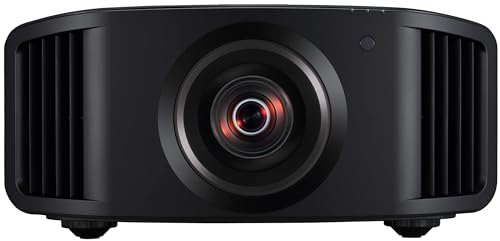
JVC DLA-NZ7 D-ILA Laser Projector — Reference All-Rounder
The NZ7 is the machine around which the modern native 4K conversation turns, and its title is a compact curriculum: D-ILA laser, 2200 lumens, native 4K with 8K e-Shift technology, Frame Adapt HDR, two HDMI inputs, support for 8K-60P and 4K-120P signals, HDR10+ — and, in parentheses at the end, the word discontinued. Begin with that parenthesis, because this guide does not bury it. The NZ7 has been succeeded in JVC’s line, and a buyer purchasing one now is purchasing a known, finished design: no future firmware surprises in either direction, a mature owner knowledge base, and a value equation set by remaining stock rather than by a current line’s pricing discipline. For many theatre builders that is an attractive equation. It must simply be entered knowingly.
The panel is the foundation: a native 4K D-ILA device, JVC’s reflective LCOS implementation, prized across two decades for the depth of its blacks. D-ILA’s native contrast — the contrast the panel itself produces, before any dynamic iris assistance — is the technology’s signature, and on film it translates to night scenes with genuine gradation: the starfield that holds its faint stars, the unlit corridor that keeps its door frames. Buyers cross-shopping the Sony picks should understand that this panel-level contrast, against SXRD’s own considerable virtues, is the axis on which the two houses have always been compared.
The 8K e-Shift requires its precise sentence, and here it is: the NZ7’s panel is native 4K; its e-Shift technology shifts that panel’s image to upconvert and display 8K signals, which the machine accepts at 60P through its HDMI inputs. It is therefore a native 4K projector with 8K input handling — a real capability for the rare 8K source and a form of future-proofing — and it is not an 8K projector, a phrase this guide reserves for panels with 8K’s full pixel count, which no pick here has. The same inputs accept 4K at 120P, which makes the NZ7 the gaming-capable member of the reference class: a theatre that can take a current console’s finest output without apology.
Frame Adapt HDR is JVC’s scene-by-scene tone mapping, analysing each frame’s luminance and adapting the HDR rendering to the projector’s actual brightness rather than to a mastering monitor’s. On real film libraries — where HDR masters vary wildly in their peak brightness assumptions — that adaptation is the difference between HDR that impresses in a demo and HDR that survives a whole collection. HDR10+ support, stated in the title, adds the dynamic-metadata format to the machine’s diet beside the base HDR10 layer.
The laser light source, at a stated 2200 lumens, completes the reference brief: brightness that holds across a long service life, instant-on manners relative to lamp warm-up, and output sized for dedicated rooms and screens in the class’s normal range rather than for daylight combat. In a blacked-out theatre — the room this machine demands and deserves — 2200 laser lumens behind D-ILA contrast is a specification that needs no inflation.
- Panel: native 4K D-ILA, as stated in the listing title
- Light source: laser, as stated in the listing title
- Brightness: 2200 lumens, as stated in the listing title
- Signal handling: 8K e-Shift upconversion on the native 4K panel; accepts 8K-60P and 4K-120P, as stated in the listing title
- HDR: Frame Adapt HDR and HDR10+, as stated in the listing title
- Inputs named in the title: 2 HDMI
- Availability note: listed as discontinued in the listing title
Strengths
- D-ILA native contrast gives night scenes their gradation without iris theatrics.
- Frame Adapt HDR adapts tone mapping frame by frame to the projector’s real brightness.
- 8K-60P and 4K-120P input support covers the finest current sources, disc to console.
Trade-offs
- The title states the model is discontinued; buyers purchase a finished design and remaining stock.
- Its 8K handling is e-Shift upconversion on a 4K panel — precisely, not a native 8K picture.
- 2200 lumens is a dedicated-room figure; it is not built for ambient light.
Best for: a dedicated theatre builder who wants the reference D-ILA picture, laser longevity, and high-frame-rate inputs in one finished design.
Not suited for: ownership plans that need a current-line model with a long update future ahead of it, since this design is complete and discontinued per its title.

Sony VPL-XW5000ES — Sony Laser Entry
Sony’s title for the XW5000ES is the most economical in this guide — a 4K HDR laser home theatre projector with a native 4K SXRD panel, in black — and its economy reflects the machine’s position: this is the doorway into Sony’s native 4K laser line, the model whose existence redefined what the entry to true 4K projection costs in commitment. Where JVC’s titles enumerate, Sony’s simply names the three facts that matter — panel, light source, purpose — and lets the line’s reputation carry the rest. This guide follows the title’s discipline: the spec box records what is stated, flags what is not, and builds the analysis on panel and position rather than on borrowed figures.
The panel is SXRD, Sony’s reflective LCOS technology, in its native 4K form. SXRD’s long-standing character in the home theatre conversation is a combination of very fine pixel structure — the inter-pixel gaps are minimal, giving the image a filmlike smoothness at close seating — and response speed that serves both film motion and gaming. A native 4K SXRD panel fed a UHD disc shows the format’s full detail without any shifting intermediary, which is the entire premise of this guide, and the XW5000ES is the most attainable machine in Sony’s line that offers it with a laser behind it.
The laser light source is the generation change this model represents. Sony’s earlier attainable native 4K machines were lamp-lit; the XW line moved the entry point to laser, with the ownership dividends this guide has noted throughout: brightness held across a long service life, no lamp consumable, and on-off manners suited to a theatre that is used for an evening rather than warmed for an event. For a buyer stepping up from the pixel-shift class, the combination — native panel, laser light — is the step itself, the point at which the two compromises of the cheaper classes are both retired at once.
What the title does not state, this section will not invent: no lumen figure, no contrast ratio, no input enumeration, no gaming specification appears in it. Buyers comparing the XW5000ES against the JVC NP5’s published 1900 lumens or the NZ500’s stated contrast should gather Sony’s figures from the manufacturer documentation, where they exist and can be weighed properly. What can be said from the title and the line’s structure is that this is Sony’s entry laser native 4K machine, finished in black, built for a home theatre — and that for the buyer whose loyalty or whose screen suits SXRD, it is the first rung of the correct ladder.
Its natural rival in this guide is the JVC NZ500 below: two compact-ish laser natives at the attainable end, divided by panel family and by how much their titles publish. The Sony asks you to trust the line; the JVC publishes a contrast figure and lets you judge. Both postures have satisfied owners, and the sections give each machine its own honest hearing.
- Panel: native 4K SXRD, as stated in the listing title
- Light source: laser, as stated in the listing title
- Picture format named in the title: 4K HDR
- Finish: black, as stated in the listing title
- Brightness: Not stated in the listing title — verify with the manufacturer documentation
- Contrast: Not stated in the listing title — verify with the manufacturer documentation
Strengths
- Native 4K SXRD with laser light is the complete step up from the pixel-shift classes.
- SXRD’s fine pixel structure gives a filmlike image at close seating distances.
- It opens Sony’s native laser line at its most attainable position.
Trade-offs
- The title publishes no brightness or contrast figures for paper comparison.
- As the line’s entry model, it concedes the flagship features of the BRAVIA Projector 7 below.
- Buyers must consult documentation to complete the specification picture.
Best for: a theatre builder entering native 4K through Sony’s laser line, on the strength of the SXRD panel.
Not suited for: paper comparisons drawn strictly from published lumen and contrast figures, since this title states neither figure at all.

JVC DLA-NP5 D-ILA Projector — Value D-ILA Pick
The NP5 is the attainable door into D-ILA, and its title publishes the figures a value buyer needs: a D-ILA 4K HDR home theatre projector at 1900 lumens, with a low latency mode for gaming, two HDMI inputs with HDCP 2.3 that are 4K/120P compatible, HDR10+, and a 65mm all-glass lens. Every phrase there is doing work. The all-glass lens, at a stated diameter, is a manufacturer’s quiet boast about optical quality — glass rather than plastic elements, in a diameter that speaks to light gathering and edge sharpness — and it signals that the value in this model was taken out of the light source and the feature list, not out of the optics or the panel.
The panel is the point, as it is throughout this guide: native 4K D-ILA, the same panel family as the flagships above and below, with the family’s native contrast character. That is the NP5’s whole argument and it is a strong one — the buyer who prioritises the panel above the light source gets the reference imaging device of this guide at its most attainable position, and accepts the ownership terms that come with the saving. Those terms centre on the light source, about which the title is silent in a way its laser siblings are not: no laser is claimed, and the spec box records the light source as not stated in the title. Buyers should confirm the lamp-based arrangement in the documentation and budget the lamp as the consumable it is; the saving over the laser models is real, and so is the ritual that accompanies it.
The gaming posture is stated with unusual completeness for the class: a low latency mode named outright, and inputs specified to HDCP 2.3 with 4K/120P compatibility. A native 4K theatre that also serves a current console at its finest output is a dual-purpose room without compromise on either side, and the NP5’s title makes that promise in writing. HDR10+ support covers the dynamic metadata format, and the 1900-lumen figure — the most modest in this guide — instructs the room: dedicated, darkened, with a screen sized to let the panel’s contrast, rather than raw output, carry the picture.
Set against the NZ500, its laser sibling at the attainable end, the NP5 trades light-source longevity for the all-glass lens and the lower rung of the ladder. Set against the Sony XW5000ES, it publishes more and lasers less. The buyer whose usage is a few long film sessions a week — the classic theatre pattern — will find the lamp economics rational and the panel identical in family to machines far above it. The buyer whose theatre runs daily for hours should climb to the lasers and pay for the light source their usage actually consumes.
It closes its case as the purist’s value pick: the panel first, the optics honoured, the figures published, and the compromises — brightness, light-source ritual — located exactly where a value model should put them, in the open.
- Panel: native 4K D-ILA, as described in the listing title
- Brightness: 1900 lumens, as stated in the listing title
- Lens: 65mm all-glass lens, as stated in the listing title
- Inputs named in the title: 2 HDMI with HDCP 2.3, 4K/120P compatible
- Gaming: low latency mode, as stated in the listing title
- HDR: HDR10+, as stated in the listing title
- Light source: Not stated in the listing title — verify with the manufacturer documentation
Strengths
- The native D-ILA panel at the line’s most attainable position.
- A 65mm all-glass lens keeps the optics at flagship standard.
- Gaming intent is fully stated: low latency mode and 4K/120P-compatible inputs.
Trade-offs
- 1900 lumens is the guide’s most modest figure; the room must be properly dark.
- The title claims no laser; buyers should expect a lamp’s consumable economics and confirm in documentation.
- Frame Adapt HDR, the laser models’ processing headline, is not claimed in this title.
Best for: a film-first theatre on a disciplined budget, where the panel matters more than the light source.
Not suited for: high-hours daily theatres, where a laser sibling’s light source fits the usage better than a lamp’s ritual.

JVC DLA-NZ500 Native 4K Laser Projector — Compact Laser D-ILA
The NZ500’s title is the most efficient in this guide: a native 4K laser projector, 2000 lumens, and a 40,000:1 native contrast figure. Three claims, each one load-bearing. The contrast figure deserves the first attention because of the word attached to it — native. Manufacturers quote contrast in several dialects, and the dynamic figures, achieved with irises and processing, can run to seven digits while describing very little about a dark scene. A native contrast figure describes the panel itself: the ratio the D-ILA device produces between its brightest white and its deepest black with no assistance. Forty thousand to one, stated as native, is the panel family’s signature written as a number, and it is the figure in this guide most directly connected to what a viewer sees in a night scene.
The machine’s position in JVC’s ladder is the attainable laser: the point where the line’s light source changes from lamp to laser while the commitment stays at the ladder’s lower end. For the high-hours theatre — the room that screens daily, the household where the projector is the main display for film and prestige television — that position is arguably the line’s sweet spot. The laser’s service life absorbs the usage that would cycle an NP5 through lamps, its output holds steady while it does so, and the panel underneath is the same D-ILA family as the flagships’. What the buyer concedes against the NZ7 above is the 8K e-Shift input handling, the published Frame Adapt headline, and a measure of brightness and processing generation — concessions itemised here so the saving can be weighed against them honestly.
At 2000 lumens, the room instruction matches the NP5’s: dedicated, darkened, screened at sizes the light can fill with authority. Laser lumens hold their figure across the source’s life in a way lamp lumens do not, so the NZ500’s picture in year four resembles its picture in month one more closely than any lamp machine’s can — a consistency that theatre owners, who calibrate their rooms carefully, value out of proportion to its place in a specification table.
The title’s terseness cuts the other way on details: no input enumeration, no HDR format list, no gaming specification is printed. Buyers for whom 4K/120P console support or HDR10+ is a deciding factor should verify the NZ500’s positions in the manufacturer documentation rather than assuming the ladder shares every feature downward. What the title guarantees is the trio that defines the machine — native panel, laser light, native contrast — and for the buyer whose priorities are exactly those three, the guarantee is complete.
It is the rationalist’s pick of this guide: the flagship’s panel virtues and the laser’s ownership manners, at the ladder’s attainable end, with the specification published where it counts and the omissions flagged where they occur.
- Panel: native 4K, as stated in the listing title (D-ILA line)
- Light source: laser, as stated in the listing title
- Brightness: 2000 lumens (2000lm), as stated in the listing title
- Contrast: 40,000:1 native contrast, as stated in the listing title
- Inputs: Not stated in the listing title — verify with the manufacturer documentation
- HDR formats: Not stated in the listing title — verify with the manufacturer documentation
Strengths
- A native contrast figure, stated as native, anchors its dark-scene claim in panel physics.
- Laser light at the ladder’s attainable end suits high-hours theatres.
- Output consistency across the laser’s life protects a calibrated room’s setup.
Trade-offs
- Inputs, HDR formats, and gaming support are not stated in the title.
- 2000 lumens asks for a darkened, dedicated room.
- It concedes the NZ7’s 8K e-Shift handling and processing headlines.
Best for: a high-hours dedicated theatre that wants D-ILA contrast and laser longevity without climbing to the reference tier.
Not suited for: gamers and format collectors whose support must be confirmed in the title itself, since this title omits them.

Sony BRAVIA Projector 7 — Current Sony Generation
Sony’s current-generation statement in this class arrives under a new banner: the BRAVIA Projector 7, identified in its title by its model designation VPL-XW5100ES, a 4K HDR laser home theatre projector with a native 4K SXRD panel, in black. The BRAVIA name — Sony’s television flagship brand — migrating to projection tells you how the company now frames these machines: not as a separate projector hobby, but as the largest members of its display family, held to the television line’s standards of picture processing and finish. For the buyer, the practical meaning is generational: this is the present design, with the present processing, at the position above the XW5000ES in the same line.
The panel continuity is the reassurance inside the new banner. Native 4K SXRD remains the imaging device, with the family’s fine pixel structure and filmlike smoothness, and the laser light source remains the line’s standard. What a new generation buys, in this class, is rarely a new panel; it is the processing around the panel — HDR tone mapping refined against another few years of mastered content, motion handling, input behaviour, and the accumulated corrections of the previous model’s ownership. Buyers choosing between this machine and its XW5000ES sibling are therefore choosing processing generation and line position, not imaging fundamentals, and should weigh the step by how much HDR material they watch and how long they keep a projector.
Sony’s HDR posture, stated in the title only as 4K HDR, is the item for documentation. The format list, the tone-mapping machinery’s name, the input enumeration, and any gaming specification are absent from the title, and this guide’s discipline leaves them there — to be gathered from Sony’s documentation, where the current generation’s details properly live. What the title establishes is sufficient for the shortlist decision: native panel, laser, current generation, BRAVIA line. The specification decision belongs to the documents.
Against the JVC flagship below, the BRAVIA Projector 7 is the alternative house’s answer at the serious end: SXRD against D-ILA, Sony’s processing lineage against JVC’s Frame Adapt generations, television-family polish against theatre-specialist depth. The choice between the houses has been the native 4K buyer’s defining decision for years, and it is honestly made on panel character and HDR philosophy — ideally by viewing both, realistically by weighing which family’s described strengths match the films and the screen in question.
It closes the Sony case in this guide as the current-generation pick: the machine for the buyer who wants SXRD’s present form, under the banner Sony now reserves for its best displays, in a theatre built to keep it for the long term its laser promises.
- Panel: native 4K SXRD, as stated in the listing title
- Light source: laser, as stated in the listing title
- Model: VPL-XW5100ES, as stated in the listing title
- Picture format named in the title: 4K HDR
- Finish: black, as stated in the listing title
- Brightness: Not stated in the listing title — verify with the manufacturer documentation
- Contrast: Not stated in the listing title — verify with the manufacturer documentation
Strengths
- The current Sony generation, carrying the BRAVIA banner and its processing lineage.
- Native 4K SXRD smoothness at close seating, with laser longevity.
- Line position above the XW5000ES for buyers keeping a projector long-term.
Trade-offs
- The title publishes no brightness, contrast, or input figures.
- Its advances over its sibling are generational processing, not a new panel.
- Format and gaming specifics require the documentation to confirm.
Best for: a Sony-loyal theatre builder who wants the current generation of native SXRD laser projection.
Not suited for: shortlists drawn strictly on title-published figures, since this title states none beyond panel and light source.

JVC DLA-NZ800 D-ILA Laser Projector — Flagship Statement
The NZ800 closes the guide at the top of JVC’s ladder, and its title states the flagship brief in full: a D-ILA laser projector with 8K e-ShiftX technology, Gen2 Frame Adapt HDR, two HDMI inputs handling 8K/60p and 4K/120p, HDR10+ compatibility, and ISF certification. Each element is a generation marker. The e-Shift carries an X suffix and a second generation of the tone mapping stands behind it; the inputs take the finest signals the current source world produces; and the ISF line — the Imaging Science Foundation’s certification — declares the machine built to be calibrated to reference standards by professionals, which is the flagship’s true native language.
The panel sentence must be spoken here with the same precision as at the NZ7, because the flagship’s marketing makes it easiest to blur: the NZ800’s panel is native 4K D-ILA. Its 8K e-ShiftX technology shifts that panel to upconvert and display 8K signals, which it accepts at 60p. It is a native 4K projector with the most advanced 8K signal handling in this guide — and it is not an 8K projector, because its imaging device holds a 4K pixel grid, and this guide’s vocabulary is anchored to the device. Buyers who internalise that sentence can read the entire category’s advertising without fear for the rest of their lives.
Gen2 Frame Adapt HDR is the processing headline, and its generational number matters for the same reason the BRAVIA’s banner did: HDR tone mapping is where projector generations actually advance. Frame-by-frame analysis of each scene’s luminance, mapped against the projector’s real output and the screen it serves, decides whether a dark film with one bright window looks like a room or like a grey rectangle with a hole in it. A second generation of that machinery, in the flagship’s hands, is the current state of the art from the house that made tone mapping its signature argument.
ISF certification speaks to a particular kind of owner: the one who will have the theatre calibrated — by a professional with instruments, or personally with the same seriousness — and who wants a machine whose modes and controls were designed for that process and certified against it. Combined with the D-ILA panel’s native contrast, it completes the flagship’s identity: not the brightest claim, not the longest feature list, but the most reference-minded instrument in this guide, built for a room that is itself an instrument.
The title publishes no lumen figure, and at this altitude the omission reads as confidence rather than gap — though the discipline of this guide records it in the spec box all the same, and the documentation holds the number for buyers who weigh it. What the title does publish is sufficient to place the machine: the top of the D-ILA ladder, with the newest shifting and tone-mapping generations, certified for calibration. The buyer it suits has built the room first and is now choosing the instrument the room deserves.
- Panel: native 4K D-ILA (panel family per the D-ILA designation in the listing title)
- Light source: laser, as stated in the listing title
- Signal handling: 8K e-ShiftX upconversion on the native 4K panel; inputs accept 8K/60p and 4K/120p, as stated in the listing title
- HDR: Gen2 Frame Adapt HDR and HDR10+ compatible, as stated in the listing title
- Certification: ISF certified, as stated in the listing title
- Inputs named in the title: 2 HDMI
- Brightness: Not stated in the listing title — verify with the manufacturer documentation
Strengths
- Gen2 Frame Adapt HDR is the current generation of the class’s signature tone mapping.
- 8K e-ShiftX gives the most advanced 8K signal handling here, on a native 4K panel.
- ISF certification suits a professionally calibrated reference theatre.
Trade-offs
- It is not an 8K projector; the panel is native 4K and the guide labels it so.
- No brightness figure is published in the title.
- Its talents presuppose a reference room and, ideally, calibration to release them.
Best for: a reference theatre, calibrated and light-controlled, choosing the top of the D-ILA ladder.
Not suited for: anyone seeking a native 8K panel, because no such panel exists in this guide — this flagship’s device is native 4K with e-ShiftX upconversion.
How Do the Six Compare Side by Side?
| Pick | Panel per title | Light source per title | Brightness per title | Signature claim |
|---|---|---|---|---|
| JVC DLA-NZ7 | Native 4K D-ILA | Laser | 2200 lumens | 8K e-Shift; Frame Adapt HDR; discontinued per title |
| Sony VPL-XW5000ES | Native 4K SXRD | Laser | Not stated in title | Sony’s laser line entry |
| JVC DLA-NP5 | Native 4K D-ILA | Not stated in title | 1900 lumens | 65mm all-glass lens; low latency mode |
| JVC DLA-NZ500 | Native 4K | Laser | 2000 lumens | 40,000:1 native contrast |
| Sony BRAVIA Projector 7 | Native 4K SXRD | Laser | Not stated in title | Current BRAVIA generation (XW5100ES) |
| JVC DLA-NZ800 | Native 4K D-ILA | Laser | Not stated in title | 8K e-ShiftX; Gen2 Frame Adapt HDR; ISF |
One column in this table is complete, and it is the column the guide exists for: every panel is native 4K, stated in its title, in a fleet where that sentence is rarely true six times in a row. The brightness column’s gaps belong to Sony’s terse titles and the flagship’s confidence, and they are printed as gaps rather than filled with borrowed numbers — the same discipline, applied at the top of the market, where it is hardest to keep.
What Does Native 4K Actually Mean — and What Is Pixel-Shift?
A native 4K panel holds 3840×2160 physical pixels, roughly eight million of them, each one a real element of the imaging device that can be set independently. Feed such a panel a UHD disc and the correspondence is one to one: every pixel of the source has a pixel of the panel waiting for it. That correspondence is the whole meaning of native, and it is why the two panel families in this guide — D-ILA and SXRD, both reflective LCOS designs — occupy the class alone: they are the technologies that manufacture a true 4K grid for the home at sane sizes and prices of entry.
Pixel-shift is the intelligent alternative, and it deserves a fair description rather than a sneer. A pixel-shift projector starts with a lower-resolution panel — commonly 1080p-class — and moves its image rapidly between offset positions, addressing the 4K grid across multiple flashes. The eye integrates the result, which resolves substantially more detail than the base panel alone and can look convincingly close to 4K at a distance. Epson’s PRO-UHD and the DLP XPR designs are the class’s exemplars, and they are legitimately good projectors, often brighter per pound than the natives and always cheaper to buy. They are discussed here once, as this guide’s brief requires: as the cheaper contrast class, the honest alternative for the buyer who weighs their advantages knowingly. What they are not is native, and a guide titled for native 4K that listed them as picks would be participating in the blur it exists to correct.
Between the classes sits the vocabulary trap of 8K e-Shift, which two picks here carry. E-Shift on the JVCs upconverts: it takes the native 4K panel’s output and shifts it to render 8K signals, which the machines accept. The panel remains 4K. The honest sentence — native 4K projector, 8K input handling — is longer than the dishonest one, and it is the only one this guide prints.
The practical question a buyer should ask of any 4K claim, anywhere, is therefore a single one: what is the panel? If the answer names a native 3840×2160 device, the claim is native. If the answer describes motion — shifting, enhancing, XPR, PRO-UHD — the claim is processing. Both can be worth buying. Only one belongs in this guide.
How Do You Build a Room Worthy of a Native 4K Panel?
Light control is the first construction project, and it is not optional decoration. A native panel’s contrast — the quality that justifies the entire class — is visible only when the room stops competing with it: blackout treatment on every window, a door that seals, matte dark finishes on the ceiling and the wall around the screen, and no light source in the viewers’ sightline during a film. Owners describe the transformation accurately when they say the room is half the projector; with panels of this quality, the fraction is closer to two-thirds.
The screen is the second project. At native 4K, screen texture becomes visible in a way 1080p forgave: woven and perforated surfaces must be chosen for 4K viewing distances, gain must be matched to the projector’s stated output and the room’s size, and the screen must be flat and tensioned, because a ripple that a lesser panel smoothed over will announce itself across a true 4K grid. Size the picture to the seating with the class’s geometry in mind — close enough that 4K detail resolves, which usually means closer and larger than television habits suggest, within the brightness the chosen machine can fill.
Sources and calibration complete the build. A native panel fed a compressed, low-bitrate stream shows the stream’s limits with documentary honesty; UHD discs and the highest-tier streams are its native diet, through inputs of the class the titles here specify. And a machine of this rank deserves calibration — ISF-level, as the flagship’s certification invites, or a careful owner’s pass with test patterns at minimum — because the difference between a native 4K projector as shipped and as calibrated is the difference between a very good picture and the picture the panel was built to give.
Lamp or Laser at the Native Tier — Which Ownership Suits You?
Five of the six titles in this guide state a laser light source, and the sixth — the NP5 — states none, which makes the lamp-versus-laser question the ladder’s main internal fork and worth a direct hearing. The laser’s case at this tier is consistency. A theatre built around a native panel is a calibrated environment: screen gain chosen, seating measured, picture modes tuned. A light source that holds its output across years protects that calibration, while a lamp’s gradual fade quietly unmakes it, month by month, until the room’s careful setup describes a projector that no longer exists. Laser machines also reach brightness quickly and tolerate the theatre’s occasional short session — a single episode, a match — without the thermal courtesies a lamp prefers.
The lamp’s case, represented here by the NP5’s position, is the price of admission and the honesty of a known ritual. The attainable end of the D-ILA ladder exists because the light source costs less; the panel — the component this entire guide argues is irreplaceable — is not where the saving was taken. For the classic theatre pattern, a few long sessions a week in a dark room, a lamp’s life stretches across years of calendar time, and its replacement, when it comes, restores the machine to full brightness in an afternoon. Owners who know the ritual and budget for it are not compromising; they are allocating, putting the money into the panel and the lens and accepting a consumable as the fee.
Usage arithmetic decides between them more reliably than preference does. Count your theatre’s honest hours: a room that screens nightly, that serves as the household’s main display, accumulates lamp lives quickly and recalibrates often, and the laser’s premium returns itself in lamps unpurchased and setups unrepeated. A room that screens twice a week for films may take half a decade to spend one lamp, and the laser’s premium buys longevity the household will never consume. Neither answer is the sophisticated one; the sophisticated act is counting before choosing.
One further consideration belongs to the resale-minded and the long-keepers alike. Laser machines hold their picture character across their lives, which makes their second-hand behaviour predictable; lamp machines ask each buyer to price the lamp’s remaining life, a negotiation as old as projection itself. And the discontinued NZ7 adds its own wrinkle to the arithmetic: a finished laser design, bought from remaining stock, whose long light-source life will likely outlast the model’s support horizon — a combination that suits the self-sufficient owner and should give the support-dependent one pause. Read your own ownership temperament as carefully as the titles, and the fork resolves itself.
What Mistakes Do Native 4K Buyers Make?
Paying native money for a pixel-shift machine is the mistake this entire guide is built against, and it is made by reading the largest number on the box instead of the panel line in the specification. The defence is the single question from the buying section — what is the panel? — asked of every candidate, including the ones whose marketing most wishes you would not.
Calling an e-Shift machine an 8K projector is the second mistake, and owners make it innocently after sellers make it carelessly. The NZ7 and NZ800 in this guide handle 8K signals beautifully on native 4K panels. That is their specification, it is a genuine virtue, and it is not an 8K panel. Precision here is not pedantry; it is the difference between knowing what you own and repeating what you were told.
Installing a reference panel in a recreational room is another expensive misjudgement: white ceiling, uncovered windows, a glossy screen wall. The panel’s contrast — the thing the money bought — evaporates into the room’s reflections, and the owner concludes the class is overrated. The class is not overrated; the room is unfinished. Build the darkness before the projector, or buy down the ladder and spend the difference on the room.
Finally, buyers underfeed the panel: bargain streaming tiers, elderly players, cables that cannot carry the signal the inputs accept. A native 4K projector is the most honest display in the house, and it will show a poor source’s poverty at eight million pixels. Feed it like a reference instrument and it behaves like one.
Final Recommendation
The ladder resolves by panel loyalty and usage. Within JVC: the NP5 for the film-first buyer who wants the D-ILA panel at its attainable end and accepts the lamp ritual; the NZ500 for the high-hours theatre that needs laser manners and that stated native contrast; the NZ7 for the reference all-round package, bought knowingly as a finished, discontinued design; and the NZ800 for the calibrated flagship room, with Gen2 tone mapping and e-ShiftX handling. Within Sony: the XW5000ES as the laser line’s doorway, and the BRAVIA Projector 7 as its current generation. Between the houses, choose on panel character — D-ILA’s contrast depth, SXRD’s filmlike smoothness — and on the HDR philosophy your library rewards. Every machine here earned its place with the same sentence in its title, and it is the sentence to carry into every future purchase: the panel is native 4K.
Frequently Asked Questions
What is the difference between native 4K and pixel-shift 4K?
A native 4K panel physically holds a 3840×2160 pixel grid, so every source pixel maps to a panel pixel. A pixel-shift projector starts from a lower-resolution panel and shifts its image rapidly to address the 4K grid across multiple flashes, resolving more than its base panel but never holding the full grid at once. Pixel-shift can look very good and costs less; native is the genuine article, and every pick in this guide is native per its title.
Are the NZ7 and NZ800 8K projectors?
No. Both are native 4K D-ILA projectors whose e-Shift technology — e-ShiftX on the NZ800 — upconverts and displays 8K signals, which they accept at 60p. The panel is a 4K device. Calling them 8K projectors would misdescribe the imaging hardware, and this guide never does.
D-ILA or SXRD — which panel family should I choose?
D-ILA’s reputation rests on native contrast and black depth; SXRD’s on fine pixel structure and a filmlike smoothness at close seating. Both are native 4K reflective panels with devoted owners, and the honest deciders are your screen, your seating distance, and each house’s HDR processing — JVC’s Frame Adapt generations against Sony’s current BRAVIA-line processing. View both if you possibly can, ideally with the same dark scene from a film you know well, because panel character reveals itself in shadow gradation far faster than in any bright demonstration reel a showroom will offer you.
Is the discontinued NZ7 a risky purchase?
It is a knowable one, and for many theatre builders a positively attractive one. A discontinued model is a finished design: its behaviour, strengths, and ownership record are fully documented by its years in the field, and its value is set by remaining stock. What you give up is a future of updates and a current line’s support horizon. Buyers who value maturity over novelty often choose exactly that trade deliberately.
Why do some titles here publish no brightness figure?
Because manufacturers choose what a title carries, and Sony’s titles in this guide are terse while the NZ800’s omits the figure as well. The numbers exist in the manufacturers’ documentation, which is where this guide directs you; inventing or borrowing them would break the rule that keeps the rest of the guide trustworthy.
Do I need a special screen for native 4K?
You need a screen chosen with 4K in mind: a surface fine enough not to texture the image at your seating distance, gain matched to your projector’s output and room, and proper flatness across the whole span the panel will illuminate. The panel resolves detail that a coarse or rippled surface will spend. It is the natural partner purchase to any pick in this guide.
Related Guides
Readers outfitting the rest of a reference room should continue to our companion guide to food photography cameras, where the same title-bound discipline governs a different panel of glass. Our roundup of compact concert cameras covers the cameras that capture the performances a theatre like this deserves. And for the documentary shelf that will feed the big screen, see our guide to documentary cameras, chosen with the same insistence on stated facts.