What's inside
- Reading These Listings Before You Spend
- Key Takeaways
- Quick Picks
- How We Chose These Picks
- Comparison
- How to Choose an LED Projector as an Artist
- What Does a Sealed Optical Engine Actually Protect?
- Why Do Artists Still Use Grids When Projectors Exist?
- How Should You Read Brightness and Lifespan Claims in These Titles?
- Does LED Really Change Daily Studio Life?
- How Do You Care for an Art Projector Over Years?
- Can One Projector Serve Both Tracing and Teaching?
- Common Mistakes
- Final Recommendation
- When Does an Artist Outgrow an Art Projector?
- Frequently Asked Questions
- Related Guides
As an Amazon Associate I earn from qualifying purchases. This post may contain affiliate links at no extra cost to you.
[SITE_DOMAIN] is reader-supported. When you buy through links on our site, we may earn an affiliate commission.
LED changed art projection quietly and completely: no bulbs to dim, warm and die mid-career, no waiting for a lamp to cool before the machine can move. The best led projectors for artists gathered here are six machines built around that light source, and they divide — as this whole corner of the market divides — into two families that must never be confused. Four are digital projectors that display image files from phones and apps. Two are opaque projectors that enlarge physical artwork laid on a copy tray. Every review below declares its family in its opening lines, because buying one while expecting the other is the costliest reading error in this category.
Four of the six carry the same brand name, Caydo, and this guide treats that fact as information rather than embarrassment. The P1, P3, S1 and M1C are distinct models separated by the technology and features their own titles print: a sealed optical engine and auto screen-fit here, a native 1080P panel and a rotating stand there, an opaque optical path on the S1, DLP technology and a battery in the palm-sized M1C. Read them as siblings with different trades, not as duplicates, and compare each title’s exact words the way you would compare four brushes from one maker.
The two Artograph machines frame the set’s extremes of philosophy. The LED Tracer is the opaque classic — paper in, enlargement out, no file anywhere in the process. The Inspire 2000 is the digital flagship of the name, a Full HD machine with built-in art grids and a few hours of cordless operation. Between those poles, the Caydo range covers app-driven digital work at several scales and one optical route of its own.
Brightness requires the standing warning of this series. Figures printed in these titles are the listings’ own marketing numbers, in dialects that do not convert into one another or into any measured standard this guide trusts. One opaque model prints a large lumen figure; the digital models mostly print none. This guide quotes such numbers only as title claims, never ranks machines by them, and reminds readers that for tracing, a darkened room contributes more than any headline figure ever will.
Lifespan claims are handled the same way: where a title prints an hour figure for its light source, the figure is reported as the maker’s claim, which is still useful — it signals a sealed, long-life LED design philosophy — without pretending to be a laboratory result. What an artist can verify is the working specification around it: focus behaviour, keystone, stands, ranges, copy sizes and control routes, and those are what the reviews judge.
Reading These Listings Before You Spend
Each linked name leads to its model’s own Amazon listing, the only place where the current figure, the full description and owner discussion live together. At this level of the market the listing page deserves a slow read: confirm whether the model in the basket is the digital or the opaque sibling, confirm the range and copy size against your largest planned piece, and confirm any hour or brightness figure’s exact wording. Sellers of LED machines write titles like seed packets — everything important is on the front, in small print, in the maker’s own dialect.
Key Takeaways
- Four picks are digital and two are opaque; the opaque pair — Artograph LED Tracer and Caydo S1 — enlarge physical artwork from a five-inch-square copy tray and accept no image files.
- The four Caydo models are separated by their titles: P1 has auto screen-fit and a sealed optical engine, P3 states Native 1080P with a 360-degree stand, S1 is the optical opaque route, M1C is the palm-sized DLP with a battery.
- The Artograph Inspire 2000 is the feature flagship: Full HD 1080P, auto focus, 96 built-in art grids and 1.5 to 3 hours of cordless operation per its title.
- Hour figures printed in titles — 30,000 hours on the P3 and M1C, 20,000 on the S1 — are maker claims for the light source, reported here as claims.
- The M1C’s 4K Support wording means it accepts and decodes a 4K signal; its drawn picture is its own projection across a 10 to 100 inch range, not native 4K.
- Auto focus and auto keystone appear across the digital Caydos, while the opaque machines trade all automation for a direct optical path from paper to wall.
Quick Picks
| Pick | Badge | Why it earns its place |
|---|---|---|
| Caydo P1 Art Projector | Sealed engine, self-fitting picture | A digital art projector with a drawing app, auto focus and keystone, auto screen-fit, a sealed optical engine and dual-band WiFi with Bluetooth 5.0, projecting 30 to 100 inches. |
| Caydo P3 Art Projector | Native 1080P on a rotating stand | A native 1080P drawing projector with a built-in exclusive drawing app, auto focus and keystone, a 360-degree rotatable stand and a 40 to 120 inch range. |
| Artograph LED Tracer Opaque Art Projector | The paper classic | An opaque LED projector enlarging physical artwork from a 5 by 5 inch copy area at 2X to 14X, portable and light, for wall art, murals and pattern tracing. |
| Artograph Inspire 2000 Digital Art Projector | Grids built in, cord optional | A Full HD 1080P digital art projector with auto focus, 96 built-in art grids across 32 patterns in 3 colours, WiFi 6, Bluetooth 5.4 and 1.5 to 3 hours of cordless operation. |
| Caydo S1 Opaque Art Projector | The optical alternative | An opaque projector for physical artwork with a 5 by 5 inch copy size, a 20 to 80 inch projection range, low noise and a portable design, with maker-claimed brightness and lifespan figures in its title. |
| Caydo M1C DLP Art Projector | Palm-sized and untethered | A DLP art projector with a built-in drawing app, a palm-size body, an 8000mAh rechargeable battery and a 10 to 100 inch projection range, with 4K Support wording in its title. |
How We Chose These Picks
Family balance governed the selection. A guide to LED art projectors that listed only digital machines would misdescribe the market, because the opaque route — LED-lit, modern, and still the most direct way to enlarge a sketchbook page — is a living part of it. Two opaque picks hold places here on merit, and the reviews keep their mechanism in the foreground so no reader mistakes a copy tray for a casting receiver.
Within the Caydo range, models were admitted only where their titles establish genuinely different equipment. The P1’s sealed optical engine is a dust argument; the P3’s native panel and rotating stand are a sharpness and posture argument; the M1C’s DLP engine, battery and palm size are a mobility argument; the S1 is not digital at all. A reader who finishes this guide should be able to explain, from the titles alone, why four machines share a badge — and that test shaped every inclusion.
Art-specific features outranked cinema features throughout. Built-in drawing apps, art grids, screen-fit for canvases and copy trays are the vocabulary of this niche; streaming boasts and speaker claims were ignored wherever titles offered them, because an artist’s projector is judged at the easel. Where a title printed a lifespan or brightness figure, it was recorded as a maker’s claim and given no ranking weight beyond signalling design intent.
Title literacy was the quiet final test applied to every candidate. Makers who print their mechanism, their range and their copy size in plain words — and who separate a support claim from a native figure — were trusted further than makers who print adjectives. In a class where the title is often the only specification a buyer reads before ordering, the quality of a maker’s sentences is evidence about the quality of the machine, and this guide scored it accordingly.
Automation was weighed as a working comfort rather than a luxury. Auto focus, auto keystone and auto screen-fit recur across the digital picks because artists reposition projectors constantly — easel to wall, desk to canvas — and each automatic rescue returns attention to the artwork. The opaque machines answer with a different virtue: nothing to configure at all, because there is nothing digital to configure.
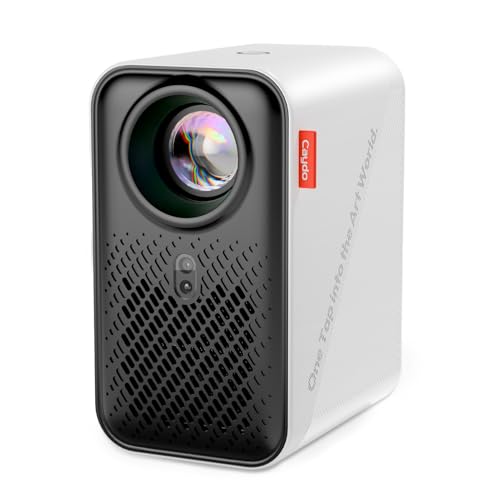
Caydo P1 Art Projector — Sealed engine, self-fitting picture
The P1 is Caydo’s tidiness manifesto. Its title assembles a cluster of features that all point the same way — auto focus, auto keystone, auto screen-fit, a sealed optical engine — describing a digital projector determined to remove the artist from the setup business. Screen-fit deserves the headline: a machine that sizes its picture to the canvas or surface it faces is solving the art projector’s most repeated annoyance, the evening spent nudging a rectangle into a frame it keeps escaping.
The sealed optical engine is the connoisseur’s detail in the list. Projector optics fog and speckle as studio dust migrates inside; sealing the light path is the manufacturer’s answer, and in a working studio — charcoal, pastel, sawdust from the stretcher frames — dust is not a hypothetical. A buyer choosing between siblings should weigh that sealed engine the way a carpenter weighs a sealed bearing: invisible daily, decisive yearly.
Its projection range runs 30 to 100 inches, the band of serious domestic art: large canvases, wall sections, banners and backdrops, without pretending to stadium scale. Dual-band WiFi and Bluetooth 5.0 handle the connections, and a drawing app made for artists is the stated software home, so references move from phone to canvas inside one maker’s ecosystem rather than through a generic casting hop.
What the title does not print is a resolution figure, and this review records that plainly: the P1 is bought for its automation and its sealed optics, with the native figure to be confirmed on the listing by anyone whose work is fine-lined. That is a coherent bargain — many artists tracing bold compositions will never feel the missing number — but it should be a chosen bargain, not a discovered one.
There is a subtle consequence of screen-fit worth naming for canvas painters in particular. A projector that fits its image to the surface encourages working to the canvas’s own proportions from the first minute, rather than composing wide and cropping in the mind. References chosen for the actual rectangle behave differently from references stretched across a wall, and painters who have made both mistakes know the fitted version is the one that survives to the final layer.
Studios that reposition constantly will feel the P1’s design most. Easel in the morning, wall at noon, a canvas on the floor by evening: a projector that refocuses, re-squares and re-fits itself at each move stops being equipment and becomes staff. Among the Caydo siblings, this is the one that most wants to be forgotten while it works, and for a painter deep in a piece, forgettable is the highest praise a tool can earn.
- Software: drawing app for artists, per title
- Automation: auto focus, auto keystone, auto screen-fit stated
- Optics: sealed optical engine stated
- Projection size: 30 to 100 inches stated
- Wireless: dual-band WiFi and Bluetooth 5.0 stated
- Resolution: Not stated in the listing title — verify with the manufacturer documentation
Strengths
- Auto screen-fit sizes the picture to the canvas
- Sealed optical engine resists studio dust
- Full automation trio for constant repositioning
Trade-offs
- Resolution figure must be confirmed on the listing
- 100-inch ceiling stops short of the largest walls
- No stand design is described in its title
Best for: artists who move between easel, wall and canvas daily.
Not suited for: buyers who require a native resolution printed in the title.

Caydo P3 Art Projector — Native 1080P on a rotating stand
Where the P1 sells automation, the P3 sells definition and posture. Native 1080P is stated in its title — the drawn picture’s true resolution, in the wording this guide trusts most — and a 360-degree rotatable stand carries it, which together describe a digital drawing projector meant to be aimed anywhere in the room and believed when it gets there. A built-in exclusive drawing app completes the proposition: Caydo’s own software, resident in the machine, rather than a guest on your phone.
The rotating stand changes the working geometry of a studio. Ceiling compositions, floor-laid canvases, the wall behind the easel — a full circle of aim means the projector’s perch stops dictating the artwork’s location. Artists who lay large canvases flat to work on them, a common and sensible practice, will understand immediately why a stand that can point straight down is not a gimmick but a colleague.
Its range, 40 to 120 inches, sits a step above the P1’s at both ends, suiting the P3 to committed wall and canvas work rather than tabletop tracing. Auto focus and auto keystone travel with it, so the rotation does not cost setup time at each new angle. A 30,000-hour lifespan figure is printed in the title as the maker’s claim for the light source — reported here as a claim, and consistent with the LED premise of this whole guide: a light engine you do not budget to replace.
Against its own sibling, the choice is legible. The P3 gives you the stated native resolution and the rotating stand; the P1 gives you screen-fit and the sealed engine. Neither is the better Caydo in the abstract — they are different allocations of the same budget, and the artist’s own habits should arbitrate: repositioning across surfaces favours the P1’s self-fitting, while fixed large work under a rotating aim favours the P3.
Sign painters and muralists should note the partnership between the rotating stand and the stated range. Lettering a shopfront design or laying out a wall composition involves aiming at surfaces that are rarely opposite a convenient table; a stand that completes a full circle lets the projector live on whatever the room offers — a stepladder’s platform, a shelf, a tripod’s cousin — and still compose the image where the work is. Flexibility of aim, at mural scale, is worth as much as flexibility of size.
For the artist whose tracing has outgrown the desk and whose references live in digital files, the P3 is the most completely specified digital pick in this guide: resolution stated natively, range stated generously, aim stated fully circular, software stated as built in. Specifications recited that plainly deserve the prominence this review gives them.
- Resolution: Native 1080P stated in title
- Software: built-in exclusive drawing app stated
- Automation: auto focus and keystone stated
- Stand: 360-degree rotatable stand stated
- Projection size: 40 to 120 inches stated
- Lifespan: 30,000 hours claimed in title for the light source
Strengths
- Native 1080P stated without translation games
- Rotating stand aims at ceiling, wall or floor canvas
- Built-in app removes phone dependence for control
Trade-offs
- 40-inch floor excludes small tabletop tracing
- No sealed-engine claim appears in its title
- Lifespan figure is a maker claim, not a measurement
Best for: digital artists working large on wall and canvas.
Not suited for: tabletop tracing of designs smaller than 40 inches.

Artograph LED Tracer Opaque Art Projector — The paper classic
The Tracer is the first of this guide’s two opaque machines, and its mechanism deserves one clear paragraph. A physical original — sketch, photograph, printed page — rests on its copy area, lit from within, and its image is projected enlarged onto the wall or canvas. There is no file, no casting, no app and no account anywhere in that sentence. For artists whose references are paper, this is not a limitation to apologise for; it is the shortest possible path between the drawing you made and the enlargement you need.
The title’s numbers define the practice exactly: a copy size of 5 by 5 inches and enlargement from 2X to 14X. A five-inch sketch can therefore head toward a six-foot wall image at full enlargement, or double gently onto a panel at the range’s modest end. Originals larger than the tray must be worked in sections or reduced first — the opaque tax, paid by illustrators for generations, and worth paying when the original is the artwork itself rather than a picture of it.
LED is doing quiet work in this design. Older opaque projectors ran hot enough to curl paper and demand cooling pauses; an LED source in a portable, light body — both stated in the title — turns the opaque route into something a small studio can store on a shelf and deploy on a table without ceremony. Wall art, murals, drawing, sketching, pattern tracing, crafts and learning fill out the stated territory, a curriculum of traditional practice.
Darkness is the Tracer’s honest demand. Projecting lit paper is a gentler throw than projecting a bright panel, so sessions belong to dim rooms and evening light, and fine detail softens as enlargement climbs — physics, not defect. Artists should also note what the machine cannot do at any price: a reference that exists only online must be printed before it can be enlarged, which adds a step digital owners never think about.
Pattern work is where the Tracer’s patience shows best. A quilter enlarging a motif, a woodworker scaling a carving template, a dressmaker growing a pattern piece — each works from paper, in sections, at enlargements the range covers comfortably, and each benefits from a machine with no software opinion about what it is being shown. The Tracer will enlarge a page from a 1920s pattern book with the same obedience it gives this morning’s sketch, and that indifference to fashion is a genuine professional virtue.
Set against the Caydo S1 below, the Tracer is the established name with the wider enlargement range; set against every digital pick here, it is the reminder that art projection began with paper and light, and that for a large tribe of artists it still should. If your studio’s true library is a stack of sketchbooks, this remains the most natural machine in the guide.
- Type: opaque projector for physical artwork
- Copy size: 5 by 5 inches stated
- Enlargement: 2X to 14X stated
- Light source: LED, per product name in title
- Build: portable and light, per title
- Stated uses: wall art, murals, drawing, sketching, pattern tracing, crafts
Strengths
- Enlarges original paper artwork with no digitising step
- Widest enlargement range among the opaque picks
- No software exists in the workflow to age or fail
Trade-offs
- Copy area caps originals at 5 by 5 inches per section
- Online references must be printed before use
- Demands a darker room than the digital picks
Best for: sketchbook artists enlarging their own paper originals.
Not suited for: artists whose references exist only as digital files.

Artograph Inspire 2000 Digital Art Projector — Grids built in, cord optional
The Inspire 2000 is Artograph’s answer to a question the Tracer cannot hear: what should a digital art projector made by an art-projector company look like? Its title answers with Full HD 1080P, auto focus — and then the detail that separates it from every other digital pick in this guide: 96 built-in art grids, across 32 unique patterns, in 3 colours. Grids are the artist’s oldest scaling tool, and building them into the projector, ready to overlay any reference, is a feature only a maker who watches artists work would think to include.
Grid work deserves explanation for readers meeting it here. A grid laid over a reference and a matching grid on the canvas lets an artist transfer proportions square by square, checking each region against its counterpart. Projector owners usually improvise grids with software or transparency sheets; the Inspire keeps nearly a hundred of them resident in the machine, in three colours chosen to stay visible against different artwork. That is not a specification — it is a workflow, shipped in the box.
Cordless operation of 1.5 to 3 hours is the second signature. A studio’s projector usually lives where the socket dictates; a machine that can run a session untethered can stand in the one place the composition needs — mid-room, on a ladder shelf, in a rented hall with no spare outlet. The stated window suits a tracing session rather than a working day, which is the honest shape of battery claims and is framed that way here.
WiFi 6 and Bluetooth 5.4 are the current wireless generation, ahead of every other pick in this guide, and auto focus keeps the picture honest as the machine moves between its cordless perches. What the title does not state is a projection range, so mural planners must take that figure from the listing; the omission is surprising in so complete a specification and is recorded here without decoration.
Teachers of drawing will recognise a second use for those resident grids: demonstration without preparation. A grid overlay summoned from the machine itself turns any projected photograph into a proportion lesson in seconds, with no laptop, no printed transparency and no software licence standing between the class and the idea. Equipment that lowers the cost of showing, not just doing, tends to be used more — and used equipment is the only kind that justifies its shelf.
Against the Caydo P3, its closest rival, the Inspire trades a stated range and rotating stand for grids, cordless running and newer radios. Artists who scale by grid — portraitists, sign painters, muralists transferring detailed cartoons — will find that trade made for them. Artists who simply trace outlines at large sizes may prefer the P3’s stated geometry. Either way, the Inspire is the most art-literate digital machine in this guide, and its grids will still be teaching proportion long after its wireless standards are antiques.
- Resolution: Full HD 1080P stated in title
- Art tools: 96 built-in grids, 32 patterns, 3 colours stated
- Focus: auto focus stated
- Power: 1.5 to 3 hours of cordless operation stated
- Wireless: WiFi 6 and Bluetooth 5.4 stated
- Projection range: not given in the title — confirm on the listing
Strengths
- Built-in art grids serve real scaling workflows
- Cordless sessions free placement from socket geography
- Newest wireless standards in this guide
Trade-offs
- Projection range must be confirmed on the listing
- Battery window suits sessions, not full days
- Grid wealth is wasted on pure outline tracers
Best for: artists who transfer work with grids and need cordless placement.
Not suited for: buyers who need a stated projection range in the title itself.
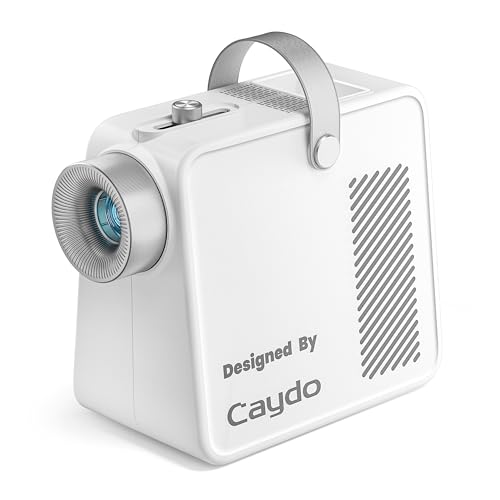
Caydo S1 Opaque Art Projector — The optical alternative
Caydo’s presence in the opaque family surprises buyers who know the brand only for apps, and the S1’s title is careful to define it in optical language: an art projector for tracing physical artwork, with a copy size of 5 by 5 inches and a projection size of 20 to 80 inches. Like the Artograph Tracer, it accepts no files. Unlike the Tracer, it expresses its enlargement as a projected size range rather than a magnification span — two dialects for the same physics, and this guide reports each in its maker’s own terms rather than converting between them.
The title prints two figures that need careful handling. A brightness figure of 5000 lumens is claimed — in the listing’s own marketing dialect, which this guide does not convert into any measured scale or compare against other machines, since no common measurement stands behind the class’s numbers. A lifespan of 20,000 hours is likewise the maker’s claim for the light source. Both are recorded as printed claims; the verifiable working facts are the copy size, the projection range, the stated low noise and the portable design.
Low noise is a more meaningful promise on an opaque machine than on most equipment. Opaque projectors sit close to the artist, lighting paper for long, quiet sessions, and a fan’s hum at arm’s length becomes part of the room’s weather. A maker who prints low noise in the title understands the session’s intimacy, and studio artists who trace in the evening will value it above several louder specifications.
Against the Tracer, the S1’s stated projection ceiling of 80 inches is the more modest geometry, and its copy size is identical at 5 by 5 inches. The choice between the two opaque picks therefore turns on working style: the Tracer’s magnification language and wider enlargement span suit artists thinking in multiples of a sketch, while the S1’s size language suits artists thinking in finished dimensions on the wall. Both demand darkness, both refuse files, both honour paper.
Think of the S1’s working session concretely and its design coheres. The sketchbook page is trimmed or chosen to the copy size, the room darkens, the machine stands at the distance that yields the planned finished size — a piece of furniture’s width of wall, say — and the artist works in the quiet its title promises. Nothing in that session involves a menu. Artists exhausted by software will recognise the description as a holiday, and they are the readers this machine was specified for.
For a Caydo loyalist whose references are physical — or any artist who prefers the newer name’s take on the optical route — the S1 is a coherent, plainly framed machine. Read its two headline numbers as dialect, trust its geometry, and it will enlarge a sketchbook page with the same quiet conviction as its famous rival.
- Type: opaque optical projector for physical artwork
- Copy size: 5 by 5 inches stated
- Projection size: 20 to 80 inches stated
- Brightness: a 5000-lumen figure is claimed in the title, in the listing’s own marketing terms
- Lifespan: 20,000 hours claimed in title for the light source
- Character: low noise and portable design stated
Strengths
- Finished-size projection range is easy to plan around
- Low noise suits long, close, quiet sessions
- Portable design stores and travels easily
Trade-offs
- 80-inch ceiling is the modest end of this guide
- Brightness figure is marketing dialect, not a measurement
- Accepts no digital files, by design
Best for: paper artists who plan work in finished wall sizes.
Not suited for: artists needing enlargements beyond an 80-inch image.

Caydo M1C DLP Art Projector — Palm-sized and untethered
The M1C is the Caydo sibling built around leaving the studio. DLP technology in a palm-size body, an 8000mAh rechargeable battery, a built-in art drawing app and a projection range of 10 to 100 inches: the title describes a digital projector that fits in a coat pocket and works where sockets are not invited. Muralists scouting a wall, teachers carrying art between classrooms, and artists who sketch at market stalls are its natural owners.
DLP deserves its sentence. It is a distinct projection technology from the LCD designs common in this class, known in projector circles for compact light engines — which is precisely the quality a palm-sized machine is advertising. This guide credits the title’s claim of the technology itself and the size it enables, without inventing performance figures the title does not print.
The 4K Support wording in its title requires the standing translation of this series: the machine can accept and decode a 4K signal, while the picture it draws is its own, across that 10 to 100 inch range. A buyer feeding it a 4K source loses nothing; a buyer expecting a native 4K picture has misread the dialect, and this review exists partly to prevent that misreading from becoming a return.
A 30,000-hour lifespan figure is claimed in the title for the light source, as on the P3, and the battery reframes what lifespan means in practice: this is a machine for many short sessions in many places, charged between them like a phone. Its range’s floor of 10 inches is the smallest in the guide, opening genuinely miniature work — labels, miniatures, small craft pieces — that the larger machines cannot compose so closely.
Against the Inspire 2000, the other cordless pick, the M1C trades grids and stated Full HD for true palm portability and the wider stated range. One is a studio instrument that can leave the desk; the other is a traveller that can work in a studio. Artists should buy the biography that resembles their own week.
Consider the market-day workflow the M1C invites. A portrait sketcher at a fair can project a customer’s phone photograph at modest size, trace the likeness’s architecture in minutes, and finish the drawing by hand while the sitter watches — a performance of skill with the measuring quietly automated. Machines earn their keep in such scenes not through any single specification but through the absence of every obstacle: no socket hunt, no cable, no bulk. Portability, fully realised, is a business model as much as a feature.
Smallness is sometimes mistaken for slightness, and the M1C’s specification argues otherwise: app, battery, range and lifespan all stated, in a body that disappears into a bag. For the artist whose studio is wherever the work is, it is the most liberating machine in this guide.
- Technology: DLP stated in title
- Body: palm-size design stated
- Battery: 8000mAh rechargeable stated
- Software: built-in exclusive art drawing app stated
- Projection size: 10 to 100 inches stated
- Input claim: 4K Support — accepts a 4K signal; not a native 4K picture
- Lifespan: 30,000 hours claimed in title
Strengths
- Palm size and battery make it genuinely portable
- Widest small-end range, down to a 10-inch image
- Built-in drawing app travels with the machine
Trade-offs
- 4K Support is input compatibility, not resolution
- Battery sessions need recharging between uses
- Native resolution figure is not printed in its title
Best for: mobile artists, teachers and market-stall sketchers.
Not suited for: buyers expecting a native 4K picture from a 4K Support claim.
Comparison
| Pick | Headline facts from its listing title | Artist it suits first |
|---|---|---|
| Caydo P1 Art Projector | Digital, drawing app, auto focus/keystone/screen-fit, sealed engine, 30–100 inch | The repositioning painter with a dusty studio |
| Caydo P3 Art Projector | Digital, Native 1080P, built-in app, 360° stand, 40–120 inch | The large-canvas digital artist |
| Artograph LED Tracer | Opaque, 5×5 inch copy, 2X–14X enlargement, portable | The sketchbook traditionalist |
| Artograph Inspire 2000 | Digital, Full HD 1080P, 96 grids, WiFi 6, 1.5–3h cordless | The grid-scaling portraitist and muralist |
| Caydo S1 Opaque Art Projector | Opaque, 5×5 inch copy, 20–80 inch projection, low noise | The paper artist planning in finished sizes |
| Caydo M1C DLP Art Projector | Digital DLP, palm-size, battery, built-in app, 10–100 inch | The travelling artist and teacher |
How to Choose an LED Projector as an Artist
Choose the family first, and choose it by where your references live. Paper originals point to the two opaque machines and nowhere else; digital files point to the other four. That decision is not a preference to be argued with but a description of your own studio shelves, and making it honestly halves this guide in a sentence.
Within the digital family, choose by your working motion. Artists who reposition constantly should prize the P1’s automation and screen-fit; artists who work large and fixed should prize the P3’s stated native resolution and rotating stand; artists who scale by grid should take the Inspire’s built-in patterns; artists who move between places should take the M1C’s battery and palm size. Each machine is the best answer to a different week.
Within the opaque family, choose by how you think: magnification multiples with the Tracer, finished dimensions with the S1, remembering that both share the same 5 by 5 inch copy ceiling and the same need for a dark room. Finally, whatever you choose, treat every brightness and lifespan number in every title as the maker’s dialect — and let geometry, mechanism and workflow, the facts you can verify, carry the decision.
What Does a Sealed Optical Engine Actually Protect?
The picture’s cleanliness over years. Projector light paths collect dust exactly where dust does the most harm — on the surfaces the image passes through — and the symptoms arrive as soft spots and speckles that no setting can remove. Sealing the engine, as the Caydo P1’s title claims, keeps studio air out of the optical path, which matters most in the rooms artists actually keep: charcoal dust, pastel haze, sanding flour and pet hair are the atmosphere of a working studio.
It is a longevity feature rather than a first-week feature, and that is why it is easy to underrate at purchase and impossible to retrofit later. Buyers choosing between near-equal digital siblings should let the sealed engine arbitrate when their studio is dusty — which is to say, when their studio is real.
Why Do Artists Still Use Grids When Projectors Exist?
Because projection and grids do different work. A projector places an image; a grid teaches the eye where the image’s parts truly sit, square by square, and the lesson survives after the projector is switched off. Portraitists in particular use grid transfer to protect likeness, checking each region against its counterpart instead of trusting a single traced outline. The Inspire 2000’s built-in grids exist because its maker understands that many artists want both tools in one gesture.
Grids also rescue difficult sessions: a wall too large for one throw can be gridded and transferred in sections with the proportions locked, and a reference too detailed to trace can be simplified square by square. A projector with resident grids is not carrying a nostalgic extra; it is carrying the fallback method of five centuries, ready the moment the modern method meets its limit.
How Should You Read Brightness and Lifespan Claims in These Titles?
As dialect, not data. The brightness figures in this class are printed by each maker in marketing terms with no shared measurement behind them, so this guide never converts them, never ranks by them, and quotes the S1’s large figure only as its title’s own claim. What actually governs a tracing session’s clarity is the darkness of your room and the size of your image — both within your control, neither printed on a box.
Lifespan hours deserve a gentler reading: a claim of 20,000 or 30,000 hours signals a sealed LED design intended to outlast the artwork’s creation by years, and it usefully separates machines whose light source is a consumable from those whose is not. Treat the number as a statement of design philosophy rather than a promise with a stopwatch, and it will inform without misleading.
Does LED Really Change Daily Studio Life?
Yes, in ways too small for headlines and too constant to ignore. An LED machine is ready the moment it is switched on, indifferent to being moved while warm, and free of the bulb-replacement calendar that used to hang over every projector owner’s year. For an artist, that translates into shorter fuses between idea and session: the projector can be fetched, aimed and used for twenty minutes of layout work without anyone calculating whether the session justifies a lamp’s lifespan.
The second change is thermal. Older light sources turned small studios into saunas and curled the very paper an opaque machine was enlarging; LED designs run comparatively cool, which is part of why the opaque route has revived in portable bodies like the Tracer and the S1. Light that does not cook its subject is simply better company for artwork, and the class’s current shape — small, sealed, patient machines — follows from that physics.
How Do You Care for an Art Projector Over Years?
Keep dust off the lens with the discipline you would give a camera, keep vents unblocked, and store the machine covered in the studio rather than naked on the workbench. Digital models with sealed engines, like the P1, forgive more of the studio’s atmosphere, but no projector forgives being used as a shelf for coffee cups and canvas offcuts. The fan intake is the second frontier: a machine that breathes clean air runs cooler and quieter in year four than one that has been inhaling pastel dust since purchase.
Battery models add one habit of their own. The Inspire and the M1C should be charged after sessions rather than stored empty for seasons, the same courtesy owed to any rechargeable tool. Artists who treat the battery as part of the instrument — topped up, exercised, never abandoned flat in a drawer — will find the cordless promise still true when a lesser owner’s has faded into a permanently tethered machine.
Can One Projector Serve Both Tracing and Teaching?
Several picks here are quietly built for double duty. A classroom needs what a studio needs — quick setup, forgiving automation, a picture that survives repositioning by many hands — plus the patience to be carried between rooms. The M1C’s palm size and battery make it the natural traveller; the Inspire’s grids make it the natural demonstrator, since a teacher can show proportion transfer on the wall exactly as students will perform it at their desks.
The opaque pair teach differently: they enlarge a student’s own sketch in front of the class, which is a small magic no file-based machine reproduces, because the drawing on the wall is visibly the drawing from the page. A department choosing one machine for both purposes should decide which lesson it teaches more often — digital workflow or paper enlargement — and let that frequency, not the specification sheet, cast the deciding vote.
Common Mistakes
Ordering an opaque projector for digital references remains the family’s defining error, and this guide has fenced it in every review because it keeps happening. The S1 and the Tracer cannot display a phone photo, a download or a scan; they enlarge paper. Buyers who need both worlds should choose a digital machine and print their paper references when necessary — or accept the print step as the price of the optical route’s directness.
Treating sibling models as interchangeable is the second error, and the Caydo range invites it. Four machines share a badge here while differing in engine, mechanism, stand and software; the model code in the title is the specification, and a buyer who orders “a Caydo” the way one orders a brand of tea will receive whichever sibling the basket held. Read the code, then the title, then the listing, in that order.
Ranking these machines by their printed brightness numbers is the third. The figures are not measured on a shared scale, and a guide that pretended otherwise would be inventing the comparison it claimed to report. Judge brightness the way artists do — in your room, at your size, after dusk — and let the return window, not the headline, arbitrate.
Finally, artists underuse the return window for the one test that matters: their own reference, at their own size, on their own wall. Every claim in every title in this guide becomes verifiable in a single evening with your actual artwork. Run that evening before the window closes, whichever machine you chose, and let your own eyes sign the review.
Final Recommendation
Digital artists should start from their motion: the P1 for constant repositioning under its automation and sealed engine, the P3 for large fixed work under a stated native resolution, the Inspire 2000 for grid-driven transfer and cordless placement, the M1C for a practice that travels. Paper artists should choose their dialect: the Tracer’s magnification span or the S1’s finished-size range, both from the same 5 by 5 inch copy tray, both in a properly dark room.
Notice what this guide never asked you to do: compare brightness numbers across brands, or believe an hour figure as a measurement, or treat four Caydos as one machine. The artists who buy well in this class read mechanisms and geometry, and the six machines here reward exactly that reading.
One practical habit will protect whichever choice you make: photograph your first successful setup — stand position, distance, room arrangement — and keep the picture with the artwork it produced. Studios accumulate these small records the way kitchens accumulate recipes, and the second mural goes up in half the time of the first because the geometry no longer needs discovering. The machine supplies the light; the habit supplies the speed.
An LED projector, chosen by family and workflow, becomes the quietest employee a studio ever hires — no bulbs to nurse, no heat to manage, only light placed where the artwork needs it. Choose the one whose title described your own week most accurately, and it will still be describing it accurately in five years.
When Does an Artist Outgrow an Art Projector?
Rarely in the way beginners fear. A projector is not training wheels with a removal date; professionals use them for the same reason carpenters use squares — because accuracy is a habit, not a stage. What changes with experience is the division of labour: the seasoned artist traces the architecture and invents the rest, leaning on the machine for proportion while the hand takes over everywhere else. Every pick in this guide supports that mature workflow as comfortably as the beginner’s full trace.
The genuine outgrowing is geometric, not artistic. A practice that grows from canvas panels to architectural walls will eventually press against a 100 or 120 inch ceiling, and a paper practice will press against the five-inch copy tray. Those are the honest upgrade triggers — measured in the size of the work, not the price of the tool — and an artist who reaches them has a body of finished pieces to show for the machine that got them there.
Frequently Asked Questions
Which picks are opaque rather than digital?
Two: the Artograph LED Tracer and the Caydo S1. Both enlarge physical artwork placed on a 5 by 5 inch copy area and accept no image files. The other four picks are digital projectors fed by apps and devices.
How do the four Caydo models differ?
By their titles: the P1 has auto screen-fit and a sealed optical engine; the P3 states Native 1080P with a 360-degree rotating stand; the S1 is an opaque optical machine for paper; the M1C is a palm-sized DLP with a rechargeable battery and its own built-in app.
Does the M1C project a native 4K picture?
No. Its title claims 4K Support, which means it can accept and decode a 4K signal. The picture it draws is its own projection across a 10 to 100 inch range, not native 4K.
What are the Inspire 2000’s built-in grids for?
Scaling and transfer. Its title states 96 built-in art grids across 32 patterns in 3 colours, letting an artist overlay a grid on a reference and transfer proportions square by square onto the canvas.
Which pick should a muralist choose first?
Among the digital machines, the Caydo P3 pairs a stated Native 1080P with the widest stated range here and a stand that rotates through a full circle — the muralist’s three needs in one title. The Inspire 2000 answers with grids and cordless placement for detailed cartoon transfer. Among the opaque machines, the Tracer’s 2X to 14X span serves mural sketches best, provided the original fits its copy tray in sections.
Are the hour figures in the titles guarantees?
No — they are the makers’ claims for the light source, printed at 30,000 hours on the P3 and M1C and 20,000 on the S1, and this guide reports them as claims. Read them as evidence of a sealed, long-life LED design rather than as a promise measured with a stopwatch.
Can an opaque projector enlarge a whole sketchbook page?
Not in one pass — both opaque picks here state a copy size of five inches square, so larger pages are enlarged in sections or reduced first. Within that area, the Tracer enlarges 2X to 14X and the S1 projects from 20 to 80 inches.
Related Guides
From here, the tracing specialists live in the projectors chosen purely for tracing images, the wall-scale step up is covered by mural wall painting projectors, and the largest work of all is handled in the projectors for large murals guide.


