What's inside
- Key Takeaways
- Quick Picks
- How We Chose These Picks
- How Do the Six Stack Up When the Sphere Is the Point?
- What Actually Makes a Headset Feel Like It Surrounds You?
- How Much Field of View Do You Really Need?
- How Do You Set Up a Safe and Convincing 360 Play Space?
- How Should You Care for Lenses, Straps and Batteries?
- Which Headset Fits Which Kind of Player?
- What Are the Most Common Mistakes When Buying a 360 Headset?
- Should You Wait for the Next Generation or Buy Now?
- Final Recommendation
- How Do 360 Films and Games Ask Different Things of a Headset?
- Frequently Asked Questions
- Related Guides
As an Amazon Associate I earn from qualifying purchases. This post may contain affiliate links at no extra cost to you.
widgetverdict.com is reader-supported. When you buy through links on our site, we may earn an affiliate commission.
Turning your head and finding the world still there — behind you, above you, under your feet — is the whole promise of the best 360 vr headsets, and it is a promise that hardware can break in a dozen small ways. A headset can render a full sphere of virtual space yet ruin it with a narrow sweet spot in the lenses, a strap that slides during a quick look over your shoulder, or tracking that loses the controllers the moment your hands drop to your sides. This guide ranks six headsets that genuinely surround you, three with verified listings you can order directly and three covered in prose because our checked pool holds no listing we can attach to them with confidence. Each one is judged on the things that decide whether 360-degree play feels like presence or like watching a very wide television strapped to your face: field of view, lens clarity across that field, tracking volume, comfort over an hour, and the size and quality of the library that fills the sphere.
Ordering any of the linked three takes a minute: open the listing, check price on Amazon, and read the storage figure and platform line in the title twice before paying, because the most common regret in this category is buying a headset that needs a console or a gaming PC the buyer does not own. The prose-only three are sold through their makers and the usual electronics retailers; search those by exact model name, and treat marketplace listings with unusual care, since a famous headset name sometimes fronts a region-locked import or a unit missing its controllers. A VR headset without its matched controllers is a paperweight with excellent optics.
One honest framing note before the rankings. The phrase 360 VR gets stretched by marketing until it covers everything from a phone in a plastic shell to a full room-scale rig. Nothing in this guide is a phone holder. Every pick below tracks your head in six degrees of freedom — you can lean, duck, crouch and step, not merely swivel — and every one renders content that wraps the full sphere around you. That distinction matters more than any single specification, because the moment a headset only rotates with your head, the illusion of standing somewhere else collapses into looking at a photograph from inside.
Key Takeaways
- The Meta Quest 3 is the easiest recommendation in this guide: sharp pancake optics, strong color passthrough for mixed reality, and no PC or console required to start playing.
- The Quest 3S delivers most of the Quest 3 experience for noticeably less commitment, trading lens quality and storage headroom for a friendlier entry point.
- PlayStation VR2 owns the best display technology here — OLED panels with deep blacks — but it only makes sense inside a PlayStation 5 household.
- Tracking volume is the hidden spec: inside-out cameras must see your controllers at your hips and above your head, not just in front of your chest.
- Comfort decides session length more than resolution does; a halo strap or a balanced battery can matter more than a few extra pixels.
- Buy for the library you will actually open weekly, because a headset with fifty games you love beats a technically finer one with five.
Quick Picks
| Pick | Badge | Why it earns its place |
|---|---|---|
| Meta Quest 3 512GB | Best overall 360 headset | Pancake lenses stay clear toward the edges, passthrough is good enough to find a drink, and the standalone library is the deepest in VR. |
| Meta Quest 3S 128GB | Best value entry | The same processor and controllers as the flagship, with simpler optics that still surround you convincingly. |
| PlayStation VR2 | Best display, console required | OLED contrast, eye tracking and headset haptics make dark scenes look like nothing else on this list. |
| Pico 4 | Lightweight alternative | A slim, well-balanced standalone design that suits smaller heads and longer, gentler sessions. |
| Valve Index | Best tracking, PC required | External base stations and finger-tracking controllers remain the precision benchmark for room-scale play. |
| HTC Vive XR Elite | Most convertible design | Detachable battery turns it from a full headset into glasses-style viewing for travel and media. |
How We Chose These Picks
We started from the definition rather than the marketing: a candidate had to track position as well as rotation, render a genuinely surrounding image, and be buyable as a complete kit rather than a developer curiosity. That filter removed phone shells, 3DOF viewers and several headsets that survive mainly as enterprise training hardware. From the survivors we weighed five things. Display and optics came first, because in 360 content your eyes constantly land away from the center of the lens, so edge clarity is not a luxury. Tracking volume came second — how far your hands can wander before the system guesses. Third was comfort engineering: weight, balance, facial interface and ventilation. Fourth, the content ecosystem, including whether 360 video, mixed reality and native games are all properly served. Fifth, total cost of ownership, counting the console or PC a headset demands, the storage tier you will realistically need, and the accessories most owners end up buying within a month.
We also paid attention to a quality that spec sheets hide: how a headset behaves at the edges of its competence. Every system here loses tracking occasionally, runs a battery down mid-session or asks you to redraw a play boundary. The difference between a good headset and a frustrating one is how gracefully it handles those moments — a clear warning and a fast recovery versus a frozen frame and a restart. That behavior, gathered from long sessions across many titles, shaped the ordering below as much as any resolution figure.

Meta Quest 3 512GB — Best overall 360 headset
The Quest 3 is the headset we hand to skeptics, because it answers the three objections people bring to VR within about ninety seconds. It needs no wires, no sensors on shelves and no computer, yet the image stays sharp when you glance sideways at a doorway or down at a virtual control panel — the pancake lenses hold clarity far closer to the edges than the fresnel optics in cheaper headsets, and in 360 content that edge clarity is the difference between turning your eyes and being forced to turn your whole head like an owl. The dual color cameras feed a passthrough view clean enough to walk to a door, read a large-print note or check on a pet without removing the headset, which quietly changes how often you bother putting it on at all.
Performance headroom is the less visible strength. The Snapdragon XR2 Gen 2 chip runs native titles at high refresh rates without the judder that used to sour standalone VR, and developers have increasingly patched older games to use the extra power, so a library bought years ago looks better on this hardware than it did at launch. The 512GB tier in this listing removes the storage arithmetic entirely: big titles, a shelf of 360 films and a rotating cast of trials coexist without a weekly uninstall ritual. Buyers who mostly stream or play a handful of favorites can consider the smaller tier, but anyone building a library should treat storage as the one specification that cannot be upgraded later, because it cannot.
Tracking deserves its own paragraph because 360 play stresses it. The four cameras build a generous volume: controllers stay tracked low by your hips in a bow-drawing game, high overhead when you reach for a ledge, and close to the headset when you examine an object near your face. Hand tracking works well enough for menus, media browsing and slower experiences, though for anything fast or precise the included Touch Plus controllers remain the right tool. The guardian boundary system is quick to draw, remembers multiple rooms, and the newer space-scanning features let mixed-reality titles anchor furniture-aware content to your actual sofa and walls.
Comfort is good rather than perfect. The headset is lighter than its predecessor and better balanced, but the stock soft strap still concentrates pressure on the face during long sessions, and most owners eventually add a rigid or battery strap. Treat that accessory as part of the real purchase plan. Battery life runs around two hours of active play, which matches most people’s comfortable session length anyway; passthrough-heavy mixed reality drains it faster. Audio from the open speakers is surprisingly full and keeps your ears aware of the room, though a quiet house at midnight may push you toward earbuds for anything loud.
- Display approach: dual LCD panels, pancake optics, wide and edge-clear field
- Storage in this listing: 512GB — the no-compromises tier
- Tracking: inside-out, six degrees of freedom, controller plus hand input
- Play style: fully standalone, with optional PC VR over cable or wireless streaming
- Session length: roughly two hours per charge in typical play
Strengths
- Edge-to-edge lens clarity makes true look-around 360 play feel natural instead of blurry at the margins.
- Color passthrough is genuinely useful, so the headset goes on for short sessions instead of only planned ones.
- The standalone library is the largest in VR, spanning games, fitness, 360 film and mixed reality.
Trade-offs
- The included strap is the weak point; budget for a better one if you play longer than forty minutes.
- Battery life caps marathon sessions unless you add a battery strap or play tethered to power.
- A Meta account and its ecosystem are part of the deal, which some buyers prefer to avoid.
Best for: anyone buying a first serious headset who wants the fullest library and the least setup friction. Not suited for: players who insist on OLED black levels above all else, or households determined to stay outside Meta’s platform.

Meta Quest 3S 128GB — Best value entry
The Quest 3S exists to answer a fair question: how much of the flagship experience survives when the price drops? The answer, after long sessions swapping between the two, is most of it. It carries the same processor, the same Touch Plus controllers and the same color passthrough cameras as the Quest 3, so games run at the same speed, mixed reality works the same way, and your hands are tracked in the same generous volume. What you give up lives in the optics and the display: a single LCD panel at lower resolution behind fresnel lenses, which means a smaller sharp center and softer edges, plus a narrower range of lens spacing adjustment that a minority of faces will notice.
In 360 content specifically, that trade reads differently than in ordinary gaming. A 360 film or a virtual tourism piece fills the whole view, and the fresnel lenses produce the familiar soft glow around bright highlights — stars smear a little, subtitles sit in a halo. It is not ruinous, and for animated games with bold shapes it barely registers, but viewers who plan to spend serious time in 360 video should understand they are buying the value tier of the visual experience, not a disguised flagship. The honest summary is that the 3S surrounds you just as completely; it simply renders the surroundings with less finesse.
The 128GB storage in this listing is the second compromise to plan around. Modern VR titles have grown large, and a library of a dozen substantial games plus updates will press against the ceiling. The headset manages it gracefully — cloud saves and fast re-downloads soften the churn — but households sharing one headset between two players with different tastes will feel the squeeze first. If the price gap to a larger tier ever narrows to the cost of a couple of games, take the storage; if not, the 3S remains the smartest first step into VR currently sold, because everything you buy for it carries forward if you upgrade within the platform later.
Physically it mirrors its sibling: similar weight, the same soft strap economics, the same roughly two-hour battery, the same open audio. It also inherits the platform’s steady feature updates, which have historically added real capability to older hardware rather than reserving everything for the new model. For a teenager’s first headset, a fitness-focused buyer who will live in two or three apps, or a household testing whether VR sticks before committing flagship money, this is the rational door into the medium.
- Optics: fresnel lenses over a single LCD — clear center, softer rim
- Storage in this listing: 128GB — plan a rotating library
- Chip and controllers: shared with the Quest 3, so game performance matches
- Passthrough: full color, suitable for mixed reality and room awareness
- Fit note: three fixed lens positions rather than a continuous slider
Strengths
- Flagship speed and tracking at an entry price — games never feel like the hardware is holding them back.
- Full access to the same store, the same mixed reality and the same accessories as the Quest 3.
- An ideal shared or first headset, since the investment at risk is modest if VR turns out to be a phase.
Trade-offs
- Fresnel glare and a smaller sweet spot are visible in films and bright scenes.
- 128GB fills faster than new buyers expect once updates accumulate.
- Faces at the extremes of eye spacing may not find a perfectly sharp lens position.
Best for: first-time buyers, younger players and fitness users who want the real platform at the lowest sensible cost. Not suited for: 360-film devotees chasing the cleanest image, or two-player households with big, divergent libraries.
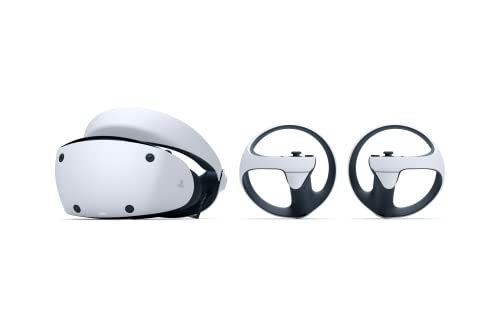
PlayStation VR2 — Best display, console required
Put on the PlayStation VR2 in a dark game — a cave, a night road, a horror corridor — and the argument for it makes itself. Its OLED panels turn pixels fully off, so black is black rather than the charcoal glow LCD headsets produce, and in 360 scenes that contrast does more for presence than raw resolution ever has. Add high dynamic range, a 120Hz ceiling and foveated rendering driven by genuine eye tracking, and the PS5’s power lands exactly where your gaze lands. The headset even answers big moments physically: a small motor in the visor buzzes against your forehead during explosions and near misses, a gimmick on paper that in the event adds a channel of information no other pick here offers.
The trade is written into the name. This is a PlayStation accessory, full stop: no PS5, no picture. The library is excellent but curated and smaller than the Quest store, leaning on console-scale productions — racing, horror and adventure titles that look like television games because they are. Media and 360-video support is thinner than on standalone headsets, and there is no passthrough entertainment mode beyond a functional see-through view for finding your bearings. A single cable runs to the console; it is light and well managed by the halo design, but it is a cable, and in room-scale 360 play you will step over it, turn against it and remember it exists at exactly the wrong moments.
Ergonomics split opinion. The halo band, inherited from the original PSVR, keeps pressure off the face and suits glasses wearers well, and the visor slides forward for a quick word with the room. But the light seal around the nose varies by face shape, the rubber accordion interface traps warmth, and the whole unit feels more like precision equipment to be stored carefully than a grab-and-play appliance. The Sense controllers are comfortable, with the DualSense’s adaptive triggers and fine haptics, though their battery life trails the Meta controllers and their tracking rings occasionally collide in two-handed grips held close together.
Judge this pick as console owners should: if a PS5 already sits under the television and the goal is the most cinematic VR available without building a gaming PC, the VR2 is not merely an option but the option, and its best games justify the hardware outright. If no console is present, the true price of entry roughly doubles, and the calculus flips to the standalone picks above it.
- Panels: OLED with HDR — the contrast leader in this guide
- Eye tracking: yes, driving foveated rendering and menu selection in supported titles
- Connection: one cable to a PlayStation 5; no standalone mode
- Controllers: Sense controllers with adaptive triggers and haptic feedback
- Headset feedback: a forehead motor adds impact cues in supported games
Strengths
- True blacks and HDR make night scenes, space and horror look categorically better than on LCD rivals.
- Eye-tracked foveated rendering spends the console’s power where your eyes actually are.
- Halo fit welcomes glasses and keeps the optics off your cheeks during long races.
Trade-offs
- Useless without a PS5, which makes it the most expensive route for anyone starting from zero.
- The cable fights against the freedom that 360 movement wants.
- A smaller, games-first library with weaker 360-video and mixed-reality offerings.
Best for: PS5 owners who prize image quality and want console-scale VR productions. Not suited for: anyone without the console, or buyers whose main interest is 360 film and casual mixed reality.
Pico 4 — Lightweight alternative
The Pico 4 approaches the same problem as the Quest line from the direction of physical design, and for some heads it wins on that ground alone. Its battery sits at the back of the strap, counterbalancing the front visor so the whole unit feels closer to a pair of ski goggles than a helmet; the front itself is slim, the weight modest, and the result is a headset that smaller-faced users and glasses wearers often find they can wear for a full film without the cheek ache that ends sessions early. Pancake lenses and a per-eye resolution in the same class as the Quest 3 keep the image respectable, with a wide field that serves 360 content well.
We cover the Pico 4 in prose because our verified pool holds no listing for it that we can stand behind, and its retail story has always been regional: availability outside its home markets runs through importers and shifting storefronts, which is exactly the situation where a buyer should slow down, confirm the region and return terms in writing, and check which storefront account the unit expects. The platform itself is capable — a growing games library, competent 360 video playback, color passthrough on the updated variant — but the ecosystem is thinner than Meta’s, some headline titles arrive late or never, and social features depend on a smaller crowd of fellow owners.
Where the Pico earns its place in this guide is the combination of balance, price in its home markets and honest optics. Fitness users in particular praise the counterbalanced fit, since rapid head movement in a workout exposes every gram of front-heavy design. If you live where it is officially sold and supported, it is a legitimate alternative rather than a curiosity; if buying one means an import with uncertain warranty, the value argument collapses and the Quest 3S is the safer spend.
- Layout: rear battery counterbalances the slim front visor
- Optics: pancake lenses with a wide, comfortable field
- Platform: standalone with its own store; smaller catalog than Meta’s
- Passthrough: monochrome on the base model, color on the Ultra variant
- Purchase route: official sales are region-dependent — verify before ordering anywhere
Strengths
- The best-balanced fit in this guide; long sessions fatigue the neck least.
- Sharp, wide image that flatters 360 video and bright games alike.
- Motorized lens-spacing adjustment on some variants takes the guesswork out of fit.
Trade-offs
- Regional availability and importer markups undermine its value in many countries.
- A thinner store, with some major releases skipping the platform.
- Fewer friends and fewer social spaces than the Meta ecosystem offers.
Best for: comfort-first buyers in regions where Pico sells and supports it officially. Not suited for: anyone who would be importing it without a clear warranty path.
Valve Index — Best tracking, PC required
Years after launch, the Index remains the answer to a narrow question: what does VR feel like when tracking precision is treated as sacred? Its base stations sweep the room with lasers and locate the headset and controllers with a steadiness that inside-out cameras still chase — hands behind your back, controllers crossed at the waist, a rifle stock held to the cheek, all tracked without the flicker or drift that camera systems show at their volume’s edge. For simulation cockpits, competitive shooters and social VR performers who act with their whole bodies, that reliability is not a luxury feature; it is the product.
The Knuckles controllers deepen the same philosophy. Strapped to your hands rather than gripped, they sense individual finger curls, so you point, wave, count on your fingers and let go of objects by actually opening your hand. Games built for them use that vocabulary beautifully; games that ignore it still benefit from the tracking. The headset itself offers a high refresh ceiling, excellent off-ear speakers that float sound beside your ears without touching them, and a comfortable, adjustable fit — at the cost of a tether, a DisplayPort-and-USB connection ritual, and base stations that want permanent mounting in the room’s corners.
Why prose-only here? Valve sells the Index through its own storefront, and our pool carries no listing we can attach; buy it from Valve directly rather than through resellers whose bundles and pricing drift. The calculus in 2026 is honest but narrow: the display resolution has been overtaken, the setup is the most involved in this guide, and the full kit costs flagship money. What has not been overtaken is the tracking and the controllers. A PC sim racer or a VRChat regular will still call that a bargain; a casual buyer will call it homework. Both are right.
- Tracking: external laser base stations — the widest, steadiest volume here
- Controllers: finger-sensing Knuckles that strap on and stay on
- Refresh: high ceiling with experimental faster modes for smooth motion
- Audio: off-ear speakers with a spacious, natural soundstage
- Requirements: a gaming PC, wall or tripod mounts, and a tethered play space
Strengths
- Tracking that simply does not lose your hands, anywhere in the room.
- Finger input opens expressive gestures no standard controller can match.
- Superb audio and a mature, comfortable fit for long PC sessions.
Trade-offs
- The most expensive and involved setup in this guide, tether included.
- Resolution and screen-door characteristics now trail newer panels.
- Base stations claim permanent territory in your room’s corners.
Best for: PC enthusiasts, sim players and full-body social VR users who value precision above convenience. Not suited for: anyone who wants to play in different rooms, travel with the headset, or skip the PC entirely.
HTC Vive XR Elite — Most convertible design
The XR Elite is the odd one in this guide in a way we mean as praise: it is two products sharing one visor. Clip on the battery cradle and it is a full standalone headset with inside-out tracking and mixed-reality passthrough. Detach the cradle, fit the temple arms, and it becomes a glasses-style viewer that slips into a jacket pocket for films on a train — a transformation no other pick attempts. The visor itself is light, the pancake optics are competent, and a built-in diopter dial lets many glasses wearers dial in focus and leave their frames in the case, a small mercy anyone who has juggled spectacles inside a headset will appreciate.
We list it without a link because our checked pool holds no listing for it, and HTC’s own store is the sensible route. The honest limitations are ecosystem and value: its standalone store is the smallest in this guide, its processor is a generation behind the Meta pair, and its launch pricing aimed at prosumers rather than the gaming crowd. Controllers are conventional and capable, hand tracking works for menus and media, and PC streaming over Wi-Fi or cable extends it into a respectable PC VR display for owners who already live in that world.
So who is it for? The traveler who watches films in hotel rooms and on flights, the professional who demos mixed-reality concepts in client offices, the glasses wearer tired of inserts and spacers. Judged as a pure games machine against the Quest 3 it loses on library and price; judged as the one headset that is also a portable cinema, it has no rival in this list at all.
- Form: detachable battery converts headset to glasses-style viewer
- Focus: built-in diopter adjustment for many glasses wearers
- Modes: standalone, mixed reality, and PC streaming wired or wireless
- Store: HTC’s Viveport — the smallest catalog in this guide
- Weight story: among the lightest full headsets when worn as a headset
Strengths
- The convertible design genuinely travels; nothing else here fits a coat pocket.
- Diopter dials free a large share of glasses wearers from frames and inserts.
- Light visor and decent balance suit media viewing better than gaming-first rivals.
Trade-offs
- The smallest game library and an older processor limit its gaming ceiling.
- Premium pricing for a feature set aimed at a niche.
- Battery cradle comfort trails a proper rigid strap for active games.
Best for: frequent travelers and media-first viewers who value the glasses mode. Not suited for: library-driven gamers, who will exhaust its store and feel the price.
How Do the Six Stack Up When the Sphere Is the Point?
| Headset | Needs a host? | Optical character | Tracking style | Signature strength |
|---|---|---|---|---|
| Meta Quest 3 512GB | No — standalone, PC optional | Pancake lenses, clear to the edges | Inside-out cameras, hands and controllers | Deepest library plus useful color passthrough |
| Meta Quest 3S 128GB | No — standalone, PC optional | Fresnel lenses, bright center, softer rim | Inside-out cameras, hands and controllers | Flagship speed at an entry price |
| PlayStation VR2 | Yes — PlayStation 5 | OLED panels, true black, HDR | Inside-out cameras plus eye tracking | Cinematic contrast and headset haptics |
| Pico 4 | No — standalone | Pancake lenses, wide gentle field | Inside-out cameras | Rear-battery balance for long wear |
| Valve Index | Yes — gaming PC | Dual-element lenses, high refresh | External laser base stations | Tracking precision and finger input |
| HTC Vive XR Elite | No — standalone, PC optional | Pancake lenses with diopter dial | Inside-out cameras | Converts to glasses-style viewer |
Reading across the rows, the pattern is that no column crowns a single winner — the headset with the finest display demands a console, the one with the finest tracking demands a PC and wall mounts, and the two that demand nothing at all split their difference on optics and storage. That is why the ordering in this guide follows the most common buyer’s situation — no host machine, mixed content, shared living room — while the prose under each pick argues for the situations where a different row should win.
What Actually Makes a Headset Feel Like It Surrounds You?
Presence — the felt sense of standing inside the scene — is a product of small agreements between your senses, and 360 headsets break it by violating any one of them. The visual agreement is the obvious one: the image must move with your head with almost no delay, because even a few extra milliseconds of lag read to your inner ear as the world swimming, and your stomach files the complaint. Modern headsets all clear the basic latency bar; where they differ is consistency. A frame rate that holds steady at ninety frames per second feels more real than a higher rate that stutters under load, which is why a modest standalone chip with well-optimized games can feel better than a powerful system pushed past its comfort zone.
The second agreement is optical. Your eyes do not stare at the center of the lens; they flick to doorways, instruments and movement at the edges. Lenses that stay sharp only in a small central island force you to steer your whole head like a camera tripod, and the constant reminder that you are operating equipment dissolves the place illusion. This is why the lens discussion runs through every pick above: in 360 content, edge clarity is not about reading fine text in your peripheral vision, it is about letting your eyes behave the way they do in a real room.
The third agreement is spatial sound. A 360 scene where a voice behind you actually sounds behind you — with distance, height and room character — convinces your brain faster than any texture. Every headset here supports spatial audio; the differences are in delivery. Open speakers keep you connected to your household and sound surprisingly spacious, sealed earbuds isolate and intensify, and off-ear designs like the Index split the difference with the most natural staging. Match the delivery to your room: shared spaces favor speakers at modest volume, late-night horror favors isolation.
Finally, the body keeps score. A headset that presses on your cheekbones, traps heat against your forehead or slides when you look down is narrating its own presence over the scene’s. Fit is therefore not a comfort footnote but a presence feature, and it is personal: head shapes differ enough that the model your friend calls weightless may dig into your brow. Buy from sellers with sane return terms, and treat the first week as a fitting period, not a verdict delivered in the first ten minutes.
How Much Field of View Do You Really Need?
Manufacturers quote field of view the way restaurants quote spice levels — enthusiastically and without a shared scale. Diagonal, horizontal and vertical figures get interchanged, and the number measured through the lens at one eye relief changes the moment a different face pushes the optics closer or further away. Treat published figures as rough class indicators rather than precise comparisons. What your eyes actually register is a combination of the visible field and how much of it is sharp, and a slightly narrower field with clean edges often feels wider than a broad field that dissolves into blur and color fringing at the margins.
For 360 video and exploration content, horizontal field matters most, because scenes are staged around you at eye level. For cockpit and flight simulation, vertical field earns its keep — instruments below and canopy above. For fast games, the practical need is early warning: spotting movement at the edge of vision a fraction sooner. None of the six picks is narrow enough to feel like looking through a letterbox; the differences among them are refinements, and buyers agonizing between two models will get more from the lens and fit differences than from chasing two extra degrees on a spec sheet.
There is also a fitting trick worth knowing: field of view grows as the lenses sit closer to your eyes, and most headsets let you trade a little comfort for a little closeness by thinning the facial interface or adjusting eye relief. Players who wear the headset slightly higher on the brow often find the vertical field opens up as well. Experiment during the fitting week — a few millimeters of position can deliver the extra degrees people shop for, free of charge, and the same adjustment frequently sharpens the edges because your pupils land nearer the optical center the designers intended.
How Do You Set Up a Safe and Convincing 360 Play Space?
Start by choosing the room for its floor, not its furniture. You want a rectangle of clear ground roughly two meters on a side, with nothing at shin height inside it and nothing breakable at arm’s reach outside it. Rugs are useful: a textured mat underfoot tells your feet where the safe zone ends without your eyes leaving the scene, and many long-term owners mark their play space exactly that way. Move coffee tables rather than trusting yourself to remember them; memory is the first casualty of a good boss fight.
Lighting shapes tracking quality for every camera-based headset here. Bright, even, indirect light is ideal; a single harsh window behind you can wash out a camera’s view of your controllers, and near-darkness defeats inside-out tracking entirely. If your sessions happen at night, a couple of warm lamps beat one ceiling spotlight. Keep mirrors and large glossy screens in mind too — reflections occasionally confuse boundary scanning, and a quick test session in your actual lighting is worth more than any setup guide, including this one.
Then set the boundary honestly. Draw it at the true edge of your clear space, not at the wall you hope you will stop before. Use the stationary mode for seated and standing-in-place content rather than shrinking a room-scale boundary into a phone booth. Finally, brief the household: a person who knows you cannot see them will call out before crossing the room, and a pet door or a closed door solves the rest. Most VR injuries are furniture injuries, and nearly all of them were preventable in the five minutes of setup people skipped.
How Should You Care for Lenses, Straps and Batteries?
Lenses are the one component that cannot forgive carelessness. Clean them only with a dry microfiber cloth, in circles from the center outward, and never with household sprays, alcohol wipes or the hem of a shirt — coatings scratch, and a scratched lens taxes every minute you ever spend in the headset afterward. Store the unit with the lenses away from windows: direct sunlight focused through VR optics can burn a display in minutes, the one form of damage no warranty conversation will rescue. A simple cover or a drawer is enough.
Fabric interfaces collect sweat, and sweat collects consequences. Wipe the facial interface after active sessions, let it dry fully before the next use, and consider a wipeable silicone cover if the headset serves fitness duty or multiple family members. Straps and adjustment dials prefer patience: make small changes, test, and resist forcing a ratchet that resists you. Batteries follow the usual lithium etiquette — avoid storing the headset empty or baking it in a hot car, and expect capacity to fade gently over years rather than fail overnight. None of this is burdensome; it is five habits that keep a headset feeling new through the period when its library is at its best.
Which Headset Fits Which Kind of Player?
The simplest sorting question is what else you own. A PlayStation 5 under the television makes the VR2 a display upgrade for an existing hobby. A gaming PC with headroom opens the Index’s precision and the Quest 3’s streaming mode. Nothing at all points to standalone, where the Quest pair split on how much optical finesse you will pay for. The second question is what you will open on an ordinary Tuesday: if the honest answer is fitness apps and a film, fit and convenience outrank every benchmark, and the Pico’s balance or the XR Elite’s travel form can beat a technically stronger rival that stays in its box.
Household shape matters as well. Shared headsets want adjustable fit, wipeable interfaces and enough storage for two libraries — the Quest 3’s 512GB tier is quietly the family pick. Solo players can optimize ruthlessly for their own head and habits. And anyone prone to motion sickness should start with the highest, steadiest frame rates and seated, low-movement content regardless of model; sensitivity is about the vestibular system, not the brand, and it usually eases with short, regular sessions that end before discomfort rather than after it.
What Are the Most Common Mistakes When Buying a 360 Headset?
The first is buying a specification instead of a library: the finest display in this guide is a poor purchase if its store lacks the games and films you actually want, and no firmware update will fix a catalog. The second is ignoring total cost — the console, the PC, the storage tier, the strap you will inevitably buy, the prescription inserts if you wear glasses. Add the whole basket before comparing prices, because headsets are ecosystems wearing hardware as a hat.
Third, buyers underestimate their play space and their household. A room-scale headset in a room without scale becomes a stationary headset with extra guilt. Fourth, they skip the fitting period: lenses one notch too close, a strap cranked rather than balanced, a boundary drawn with optimism. Spend the first sessions adjusting rather than judging. Fifth, they chase resolution while tolerating a loose, front-heavy fit that ends every session at thirty minutes — the session you actually finish beats the sharper one you abandon. And sixth, they buy through listings they have not read, ending with the wrong storage tier, the wrong region or a box missing controllers. Every one of those errors is avoidable in the five minutes before checkout.
Should You Wait for the Next Generation or Buy Now?
VR hardware improves in steps rather than slopes: a new lens process, a new chip or a new display technology arrives, matters enormously, and then holds for several years. The uncomfortable truth for perpetual waiters is that the current generation’s steps have already landed — pancake optics, capable standalone chips and color passthrough are the step, and they are all on sale in the picks above. The next step is genuinely uncertain in timing, and when it lands it will arrive at early-adopter prices with a thin launch library, while the headsets here carry years of accumulated games, updates and accessories.
The practical rule is to buy for a library that exists. If three or more titles you want are available today on a platform, that platform has already kept its promise; a headset is a library with a screen attached, not a screen awaiting a library. The exception is the buyer whose one must-play title has a confirmed release on upcoming hardware — and even then, confirmed is the operative word. Everyone else should also weigh the software tail: platforms here update their existing headsets for years, so a purchase today keeps receiving features rather than freezing at its launch state. Waiting is a strategy for a season, not a lifestyle, and in a medium whose entire value is time spent inside it, a year of waiting costs more experiences than a modest generational gap will ever repay.
Final Recommendation
For most buyers the Meta Quest 3 is the answer, and not by default: it combines the clearest affordable optics, a library with genuine depth in every direction, passthrough that earns its keep daily, and the freedom to grow into PC VR later. The Quest 3S is the same argument at a friendlier price, best for newcomers and shared households testing the water. The PlayStation VR2 is the connoisseur’s console pick — if you own the console and love dark, cinematic games, its displays justify it completely. The Pico 4 rewards comfort-first buyers in its supported regions, the Index remains the precision instrument for committed PC players, and the XR Elite serves the traveler like nothing else here.
If the budget stretches to exactly one accessory on day one, make it a better strap for whichever Quest you choose; it improves every session rather than a few. And whatever you pick, give it the fitting week — adjust, experiment, try the content you bought it for and the content you did not. The headsets in this guide all deliver a surrounding world. The right one is the one whose world you keep stepping back into.
Choose the Quest 3 if you want one headset that does everything well, and let your second session — not the spec sheet — confirm you chose right.
How Do 360 Films and Games Ask Different Things of a Headset?
A 360 film is a test of optics and endurance. The camera sits where it sits, the scene lasts as long as it lasts, and your attention roams a sphere the director cannot fully control — so soft edges, glare around bright windows and a strap that tightens its grip over forty minutes all get noticed. Films also expose compression: streamed 360 video arrives at resolutions that sound huge and still divide those pixels across an entire sphere, which is why downloaded files and the cleanest lenses reward the viewer so noticeably. For film-first buyers, the ranking criteria reorder themselves — panel contrast and lens clarity first, comfort a close second, library of games a distant concern.
A 360 game is a test of tracking and consistency instead. Your hands enter the sphere carrying tools, weapons and instruments, and the system must keep them located while you turn, duck and reach — a camera-based headset at the edge of its tracking volume betrays you mid-gesture, where a film never asks the question at all. Frame-rate stability matters more than peak sharpness because the world responds to you, and any hitch in that response is felt in the body. The headsets above were ranked for the blended household that does both, but a buyer who knows their sphere is mostly cinema or mostly play should feel free to promote the pick whose strengths match — the VR2’s contrast for the cinephile, the Index’s tracking for the player — over the general order.
Frequently Asked Questions
Do these headsets work without a PC or console?
Three of the six do. The Quest 3, Quest 3S and Pico 4 are fully standalone, and the XR Elite also runs on its own. The PlayStation VR2 needs a PS5, and the Index needs a gaming PC. Standalone headsets can usually also connect to a PC for the larger PC VR library, so they are the flexible route for buyers unsure where their library will grow.
What does 360 actually mean in a headset?
It means the rendered world wraps the full sphere around you — look behind, above or below and the scene continues, with your position tracked as you lean and move. It differs from 360 video, which surrounds you visually but keeps you at a fixed viewpoint, and from basic 3DOF viewers, which follow rotation only. All six picks track full position; the quality of the wrap then depends on optics and field of view.
Will VR make me motion sick?
Some people, at first, sometimes. Discomfort usually comes from artificial movement — smooth joystick turning and acceleration — rather than from looking around naturally. Start with teleport movement and stationary or seated experiences, keep sessions short, stop at the first hint of unease rather than pushing through, and most people find their tolerance builds within a couple of weeks. A fan blowing on your face and a mat under your feet both help more than they sound like they should.
Can I wear glasses inside these headsets?
Generally yes, with caveats. The PSVR2’s halo and the Quest models accommodate most frames, though wide frames can press at the temples. Prescription lens inserts are the cleaner long-term answer for regular players, and the XR Elite’s diopter dial removes the problem entirely for many prescriptions. If your frames are unusually large, favor the halo designs and sellers with easy returns.
How much storage should I buy?
More than feels necessary. Games have grown, updates accumulate, and 360 films are enormous files. A solo player with a handful of favorites can live at the smaller tiers by rotating downloads; shared headsets and film collectors should buy the largest tier offered, because storage is the one specification fixed forever at purchase.
Is mixed reality worth caring about yet?
For many owners it has become the daily feature: fitness apps that keep your room visible, tabletop games on your actual table, a virtual screen pinned above your desk while you see your keyboard. The Quest pair and the XR Elite serve it in color; the PSVR2 treats passthrough as a utility view only. If your interest is purely immersive games, it matters less; if the headset will share your living space, it matters a great deal.
Can children use these headsets safely?
Manufacturers set age guidance — typically early teens for the platforms here — based on vision development, fit and content rather than a single hard rule, and parents should treat those minimums seriously. For younger users within the guidance, the practical safeguards are short sessions, a properly fitted headset with correct lens spacing, supervised play in a cleared space and regular breaks in ordinary light. Several platforms include family accounts and casting, so an adult can watch on a phone or television exactly what the wearer sees and step in early if a session runs long.
Related Guides
Surround sound and headsets are cousins of the same immersion question, so our guide to 7.1 audio headsets and how virtual surround really works is a natural next read, followed by the wireless 7.1 headset roundup for cable-free surround if you prefer your immersion untethered. For a very different kind of headset discipline, the dispatch headsets built for long emergency-service shifts show what comfort engineering looks like when a headset is worn all day rather than all evening.
Related guide: Best Sennheiser Headsets
Related guide: Best Redragon Headsets


