What's inside
- Key Takeaways
- Quick Picks
- How We Chose These Picks
- Which of These Six Fits a Kitchen-Table Desk, a Spare Room, and a Shared Lounge?
- What Should You Check Before Spending Anything on a Home-Work Headset?
- How Do You Set Up a Headset So Calls Sound Professional From a House?
- Which Buying Mistakes Do Home Workers Keep Making?
- What Changes After Three Months of Daily Home Use?
- Which Platform Do You Live In — and Does the Headset Care?
- How Does Each Pick Handle the Five Calls Every Home Worker Dreads?
- What Should a Sensible Home-Work Audio Budget Actually Cover?
- Why Do Some Colleagues Sound Broadcast-Clear From the Same Kind of House?
- Final Recommendation
- Frequently Asked Questions
- Related Guides
As an Amazon Associate I earn from qualifying purchases. This post may contain affiliate links at no extra cost to you.
widgetverdict.com is reader-supported. When you buy through links on our site, we may earn an affiliate commission.
Finding the best affordable headsets for work at home comes down to a problem nobody mentions in gaming reviews: your voice has to survive a kitchen blender, a doorbell, a dog with opinions, and a laptop fan that spins up the moment a video call starts. A headset that flatters game audio can still make you sound distant and muffled to the people who decide your deadlines, so this guide judges six headsets the way a home worker actually lives with them — call clarity first, all-day comfort second, and everything else after that.
Three of the six carry verified listings you can order directly, and those three open the guide because each one solves a recognisable home-working pattern: the dedicated desk worker, the worker who moves between rooms, and the worker who takes calls while walking the dog. The remaining three are covered in prose because our checked pool holds no listing we can attach to them with confidence; they are still worth knowing, since each fills a gap the linked trio leaves open. Prices in this class move around constantly, so check price on Amazon for the linked models and treat affordability here as a tier — sensible money for gear you will wear for years — rather than a fixed number.
One honest note before the picks. Affordable work headsets split into two families that behave very differently on calls: models built for unified communications platforms, with microphones tuned to reject household noise and buttons that answer calls inside Teams or Zoom, and general headsets borrowed from other jobs. The six below lean heavily toward the first family, because a microphone that keeps a washing machine out of your meeting is worth more at home than almost any other single feature. That leaning is deliberate rather than snobbish: a borrowed gaming headset can absolutely cover a quiet flat and a light meeting schedule, but the moment a household gets busy, the purpose-built microphone earns back every penny of its premium within a single important call.
Key Takeaways
- The Jabra Evolve2 65 is the default desk answer: a proper boom microphone, a busy light colleagues and family members can read at a glance, and battery endurance measured in days rather than hours.
- Portability changes the maths at home — the Evolve2 65 Flex folds flat, so the same headset serves the desk, the sofa, and a bag packed for a co-working day.
- Single-ear designs such as the Poly Voyager 5200 suit workers who must hear the house — children, deliveries, a kettle — while staying on a call.
- Microphone noise handling matters more than speaker size for home work; nobody in your meeting hears your drivers, but everyone hears your microphone.
- A wired USB fallback earns its place in any home office drawer, because Bluetooth problems always choose the morning of an important call.
Quick Picks
| Pick | Badge | Why it earns its place |
|---|---|---|
| Jabra Evolve2 65 | Best all-round desk pick | Three-microphone call quality, a visible busy light, and multi-day battery for a fixed home desk. |
| Jabra Evolve2 65 Flex | Best for movers | Folds flat for bags and drawers, adds hybrid noise cancelling, and keeps the same call-first microphone thinking. |
| Poly Voyager 5200 | Best single-ear option | One ear stays open to the house while four microphones and wind protection keep mobile calls intelligible. |
| Logitech Zone Vibe 100 | Lightest all-day wear | Featherweight build and a flip-up microphone for workers who split time between calls and focused solo work. |
| Poly Voyager Focus 2 | Quietest home office | Strong active cancelling and an acoustic fence around your voice for open-plan homes and shared rooms. |
| Logitech H390 | Drawer-proof backup | Wired USB simplicity with in-line controls; the headset that rescues a meeting when wireless gear misbehaves. |
How We Chose These Picks
Home working imposes a strange mixture of demands. A headset might handle a stand-up call at nine, a two-hour workshop before lunch, music during a spreadsheet afternoon, and a school-run phone call at four — all through the same laptop, the same phone, and the same pair of ears. Our selection started from that day rather than from specification sheets, and every model below had to clear four hurdles before sound quality even entered the discussion.
Microphone behaviour came first. We favoured headsets whose microphones are positioned close to the mouth on a boom, or whose makers publish a serious noise-reduction approach for the single-ear format, because distance between mouth and microphone is the root cause of the thin, roomy sound that makes colleagues ask you to repeat yourself. Models with certified variants for major meeting platforms scored well here, since certification involves microphone testing against platform requirements rather than a logo fee alone.
Comfort over a full working day formed the second hurdle. Weight, clamping pressure, ear cushion material, and whether the headset can be worn with glasses all decide whether a technically excellent headset ends up in a drawer by Wednesday. Several fine-sounding models were cut at this stage because their fit suits shorter gaming sessions rather than six hours of calls.
Connection behaviour mattered third. Home workers juggle a laptop and a phone, often mid-sentence, so multipoint Bluetooth or a supplied USB adapter that keeps the connection stable through walls and floors counted heavily. Headsets that depend on a laptop’s built-in Bluetooth alone tend to suffer dropouts in houses with thick walls, and we weighted the bundled-adapter designs accordingly.
Finally, we applied the affordability test honestly. Affordable in this guide means the sensible end of the business-headset market — gear priced for individuals buying their own equipment, not enterprise fleets — together with one deliberately cheap wired model that exists as insurance. Anything requiring a separate paid subscription, a proprietary charging ecosystem with costly replacements, or a fleet management contract fell outside the brief.
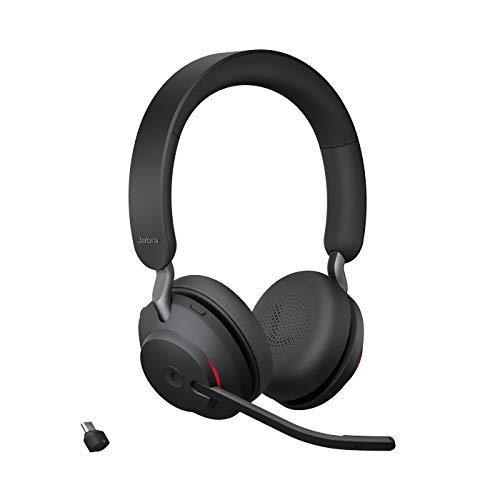
Jabra Evolve2 65 — Best all-round desk pick
Spend a week of back-to-back calls on the Evolve2 65 and its design priorities become obvious: everything about it serves the person speaking. The boom arm carries three microphones working together to separate your voice from the room, and the difference shows up in the situations home workers actually face — a call taken beside an open window, a dishwasher running through its loud cycle, a partner on their own call two metres away. Your voice stays forward and dry while the household drops into the background, which is precisely the trade a work headset should make.
Comfort engineering is equally deliberate. The headband distributes pressure across a wide padded contact area, the ear cushions use memory foam under a leatherette skin, and the whole headset stays light enough that the end of a long call block does not come with the familiar urge to tear it off. Glasses wearers fare well here; the cushions seal without clamping the arms of spectacles into the side of the head. A red busy light on the ear cup, switched on automatically during calls or manually when you need to concentrate, communicates with the rest of the household more effectively than any closed door that does not exist in an open-plan home.
Connection arrives through a pre-paired USB adapter in the box, and that detail quietly solves most home Bluetooth misery. The adapter presents the headset to your computer as a dedicated audio device, holds the link through floors and walls far better than a laptop’s internal radio usually manages, and keeps call controls — answer, end, mute — working inside the major meeting platforms. Bluetooth pairing to a phone runs alongside it, so a mobile call can interrupt your laptop audio and hand you back afterwards without a settings expedition.
Battery endurance stretches across several working days of mixed calls and music, and a short top-up buys hours of talk time, which changes behaviour: you stop rationing the headset and simply wear it. Music replay is respectable rather than thrilling, with a warm, voice-forward tuning that flatters podcasts and acoustic playlists more than electronic bass. For a desk-bound home worker buying one headset to live in, this is the shape of the correct answer.
- Form: on-ear stereo headset, fold-flat ear cups
- Microphone: boom arm with a three-microphone array
- Connection: Bluetooth plus supplied USB adapter, multipoint pairing
- Battery: up to roughly 37 hours between charges
- Extras: integrated busy light, call controls on the ear cup
Strengths
- Callers hear you clearly even with household noise running behind you.
- Supplied USB adapter removes most laptop Bluetooth flakiness in one move.
- Busy light genuinely reduces interruptions in shared living spaces.
Trade-offs
- On-ear cushions warm up during summer afternoons of continuous wear.
- No active noise cancelling; a loud household still reaches your own ears.
- Music tuning prioritises voices, so bass-heavy playlists sound restrained.
Best for: desk-based home workers whose day is mostly scheduled calls on one computer. Not suited for: anyone needing silence from the headset itself in a noisy shared house.

Jabra Evolve2 65 Flex — Best for movers
Plenty of home workers no longer have a desk so much as a rotation — kitchen table in the morning, sofa after lunch, a co-working space on Thursdays. The Evolve2 65 Flex is built for that rotation. Its ear cups fold completely flat and the headband collapses, so the headset slips into a laptop sleeve or a shallow drawer instead of demanding its own shelf, and a soft travel pouch in the box acknowledges that this headset will genuinely travel.
Folding is not its only trick. The Flex adds hybrid active noise cancelling, which the standard Evolve2 65 lacks, and in a home setting that cancelling earns its keep against low, constant sounds: the hum of a refrigerator, traffic wash from a street-facing room, the drone of an extractor fan. Voices and doorbells still get through — cancelling of this class does not erase them — but the background floor of the house drops away, and concentration gets noticeably cheaper during writing work between calls.
The microphone system takes a different approach from its desk-bound sibling. A shorter, more discreet boom carries Jabra’s ClearVoice processing, tuned to present your voice cleanly while pushing room noise down, and in practice it handles the echo-prone acoustics of sparsely furnished rooms well. The boom also hides away more gracefully than most, which matters when your working day includes video calls where a giant microphone reads as call-centre costume.
Wireless charging is the indulgence here: set the Flex down on a charging pad between calls and the battery anxiety that haunts heavy call days simply evaporates. Wired charging still works when you travel. Platform-certified variants exist for the major meeting services, and the on-ear controls mirror the desk model closely enough that moving between the two Jabra headsets costs no relearning. Choose the Flex when your home office has wheels, or when your ears run hot and you want the lighter, airier fit of the two.
- Design: stereo on-ear, folds fully flat for storage and travel
- Cancelling: hybrid active noise cancelling for household hum
- Voice pickup: short boom with ClearVoice noise reduction
- Charging: wireless pad charging plus USB cable option
- Fit: lighter clamp than the standard 65, kind to glasses
Strengths
- Folds into bags and drawers that defeat bulkier headsets.
- Hybrid cancelling takes the edge off constant household noise.
- Wireless charging suits a tidiness-minded desk routine.
Trade-offs
- Shorter boom places the microphone further from your mouth than the 65.
- Cancelling drains the battery faster on heavy call days.
- Premium positioning stretches the affordable brief further than its sibling.
Best for: hybrid workers splitting the week between home, office days, and cafés. Not suited for: a fixed desk where folding earns nothing and the longer boom serves better.

Poly Voyager 5200 — Best single-ear option
A single-ear headset looks like a compromise until you spend a day working at home with children, deliveries, and a washing machine all requiring intermittent attention. The Voyager 5200 leaves one ear completely open to the house while its four-microphone array and wind-reduction design keep your outgoing voice intelligible — including outdoors, where this design has been the default choice of mobile professionals for years. Walking the dog during a call stops being an apology and becomes a scheduling strategy.
The earpiece itself is small, light, and shaped to sit behind the ear with the speaker resting at the ear canal rather than plugging it. Hours pass without the pressure build-up that over-ear designs can cause, and because one ear stays open, your own voice sounds natural to you — no occlusion effect, no tendency to shout. Voice prompts announce callers and battery status, and a spoken command can answer or ignore a call when your hands are full of shopping or toddler.
Noise handling deserves its reputation. Wind is the classic killer of outdoor calls, and the 5200’s layered approach — microphone placement, windscreens in the design, and processing that recognises wind patterns — keeps a breezy street conversation usable where phone handsets dissolve into buffeting. Indoors, the same processing trims keyboard clatter and television bleed from the next room. It will not match a boom headset in a genuinely loud kitchen, but it operates in places boom headsets never go: the school run, the garden, the supermarket aisle.
Battery life covers a working day of calls rather than a week, so the charging case sold alongside it — or disciplined nightly charging — becomes part of the routine. The connection is phone-first Bluetooth; pairing to a computer works, though workers who live inside desktop meeting apps all day will feel the absence of a bundled USB adapter. Treat the 5200 as the mobile half of a home-working setup, or as the whole setup for anyone whose calls happen away from a desk more often than at one.
- Style: single-ear earpiece worn over either ear
- Microphones: four-mic array with dedicated wind protection
- Controls: voice commands plus physical answer and mute buttons
- Endurance: a full day of talk time, case extends it further
- Companion app: firmware updates and find-my-headset support
Strengths
- Keeps one ear open to children, doorbells, and the real world.
- Outdoor call quality in wind beats any headset in this guide.
- Light enough to forget during long, mobile working days.
Trade-offs
- Music in one ear satisfies nobody; this is a voice tool first.
- Small size makes it the easiest headset here to misplace.
- Desk-bound meeting-platform integration is thinner than the Jabra pair.
Best for: parents and mobile workers whose calls follow them around the house and street. Not suited for: music lovers or anyone wanting stereo immersion between calls.
Logitech Zone Vibe 100 — Lightest all-day wear
Some home workers barely notice a headset until hour three, when weight announces itself as a dull ache across the crown of the head. The Zone Vibe 100 attacks that problem directly: it is among the lightest full stereo headsets in its class, built with a fabric headband and knitted ear cushions that breathe far better than leatherette during warm afternoons. Workers who run hot, wear headsets over caps, or simply dislike the clamped feeling of business headsets tend to settle here quickly.
The microphone flips up into the headband when not needed, and flipping it up mutes it — a physical gesture colleagues on video can actually see, which builds a small but real trust in meetings. Voice quality from the noise-cancelling microphone is clean for platform calls, a step behind the Jabra boom systems in ugly noise but entirely respectable in a normal home. We cover the Zone Vibe 100 in prose because our verified pool holds no listing for it; buy it by exact model name from established retailers if it suits you.
Sound tuning leans pleasant: a gentle bass lift for music between calls, clear midrange for voices, nothing analytical or fatiguing. Bluetooth multipoint connects a laptop and phone together, and the controls are big, simple buttons that can be found by touch. Battery claims stretch across a heavy working week of mixed use. What you give up versus the linked Jabras is the bundled USB adapter’s bulletproof connection and the deeper platform certification story; what you gain is a headset that disappears on your head, which for many home workers is the feature that decides everything.
- Build: very light stereo frame with fabric and knit materials
- Microphone: flip-up boom, flip gesture mutes the call
- Pairing: Bluetooth multipoint for laptop and phone together
- Character: breathable cushions suited to warm rooms
- Controls: large tactile buttons, easy to find blind
Strengths
- Weight low enough for genuinely forgettable all-day wear.
- Breathable materials beat leatherette in un-airconditioned homes.
- Flip-to-mute boom reads clearly on video calls.
Trade-offs
- No bundled USB adapter, so laptop Bluetooth quality varies.
- Microphone noise rejection trails the boom specialists above.
- Plastic build feels less premium than its price peers suggest.
Best for: comfort-first workers in warm homes who take moderate call loads. Not suited for: very noisy households where microphone armour matters most.
Poly Voyager Focus 2 — Quietest home office
Open-plan living turns home working into an exercise in shared noise: your call competes with a partner’s call, a television, and the acoustics of a room designed for sofas rather than speech. The Voyager Focus 2 is the heavy artillery for that situation. Its active cancelling is a class above the Flex’s, and Poly’s acoustic fence technology draws a boundary around your voice — sounds beyond a short distance from the microphone are treated as intruders and pushed down hard, so your colleagues hear your sentence rather than your household’s argument about dinner.
The fence concept suits shared rooms better than raw microphone sensitivity figures suggest. A partner working two metres away remains audible to you, yet your meeting hears them as distant murmur. The boom carries a clear mute alert system that warns you if you start talking while muted — a small feature that saves real embarrassment roughly once a week. The Focus 2 is written up without a link, since the pool we checked for this batch carries no entry for it; it is a widely stocked business model, so sourcing by exact name is straightforward.
On the wearing side, the Focus 2 is a substantial over-ear design with plush cushions and a suspension-style headband that spreads its weight kindly. A desk stand with charging exists in its ecosystem, and the headset supports the softphone integrations larger employers expect. Stereo sound for music is full and relaxed. The honest cost is bulk and price positioning: this is the top of the affordable tier, bought by people whose home is loud enough to justify it, and it will feel like overkill in a quiet spare-room office.
- Format: over-ear stereo with advanced active cancelling
- Voice tech: acoustic fence limits pickup to a zone near the boom
- Alerts: spoken warning when you talk while muted
- Fit: suspension headband, deep plush ear cushions
- Extras: desk charging stand available in its accessory range
Strengths
- Best defence here against a loud, shared living space.
- Acoustic fence keeps a partner’s nearby call out of yours.
- Talking-while-muted alert prevents a classic meeting mishap.
Trade-offs
- Heaviest and bulkiest headset in this guide by a margin.
- Sits at the ceiling of what affordable can honestly mean.
- Over-ear seal gets warm during summer call marathons.
Best for: workers sharing one room with another caller, or living beside a busy road. Not suited for: quiet solo offices where its armour goes unused.
Logitech H390 — Drawer-proof backup
Every home office needs one piece of technology with no battery, no pairing menu, and no firmware: the H390 is that piece. It plugs into a USB port, appears as an audio device, and works — on the morning your wireless headset is dead, on the laptop you borrowed, in the meeting that started four minutes ago. Keeping one in a drawer has rescued more working days than any premium feature in this guide, and its modest cost is precisely the point.
Judged as a primary headset, expectations must be set honestly. The microphone includes basic noise cancelling and produces clear, intelligible speech for platform calls, though it lacks the multi-microphone polish of the Jabra models and will let a loud kitchen leak through. The speakers handle voices well and music adequately. In-line controls on the cable cover volume and mute with a reassuring physical click, and the microphone boom rotates out of the way when you are listening rather than talking.
Comfort is the real limitation: the on-ear cushions and lightweight plastic frame are fine for an hour, acceptable for two, and increasingly noticeable beyond that. Treat the H390 as insurance and as a perfectly rational primary headset for workers whose call load is genuinely light — a couple of meetings a week rather than a day built from calls. It also serves brilliantly as the household spare, the headset handed to a partner or teenager whose own gear has failed at the worst moment. No listing for it sits in our verified pool, so it appears here in prose; it is sold everywhere office supplies are sold.
- Connection: wired USB-A, plug and play on any computer
- Microphone: rotating boom with basic noise cancelling
- Controls: in-line volume and mute on the cable
- Power: none required — draws nothing, charges never
- Role: backup, spare, and light-duty primary headset
Strengths
- Works instantly on any machine with a USB port.
- No battery means it can never be dead before a call.
- Cheap enough to buy purely as meeting insurance.
Trade-offs
- Cable tethers you to the desk during calls.
- Comfort fades on genuinely long call days.
- Microphone lets busy household noise leak through.
Best for: light call loads, backup duty, and anyone burned by dead batteries before. Not suited for: all-day callers who need real comfort and noise armour.
Which of These Six Fits a Kitchen-Table Desk, a Spare Room, and a Shared Lounge?
| Headset | Style | Connection | Noise defence | Strongest setting |
|---|---|---|---|---|
| Jabra Evolve2 65 | On-ear stereo | Bluetooth + USB adapter | Three-mic voice isolation | Fixed desk, scheduled calls |
| Jabra Evolve2 65 Flex | On-ear stereo, folding | Bluetooth + USB adapter | Hybrid cancelling + ClearVoice | Moving between rooms and sites |
| Poly Voyager 5200 | Single-ear earpiece | Bluetooth, phone-first | Four-mic array, wind protection | Calls on foot, indoors and out |
| Logitech Zone Vibe 100 | Over-ear stereo, very light | Bluetooth multipoint | Noise-cancelling flip mic | Mixed calls and solo focus |
| Poly Voyager Focus 2 | Over-ear stereo | Bluetooth + USB adapter options | Advanced cancelling, acoustic fence | Shared rooms, loud homes |
| Logitech H390 | On-ear stereo | Wired USB | Basic mic noise cancelling | Backup duty, light call loads |
Read the six as answers to three different home layouts. A spare-room office with a door rewards the Evolve2 65: its microphone keeps your voice clean, its adapter keeps the link solid, and nothing about the room fights back hard enough to justify heavier armour. A kitchen-table or lounge setup, where the household flows around you, pushes toward the Focus 2’s fence or the Flex’s cancelling — both spend their technology on separating you from a room that will not be quiet on request.
The Voyager 5200 refuses the desk framing entirely. It wins whenever your working day is measured in steps rather than seated hours, and it pairs happily with any of the stereo models as the second half of a two-headset household system. The Zone Vibe 100 and H390 divide the remainder: the Logitech wireless model for comfort-led mixed days, the wired H390 for insurance and simplicity. Notice that no row wins on speaker size or driver numbers — at home, the microphone column and the noise column decide satisfaction months later, long after unboxing impressions fade.
What Should You Check Before Spending Anything on a Home-Work Headset?
Start with your employer’s meeting platform and ask whether a certified headset variant exists for it. Certification sounds like marketing until your headset’s answer button works inside the app, your mute state stays in sync with the screen, and the platform’s audio processing has been tested against your exact microphone. Workers on Teams or Zoom all day should treat certification as a genuine feature; workers whose calls arrive by phone can safely ignore it.
Next, audit your own noise. Record a voice memo on your phone during a typical call hour, standing where you actually sit, and listen back. If the recording is mostly your voice, a mid-tier microphone such as the Zone Vibe 100’s will serve you well. If the recording carries a washing machine, a partner’s call, or street noise as a second track, spend on microphone armour — the Evolve2 65’s array or the Focus 2’s fence — because no speaker upgrade will fix what your colleagues hear.
Fit deserves a trial, not a guess. Head size, glasses, earrings, and hairstyles all interact with headbands and cushions, and return policies exist precisely because comfort cannot be read off a specification page. Order from a seller with a sane returns window, wear the headset through your two longest call blocks, and judge it at the end of those blocks rather than in the first five minutes.
Finally, plan the failure day before it arrives. A charged headset, a working adapter, and a wired spare in the drawer form a complete system; any single headset alone is a hope. The total cost of the six models here varies widely, but the backup layer — the H390 or anything like it — is the cheapest productivity insurance in the entire home office.
How Do You Set Up a Headset So Calls Sound Professional From a House?
Position the boom correctly before touching any software setting: the microphone tip should sit roughly two finger-widths from the corner of your mouth, not directly in front of your lips, where breath blasts turn into popping sounds. On the Voyager 5200, seat the earpiece firmly and let the stabiliser rest as designed; a loose single-ear fit degrades both what you hear and what the microphones can do.
Inside your meeting app, select the headset — or its USB adapter — explicitly as both microphone and speaker, rather than accepting a default that may route your voice through a laptop’s built-in microphone across the room. Disable automatic gain if your voice level swings wildly, then run the app’s test recording and listen on headphones. That thirty-second check, done once, prevents the most common home-call fault: a premium headset worn while the laptop microphone does the actual work.
Room treatment need not cost anything. A call taken facing a wall of books, curtains, or hanging clothes sounds markedly drier than one taken in a bare room with hard floors, because soft surfaces swallow the reflections that make voices sound distant. If your desk faces a bare wall, a cushion or two behind your monitor still helps. Close the door if you have one; if you do not, the busy light on the Evolve2 65 and a household agreement about its meaning will do similar work.
Keep firmware current through the maker’s app, charge on a rhythm rather than in a panic — Friday afternoon, say, for the desk models — and store the headset on a hook or stand instead of in a tangle of cables. Small disciplines, but they are the difference between gear that supports a working day and gear that becomes one more problem inside it.
Which Buying Mistakes Do Home Workers Keep Making?
Buying a gaming headset for a call-heavy job is the classic error. Gaming models can sound superb, yet their microphones are often tuned as an afterthought, their bulk tires the neck by mid-afternoon, and their styling draws comments in client meetings. The reverse mistake exists too: a featherweight call headset asked to carry music all evening will disappoint. Match the tool to the hours it will actually serve.
Chasing the longest feature list is a quieter trap. A home worker in a silent flat gains nothing from an acoustic fence; a worker who never leaves one desk gains nothing from a folding frame. Several models in this guide are excellent precisely because they omit features their intended user would pay for and never touch. Cross out every feature you cannot attach to a moment in your own week before comparing what remains.
Ignoring the return window completes the trio of common errors. Headsets are worn, not just used, and a model that pinches your glasses or heats your ears will be abandoned regardless of its microphone quality. Buy where returns are painless, test through real call blocks, and send back the wrong fit without guilt — the right headset, worn eight hours a day, is worth the postage.
What Changes After Three Months of Daily Home Use?
Headsets reveal themselves slowly. The first week flatters almost everything; the third month exposes cushion wear, hinge creaks, battery habits, and the small frictions that decide whether a headset stays on the desk or migrates to a cupboard. Each model here ages in a characteristic way, and knowing the pattern helps you choose the ageing curve you can live with.
The Evolve2 65 settles into routine the fastest. Its cushions soften slightly and conform to your glasses, the headband keeps its shape, and the adapter-based connection becomes invisible infrastructure — you stop thinking about audio entirely, which is the highest praise a work tool can earn. The busy light’s social effect also compounds over time: households learn it, children learn it, and interruptions during calls decline in a way no software setting ever achieved. Battery discipline becomes a weekly rhythm rather than a daily concern, and the headset’s one persistent quirk — warm ears in high summer — is solved by most owners with short breaks between call blocks rather than a replacement purchase.
Owners of the Evolve2 65 Flex report a different long-term story, centred on movement. The folding joints stay tight when the headset is folded nightly, and the habit of dropping it onto a charging pad removes charging from conscious thought altogether. Hybrid cancelling proves its worth in seasons rather than days: winter brings the boiler’s hum, summer brings open windows and street noise, and the Flex smooths both. Its shorter boom asks for slightly more care with placement — a centimetre of drift costs clarity — so experienced owners develop a quick touch-check at the start of each call that becomes as automatic as adjusting a rear-view mirror.
The Voyager 5200 ages like a good pocket tool. Its ear gels are consumables and swapping in a fresh set restores both comfort and microphone geometry in minutes; owners who skip that small maintenance blame the headset for a decline that a new gel would have fixed. The single-ear habit deepens over months — you take calls while cooking, gardening, and walking, and the working day quietly gains usable time. Its battery, cycled daily, is the component most likely to show age first, which is why the charging case matters more in year two than in week one.
Logitech’s Zone Vibe 100 keeps its party trick — the weight, or rather the absence of it — indefinitely, because lightness does not wear out. Its fabric cushions can be wiped clean and hold their shape well, though the knit shows dust and lint more readily than leatherette. The flip boom’s hinge is the part to treat kindly; flipped by the arm rather than wrenched by the tip, it stays precise for years. Owners typically describe it as the headset they forget, and forgotten equipment is exactly what a home worker wants from audio gear.
The Voyager Focus 2 asks the most of its owner and gives the most back. Its cushions are deep and plush, and like all deep foam they benefit from a weekly airing; the acoustic fence, meanwhile, becomes more valuable as households evolve — a partner who also moves to home working, a baby, a puppy — because the fence scales with the noise around you. The mute-alert feature, amusing in week one, becomes genuinely valued by month three, when every regular caller has been saved at least one monologue delivered to a muted microphone.
And the H390 simply persists. It has no battery to degrade, no firmware to age, no hinge under real strain. Five years in a drawer costs it nothing. That permanence is why it closes this section: the premium models earn their money daily, but the cheap wired headset is the one still working on the day everything else is charging, updating, or missing.
Which Platform Do You Live In — and Does the Headset Care?
Meeting platforms treat headsets differently, and a home worker’s platform is usually chosen by an employer rather than by preference. On Teams, certified variants of the Jabra and Poly models here expose call controls inside the app, synchronise mute state both ways, and handle the platform’s notification sounds gracefully. That synchronisation matters more than it sounds: a headset muted at the ear cup while the screen shows you live is a modern meeting hazard, and certified gear eliminates the mismatch.
Zoom is more forgiving. Its audio stack accepts almost anything Bluetooth-shaped, and the differences between models narrow to microphone quality and comfort. Workers whose day is Zoom-shaped can weight the Zone Vibe 100’s lightness or the Voyager 5200’s mobility more heavily, since platform integration will not punish the choice. Google Meet, running in a browser, cares chiefly about which device the operating system calls default — one more argument for the USB adapter models, whose dedicated device identity survives browser restarts and system updates without wandering.
Phone-heavy workers live in a third world. If your calls arrive on a mobile — clients ringing directly, a softphone app, a second SIM for work — the Voyager 5200’s phone-first design and spoken caller announcements fit the day better than any desk headset, and multipoint models such as the Evolve2 pair let a mobile interrupt a laptop cleanly. The honest summary is that platform should steer you between the six, not beyond them: every model here can serve every platform, but each serves one platform’s habits noticeably better than the rest.
How Does Each Pick Handle the Five Calls Every Home Worker Dreads?
Specification sheets never mention the calls that actually test a headset: the client presentation during a thunderstorm of household noise, the interview taken from a parked car, the all-hands meeting where your microphone must behave for ninety unbroken minutes. Walking each pick through those moments says more about fit than any feature list.
The important presentation, taken from a kitchen table while lunch cooks behind you, belongs to the Evolve2 65 and the Voyager Focus 2. The Jabra’s microphone array keeps your voice in front of the hob’s hiss and the extractor’s roar, while the Poly’s fence draws a tighter circle still, at the cost of wearing the bulkiest frame here. Between them, choose by room: a kitchen you can partly quiet suits the 65; a lounge shared with a television and another worker demands the Focus 2’s heavier machinery.
The call from the car, the garden, or the school gate belongs to the Voyager 5200 without contest. Wind handling decides these calls, and the 5200 was designed around wind before anything else. Its weakness appears if the call becomes a video meeting — a single earpiece offers no camera-friendly silhouette and no stereo presence — but for voice-only mobility it stands alone in this guide.
The ninety-minute workshop tests comfort rather than electronics. Here the Zone Vibe 100’s lightness and the Evolve2 65 Flex’s airy fit outlast heavier rivals; the Focus 2’s deep cushions also endure, though warm rooms tilt the balance toward the breathable Logitech. The H390 survives such calls functionally but reminds you it is there, which is why it serves best in short bursts and emergencies.
The early-morning call taken quietly, so as not to wake the house, rewards headsets with precise volume steps and microphones that perform at low speaking levels. The Jabra pair handle a near-whisper without dropping words, because their booms sit close enough to catch soft speech; the 5200 also copes well, its microphone riding near the cheek. Shouting is never required by any model here — if you find yourself raising your voice, the boom has drifted, and repositioning it fixes the call faster than volume ever will.
The final dreaded call is the one where everything else fails: laptop updated overnight, wireless headset uncharged, meeting starting now. That call belongs to the H390, pulled from its drawer, plugged in, and working before the host finishes the introductions. Every guide has a glamorous pick; this one also has a survivor, and a complete home setup includes both kinds.
What Should a Sensible Home-Work Audio Budget Actually Cover?
Think in layers rather than in a single purchase. The first layer is the primary headset, chosen from the linked trio or the Focus 2 according to your room and your platform; this is where most of the budget belongs, because this device shapes every call you make. The second layer is the wired spare, bought once and forgotten until it saves a morning. The third layer is small and often skipped: replacement cushions or ear gels, a spare charging cable that lives at the desk, and a simple stand or hook that keeps the headset off the floor and out of the chair-castor zone.
Skipping the third layer is false economy. Cushions are wear parts; a headset with flattened foam sounds and feels older than it is, and fresh cushions restore both for a fraction of a replacement headset’s cost. Likewise, a Voyager 5200 with a tired ear gel is a microphone problem disguised as an electronics problem. Budget for the consumables when you buy the headset, and the affordable tier stays affordable across years rather than months.
What the budget should not cover is duplication. Two mid-priced stereo headsets for one desk solve nothing that one good headset plus a wired spare does not solve better, and the money saved funds the cushion replacements that keep the primary headset feeling new. Buy once, maintain lightly, and let the gear disappear into the working day — that is the entire philosophy behind the six picks above.
Why Do Some Colleagues Sound Broadcast-Clear From the Same Kind of House?
Two workers can own the same headset and sound completely different, because technique multiplies hardware. The clearest voices in any meeting share habits that cost nothing. They keep the boom where they put it at the start of the call instead of letting it ride upward as they talk. They speak across the microphone rather than directly into it, so consonants stay crisp instead of exploding. They sit still during their own speaking turns, because a microphone forgives a noisy room more readily than a moving target.
They also manage the room in small ways. A door closed, a washing machine started after the call rather than before it, a dog given something to do in another room — none of this is glamorous, and all of it outperforms a more expensive microphone asked to perform miracles. Headsets in this guide can suppress a remarkable amount of household life, but suppression always trades a little naturalness for quiet; a room that starts quieter lets the processing relax and your voice sound like you.
Finally, the broadcast-clear colleagues test themselves. Once a month they record a short clip through their actual meeting app, in their actual chair, at their actual call hour, and they listen. Drift gets caught — a boom bent by a toddler, a cushion flattened on one side, a system update that quietly rerouted the microphone to the laptop. Ten minutes of self-checking preserves the investment better than any upgrade, and it is the habit that separates workers who sound professional from a house from workers who merely own professional equipment.
Final Recommendation
For the majority of home workers, the Jabra Evolve2 65 is the purchase to make first: its microphone keeps household chaos out of your meetings, the bundled adapter removes the flakiest part of home audio, and the busy light buys you a household that understands when you are on a call. Add the Logitech H390 to the same drawer as cheap, permanent insurance, and your call setup is complete for years.
Choose differently when your circumstances differ. Movers and hybrid workers should take the Evolve2 65 Flex and its folding, cancelling design; parents and anyone who works on foot should take the Voyager 5200 and keep an ear on the house; shared-room workers with real noise to defeat should stretch to the Voyager Focus 2. The Zone Vibe 100 remains the comfort pick for lighter call loads in warm rooms.
Whichever model you choose, judge it by the right test in its first week: not how music sounds on a quiet Sunday, but how your voice lands in the noisiest meeting of your real schedule, recorded and played back honestly. A headset that passes that test will quietly improve every working day that follows, in ways your colleagues will notice before you do. If your first headset lets your colleagues hear your kitchen more clearly than your conclusions, no discount was ever a bargain — start with the microphone, and the rest of the working day follows from there.
Frequently Asked Questions
Is a boom microphone really necessary for working from home?
For call-heavy roles, yes, in practical terms. A boom places the microphone close to your mouth, which raises your voice relative to room noise before any processing begins, and that physical advantage is why the Jabra models here sound clearer in a busy house than earbud-style microphones can manage. Light call loads in quiet rooms can manage without one.
Can one headset serve both my laptop and my phone?
Most of the wireless models here can. Multipoint Bluetooth holds two connections at once, so a phone call can interrupt laptop audio and hand back afterwards. The Evolve2 models add a USB adapter for the computer side, which keeps that link steadier than a laptop’s built-in Bluetooth in houses with thick walls.
Does active noise cancelling help my colleagues hear me better?
No — cancelling works on what reaches your ears, not on what your microphone sends. Your colleagues benefit from microphone noise reduction, which is a separate system. Cancelling still earns its place at home by lowering the background you must concentrate through, as on the Evolve2 65 Flex and Voyager Focus 2.
How long should a work headset battery last?
Look for at least a full working day of talk time, and prefer models measured in days if you dislike charging routines. The Evolve2 65 runs for several days of mixed use, while the single-ear Voyager 5200 covers a day of calls and expects a nightly charge or its charging case.
Is a wired headset still worth buying?
As a backup, absolutely — the H390 in this guide exists for the morning wireless gear fails. As a primary headset it suits light call loads and anyone who values never thinking about batteries over long-session comfort.
Should I buy the mono or stereo version of a work headset?
Decide by how much of the house you must monitor. Stereo models immerse you in calls and music and shut the room out, which suits dedicated offices and focused work. A single-ear design such as the Voyager 5200 keeps you connected to children, deliveries, and conversations around you. Households with young children often end up owning one of each, using the stereo headset for scheduled meetings and the earpiece for the fluid hours in between, and that pairing costs less than forcing one design to serve two incompatible jobs.
How often do ear cushions and ear gels need replacing?
Plan on roughly a year of daily use for foam cushions before they flatten enough to change both comfort and seal, and sooner for the small ear gels on a single-ear earpiece, which are cheap and take seconds to swap. Flattened cushions also let more room noise reach your ears and can shift a boom’s geometry slightly, so fresh cushions are a sound-quality measure as much as a comfort one. Ordering a spare set alongside the headset itself is the habit that keeps an affordable purchase performing like a new one in its second year.
Related Guides
Wireless freedom raises its own questions, and our companion roundups cover them: start with the strongest affordable wireless headsets for mixed home and travel use if cables are your main frustration, then look at budget Xbox headsets that also handle work calls on PC for households sharing one headset between desk and console, and finish with Bluetooth headsets with serious active noise cancelling when the house itself is the problem to solve.


