What's inside
- Key Takeaways
- Quick Picks
- How These Picks Were Chosen
- The Six Headsets in Detail
- Comparison Table
- Microphone First: The Beginner’s Audio Doctrine
- How to Choose Your First Streaming Headset?
- Your First Ten Streams: A Practical Audio Routine
- The Room Is Half the Microphone
- Voice Craft: Presence, Pace and the Sound of Ease
- Building the Rest of the First Desk
- Common Mistakes
- Frequently Asked Questions
- The First Ninety Days: What Actually Changes
- Co-Hosts, Guests and the Social Stream
- A Short Honesty Section About Numbers and Names
- Final Recommendation
- Related Guides
As an Amazon Associate I earn from qualifying purchases. This post may contain affiliate links at no extra cost to you.
widgetverdict.com is reader-supported. When you buy through links on our site, we may earn an affiliate commission.
Where to buy: all six headsets below link to checked Amazon listings; voice-first beginners should start with the Audio-Technica StreamSet, and every listing page carries today’s price for its pick.
The best headsets for first-time streamers are judged by a ruthless standard: what will your first hundred viewers hear? New audiences forgive a modest camera, a plain overlay and a beginner’s nerves, but they leave streams whose audio hurts — and they leave quietly, without explaining. This guide therefore ranks six headsets by microphone honesty first and gaming glamour second, spanning a broadcast-grade USB StreamSet, two Logitech voice-processing designs, a featherweight Razer, a comfort-built HyperX and a budget classroom model, so your first purchase teaches you the craft instead of punishing you for learning it.
One reassurance before the rankings: every pick here is a complete, working streaming headset on day one. The differences are about which lesson each teaches fastest — voice production, wireless performance, comfort endurance or budget discipline — not about which ones are real.
Key Takeaways
- Viewers forgive video before audio; microphone quality is the first streamer’s highest-return investment.
- The StreamSet’s condenser mic, 24-bit/96 kHz converter and sidetone form a broadcast chain in one USB headset.
- Cardioid patterns — Razer’s HyperClear, the StreamSet capsule — reject the room behind the microphone.
- Blue VO!CE on the Logitech G733 and G Pro X turns voice tuning into presets a beginner can learn from.
- Comfort is a growth feature: the 240 g BlackShark and the Cloud III’s memory foam sustain long sessions.
- Flip-to-mute on the G432 is the beginner control that prevents the most embarrassing accidents.
Quick Picks
| Pick | Badge | Why it earns its place |
|---|---|---|
| Audio-Technica ATH-M50xSTS-USB StreamSet Streaming Headset | The broadcaster in a box | A cardioid condenser microphone, a 24-bit/96 kHz converter and sidetone circuitry — studio thinking applied to a first stream. |
| Logitech G733 Lightspeed Wireless Gaming Headset | The wireless personality pick | Lightspeed wireless, a suspension headband, Blue VO!CE microphone processing and multi-platform reach for streamers who move. |
| Razer BlackShark V2 X Gaming Headset | The featherweight starter | TriForce Titanium 50 mm drivers, a HyperClear cardioid mic and a 240 g build on a simple 3.5 mm connection. |
| Logitech G Pro X Wired Gaming Headset | The voice-polish specialist | Blue VO!CE processing, DTS 7.1, a detachable boom, spare pads, a USB DAC and a bag — the tinker’s first headset. |
| HyperX Cloud III Wired Gaming Headset | The comfort marathoner | Memory foam, a durable frame, an ultra-clear 10mm mic and USB-C, USB-A and 3.5mm connections for every machine you own. |
| Logitech G432 Wired Gaming Headset | The honest budget classroom | DTS Headphone:X 2.0, 50 mm drivers, USB and 3.5 mm connections and a flip-to-mute mic at starter money. |
Streamers planning a combined play-and-record setup will find the natural sequel in Best Gaming and Podcast Headsets, where broadcast headsets take the same argument further.
How These Picks Were Chosen
Admission required a microphone a beginner could grow with, not merely game with: cardioid patterns, named voice processing, condenser capsules or a documented clarity focus. Pure fashion headsets and microphone-free headphones were excluded regardless of their audio quality, because a first streamer’s bottleneck is transmission, not reception. Platform honesty was checked pick by pick — which features live on PC, which travel to console — since beginners stream where their friends already are.
We also weighted forgiveness. A first headset should mute certainly, connect simply and stay comfortable while its owner is too busy learning streaming to fight equipment. Price spread was kept deliberate, from the G432’s starter tier to the StreamSet’s broadcast tier, because the correct first purchase is the one whose lessons match the channel’s actual ambitions.
The Six Headsets in Detail

Audio-Technica ATH-M50xSTS-USB StreamSet Streaming Headset
Most first headsets ask a beginner to become an audio engineer before the first stream. The StreamSet inverts that bargain. Its listing reads like a recording chain compressed into one object: a cardioid condenser microphone — the capsule type broadcasters favour for rejecting room noise — a 24-bit/96 kHz converter handling the digital translation, and sidetone circuitry that feeds your own voice back into your ears so you stop shouting into the void. Audio-Technica built this from its M50x headphone lineage, and the intent shows: the voice is the product, and everything else is packaging.
Sidetone deserves the beginner’s special attention, because it solves the first streamer’s most embarrassing problem — volume self-awareness. Without hearing yourself, you will drift loud when excited and quiet when concentrating, and your first viewers will spend their visit riding the volume slider. Sidetone closes that loop inside the headset, teaching broadcast presence by feel rather than by post-stream regret.
The USB connection keeps the promise of simplicity. One cable carries power, audio out and microphone in, and the converter figures in the listing mean the digital quality ceiling sits far above anything a first-year channel will be limited by. Podcasting and gaming are both named in the listing, correctly: this is a headset for people whose streams are conversations, interviews and commentary as much as gameplay.
Its specialisation is also its boundary. There is no wireless freedom, no console-first design language, and the condenser capsule rewards a reasonably quiet room more than a chaotic one — cardioid pattern helps, but it is a microphone, not a miracle. Buy the StreamSet when the voice is the channel’s centre of gravity.
For a first-time streamer who suspects — correctly — that viewers forgive modest visuals far sooner than painful audio, this is the most direct purchase in the guide: a broadcast chain that happens to be wearable.
There is a confidence dividend to equipment like this that beginners rarely price in. Knowing the voice is handled — that the capsule is broadcast-grade, the conversion is clean and your own ears are monitoring you honestly — frees attention for the actual work of streaming: reading chat, timing jokes, playing well. First channels fail from divided attention more often than from weak hardware, and a headset that removes its own topic from the worry list is buying the streamer cognitive room, which is the scarcest resource in the room.
The StreamSet also future-proofs the talk formats specifically. Interviews, co-hosted shows, podcast crossovers and commentary all lean entirely on the voice chain, and a beginner whose channel drifts toward conversation — as many do, because conversation is where communities form — will find this headset already dressed for the destination. Buying for the channel you are becoming is a gamble; buying the voice first is the version of that gamble with the odds on your side.
Strengths
- Cardioid condenser microphone rejects room noise by design
- 24-bit/96 kHz conversion gives the voice a high quality ceiling
- Sidetone teaches broadcast volume control from day one
Trade-offs
- USB-only connection; no wireless or console-first flexibility
- Condenser capsule still rewards a quieter room
- Specialist pricing above the gaming-first rivals
| Microphone | Cardioid condenser |
|---|---|
| Conversion | 24-bit/96 kHz converter |
| Monitoring | Sidetone circuitry |
| Connection | USB (StreamSet USB model) |
Best for: new streamers whose channels are built on voice — commentary, podcasts, interviews and talk-led formats.
Not suited for: console-first streamers needing wireless freedom and platform chat features above voice quality.
Talk-led beginners can open the StreamSet listing, confirm the USB model matches their setup, and compare the Amazon price against a separate mic-and-interface basket.

Logitech G733 Lightspeed Wireless Gaming Headset
The G733 understands something the spec-obsessed miss: streaming is performance, and performers move. Its listing pairs Lightspeed wireless — Logitech’s low-latency connection — with a suspension headband that floats the headset on a strap, Blue VO!CE microphone processing, PRO-G audio drivers and compatibility spanning PC, PS5, PS4 and Switch. That is a headset designed for a streamer whose show involves standing, gesturing, celebrating and occasionally leaving the chair mid-sentence without the stream noticing a cable’s opinion.
The suspension headband is the unsung hero of long sessions. Instead of clamping a fixed frame to the skull, the strap distributes weight and self-adjusts, which matters at hour three of a charity stream when lesser headsets have become the story your neck tells. Wireless freedom compounds the comfort: no cable drag across the desk, no tether when the doorbell rings, no accidental unplugging during the best moment of the night.
Blue VO!CE processing gives the microphone a software dimension — filters and tuning that shape the voice before it reaches the audience. Beginners should treat it as training wheels with real value: sensible presets can rescue a thin voice in a bare room while you learn microphone distance and gain discipline. The processing lives on the PC side of the world, so console streamers should expect the plainer version of the headset’s personality.
Position the G733 honestly against the wired picks. It trades the absolute simplicity of a cable for freedom and presence, and it asks for charging discipline in return. For streamers whose energy is the content, that trade is not a compromise but a casting decision.
Consider the G733’s social geometry. A wireless streamer can stand to greet a raid, walk to a whiteboard, act out the story the game just told, and the audience’s experience never snags on a cable’s length. That physical freedom changes a channel’s energy in ways viewers feel before they can name, and for variety, fitness-adjacent or performance-heavy formats it is not decoration but format itself. The suspension band supports the same idea from the comfort side: a headset that adjusts itself is one less interruption between the performer and the moment.
The honest homework is platform homework. List your machines, list where the processing lives, and rehearse the charging ritual until it is as automatic as opening the streaming software. Streamers who do that small administration once find the G733 disappears into the show; streamers who skip it meet the battery at the worst possible moment, live, in front of the audience the headset was bought to impress.
Strengths
- Lightspeed wireless frees the performance from cable management
- Suspension headband sustains comfort across marathon streams
- Blue VO!CE processing polishes the voice on PC
Trade-offs
- Charging joins the pre-stream checklist permanently
- Microphone processing features centre on the PC experience
- Wireless design costs more than comparable wired starters
| Connection | Lightspeed wireless |
|---|---|
| Fit | Suspension headband |
| Microphone | Blue VO!CE mic technology |
| Compatibility | PC, PS5, PS4, Switch, per the listing |
Best for: energetic streamers who move, gesture and host on camera as much as they play.
Not suited for: set-and-forget broadcasters who never want a battery in their audio chain.
Performers can open the G733 listing, check platform compatibility against their setup, and see what Amazon asks for wireless freedom.

Razer BlackShark V2 X Gaming Headset
The BlackShark V2 X makes its case with a number and a capsule: 240 g of weight and a HyperClear cardioid microphone. The weight figure matters because first-time streamers stream long — building an audience is an hours business — and a headset that vanishes on the head lets those hours accumulate without a comfort tax. Razer’s TriForce Titanium 50 mm drivers handle the game audio, the noise-isolating earcups keep the room at bay, and the whole assembly connects by a humble 3.5 mm plug that fits PC, PS5, PS4 and Switch without drivers, dongles or drama.
Cardioid is the pattern word beginners should learn first. It hears what is in front of the capsule — your mouth, positioned correctly — and discounts what is behind it, which in a bedroom studio means the door, the hallway and the household. HyperClear is Razer’s name for its implementation, and the practical result is a voice that arrives at the stream with less of your house attached to it.
The 3.5 mm connection defines both the virtue and the ceiling. Virtue: universal, latency-free, and immune to every software update. Ceiling: no processing suite, no USB conversion stage, and your audio quality rides on the device you plug into. A beginner on a decent PC or a controller will be well served; a beginner chasing broadcast polish should look at the StreamSet or the G Pro X.
As a first purchase the BlackShark’s honesty is refreshing. It spends its budget on the two things a new streamer feels every minute — weight and microphone — and declines to spend it on lights, wireless radios or surround branding. Many first headsets should be exactly this, and few are.
The BlackShark’s lightness has a second-order benefit that shows up in posture. Heavy headsets recruit the neck and shoulders into the stream; a 240 g design leaves them out of it, and across a week of evening sessions that difference accumulates into whether streaming feels like a hobby or a shift. Beginners building a sustainable schedule — the unglamorous foundation under every growth story — should treat that arithmetic as seriously as any driver specification.
Its simplicity also disciplines the beginner’s attention in a useful direction. With no software suite to hide inside, a BlackShark owner learns the transferable skills — placement, gain, room awareness — that will make every future microphone sound better. Equipment that teaches fundamentals while performing well is rarer than equipment that merely performs, and it is why this unadorned headset keeps appearing in serious beginner conversations.
Strengths
- 240 g build disappears during long audience-building sessions
- HyperClear cardioid mic focuses on the voice, not the room
- 3.5 mm connection works everywhere with zero setup
Trade-offs
- No software processing to rescue a difficult room
- Audio quality depends on the device it plugs into
- Noise-isolating cups warm ears on very long streams
| Drivers | TriForce Titanium 50 mm |
|---|---|
| Microphone | HyperClear cardioid |
| Weight | 240 g |
| Connection | 3.5 mm; PC, PS5, PS4, Switch listed |
Best for: beginners streaming long hours on mixed platforms who value lightness and a focused microphone above software extras.
Not suited for: voice-first broadcasters wanting condenser quality and conversion in one unit.
Marathon beginners can open the BlackShark listing, note the featherweight figure, and check the Amazon price for the simplest strong start here.
Logitech G Pro X Wired Gaming Headset
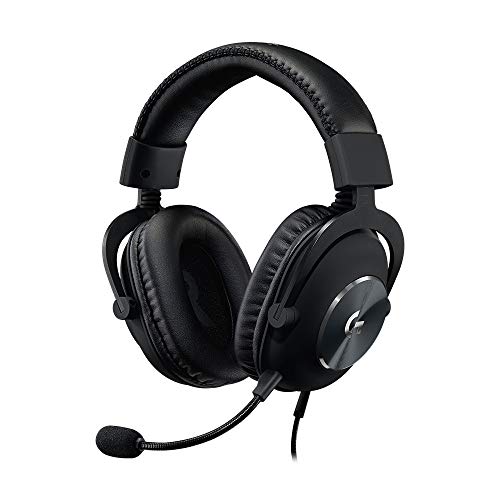
The G Pro X is the headset for the beginner who enjoys dials. Its listing is a small inventory of serious intent: Blue VO!CE microphone processing, DTS 7.1 surround, 50 mm drivers, a detachable boom microphone, spare memory foam pads, a USB DAC and a carrying bag, with USB and 3.5mm connections across PC, Xbox, PS5 and PS4. Logitech built it with competitive players, and streamers inherit the benefits, because a voice that survives a tournament’s comms discipline will survive a Tuesday night stream beautifully.
Blue VO!CE is the headline for streamers. It offers a processing chain — the kind of filtering and tuning that broadcasters apply deliberately — in preset form a beginner can grow into. Start with a sensible preset, record yourself, adjust one thing, record again: the G Pro X turns microphone technique into a learnable hobby rather than an accident, and the detachable boom means the headset can retire to pure listening when the stream ends.
The included extras deserve respect because they are the items other brands sell separately. Spare pads extend the headset’s comfortable life by years, the DAC gives the PC connection a clean conversion stage, and the bag acknowledges that streamers travel to friends, events and LANs. The box is a small ecosystem, and first-time buyers benefit from ecosystems more than from any single specification.
Its wired nature and feature depth set the terms: this is a desk headset for a streamer building a station, not a wanderer. Within that station it may be the most complete first purchase in this guide, and the one whose ceiling a growing channel will take longest to reach.
The G Pro X rewards a particular learning loop that this guide recommends to every beginner: record, listen, adjust one variable, repeat. Its processing chain gives that loop meaningful variables to explore — the difference between a voice that merely avoids offence and a voice with presence often lives in two or three deliberate adjustments, discovered by ear over a fortnight of evenings. A headset that turns its owner into a student of their own voice is selling education disguised as hardware.
The detachable boom completes the lifecycle argument. Streams end; music, films and focused work remain, and a headset that converts gracefully into plain headphones earns desk space the other twenty hours of the day. First purchases that serve beyond their original purpose survive upgrades longer, because the replacement has to beat the whole of their usefulness rather than one feature of it.
Strengths
- Blue VO!CE processing teaches real microphone craft
- Detachable boom, spare pads, DAC and bag included
- 50 mm drivers with DTS 7.1 for game immersion
Trade-offs
- Feature depth asks for setup time and experimentation
- Wired connection anchors the streamer to the desk
- Console use leaves some PC-side processing behind
| Microphone | Detachable boom with Blue VO!CE |
|---|---|
| Drivers | 50 mm, DTS 7.1 surround |
| Connections | USB and 3.5mm |
| Included | Spare memory foam pads, USB DAC, bag |
Best for: desk-based streamers who enjoy tuning their sound and want one headset to grow with the channel.
Not suited for: streamers who perform standing, moving and away from a fixed station.
Tinkerers can open the G Pro X listing, inventory the included extras against rival baskets, and review the Amazon figure for the full kit.

HyperX Cloud III Wired Gaming Headset
HyperX built the Cloud line’s reputation on a single promise kept relentlessly: comfort you forget. The Cloud III’s listing continues the theme — memory foam, a durable frame — and adds the modern connection set of USB-C, USB-A and 3.5mm, an ultra-clear 10mm microphone, and platform reach across PC, PS5, PS4 and Xbox Series X and S. For a first-time streamer, that connection trio quietly deletes an entire category of beginner panic, because whatever machine the stream runs on, this headset already speaks its language.
Memory foam is not a luxury in this context; it is session length. New streamers discover quickly that audience growth is a long-hours project conducted in a chair, and the headset that stays comfortable at hour four gets worn at hour four, which is when the raid arrives and the channel’s best moments happen. The durable frame backs the foam with structure, because a headset used daily by an enthusiast is a tool, not a display piece.
The 10mm microphone, described in the listing as ultra-clear, continues HyperX’s voice-first competence. It will not teach technique the way the G Pro X’s processing does, nor match the StreamSet’s condenser pedigree, but it delivers the dependable clarity that keeps a new channel’s audio professional while its owner learns everything else streaming demands.
Judge the Cloud III as the balanced adult in the room: no wireless theatre, no processing laboratory, just comfort, connections and clarity in durable proportions. Beginners whose stream plan spans a PC today and a console tomorrow will find it the hardest pick here to outgrow accidentally.
Comfort research on the Cloud line usually arrives at the same unglamorous conclusion: people keep wearing them. That sounds like faint praise until you map it onto a beginner’s calendar, where the difference between a channel that streams twelve hours a week and one that manages five is very often the difference between equipment that invites sessions and equipment that must be negotiated with. Memory foam, a forgiving clamp and a frame that tolerates being tossed onto the desk are growth features in the only currency that matters — hours broadcast.
The connector trio deserves a second mention for households with shared machines. A headset that moves between the gaming PC, a partner’s laptop and a console without an adapter hunt becomes the household’s default audio tool, which multiplies its value in a way a spec sheet cannot express. Beginners rarely buy for a household, but they frequently live in one, and the Cloud III is quietly designed for that reality.
Strengths
- Memory foam comfort sustains the long sessions growth requires
- USB-C, USB-A and 3.5mm cover every streaming machine
- Durable frame suits daily enthusiast use
Trade-offs
- No software voice processing suite to experiment with
- Wired design only, despite the modern connector set
- Balanced spec leads in no single headline category
| Connections | USB-C, USB-A and 3.5mm |
|---|---|
| Fit | Memory foam, durable frame |
| Microphone | Ultra-clear 10mm mic |
| Platforms | PC, PS5, PS4, Xbox Series X and S, per the listing |
Best for: beginners streaming across PC and console who want comfort and universal connections in one durable purchase.
Not suited for: performers needing wireless movement for an on-camera show.
Cross-platform beginners can open the Cloud III listing, match its connectors to their machines, and check the Amazon price for the balanced option.

Logitech G432 Wired Gaming Headset
Every beginner category needs its honest classroom, and the G432 is this guide’s. Its listing promises DTS Headphone:X 2.0 surround, 50 mm drivers, USB and 3.5 mm connections and a flip-to-mute microphone, at the accessible end of Logitech’s range. That combination teaches a new streamer the essential grammar — positional audio for games, a microphone with an unambiguous mute gesture, connections for both PC and everything else — without requiring a broadcast budget to attend the lesson.
Flip-to-mute deserves more praise than it gets. The gesture is physical, silent and certain: boom up, muted; boom down, live. Beginners, whose streams are punctuated by doorbells, family negotiations and coughing fits, need exactly that certainty, because the alternative — hunting a software mute while the audience listens — is how early channels earn their blooper reels. A control you can trust without looking is a professional feature wearing a budget costume.
The surround implementation gives game audio a spatial stage that helps both play and commentary, since a streamer who hears the flank coming can narrate it. Through USB the PC experience is complete; through 3.5 mm the headset serves controllers and other platforms in simpler form. Either way the first channel’s needs are met without a peripheral shopping list.
Set the ceiling honestly: materials, microphone refinement and processing all live a tier below the G Pro X, its own stablemate. The G432 is the first headset, bought to learn what you actually need — and a remarkable number of streamers discover that what they need was this, plus time.
The G432’s deepest virtue is that it lets a beginner begin this week. Streaming culture drowns newcomers in upgrade paths before they have an audience, and the result is channels that exist as shopping lists rather than broadcasts. A competent, affordable headset with a certain mute and honest sound collapses that delay: plug in, record the test, go live, learn what your actual format demands, and let the channel — not the catalogue — write the next purchase order.
It also serves as the correct second headset later: the loaner for a co-host, the spare when the main unit is charging or travelling, the guest microphone for the friend whose visit becomes a stream. Equipment bought honestly for a first chapter often serves every later chapter in a supporting role, and the G432’s simplicity makes it unusually good at supporting.
Strengths
- Flip-to-mute boom gives beginners a certain, silent mute gesture
- DTS Headphone:X 2.0 stages game audio spatially
- USB and 3.5 mm connections cover PC and controllers
Trade-offs
- Materials and mic refinement sit below the G Pro X tier
- No detachable boom or included accessory ecosystem
- Surround features centre on the PC connection
| Drivers | 50 mm audio drivers |
|---|---|
| Surround | DTS Headphone:X 2.0 |
| Microphone | Flip-to-mute |
| Connections | USB and 3.5 mm jack; PC compatible |
Best for: budget-conscious beginners who need the essential streaming grammar taught by a trustworthy first headset.
Not suited for: voice-led channels ready to invest in condenser-grade audio immediately.
Starters can open the G432 listing, note the flip-to-mute design, and weigh the Amazon price as the cost of a proper first semester.
Comparison Table
| Headset | Microphone story | Connection | Standout trait | Natural home |
|---|---|---|---|---|
| ATH-M50xSTS-USB StreamSet | Cardioid condenser, sidetone | USB | 24-bit/96 kHz conversion | Talk-led channels |
| Logitech G733 | Blue VO!CE processing | Lightspeed wireless | Suspension headband | Moving performers |
| Razer BlackShark V2 X | HyperClear cardioid | 3.5 mm | 240 g weight | Long-session beginners |
| Logitech G Pro X | Blue VO!CE, detachable boom | USB and 3.5mm | DAC, spare pads, bag | Tuning enthusiasts |
| HyperX Cloud III | Ultra-clear 10mm mic | USB-C, USB-A, 3.5mm | Memory foam comfort | Cross-platform desks |
| Logitech G432 | Flip-to-mute boom | USB and 3.5 mm | DTS Headphone:X 2.0 | First headsets |
Microphone First: The Beginner’s Audio Doctrine
A stream is a radio programme with pictures. That sentence, internalised early, rearranges a beginner’s entire budget: the microphone stops being an accessory to the headset and becomes the broadcast itself, with the earcups demoted to monitoring equipment. Cardioid patterns earn their dominance in this doctrine because bedrooms are not studios; they contain doors, windows, radiators and relatives, and a capsule that favours the mouth over the room is worth more than a shelf of corrective software.
Distance is the second doctrine. Every microphone in this guide sounds dramatically better at a hand’s breadth from the mouth than at arm’s length, and boom designs exist to enforce that geometry without thought. Beginners who master placement — boom close, gain moderate, voice projected as if to a friend across a table — extract professional results from mid-tier hardware, while beginners who drape expensive microphones at chest height collect expensive disappointment.
How to Choose Your First Streaming Headset?
Begin with your format, honestly described. Talk-led channels — commentary, interviews, podcasts, reactions — point at the StreamSet or the G Pro X, where the voice budget lives. Performance-led channels point at the G733’s wireless freedom. Session-led channels, built on long gameplay hours, point at the BlackShark’s weight or the Cloud III’s foam. Budget-led beginnings point at the G432 without shame, because a channel’s first need is to exist.
Then check your room before your wallet. A quiet, soft-furnished room flatters every pick here; a bare, echoing one argues for cardioid discipline and processing help. Finally, decide your relationship with software. Streamers who enjoy tuning will thrive with Blue VO!CE; streamers who want to press go should choose the headset whose untreated voice already sounds like them on a good day. Softphone veterans will recognise the same trade-offs from the office world surveyed in Best Softphone Bluetooth Headsets.
Your First Ten Streams: A Practical Audio Routine
Record before you broadcast. Every headset in this guide should meet your own ears first, in a private recording where you play, talk, laugh and go quiet, because each of those states exposes a different weakness. Listen for the room behind your voice, the plosive thumps on hard consonants and the level drift between excitement and concentration. Fix one thing per recording — distance, gain, a cushion between you and the bare wall — and the tenth recording will embarrass the first in the most encouraging way.
During early streams, build the mute habit before you need it. Know your gesture — flip, button or software — the way pilots know their checklist, because the doorbell does not schedule itself around your broadcast. Keep water at the desk, keep levels conservative, and remember that audiences bond with a streamer who sounds relaxed far more than with one who sounds processed. The headset is the instrument; the routine is the musicianship.
The Room Is Half the Microphone
Beginners shop for headsets and forget to shop their room, yet the room contributes half of every recording. Bare walls return your voice to the microphone as a smeared echo; a room with a bed, curtains, a rug and a bookshelf absorbs that return and lets the capsule hear one clean event instead of a voice and its ghosts. Before upgrading any hardware, hang the duvet, close the curtains and put the laundry basket between you and the emptiest wall. The improvement will embarrass most purchasable upgrades.
Noise sources deserve an audit of their own. The PC’s fans, the fridge through the wall, the road outside — each has a schedule and a direction, and a cardioid microphone pointed with its deaf side toward the worst offender is free noise reduction. Stream at the quiet hour if the house allows it, warn the household with the seriousness of a recording studio’s red light, and remember that audiences accept a lived-in background far more readily than a voice struggling to be heard through it.
None of this diminishes the headsets in this guide; it multiplies them. A cardioid capsule in a treated corner performs like equipment a tier above itself, while a flagship microphone in a tiled box performs like a rumour. Treat the room as the first upgrade, the headset as the second, and the order of your spending will finally match the order of what viewers hear.
Voice Craft: Presence, Pace and the Sound of Ease
Equipment ends at the capsule; craft begins behind it. The streamers audiences describe as naturals are usually doing three learnable things: speaking at a steadier level than conversation, leaving deliberate space between thoughts, and smiling audibly — the small physical act that listeners genuinely hear as warmth. Headsets with sidetone or honest monitoring help you hear yourself doing these things, which is why this guide keeps returning to monitoring as a teaching tool rather than a feature.
Pace deserves special attention from gamers, whose commentary tends to sprint during action and collapse during calm. A voice that breathes with the game is exciting; a voice that only sprints is exhausting by the hour. Practise narrating the quiet moments — inventory, travel, loading — because those are where personality lives and where new viewers decide whether the channel feels like company. The headset that stays comfortable and clear through those stretches is doing creative work, not just technical work.
Finally, protect the instrument. Streaming voices work harder than their owners realise, across hours of projected speech in dry, heated rooms. Water at the desk, a voice rested before long sessions, and a microphone close enough that you never need to push — these are professional habits available free to every beginner, and they will outlast every headset in this guide.
Building the Rest of the First Desk
A first headset sits inside a small ecosystem, and two companions matter more than the rest. The first is light — not for vanity, but because a face the audience can read is half the performance, and because you will play better in a lit room than a cave. The second is a second screen or a phone stand for chat, since a streamer who cannot see the audience talks past them. Neither costs what a headset costs, and both multiply what the headset delivers.
Resist the rest of the catalogue until the channel asks for it by name. Capture cards, stream decks, acoustic panels and dedicated microphones all have their season, and the season is announced by a specific frustration you can describe in one sentence. Until that sentence exists, the correct purchase is another month of streaming on the equipment in this guide, because audiences are built by broadcasts, not by baskets.
Common Mistakes
Buying by headphone reviews alone is the founding error: a headset can render game audio beautifully and broadcast a voice like a phone call from a stairwell. Judge the microphone with your own recordings, on your own voice, in your own room. The second error is gain bravado — turning everything up until the room, the keyboard and the chair all join the broadcast. Moderate gain and close placement beat volume every time.
Third, beginners hide behind processing, stacking filters until the voice sounds like a radio station from underwater; presets are a starting point, not a destination. Fourth, wireless buyers skip the charging ritual and meet a dying headset live on air. Fifth, comfort is tested for four minutes in a shop and regretted at hour four of the first long stream — the audience-building hours are long, so buy for them. Players comparing pure gaming priorities should also browse Best Gaming Headsets For First Person Shooters before deciding where their own balance sits.
Frequently Asked Questions
Do I need a separate microphone to start streaming?
No. Every pick here broadcasts respectably on its own, and the StreamSet and G Pro X reach well beyond respectably. A separate microphone becomes interesting later, when your format, room treatment and audience justify a dedicated chain; starting with a strong headset keeps the first year simple and mobile.
Wired or wireless for a first headset?
Wired for simplicity, reliability and value; wireless for performance and movement. The G733 proves wireless can be a first headset without apology, provided its owner accepts charging as part of the pre-stream ritual. Everyone else in this guide plugs in and forgets the question, which is its own virtue.
What is sidetone and why does the StreamSet include it?
Sidetone is your own voice played back into your ears as you speak. It stops the shouting and mumbling drift that plagues new broadcasters by giving you the feedback a telephone gives naturally and a streaming setup otherwise removes. Once you have streamed with it, its absence feels like driving without a speedometer.
How do I stop my keyboard and room appearing on stream?
Start with geometry: cardioid microphone close to the mouth, keyboard behind the capsule’s deaf side, gain no higher than needed. Add soft furnishings before software. Processing like Blue VO!CE can then polish a basically clean signal instead of performing rescue work it was never meant to do.
Can one headset cover streaming and console play with friends?
Yes — the Cloud III’s connector set and the BlackShark’s universal 3.5 mm plug are built for exactly that double life. Expect platform features to vary: processing suites live on PC, while consoles receive the headset’s honest hardware self, which for these picks is plenty.
The First Ninety Days: What Actually Changes
Month one with a first headset is about survival skills: levels that stay put, a mute gesture that never fails, a fit that survives the session. Beginners underestimate how much of early streaming is pure operations, and a headset that behaves predictably — same sound every night, same controls under the fingers — is what allows the performance layer to exist at all. This is why this guide weights certainty so heavily for first purchases and glamour so lightly.
Month two is when the recordings start teaching. Listening back, you will hear your room, your habits and your headset’s character separately for the first time, and the fixes arrive in order of cheapness: placement, then room, then settings, then — only then — equipment questions. Streamers who keep a small notebook of one change per week improve audibly month on month, and their audiences hear a channel learning its craft in real time, which is itself compelling content.
By month three the headset has become transparent, and that transparency is the true product every pick here is selling. The streamer thinks about the game, the guest, the story — never about the gear. When that day arrives, the first purchase has done its complete job, whether it cost the G432’s modest sum or the StreamSet’s broadcast premium, and any later upgrade will be a choice rather than a rescue.
Co-Hosts, Guests and the Social Stream
Sooner than expected, most channels invite a second voice — a friend in the room, a guest on a call, a partner who becomes a regular. Headset discipline scales to that moment in specific ways: a spare headset for the in-room guest, a shared understanding of microphone distance, and levels rehearsed before the audience arrives rather than negotiated in front of them. The picks with universal connections — the Cloud III, the BlackShark — shine here, because the guest’s platform is whatever it happens to be.
Guests also reveal a headset’s microphone honesty, because unfamiliar voices at unfamiliar distances are the test recordings you cannot fake. Keep the guest’s level conservative, let them hear themselves in a pre-stream check, and resist fixing in software what a two-inch boom adjustment fixes in fact. Channels are remembered for how guests felt; guests feel how they sounded, and they return to the streams where they sounded good.
A Short Honesty Section About Numbers and Names
Beginners drown in terminology, so here is the small dictionary that actually matters for this guide. Cardioid means the microphone listens forward and discounts the rear. Condenser means a capsule design that captures detail and nuance, the broadcast tradition. Sidetone means hearing yourself. A DAC is the translator between digital files and audible sound, and its quality sets a quiet ceiling under everything. Surround branding describes how game audio is staged in the earcups, which is pleasant and entirely separate from how your voice sounds to viewers.
Driver size, quoted across these listings at 50 mm, describes the speaker in each cup; it correlates loosely with capacity and not at all with microphone quality, which is why this guide never ranks by it. Weight, by contrast, is a number with daily consequences, and connection types are promises about which machines will welcome the headset without negotiation. Read listings with those priorities — pattern, placement, weight, connections, comfort — and the marketing fog thins to a manageable mist.
The deeper lesson is that a first streamer’s scarce resource is not money but attention, and every specification should be taxed by one question: does this make my voice clearer or my sessions longer? The picks that survive that tax are the six above; the ones that failed it are not missed.
One more beginner reality deserves print: your first audience is mostly you, plus the friends who love you enough to watch a channel learn. That is not a discouragement — it is the safest rehearsal space in media, and a headset bought now will be seasoned, understood and trusted by the time strangers arrive in numbers. Streamers who treat the early months as craft school, with the recordings as homework and the headset as a patient instrument, build the habits that later growth merely amplifies. Start the school this week; the equipment above is ready when you are.
And keep the box. First headsets get lent, resold, repurposed as guest kit and occasionally rediscovered years later with genuine affection, and every one of those second lives is easier with the spare pads, the cable and the paperwork still together.
There is a final, unfashionable selection test: put the candidate headset on and make a phone call to the most honest person you know. Ask how you sound, and listen to the answer without defending the purchase you are privately hoping to make. Friends on telephones are the world’s oldest audio focus group, and a voice that sounds present, warm and unstrained down a phone line will sound the same — better, in fact — through the better chain a streaming setup provides. Buy the headset that passes the honest friend, and you will rarely regret the choice on air.
Remember, too, that your voice is allowed to sound like you. The goal of all this equipment and technique is not to sand a personality into broadcast neutrality but to deliver the personality intact — the laugh, the accent, the thinking pauses — without the room, the hiss and the level chaos that make strangers work to hear it. Channels grow around recognisable humans, and a headset’s highest achievement is to disappear so completely that the human is the only thing left in the listener’s ear.
If you are torn between two finalists, let your calendar decide. Count the hours you honestly expect to stream in the next ninety days and buy the headset whose comfort story matches that number, because a channel’s early life is measured in hours far more than in highlights. The microphone will be good enough in either finalist — this guide saw to that — so let endurance break the tie, and spend the saved deliberation on the first recording test instead.
Ninety days of hours, honestly counted, also expose the truth about format: the streamer who talks for most of them belongs in a voice-first headset whatever the game on screen, and the streamer who performs belongs in the wireless one whatever the microphone charts say. Let the calendar, the room and the honest friend vote together, and the first purchase stops being a gamble and becomes what it should be — the first deliberate production decision of a channel that intends to last.
Production decisions compound. The streamer who begins with a voice they trust experiments more, invites guests sooner, clips highlights without wincing at the audio and shows up on the tired evenings when consistency is actually built. None of that appears in a specification table, and all of it is downstream of the modest object sitting on your head — which is why this guide has treated a first headset purchase with the seriousness usually reserved for cameras and computers.
Treat the purchase, then, as the channel’s founding act rather than its first expense. Founding acts deserve a deadline: choose this week, record the test the day the box arrives, and schedule the first stream before the packaging leaves the house, because momentum is the only launch strategy that has ever worked.
The audience you are imagining is, at this moment, somebody else’s audience, listening to a voice that sounds clear and close and worth staying for. Everything in this guide exists to make that voice yours — not louder, not stranger, simply present — from the very first night you press the button and introduce yourself to the internet.
Press it with the confidence that the technical side, at least, has been thought through properly this time.
Your future regulars are out there; give them a voice worth becoming regular for, starting now.
That is the entire brief, and any of the six will carry it.
Keep the first recording you ever make with it, whatever you choose. A year from now it will be the most encouraging file on your computer, because it measures exactly how far the voice — and the streamer behind it — has travelled.
Final Recommendation
Choose by format and the decision nearly makes itself. Talk-led beginners should buy the StreamSet and own the best voice in their follower count from the first stream. Tinkerers should buy the G Pro X and enjoy growing into its processing. Performers should buy the G733, comfort marathoners the BlackShark or Cloud III, and the budget-wise should start on the G432 with a clear conscience and a flip-to-mute habit that professionals would envy.
Above all, start: a good headset worn tonight teaches more than a perfect one researched until spring, because your first hundred viewers are waiting to hear you — clearly, comfortably and unmistakably yourself.
Related Guides
- Best Gaming and Podcast Headsets
- Best Softphone Bluetooth Headsets
- Best Gaming Headsets For First Person Shooters