What's inside
- Key Takeaways
- Quick Picks
- How These Picks Were Chosen
- The Six Headsets in Detail
- Comparison Table
- DECT Explained: Why Landlines Kept Their Own Wireless Standard
- How to Choose a Wireless Landline Headset?
- Range, Walls and the Geography of a Real Call
- The Working Day, Rebuilt Around a Cordless Ear
- Sound Quality on DECT: What Callers Actually Hear
- Setting Up: Pairing, Bases and the First Afternoon
- Common Mistakes
- Frequently Asked Questions
- When the Landline Is the Business: Professions That Never Left
- Care, Spares and the Five-Year View
- Final Recommendation
- Related Guides
As an Amazon Associate I earn from qualifying purchases. This post may contain affiliate links at no extra cost to you.
widgetverdict.com is reader-supported. When you buy through links on our site, we may earn an affiliate commission.
Where to buy: each pick below links to its Amazon listing; the Plantronics CS540 is the classic starting point, and every listing page is where today’s price and compatibility notes should be confirmed.
The best wireless headsets for landlines solve a problem the mobile age forgot: the desk phone still rings, and the person answering it still has hands that could be doing something else. DECT — the digital cordless standard these headsets speak — offers what Bluetooth rarely promises: a dedicated, interference-shy channel between headset and base, paired once and dependable for years. This guide compares six routes to cordless landline freedom, from enterprise fleets to a home cordless expansion, so the headset matches the phone system you actually own.
Notice the discipline running through the picks: none of them asks you to replace your phone. Each meets an existing system — a desk phone, a Cisco estate, an AT&T cordless setup — and removes its cord. That is the correct shape for landline upgrades, because the landline’s whole virtue is that it already works.
Key Takeaways
- DECT gives landline headsets a dedicated channel that shrugs off the congestion of office Wi-Fi and Bluetooth traffic.
- Mono headsets like the CS540 and Cisco 561 keep one ear on the room; the dual-ear EPOS trades that awareness for focus.
- Stated ranges differ by philosophy: 607 ft headline from Yealink, 300 ft enterprise figures from Cisco and INNOTALK.
- The VTech IS6200 is an accessory for compatible AT&T cordless systems, not a standalone headset — compatibility is the purchase.
- RJ9 handset-port connection makes the INNOTALK the least invasive upgrade in the guide.
- Teams certification on the Yealink matters most where an IT department must approve the purchase.
Quick Picks
| Pick | Badge | Why it earns its place |
|---|---|---|
| Plantronics CS540 Wireless Headset | The convertible classic | A single-ear DECT headset with three wearing styles and a noise cancelling microphone — the design that defined desk-phone freedom for a decade. |
| EPOS Impact D 30 Phone Wireless DECT Headset | The dual-ear focus tool | Two ears covered for concentration in busy rooms, DECT connection to the desk phone, and EPOS’s business audio pedigree. |
| Yealink WH63 E2 DECT Headset | The range and certification pick | Teams certification, three wearing styles, a noise cancelling mic and a stated 607 ft range for people whose calls follow them around the building. |
| VTech IS6200 DECT 6.0 Cordless Headset | The home cordless companion | An accessory headset that expands compatible AT&T cordless phone systems, bringing hands-free calling to the home landline. |
| Cisco 561 Wireless DECT Headset | The enterprise standard | Mono DECT 6.0 with a stated 300 ft reach and Cisco’s business phone ecosystem behind it, built for administered fleets. |
| INNOTALK Desk Phone Wireless Headset with RJ9 Adapter | The plug-and-go budget route | An RJ9 adapter in the plan, twelve hours of stated talk time and 300 ft of stated range — cordless calling without replacing the phone. |
Readers equipping a whole desk for hybrid work often pair a landline headset with the PC-side advice in Best Headsets for First-Time Streamers, since microphone discipline transfers between the two worlds.
How These Picks Were Chosen
Admission required a genuine landline relationship: a DECT base for desk phones, a cordless-system accessory path, or a handset-port adapter route. Pure Bluetooth mobile headsets were excluded, however good, because they answer a different question. Within the frame we spanned the three real habitats of the landline in this decade — the administered office, the small business and hybrid desk, and the home — and kept one honest pick for each rather than six variations on the office theme.
Manufacturer-stated figures are reported as stated: ranges from Yealink, Cisco and INNOTALK, talk time from INNOTALK. We flag throughout that range is a building-dependent experience, because a number measured in a field becomes a different number across three walls and a lift shaft. Comfort formats were deliberately varied — convertible, dual-ear, supra-aural, accessory — since ears, like phone systems, are not standardised.
The Six Headsets in Detail
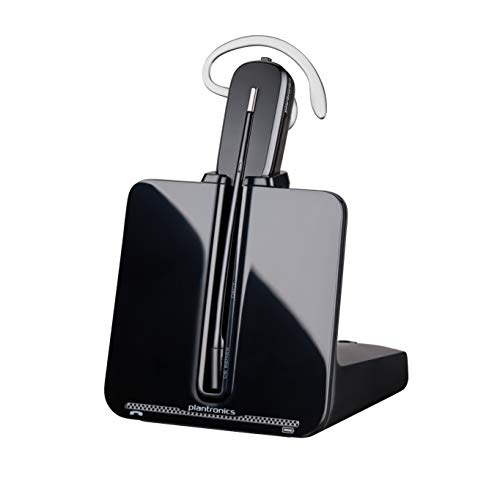
Plantronics CS540 Wireless Headset
The CS540 is the headset that taught offices what DECT freedom felt like, and its listing still reads like the category’s founding document: wireless DECT connection to a desk phone, a single ear, a convertible design with three wearing styles and a noise cancelling microphone. Convertible is the operative word. Some ears accept an ear hook, some demand a headband, and some rotate between them across a long day; the CS540 refuses to choose for you, which is why it survived on desks long after flashier rivals were recycled.
Single-ear working is a philosophy, not a compromise. The open ear keeps the room present — colleagues, doorbells, the kettle, the part of the conversation happening off the phone — while the covered ear carries the caller. For receptionists, coordinators and home workers who mediate between a phone and a physical space all day, that balance is the entire job. The noise cancelling microphone protects the other direction, keeping your side of the call free of the room you are monitoring.
Plantronics, now under the Poly name the listing carries, built its reputation on exactly this class of tool, and the CS540’s longevity in the catalogue tells its own story about spares, familiarity and IT departments that standardise and then relax. A headset your organisation already knows how to deploy, repair and replace has a value no spec sheet captures.
Set against the dual-ear EPOS below, the CS540 is the awareness choice; set against the Yealink, it is the simplicity choice, trading range and certification for a lighter, proven convertible. Buyers whose desk phone is the centre of the working day and whose ears dislike commitment will find it remains the reference.
One practical note: DECT headsets live or die by their base pairing with your specific phone. The CS540’s long production run means compatibility knowledge is deep and public, so a few minutes confirming your handset model against the documentation before ordering is time unusually well spent.
Longevity deserves one more paragraph, because the CS540’s story is unusual in consumer electronics: a design that stayed in production while the industry around it reinvented itself twice. That continuity creates a quiet infrastructure of knowledge — IT staff who have deployed hundreds, users who can borrow a colleague’s ear loop and know it fits, administrators who stock one spare for an entire floor. When a headset becomes infrastructure, its individual specifications matter less than the system’s total reliability, and the CS540 crossed that threshold years ago.
It also reframes the buying decision for small teams. Choosing the headset your neighbour office already runs means their experience becomes your support channel, their spare becomes your emergency loan, and their compatibility lessons arrive pre-learned. There is a reason professions standardise on proven tools even when newer ones photograph better, and the CS540 is that reason wearing a headband.
Strengths
- Three wearing styles let the headset fit the ear, not the reverse
- Noise cancelling microphone keeps calls clean in live rooms
- Single-ear awareness suits reception and coordination roles
Trade-offs
- Mono coverage only, so noisy rooms stay audible by design
- No computer softphone focus in the listing’s promise
- Convertible parts are small and easily lost in busy desks
| Connection | Wireless DECT to desk phone |
|---|---|
| Fit | Single ear (mono), convertible, 3 wearing styles |
| Microphone | Noise cancelling |
| Brand | Plantronics (Poly) |
Best for: desk coordinators and receptionists who need one ear on the caller and one on the room, with wearing styles to spare.
Not suited for: open-plan workers seeking dual-ear isolation from surrounding noise.
Reception desks ready to cut the cord can open the CS540 listing, confirm handset compatibility, then look at the Amazon price for the convertible classic.
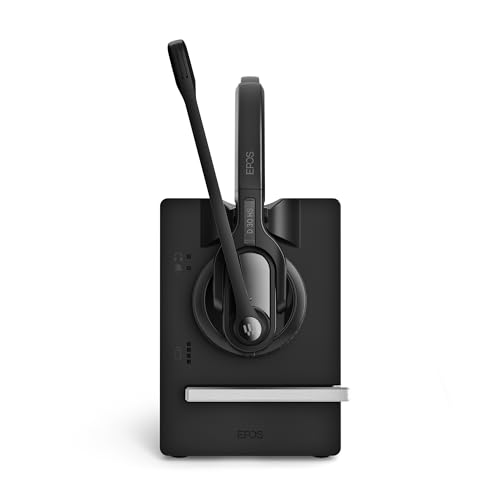
EPOS Impact D 30 Phone Wireless DECT Headset
Where the CS540 keeps one ear open, the EPOS Impact D 30 closes both — deliberately. Its listing describes a wireless DECT dual ear headset for connection to a desk phone, and that pairing of technologies serves a specific worker: the one whose calls demand concentration while the room around them refuses to quieten. Two covered ears do not merely double the audio; they change the psychology of a call, signalling to colleagues and to your own brain that this conversation has the floor.
EPOS arrives in this category with a serious audio lineage, and the Impact line is its business workhorse range. Buyers should expect the tuning philosophy that implies: voice clarity prioritised over entertainment warmth, controls arranged for gloved-by-habit fingers, and a build aimed at daily commercial use rather than occasional home duty. The listing keeps its promises narrow — DECT, dual ear, desk phone — and narrow promises kept are worth more than wide ones hedged.
The dual-ear format carries honest costs. You will not hear the doorbell, the colleague’s question arrives as a tap on the shoulder, and long days in a fully covered headset feel more enclosed than in a mono design. Offices buy the D 30 for staff whose calls are the product — sales floors, support desks, booking lines — where the enclosure is the point and the room’s noise is the enemy being engineered out.
Compare it directly with the Cisco 561 if your organisation runs administered fleets, and with the CS540 if the same budget is equipping mixed roles. The D 30’s case rests on focus per seat: where a missed sentence costs money, two ears earn their keep every hour.
Because the listing centres on the desk phone connection, buyers hoping for computer softphone duties should verify their wider setup before ordering, or look at the Yealink below, whose listing speaks to phones and softphones together.
The D 30’s dual-ear case strengthens further in the era of the long call. Customer conversations have stretched — support cases, consultations and sales calls routinely run past the half hour — and the cost of ambient distraction is paid in repetitions, misunderstandings and the slow leak of professionalism when a caller hears your office more clearly than your voice. Two ears of coverage are a crude technology and a completely effective one, the acoustic equivalent of closing the office door that open-plan design abolished.
There is a training angle as well. New call-handlers learn faster when they can hear callers properly, and supervisors reviewing performance prefer recordings unpolluted by room noise bleeding around a single ear cushion. A dual-ear standard on a call floor is therefore partly a quality system disguised as a headset choice, and the D 30’s straightforward DECT-to-desk-phone design keeps that system simple to run.
Strengths
- Dual-ear coverage builds real concentration in loud rooms
- DECT reliability with a desk-phone-first design
- Business tuning prioritises voice clarity over decoration
Trade-offs
- Room awareness disappears; colleagues must tap shoulders
- Fully covered fit feels enclosed across very long days
- Listing promise centres on desk phones, not softphones
| Connection | Wireless DECT to desk phone |
|---|---|
| Fit | Dual ear |
| Colour | Black |
| Range | The listing headline does not state a range figure — consult EPOS documentation for the current specification |
Best for: call-handlers in noisy offices whose conversations cannot afford the room leaking in.
Not suited for: front-desk roles that must hear the physical room as clearly as the caller.
Busy floors can open the D 30 listing, check the dual-ear fit against their team’s habits, and review the Amazon figure before equipping a row.

Yealink WH63 E2 DECT Headset
The Yealink WH63 E2 arrives with the longest listing in this guide, and nearly every clause earns its place: DECT wireless, a single ear convertible earpiece, Teams certification, three wearing styles, an earhook in the set, a noise cancelling microphone, a stated 607 ft range, and a brief spanning desk phone, telephone, computer and softphone. That breadth describes the modern hybrid desk, where the landline and the laptop share the working day and a headset that serves only one of them is half a tool.
The stated range deserves both respect and translation. DECT range figures are measured in open air, and walls, floors and metal shelving tax them heavily; even so, a generous headline figure signals a radio with headroom, which shows up in practice as clean audio at the far end of an office, in the stockroom, at the printer — the places calls actually follow people to. Roaming workers, facilities staff and every roaming worker whose job refuses to sit down should read that number as the pick’s thesis.
Teams certification matters to a specific buyer: the one whose IT department has opinions. Certified devices promise tested behaviour with the platform — call control from the headset, predictable audio paths — and in administered environments that promise can be the difference between a purchase approved and a purchase debated. Combined with the earhook and three wearing styles, the WH63 E2 is the most administratively and ergonomically flexible pick here.
Its breadth is also its caveat. A headset that connects to everything needs its owner to understand what it is connected to, and the first week involves more setup thought than the plug-and-go INNOTALK below demands. For hybrid workers that week is an investment; for a single landline in a hallway, it is overhead without a payoff.
Certification deserves a demystification, because buyers either worship it or dismiss it and both reactions miss the point. Teams certification on the WH63 E2 means the device’s behaviour with that platform has been tested against a standard: answering and ending calls from the headset, predictable mute behaviour, audio paths that do not surprise the software. In a home office that may sound like bureaucracy; in a two-hundred-seat deployment it is the difference between a rollout and a saga. Buy certification when other people depend on your equipment behaving, and save the money when only you do.
The convertible earpiece, meanwhile, solves the oldest staff-room argument in the headset world — which ear, and how held — by declining to settle it. Earhook for the minimalist days, headband for the long ones, and the same electronics throughout. Yealink’s kitchen-sink listing can read as excess until you map each clause to a real desk somewhere, at which point it reads as field research.
Strengths
- Stated 607 ft range gives roaming workers real headroom
- Teams certification smooths approval in administered offices
- Connects across desk phone, computer and softphone duties
Trade-offs
- Breadth means a more involved first-week setup
- Headline range shrinks through walls and floors in practice
- Single-ear format will not satisfy isolation seekers
| Connection | DECT wireless; desk phone, computer and softphone |
|---|---|
| Certification | Teams Certified |
| Fit | Single ear convertible, 3 wearing styles, earhook |
| Range | 607 ft, as stated in the listing |
Best for: hybrid workers roaming a building while calls follow, on desks shared between landline and laptop.
Not suited for: a single hallway landline, where its breadth becomes unused overhead.
Roamers can open the WH63 E2 listing, sanity-check the range claim against their building’s layout, and see today’s Amazon price.

VTech IS6200 DECT 6.0 Cordless Headset
The VTech IS6200 plays a different sport from the office headsets around it. Its listing describes a DECT 6.0 accessory cordless headset — an expansion for compatible AT&T cordless phones — and that word accessory is the key to its value. Millions of homes run multi-handset cordless systems; this headset joins such a system as another endpoint, bringing hands-free conversation to the landline that already rings in the kitchen, the workshop and the garden room.
Home landline calling has its own ergonomics. Calls are long, unhurried and often taken while doing something else — cooking, folding, mending, supervising homework. A lightweight cordless headset turns the family phone call from a shoulder-cramping endurance event into background companionship, and for older relatives it removes the handset-weight and hearing-position problems that quietly shorten calls. The silver and black finish suits domestic kit rather than office fleets, correctly.
Compatibility is the whole purchase here, so read the listing’s wording with care: this is an expansion for compatible systems, not a standalone phone and not a universal headset. Owners of a matching AT&T cordless setup gain an inexpensive new capability; everyone else should look at the other five picks. That narrowness is a virtue when it is understood — the IS6200 does one domestic job completely instead of five jobs partially.
It also makes a thoughtful gift purchase, the rare kind that gets used weekly: parents and grandparents who love long calls and hate handsets are its natural constituency. Confirm the home system model first, and the rest of the decision makes itself.
Think of the IS6200 as an argument about how technology should age. The home cordless system it expands was bought for handsets, and handsets remain fine for short calls; what changed is the length and style of home conversation, which now happens alongside everything else a household does. An accessory that upgrades the system in place respects the original purchase instead of obsoleting it, and there is an environmental as well as a financial elegance in extending working kit rather than replacing it.
It also quietly serves accessibility. A headset endpoint removes grip strength, handset weight and precise ear placement from the act of telephoning, which for some relatives is the difference between calling weekly and calling rarely. Technology that lengthens family conversations does not need a grander justification than that, and the IS6200’s modest brief delivers it for the price of an accessory rather than a system.
Strengths
- Joins compatible AT&T cordless systems as a hands-free endpoint
- Domestic weight and finish suit long, relaxed home calls
- Turns existing home landline kit into a headset system cheaply
Trade-offs
- Accessory only — useless without a compatible base system
- No office desk-phone or softphone ambitions in its brief
- Compatibility wording must be checked model by model
| Connection | DECT 6.0 accessory for compatible AT&T cordless phones |
|---|---|
| Role | Hands-free expansion handset alternative |
| Colour | Silver/Black |
| Standalone use | Not a standalone phone; a compatible system is required — the listing says so in terms |
Best for: homes with a compatible AT&T cordless system and long family calls to enjoy hands-free.
Not suited for: offices and softphone users, whose ecosystems it was never designed to join.
Home callers can open the IS6200 listing, match their cordless system model against the compatibility wording, and check the Amazon price with confidence.

Cisco 561 Wireless DECT Headset
The Cisco 561 brings the enterprise accent to this guide. Its listing is written the way Cisco writes: mono, black, wireless DECT 6.0, a stated 300 ft reach, over-the-head fit, monaural supra-aural design, and a microphone described by type — uni-directional, electret, condenser. That vocabulary signals the buyer it serves: organisations that specify equipment the way they specify network switches, and value a headset that belongs to a managed ecosystem.
The stated 300 ft range is the honest enterprise figure — conservative next to the Yealink’s headline, and measured for buildings rather than fields. In practice it covers the office floor, the meeting room dash and the coffee run, which is the real geography of desk-phone roaming. Supra-aural means the cushion sits on the ear rather than around it, a fit many long-day wearers prefer for its lightness and its ability to coexist with the room.
Cisco’s ecosystem gravity is the deeper argument. Where an organisation’s phones, support contracts and spares cupboards already speak Cisco, the 561 slots into an administered world of predictable replacements and known behaviour. Individual buyers can still choose it — the specification is complete and the brand accountable — but its design centre is the fleet, and fleets are where its value compounds.
Against the CS540, the 561 is the managed alternative to the convertible classic: one wearing style done properly, enterprise language throughout. Against the EPOS, it trades dual-ear focus for mono awareness. Its buyer knows which side of both trades their organisation lives on before the box is opened.
Enterprise buyers reading this guide will recognise the 561’s deeper offer: predictability at scale. A fleet headset is not six hundred individual purchases but one decision repeated six hundred times, and its true costs live in deployment hours, training minutes, spare ratios and the helpdesk tickets that either arrive or do not. Cisco’s specified, documented, ecosystem-native design is priced and built for that arithmetic, which is why its listing reads like a datasheet — its audience buys from datasheets.
Individual buyers are not excluded from that logic; they simply run it at a scale of one. A home-based professional on a Cisco phone gains the same documented behaviour and the same accountable brand, and gives up only the convertible tricks and consumer warmth of the rivals. Where the desk phone is a working tool of a managed job, that is usually the right trade, and the 561 makes it without apology.
Strengths
- Enterprise specification stated plainly, including 300 ft range
- Supra-aural mono fit stays light across long administered days
- Cisco ecosystem suits fleets, spares and support contracts
Trade-offs
- Single wearing philosophy, no convertible tricks
- Conservative range trails the Yealink’s headline figure
- Best value appears inside Cisco-centred organisations
| Connection | Wireless DECT 6.0 |
|---|---|
| Fit | Over-the-head, monaural, supra-aural |
| Microphone | Uni-directional electret condenser |
| Range | 300 ft, as stated in the listing |
Best for: organisations running Cisco-centred phone estates that need a specified, supportable mono headset.
Not suited for: home users, whose needs the VTech and INNOTALK serve more directly.
Fleet buyers can open the 561 listing, align the specification with their estate standard, and confirm the Amazon figure for their rollout.

INNOTALK Desk Phone Wireless Headset with RJ9 Adapter
The INNOTALK closes the guide with the most direct proposition of all: keep your desk phone, add an RJ9 adapter, and gain a wireless headset with twelve hours of stated talk time and 300 ft of stated range. The RJ9 detail is the soul of the pick. That small handset-port plug is how countless desk phones accept accessories, so the INNOTALK’s route to cordless calling runs through the phone you already own rather than around it — no system replacement, no administrator, no ceremony.
Twelve hours of talk time, as the listing states it, covers the working day of nearly any desk with margin to spare, and stating the figure plainly invites the right comparison against rivals that leave endurance vague. The 300 ft range matches the Cisco’s stated reach, covering home offices, small business floors and the garden-office walk that modern working keeps inventing.
Expectations should match the positioning. This is the accessible end of the DECT-adjacent world: the brand carries no enterprise ecosystem, the fit and finish serve function first, and support will be a listing-and-manual affair rather than a contract. For a home worker, a small office or a first cordless experiment, that trade is not a flaw but the entire offer — cordless landline calling at a price that makes trying it the rational move.
Verify the RJ9 path on your specific phone before ordering, because handset-port wiring is the one variable the listing cannot settle for you. With that single check done, the INNOTALK is the shortest route in this guide from a corded desk to a roaming one.
The INNOTALK’s RJ9 route also future-proofs in an unexpected direction: it is phone-agnostic within the vast family of handset-port desk phones. Change the phone, keep the headset; move desks, keep the headset; lend it to the colleague whose ancient handset still soldiers on, and it works there too. In a category where bases and ecosystems lock buyers into lineages, an adapter-based design is a small declaration of independence.
That independence suits the way small organisations actually buy — opportunistically, one desk at a time, when a specific person’s shoulder starts complaining. Not every purchase can be a standardisation programme. The INNOTALK exists for the purchase that needs to happen this week, for one worker, without a committee, and its stated talk time and range are honest enough to let that worker judge the result fairly.
Strengths
- RJ9 adapter route works through the desk phone you own
- Stated 12H talk time covers a full working day
- Stated 300 ft range matches enterprise rivals’ reach
Trade-offs
- No enterprise ecosystem or contract support behind it
- Handset-port wiring varies; per-phone checks are essential
- Finish and refinement follow its accessible positioning
| Connection | Wireless via RJ9 adapter to desk phone |
|---|---|
| Talk time | 12H, as stated in the listing |
| Range | 300 ft, as stated in the listing |
| Role | Hands-free office phone headset |
Best for: home offices and small firms wanting cordless landline calling without replacing any phones.
Not suited for: administered fleets needing certification, contracts and standardised spares.
Small offices can open the INNOTALK listing, verify their phones’ handset ports, and weigh the Amazon price against a system replacement.
Comparison Table
| Headset | Connection route | Fit | Stated range | Natural home |
|---|---|---|---|---|
| Plantronics CS540 | DECT base to desk phone | Mono convertible, 3 styles | See documentation | Reception, coordination |
| EPOS Impact D 30 | DECT to desk phone | Dual ear | See documentation | Noisy call floors |
| Yealink WH63 E2 | DECT; phone, PC, softphone | Mono convertible, earhook | 607 ft | Hybrid roaming desks |
| VTech IS6200 | DECT 6.0 accessory | Cordless headset | Follows host system | Home AT&T cordless |
| Cisco 561 | DECT 6.0 | Mono supra-aural | 300 ft | Cisco estates |
| INNOTALK with RJ9 | RJ9 handset-port adapter | Office headset | 300 ft | Home offices, small firms |
DECT Explained: Why Landlines Kept Their Own Wireless Standard
DECT was designed for exactly one job — carrying voice around buildings — and it shows. It operates in its own spectrum arrangements, pairs a headset to a base with none of the multi-device diplomacy of Bluetooth, and prioritises the unglamorous virtues: calls that connect instantly, audio that does not stutter when the microwave runs, and a relationship between base and headset that can last the life of the phone system. When a receptionist lifts a call, DECT simply is there, the way the landline itself simply is there.
The standard’s limits are the mirror of its virtues. DECT headsets are citizens of their base station; they do not wander to your mobile or your laptop unless the design explicitly bridges there, as the Yealink’s softphone support does. Buy DECT for the desk it serves and it will serve that desk superbly for years. Buy it expecting a universal wireless headset and you have misread the standard’s character entirely.
How to Choose a Wireless Landline Headset?
Start at the phone, not the headset. Identify your system — a standalone desk phone, a Cisco estate, a home AT&T cordless network — because that identity deletes most of the catalogue instantly and correctly. Then decide the ear question: mono for roles that mediate a room, dual for roles that must escape one. Only then compare ranges, and compare them as buildings rather than numbers: count the walls between your desk and the furthest place you take calls, and favour headroom over headlines.
Certification and ecosystem come next for administered buyers, while home buyers should weight compatibility wording above every feature. Finally, plan the charging geography. A DECT headset lives on its base; put the base where the phone is, keep the path back to it habitual, and the headset will be charged every morning of its life without a single act of willpower. Workers building a complete call setup sometimes cross-check microphone expectations against Best Gaming and Podcast Headsets, where boom quality is judged with similar severity.
Range, Walls and the Geography of a Real Call
Every range figure in this guide was earned outdoors or in open space, and every buyer will spend it indoors. Treat walls as currency: each partition spends some of the budget, metal spends extravagantly, and floors spend most of all. A 300 ft headset may give a large open office complete freedom and a Victorian terrace house two rooms. This is not deception by manufacturers; it is physics declining to read marketing.
The practical response is to buy for your worst regular journey, not your average one. If calls follow you to a stockroom, a garden or a workshop, choose the generous radio and test it on the first day along the exact route, while returns are still easy. If calls never leave the desk’s orbit, range is the least important number on the page and comfort should take its budget instead.
The Working Day, Rebuilt Around a Cordless Ear
It is worth describing what actually changes when a landline goes wireless, because the transformation is behavioural before it is technical. The corded worker is a lighthouse: fixed, rotating slightly, signalling availability to a room arranged around the desk. The cordless worker becomes a colleague again — able to fetch the file mid-call, walk the visitor to the door while finishing the conversation, make tea during the on-hold music without performing the handset-shoulder clamp that chiropractors could identify blindfolded. Calls stop being appointments with a chair and become threads woven through the day.
That behavioural shift has measurable texture. Conversations lengthen slightly and improve, because a person who can move thinks differently from a person who is tethered; everyone who has paced during a difficult call knows the cognition is in the legs as much as the head. Callers, meanwhile, hear a calmer professional — one whose voice is not competing with the sounds of a trapped person shuffling paper at arm’s length. The headset’s microphone, positioned once and correctly, delivers a consistency that handset calls never achieve across a day of shifting postures.
Home workers feel the change most sharply, because the home landline often serves the whole household’s official life: schools, doctors, tradespeople, relatives. A cordless headset turns those calls from interruptions into accompaniments — the appointment booked while the soup is stirred, the plumber directed while the meter is read. The landline stops demanding a pilgrimage to the hallway table and joins the flow of the house, which is where telephones were always supposed to live.
Sound Quality on DECT: What Callers Actually Hear
Callers judge your organisation by a signal they cannot name: the clarity and steadiness of your voice against the absence of everything else. DECT’s dedicated channel gives that signal a head start, because the audio path is not negotiating with streaming video and cloud backups for bandwidth. Add a boom microphone placed at the corner of the mouth — the position every pick in this guide is built around — and the caller’s experience becomes almost independent of your room’s chaos.
Noise cancelling microphones, named in the CS540 and Yealink listings, work the other side of the street: they favour the voice in front of the boom and discount the room behind it. The effect on a caller is disproportionate to the technology’s cost. A voice that arrives clean reads as competence; a voice fighting a photocopier reads as a smaller operation than you are. Businesses buy many things to sound established — premises, branding, hold music — and few of them work as directly as the microphone three inches from the speaker’s mouth.
Wearer-side audio matters differently. You need the caller’s words intelligible at low volume across an eight-hour day, because listening effort is fatigue in disguise. Dual-ear designs help by coverage, supra-aural designs by lightness, and every design by the simple virtue of a speaker positioned consistently, unlike a handset that migrates around the ear as shoulders tire. Judge headsets by the end of the day, not the start: the one that leaves your ears and neck unmentioned in your evening complaints is the one doing its job.
Setting Up: Pairing, Bases and the First Afternoon
DECT setup follows a reassuringly old-fashioned script. The base connects to the phone, the headset pairs to the base, and the relationship is then permanent until someone deliberately changes it. There are no accounts, no app permissions, no annual rediscovery of a pairing menu. For the RJ9 route, the adapter takes the handset’s place in the circuit and the phone never learns that anything unusual has happened. For the VTech, the headset registers to the home cordless system like an additional handset, inheriting the system’s identity wholesale.
Spend the first afternoon on fit and geography rather than features. Choose the wearing style your ear prefers at hour one and re-judge at hour four, because ears vote differently with experience. Walk your real call routes — the printer, the stockroom, the kettle, the garden — and listen for where the audio thins, so the building teaches you its own range map while returns are still painless. Set the base where the headset will actually be docked nightly, not where the cables look tidiest.
Then make the small administrative decisions that separate smooth ownership from friction: whose name is on the spare parts, where the second wearing style lives, what happens when the headset is borrowed. Offices call this deployment; households call it putting things in a drawer and telling everyone which drawer. Either way, an hour of it in week one saves a year of minor mysteries.
Common Mistakes
The most common misstep is ordering a Bluetooth headset for a landline and discovering the phone has no Bluetooth to offer. Landlines speak DECT or handset-port; match the standard to the socket. Second, buyers ignore the accessory trap in both directions — purchasing the VTech without a compatible system, or overlooking it while owning exactly the system it expands.
Third, range is bought by headline and spent through walls, as described above. Fourth, mono and dual are chosen by price rather than by role, leaving receptionists sealed away from their rooms and call-handlers distracted in open ones. Fifth, the base station gets banished to a distant socket for tidiness, and the headset’s charging habit dies with the geography. Keep the base at the desk, as the phone expects.
Frequently Asked Questions
Will a DECT headset work with my mobile phone?
Generally no, and it is not trying to. DECT headsets pair with their base and the landline behind it. The Yealink’s listing adds computer and softphone duties, which covers laptop calling, but your mobile remains a separate device with its own headset world.
What does an RJ9 adapter actually do?
It connects through the handset port of a desk phone — the socket the curly cord uses — letting a wireless headset take over the handset’s job. It is the least invasive upgrade path in this guide, which is why the INNOTALK leads with it; verify your phone’s port and wiring before ordering.
Is mono or dual ear better for office calls?
Neither, universally. Mono suits roles that must stay aware of a room; dual suits roles that must concentrate despite one. The CS540 and the EPOS D 30 embody the two answers, and the correct choice is a description of your working day, not a ranking.
Can several DECT headsets share one office?
Yes — DECT was built for multi-handset, multi-headset environments, and offices run fleets of them side by side. Each headset keeps its own base relationship, and the standard’s design keeps neighbours from interfering with each other’s calls.
What range should a home user actually buy?
Enough for the house and garden you really use, tested on day one. Most homes are served comfortably by the 300 ft class once walls take their share; larger properties or outbuildings argue for the Yealink’s headroom. Churches and halls planning similar roaming should also see Best Wireless Headsets for Churches for larger-space thinking.
When the Landline Is the Business: Professions That Never Left
Entire professions still run on landlines for reasons that have nothing to do with nostalgia. Medical and dental practices keep desk phones because call recording, hunt groups and reception workflows grew up around them. Trades businesses keep them because the number on the van predates the website. Hotels, schools, surgeries, depots and council offices share a pattern: a published number, a physical desk, and callers who expect a person rather than an app. For those desks, the wireless headset is not a gadget purchase but the final ergonomic correction to a system that otherwise works perfectly.
There is also a resilience argument that recent years have taught repeatedly. Landline infrastructure and DECT’s local, base-centred design keep working through internet outages that silence purely cloud-based setups, and a headset paired to a base in the same room has no distant server in its chain of dependencies. Businesses that must be reachable — the surgery, the emergency plumber, the school office — value that short chain precisely because every link removed is a failure that cannot happen during the call that matters most.
Home landlines carry a quieter version of the same logic. The number that schools, doctors and grandparents hold is a household institution, and it rings on equipment that works during power cuts and broadband sulks alike. Adding a cordless headset to that institution is a small act of maintenance on something the family actually relies on, which is a better reason to buy technology than novelty ever provides.
Care, Spares and the Five-Year View
DECT headsets reward the ownership style of the landline era: buy once, maintain lightly, use for years. Ear cushions and ear loops are the consumables; bases and batteries age slowly and predictably; and because the pairing relationship is stable, a headset’s second and third years feel exactly like its first. Keep the spare wearing style in the desk drawer, wipe cushions as you would spectacles, and dock the headset nightly in the same place — that is nearly the whole liturgy, and it is why these devices routinely outlast the phones’ software-driven replacements around them.
When a fleet or a family eventually standardises, the deepest saving is cognitive. One model means one set of habits, one drawer of spares and one answer to every how-does-this-work question. The six picks in this guide were chosen partly for their ability to become that standard in their respective worlds — the classic, the fleet tool, the roamer, the home companion — because in this category the best headset is usually the one everybody already knows how to use.
A last piece of advice concerns the transition week. Keep the old handset plugged in and reachable while the headset earns trust, because people adopt new call habits at human speed, not installation speed. By the second week the handset will be gathering the particular dust of retired equipment, and by the second month the idea of taking a long call while seated and holding something will feel like a description of the past. Every pick in this guide has produced that small domestic or office revolution somewhere; the only real decision is which desk gets it first, and which phone system in your building has been waiting longest for its cord to be cut.
If two headsets remain tied after all the checks, choose the one whose wearing style you preferred at hour four rather than minute four, and whose base will live exactly where your hand already reaches at the end of a call. Ergonomic ties are broken by habits, and habits are what a headset becomes.
One more scenario is worth rehearsing before you buy: the busiest hour of your busiest day. Picture the calls queuing, the room at full volume, a colleague needing a signature and the kettle boiling over, all while a caller explains something complicated. Now ask which headset in this guide you would want already on your head — the convertible that kept one ear free, the dual-ear that sealed the chaos out, the roamer that let you walk to the quiet corridor mid-sentence. That imagined hour is a better buying instrument than any comparison chart, because it is a truthful simulation of the conditions the purchase is actually for. Buy for that hour and the ordinary hours will take care of themselves.
And do not overlook the person who answers when you are out. A headset standardised across a small office means cover staff inherit a tool they already understand, calls sound identical whoever picks them up, and the business presents one calm voice to the world regardless of rosters and holidays. That continuity is a brand asset hiding inside an equipment choice, and it is available at every level of this guide, from the family kitchen’s cordless system to the enterprise floor’s managed fleet.
Finally, buy the headset before the need becomes an injury or a resignation. Shoulder strain from handset clamping and the low-grade dread of a ringing desk are cumulative complaints, and they are the two this entire category exists to retire. The right week to cut the cord is the week you first notice the habit forming, not the week it starts sending you to the physiotherapist with a story the physiotherapist has heard from a hundred desk workers before you.
Keep the packaging and pairing notes until the headset has survived its first month, and write the base’s location and the wearing style you settled on somewhere the next person can find. Small kindnesses to your future self are the hallmark of every well-run desk, and a landline headset — designed to serve for years — deserves to be documented like the long-term colleague it is about to become.
If the decision still feels abstract, borrow the trick from fleet managers: trial one seat. Equip the busiest desk for a fortnight and watch what the rest of the team asks for by name afterwards. Equipment that survives a trial by the hardest user in the building rarely needs a second round of persuasion.
The trial will also reveal your building’s honest range map, which no datasheet can draw for you — and that map, once known, makes every later headset decision in the building an informed one.
Trust that map over any number printed on a box, including the numbers quoted in this guide.
Your ears, neck and callers will file the verdict within the first week.
And if the trial converts the sceptics, standardise without delay, while the lessons are fresh and the spares drawer can be stocked in a single order rather than a year of small ones.
Final Recommendation
For the classic desk-phone role, the CS540 remains the recommendation to beat: convertible, proven and honest about its single-ear philosophy. Roaming hybrid workers should choose the Yealink WH63 E2 for its range, certification and softphone breadth; noisy floors should choose the dual-ear EPOS; Cisco estates should standardise on the 561; homes with compatible cordless systems should grab the VTech; and small firms wanting the shortest path should take the INNOTALK’s RJ9 route.
Whichever route you take, the landline on your desk is about to become the most comfortable phone you own — and the first call taken from the garden, hands busy and conversation unhurried, will explain why this category never actually died.
Related Guides
- Best Headsets for First-Time Streamers
- Best Gaming and Podcast Headsets
- Best Wireless Headsets for Churches