Key takeaways
- Tablets with OLED displays compared by contrast, peak brightness, PWM behaviour, refresh rates, HDR support and battery impact for daily use.
What's inside
- Emissive pixels against a backlight, explained plainly
- Contrast ratio and the meaning of true black
- Peak brightness, full-screen brightness, and the nit figures that matter
- PWM dimming, flicker sensitivity, and tired eyes
- Burn-in, image retention, and the protections built against them
- Refresh rates at 90 and 120 hertz, and what they actually smooth
- HDR, Dolby Vision, and why tone mapping is half the picture
- What OLED does to battery life, in both directions
- Real families: AMOLED in the Galaxy Tab S line and tandem OLED in the iPad Pro
- Pen latency, drawing feel, and the display as a work surface
- Thickness, weight, and living with a large emissive screen
- Subpixel layouts and the sharpness of small text
- Reflections, coatings, and reading outdoors
- Uniformity, tint shift, and the panel lottery
- How the technology is improving, generation by generation
- Matching the panel to the person, use by use
- A final check before choosing any OLED tablet
- Software features that only make sense on an emissive panel
- Check prices on Amazon
- Heat, brightness, and long sessions in warm rooms
As an Amazon Associate I earn from qualifying purchases. This post may contain affiliate links at no extra cost to you.
An OLED screen changes a tablet in a way that is visible within seconds of switching it on. A night scene in a film holds genuine black in its shadows instead of a washed grey, text sits on the page with a crispness that comes from each letter being lit individually, and a photograph of a sunset keeps separation between near-black tones that lesser panels merge into one dark block. Those differences are not magic and they are not marketing adjectives. They follow directly from how the panel makes light, pixel by pixel, rather than by shining a backlight through a liquid crystal layer. Understanding that mechanism, and the compromises that travel with it, is the surest way to judge whether an OLED tablet suits a particular reader, viewer, student, or illustrator.
Some links here may earn the site a commission when a reader buys, which helps fund the work of comparing published specifications across whole product ranges. As an Amazon Associate we earn from qualifying purchases. No maker pays for placement in what follows, and every figure discussed, from peak brightness in nits to refresh rate in hertz, is a published figure or a standard display measurement that readers can verify against manufacturer documentation and display industry references.
The sections below move from physics to practice. They explain emissive pixels against backlit LCD construction, contrast and black level, the crucial distinction between peak brightness on a small window and sustained brightness across the full screen, and the pulse-width modulation many OLED panels use to dim, which matters to sensitive eyes. They then cover burn-in risk and the protection systems makers build against it, refresh rates of 90 and 120 hertz, high dynamic range formats including Dolby Vision, and the effect of all of this on battery life. Real product families anchor the discussion, including the AMOLED panels in the Samsung Galaxy Tab S line and the tandem OLED design published for the iPad Pro, before the guide closes with pen latency, thickness, weight, and the questions worth asking before choosing a size.
Emissive pixels against a backlight, explained plainly
In an OLED panel, each subpixel generates its own light when current passes through organic compounds. A pixel told to show black simply switches off, producing no light at all from that point on the screen. A pixel told to show white or a colour emits exactly the required amount. There is no separate light source behind the image and no shutter layer rationing that light. This per-pixel control is the root of nearly every strength and every weakness attributed to the technology, from its contrast to its burn-in behaviour, and it is why two tablets with identical resolution can present the same scene in visibly different ways.
A conventional LCD tablet works differently. A sheet of LEDs along an edge or behind the panel produces white light continuously, and liquid crystals twist to block or pass that light for each pixel, with colour filters creating the red, green, and blue components. Even at its best, the blocking is imperfect, so some light leaks through pixels meant to be dark, lifting blacks toward grey. Local dimming on advanced LCD designs switches backlight zones down for dark regions, which narrows the gap considerably, but a zone still covers thousands of pixels at once, so a single bright star in a dark sky forces a compromise across its whole neighbourhood. OLED makes that decision one pixel at a time.
The emissive structure also removes layers. Without a backlight unit and light guide, an OLED panel can be thinner and slightly flexible at the manufacturing stage, which is part of how modern tablets achieve their slim profiles. The absence of a backlight does not remove the need for careful thermal and power management, because the pixels themselves become the light source and their combined output is the brightness of the screen. When a scene is mostly dark, an OLED panel draws relatively little power for its display; when a scene is a full white page, it may draw more than an equivalent LCD, a reversal that later sections quantify in practical terms.
Viewing angles follow from the same structure. Because each pixel emits its own light in a broad pattern, colours and brightness hold up better when a tablet is viewed from the side, shared across a sofa, or laid flat on a table during a group task. LCD panels have improved greatly here, yet an emissive screen still tends to keep shadow detail visible at angles where a backlit panel begins to wash out. For a device routinely shared between two people, that stability is a daily benefit rather than a laboratory curiosity.
Contrast ratio and the meaning of true black
Contrast describes the distance between the darkest and brightest tones a screen can show at once. Because an OLED pixel can be fully off, the black level of the panel approaches zero light output, and makers therefore describe contrast with extremely large ratios or simply as effectively infinite under test conditions. The practical meaning matters more than the number. Shadow detail separates: the folds of a dark coat in a film, the gradations in a night photograph, and the subtle background shading in a strategy game all remain distinct instead of collapsing into a single grey-black mass.
That black level also changes how bright a screen feels. A highlight surrounded by genuine black appears more brilliant than the same highlight surrounded by dark grey, because the eye judges brightness relative to its surroundings. This is why an OLED tablet with a moderate published peak brightness can look more vivid in a dim room than a brighter LCD model. It is equally why showroom comparisons under harsh retail lighting can mislead, since ambient light reflects off the screen surface and raises the perceived black level of every panel toward the same grey. Judging black performance needs a dim environment and dark content, conditions closer to evening reading and film watching at home.
Near-black behaviour is the subtler test. The steps just above black, the darkest greys, are where some panels crush detail or introduce a faint colour tint, and where video compression artefacts in streaming content become most visible. Panel tuning, often described as gamma handling, decides whether those first steps rise smoothly from darkness. Published specifications rarely capture this nuance, so readers should value makers who publish detailed display calibration information and should treat contrast ratio headlines as a starting point rather than a complete description of shadow quality.
For reading, true black enables dark modes that are genuinely dark. An application using a pure black background switches those pixels off entirely, which rests the eyes in a dark room and, as the battery section explains, reduces display power draw at the same time. Text in white or light grey on that background achieves a contrast that printed paper cannot match in the dark, although brightness should still be lowered at night, because contrast alone does not prevent glare from bright letters in a black bedroom.
Peak brightness, full-screen brightness, and the nit figures that matter
Brightness is measured in nits, where one nit equals one candela per square metre, and OLED specifications contain a trap for the unwary: the headline figure is usually a peak value achieved over a small portion of the screen for a short period. A panel might publish a peak of 1,000 nits or considerably more, measured on a window covering a tenth of the display, while its sustained full-screen figure for an entirely white image sits far lower, perhaps in the region of several hundred nits. Both numbers can be honest. They simply describe different workloads, and confusing them leads buyers to expect a sunlit white page to glow with the intensity reserved for a small specular highlight in a film.
The reason for the gap is power and heat. Driving every pixel to maximum simultaneously would draw more current and generate more heat than a thin tablet body can sustain, so panel controllers enforce an overall limit, sometimes called automatic brightness limiting. As the bright area of an image grows, the maximum per-pixel output steps down. Viewers notice this as a subtle dimming when a scene cuts from a dark interior to a bright beach, or when a mostly white document replaces a dark application. Well-tuned tablets make those transitions gradual enough to pass unnoticed during video, while aggressive limiting on some models can be visible during ordinary browsing between light and dark pages.
For choosing a tablet, match the figure to the use. Film and television in high dynamic range exploit peak brightness on small highlights: sunlight glinting off water, a lamp in a dark room, an explosion against a night sky. Those moments use the peak figure, and a higher published peak generally means more convincing highlights, provided the tone mapping is competent. Reading, browsing, and document work use the full-screen figure, because a page is mostly bright. Outdoor use depends on sustained brightness together with screen reflections, so a tablet with a moderate full-screen figure and an effective anti-reflective coating can outperform a nominally brighter panel behind glossy, untreated glass.
Published figures also differ in the conditions attached to them. Some makers quote brightness with automatic outdoor boosting enabled, a temporary mode triggered by ambient light sensors, while others quote the standard maximum from the brightness slider. Comparing across brands therefore requires reading the footnotes of the specification, a tedious but decisive habit. The most useful published combination is a stated full-screen figure, a stated peak figure with its window size, and a stated typical figure for everyday content, because together they describe the panel honestly across the three situations a tablet actually meets.
PWM dimming, flicker sensitivity, and tired eyes
Most OLED panels control low brightness by switching pixels on and off rapidly, a technique called pulse-width modulation. At full brightness the pixels stay on almost continuously, but as brightness falls the off periods lengthen while the on pulses remain strong, and the eye averages the pulses into a perception of dimness. The switching frequency varies by panel and by brightness level. Many people never notice it. Others report eye strain, headaches, or a sense of shimmer, particularly during long reading sessions at low brightness in dark rooms, which is precisely the setting where the off periods are longest.
Makers respond in several published ways. Some panels switch at frequencies high enough, in the thousands of hertz, that sensitivity becomes far less likely. Others blend methods, using direct current style dimming at higher brightness levels and reserving modulation for the lowest settings, or they offer a software comfort mode that adjusts how brightness is delivered. Because individual sensitivity varies so widely, no single specification guarantees comfort, yet the published modulation frequency and the availability of a comfort mode are legitimate comparison points, not niche trivia, for anyone who reads on a tablet for hours after dark.
Practical habits reduce risk regardless of panel. Raising ambient light slightly so the tablet need not sit at its dimmest settings, keeping brightness a little higher and using a dark theme instead of forcing the slider to its floor, and taking ordinary breaks all shorten exposure to the most flicker-prone configuration. Readers who know they are sensitive to earlier OLED phones should apply that knowledge directly, because a tablet used for long-form reading presents a longer, steadier exposure than a phone checked in bursts. The category overview at best 1080p tablets is a useful reminder that resolution alone says nothing about any of this; dimming behaviour lives in a different part of the specification sheet entirely.
It is worth separating flicker from the broader topic of blue light. Evening eye comfort advice often concentrates on colour temperature, and night modes that warm the display genuinely change its spectral balance. Modulation is a separate temporal effect, about how light is delivered over time rather than which wavelengths dominate. A warm, heavily modulated screen can still trouble a sensitive reader, and a neutral, high-frequency screen may feel restful. Treating the two issues as one leads buyers to enable a night mode, feel no improvement, and blame the wrong variable.
Burn-in, image retention, and the protections built against them
Organic light-emitting materials age with use, and they age unevenly when some pixels work harder than others. A static element shown for thousands of hours, such as a navigation bar, a news channel logo, or the fixed interface of a single application, can wear its pixels faster than the surrounding area, leaving a faint ghost visible on uniform backgrounds. That permanent form is burn-in. A temporary form, image retention, describes a ghost that fades after the content changes, and it is far more common and far less serious. The distinction matters because alarming language often merges the two.
Modern tablets defend against uneven wear with several layered techniques described in manufacturer documentation. Pixel shifting moves the entire image by tiny amounts imperceptible to the viewer, spreading the load across neighbouring subpixels. Interface elements may dim automatically when static, logos in video can be detected and softened, and panel compensation cycles run during standby to even out electrical differences across the display. Material improvements in each panel generation also slow the underlying ageing. The cumulative result is that mixed everyday use, varied applications, films, browsing, and reading in rotation, presents a low risk over the normal life of a tablet, while a device fixed to one static screen all day in a shop or kiosk presents a genuinely unsuitable workload.
Owner behaviour still counts. Leaving a static image at maximum brightness for hours accelerates wear more than any other habit, because brightness multiplies pixel stress. Screen timeouts should stay short, the tablet should sleep when set down, and anyone using a tablet as a permanent dashboard, recipe display, or photo frame should rotate content and lower brightness for that duty. Buying decisions can factor this in honestly: a household tablet with varied use need not fear the phenomenon, whereas a buyer planning years of single-application display work should weigh that plan heavily and perhaps choose a different panel technology for that specific station.
Warranty language is the final check. Makers differ in whether they treat burn-in as a covered defect or as expected wear, and the wording in published warranty summaries is worth reading before purchase rather than after a ghost appears. A buyer who understands the mechanism, uses the built-in protections, and avoids static maximum-brightness duty has done everything reasonably available, and can enjoy the contrast benefits without monitoring the screen anxiously each week for shadows that varied use is unlikely to produce.
Refresh rates at 90 and 120 hertz, and what they actually smooth
Refresh rate counts how many times per second the panel can present a new image. A standard 60 hertz screen updates every 16.7 milliseconds, a 90 hertz screen every 11.1 milliseconds, and a 120 hertz screen every 8.3 milliseconds. On a tablet, the visible dividend is motion clarity: scrolling text stays more legible as it moves, page animations glide rather than step, and a stylus stroke tracks the pen tip with less perceived lag because the newest position reaches the screen sooner. Games that render at matching frame rates gain the same fluidity, although a game limited to 60 frames per second gains nothing from a faster panel beyond general interface smoothness.
OLED response time amplifies the benefit. Pixel transitions on an emissive panel occur in well under a millisecond in published measurements, far faster than typical LCD transitions, so a high refresh rate is not undermined by slow pixels smearing one frame into the next. The combination of rapid refresh and near-instant response produces the clean motion the technology is known for. It also explains why a 90 hertz OLED can feel smoother than its number alone suggests when compared with a nominally similar LCD specification.
Adaptive refresh is the power-saving half of the story. Panels that vary their rate, dropping toward very low figures for a static page and rising for scrolling or video, deliver smoothness when it is visible and conserve energy when it is not. The published range of that adaptation, from its floor to its ceiling, is therefore as informative as the headline maximum. Buyers comparing sizes will find the mid-size class surveyed at best 11 inch tablets includes a spread of refresh strategies, and the pattern repeats across the market: the maximum rate attracts attention, while the intelligence of the adaptation decides battery consequences.
Video sits mostly outside this contest. Films at 24 frames per second and television at 25, 30, or 60 are handled by frame pacing rather than raw refresh, and a 120 hertz panel has the arithmetic advantage of dividing evenly by both 24 and 30, which can reduce judder during slow camera pans. Viewers sensitive to that judder on landscape shots may notice the improvement; viewers who never spotted it on a 60 hertz screen will not miss it. Refresh rate should therefore rank high for readers, note-takers, and players, and lower for a tablet bought almost entirely for streamed drama.
HDR, Dolby Vision, and why tone mapping is half the picture
High dynamic range content carries brightness and colour information beyond the standard range older formats allowed, and an OLED panel is naturally suited to present it because its black floor gives the extra highlight headroom somewhere to rise from. Two elements must align for the result to impress. The panel needs sufficient peak brightness and colour volume to render the highlights and saturated colours, and the tablet needs a licence and decoding support for the specific format a streaming service delivers, whether that is the widely used HDR10, the adaptive HDR10 variant some services offer, or Dolby Vision with its scene-by-scene metadata describing how each sequence should be mapped to the screen capabilities.
Dolby Vision published support is worth checking service by service, because a tablet may support a format in one application and fall back to a lesser version in another due to licensing and application certification rather than hardware limits. The same caution applies to advertised wide colour: a panel covering a large share of the DCI-P3 colour space used by cinema content can only show that range when the content and the playback path actually deliver it. Specification sheets that state colour gamut coverage, format support, and peak brightness together give a buyer the complete triangle; any single corner quoted alone invites disappointment.
Tone mapping is the invisible craft between the content and the panel. A film mastered for a far brighter reference display must be adapted to a tablet peak, and good mapping preserves highlight detail and skin tones while mediocre mapping either clips bright areas to flat white or dims the whole image to protect small highlights. This processing is a property of the device software and its display tuning, not of the OLED material itself, which is why two tablets using similar panels can present the same scene with noticeably different conviction. Published format badges confirm compatibility; they cannot certify taste, and buyers who watch a great deal of film should weight demonstrations and detailed display analysis accordingly.
Standard dynamic range content still dominates most catalogues, and a good OLED tablet should present it without exaggeration. Some devices stretch ordinary video toward a vivid, HDR-like presentation by default, which flatters trailers and falsifies drama. A natural or cinema picture mode that respects the original grading is a feature worth locating in the settings of any model under consideration, because accuracy with everyday content matters more across a year of viewing than fireworks with a handful of showcase titles.
What OLED does to battery life, in both directions
Display power on an OLED tablet depends on what is shown, because each pixel is its own light source. Dark interfaces, night scenes, and black-background reading switch most pixels off or run them gently, and the display can draw strikingly little. Bright pages do the opposite: a white document at high brightness asks millions of subpixels to work hard, and consumption climbs accordingly, sometimes beyond that of a comparable LCD whose backlight draw stays roughly constant whatever the image. Published battery figures from makers are usually measured with mixed or video workloads, so a buyer whose day is mostly white documents outdoors should expect less endurance than a buyer whose day is mostly dark-mode reading and streamed drama indoors, even on identical hardware.
Refresh adaptation, brightness discipline, and theme choice are the levers an owner controls. Automatic brightness that responds sensibly to ambient light prevents the common waste of running a screen at indoor-excessive levels. Dark themes in reading and browsing applications produce genuine savings on this panel type, unlike on most LCD tablets where the benefit is mainly comfort. None of this requires austerity; it requires matching settings to the physics of the panel, in the same way that the earlier brightness discussion matched expectations to window size.
Charging and battery size complete the published picture. Capacity in watt-hours allows rough comparison across models, and stated video playback hours give a maker own benchmark under its chosen conditions. The larger formats gathered at best 12 inch tablets often carry bigger batteries simply because their bodies allow them, yet their larger panels also spend more on bright content, so endurance does not scale automatically with size. Weight, discussed shortly, is where the cost of a bigger battery is paid.
Over years, battery ageing interacts with brightness habits. A tablet routinely run at maximum brightness works its battery harder and its pixels harder simultaneously, while moderate brightness extends the comfortable life of both. Owners planning to keep a premium OLED tablet for four or five years, a realistic span for this class, serve that plan best with unglamorous habits: charge before the battery is exhausted when convenient, avoid leaving the screen on static bright images, and let automatic brightness do its quiet work.
Real families: AMOLED in the Galaxy Tab S line and tandem OLED in the iPad Pro
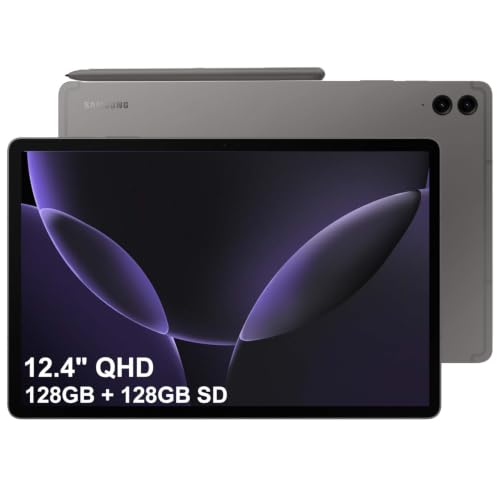
Samsung builds its premium tablet panels under the AMOLED name, its branding for active-matrix OLED, and the Galaxy Tab S family is the long-running showcase for that technology in large sizes. Published specifications for recent Tab S models combine high resolution, 120 hertz refresh, and HDR support, and the line demonstrates the classic emissive strengths at tablet scale: deep blacks for film, strong colour for illustration work, and slim bodies because no backlight assembly competes for depth. The family also illustrates the category cautions, since its panels use modulation-based dimming and its brightest figures are peak figures, exactly as the earlier sections describe for the technology generally.
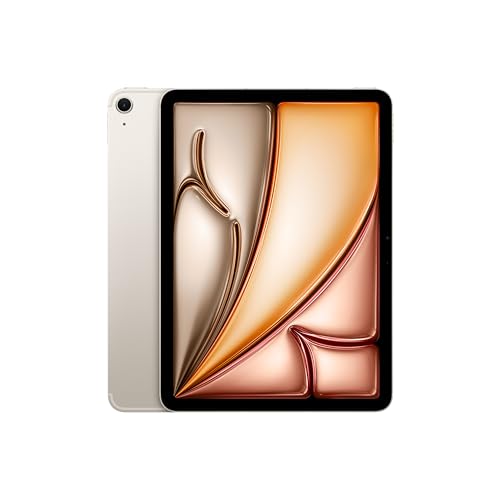
The iPad Pro line took a different published route with its Ultra Retina XDR display, which stacks two OLED panels in a tandem arrangement. Layering two emissive panels lets the combined structure reach higher brightness, with published figures of 1,000 nits across the full screen and 1,600 nits at peak for HDR content, while sharing the workload between layers so each panel runs less hard for a given output, a design also presented as helping longevity. The tandem approach shows where the technology is heading: not merely accepting the brightness ceiling of a single emissive layer, but engineering around it with structure, at the cost of additional complexity that only a flagship price tier currently absorbs.
These two families should be read as evidence about the technology rather than as a two-horse verdict. Other makers ship OLED tablets that apply the same principles at different sizes and positions, and panel sourcing across the industry means similar underlying technology appears under many badges. What a buyer can reliably extract from the flagship examples is the direction of travel: higher full-screen brightness through new structures, higher modulation frequencies answering sensitivity concerns, and ever more sophisticated compensation protecting panels across longer ownership. A mid-range OLED tablet bought today inherits much of that progress even when its own headline figures are more modest.
Published data discipline applies here with special force. Flagship launches generate summaries that repeat peak figures without window sizes, drop the distinction between a temporary outdoor boost and a sustained level, and treat a format badge as universal across applications. Returning to the maker specification page for any model under serious consideration, and noting the exact conditions printed beside each figure, remains the single most reliable step in the whole comparison process.
Pen latency, drawing feel, and the display as a work surface
For note-takers and artists, a tablet screen is not only for viewing; it is the desk. Pen latency, the delay between the stylus tip moving and the line appearing, is a chain of small delays: the digitiser sampling the pen position, the processor predicting and rendering the stroke, and the panel presenting the new frame. Published latency figures for leading stylus systems now reach into single-digit milliseconds under optimal conditions, and high refresh rates shorten the final link of that chain, which is one reason 120 hertz panels feel more like paper during fast handwriting even when the writer cannot name the mechanism.
OLED contributes a subtler quality to drawing. Because contrast is absolute at the pixel level, a fine dark line on a pale background, or a pale line on a dark canvas, holds its edge without the faint halo that backlight leakage can add around high-contrast strokes on some LCD panels. Colour accuracy at low brightness matters to illustrators working at night, and panels differ in how faithfully they hold colour as brightness falls, another property governed by tuning and dimming method rather than by the emissive principle alone. Buyers for whom drawing is the primary purpose should therefore weigh published colour coverage, stated pen latency, and refresh rate as a connected trio.
Convertible designs complicate the work-surface question in useful ways, and the machines collected at best 2in1 tablets show how keyboards, stands, and pen storage reshape what a tablet is for. An OLED screen in a convertible earns its keep twice, once as a drawing surface and once as the display for document work in laptop posture, but the buyer should confirm that pen performance figures apply in both postures and that the panel coating suits pen nibs, since a glossy screen that delights a film viewer can feel slippery under a stylus until a nib or a matte protector changes the friction.
Palm rejection, pressure sensitivity in levels published by the pen maker, and tilt support complete the drawing specification, and none of them is a property of OLED itself. Keeping the categories separate prevents a common buying error: assuming a superb panel guarantees a superb pen experience. The panel governs how the stroke looks and how quickly it appears; the digitiser and pen govern how faithfully the stroke follows intention. A tablet that excels at both is a genuine instrument, and its specification sheet will say so in two distinct places.
Thickness, weight, and living with a large emissive screen
Removing the backlight helps designers build remarkably thin tablets, and flagship OLED models publish thickness figures around five millimetres, thinner than a typical paperback spine edge. Thinness is pleasant in the hand and dramatic in the shop, but its practical value is mostly about total weight and bag bulk. A large OLED tablet still weighs roughly 450 to 700 grams depending on size and battery, because glass, battery, and frame dominate the mass once the panel itself is slim. Held one-handed for reading, that weight is felt within minutes; propped on a stand or shared across a lap, it disappears from attention.
Size choice should therefore start from posture rather than screen enthusiasm. A tablet read in bed and carried daily rewards the lighter end of the range, while a tablet that lives on a desk stand for illustration or film can spend its size budget freely. Cases and keyboard covers add meaningful grams, sometimes a third again, and published tablet weights exclude them, so the honest comparison adds the accessories a buyer will actually attach. The most beautiful thinness figure in the category means little once a protective folio doubles the thickness, which is an argument for reading accessory specifications with the same care as panel specifications.
Durability considerations shift slightly with thin emissive devices. A slim body has less material to absorb a corner impact, and a replacement OLED panel is among the costliest parts of the tablet, so a case is not an optional courtesy for a device that travels. Screen protectors deserve a compatibility check, because some films mute the anti-reflective properties that help OLED panels outdoors, and textured matte protectors chosen for pen friction scatter light in ways that soften the very contrast the panel was bought for. Every accessory decision on an OLED tablet is quietly a display decision.
Subpixel layouts and the sharpness of small text
Resolution figures assume each pixel contains a full set of red, green, and blue subpixels, but many OLED panels arrange subpixels differently, sharing some between neighbouring pixels in patterns designed around how human vision weights colour detail against brightness detail. The practical consequence appears in fine text and in the coloured fringes that can edge a diagonal line when a layout renders fewer colour samples than the headline resolution implies. At tablet viewing distances and modern pixel densities, most readers will never perceive the arrangement, yet anyone comparing two panels at identical stated resolution may still notice that one renders small serif type with slightly cleaner edges.
Pixel density, expressed in pixels per inch, sets the scale of the question. Around and above roughly 260 pixels per inch, individual pixels disappear at a normal tablet distance of 35 to 50 centimetres, and remaining sharpness differences come from rendering software, font smoothing, and subpixel geometry rather than raw count. A larger tablet spreads the same resolution across more glass, lowering density, which is why size and resolution must be read together. Buyers who read dense documents, sheet music, or code should favour the combination that keeps density high at their chosen size, rather than pursuing the largest panel and accepting a softer page.
Operating systems render text with assumptions inherited from LCD geometry, and modern platforms handle alternative layouts far better than early implementations did. Still, a reader who spends six hours a day in documents is entitled to treat text rendering as a first-order criterion, equal to contrast. The honest summary is that emissive panels deliver their most dramatic advantages in imagery and film, while their text performance is excellent but occasionally idiosyncratic, decided by details that specification headlines rarely mention and that careful display analysis can reveal.
Reflections, coatings, and reading outdoors
Every tablet screen is also a mirror to some degree, and outdoors the reflected scene competes with the emitted image. OLED black, so commanding in a dark room, offers no protection against a bright sky reflected in glossy glass; the reflection sits on the surface regardless of what the pixels beneath are doing. Anti-reflective coatings, laminated construction that bonds the glass tightly to the panel, and in some premium models etched or nano-texture glass options all attack the same problem from the surface side. Their published effect is sometimes expressed as a reflectivity percentage, and lower is meaningfully better in sunlight.
Sustained brightness returns here as the second half of outdoor legibility. A panel that can hold a high full-screen level for a white page, in warm ambient conditions, without its limiting systems stepping in aggressively, will keep a document readable on a train platform or a shaded terrace. Direct overhead sun defeats every consumer tablet eventually, and buyers should calibrate expectations accordingly: OLED tablets are excellent in shade and bright interiors, serviceable in open daylight with a good coating, and not a substitute for the specialised reflective displays used by dedicated outdoor reading devices.
Polarised sunglasses introduce a niche but real complication. Display polarisation layers can interact with sunglass lenses at certain orientations, dimming or colour-shifting the image when the tablet is held in landscape. Makers have reduced this effect with circular polariser designs in many modern panels, but a buyer who routinely uses a tablet outdoors with polarised eyewear, on boats or around snow, should treat orientation behaviour as a legitimate question for detailed product documentation rather than an oddity to discover on the first trip.
Uniformity, tint shift, and the panel lottery
No large emissive panel is perfectly uniform, and the imperfections have characteristic forms. At very low brightness, some panels show faint blotchiness on dark grey screens, a phenomenon often called mura, visible mainly in dark rooms on uniform test patterns. Colour can shift slightly with viewing angle, classically toward a cooler tint, because the optical path through the panel layers changes with angle. Manufacturing variation means two examples of the same model can differ subtly, which is why enthusiasts describe a panel lottery: the distribution is tight for reputable lines, yet it is not a single point.
Calibration narrows what variation remains. Makers publish colour accuracy claims for their better models, sometimes including average error figures against standard colour targets, and professional creative buyers should look for those numbers alongside gamut coverage. A panel can cover a wide gamut and still present it inaccurately out of the box; coverage describes the boundary of what the screen can show, while accuracy describes whether a given colour lands where it should. For film enjoyment the distinction is forgiving, but for photo editing intended to survive printing, accuracy is the figure that protects the work.
Low-brightness uniformity deserves a proportionate response. Test patterns at five percent grey in a pitch-black room represent a harsher examination than any real content a tablet will show, and minor variation there may never appear during films, reading, or browsing. Buyers should reserve concern for defects visible in ordinary use: a persistent tint across half the screen, banding in gradients of skies and fog, or a bright edge that draws the eye during dark scenes. Those are grounds for exchange under normal retail practice, distinct from the faint texture that only a test pattern can summon.
How the technology is improving, generation by generation
Panel development concentrates on the historical weak points in a predictable order. Efficiency comes first, because brighter output for the same power, or equal output for less, simultaneously helps battery life, heat, and longevity. New emitter materials and structures, including improved blue emitters that have long been the least efficient and shortest-lived component, push that frontier. Tandem stacking, already discussed in the flagship context, attacks brightness and lifespan together by sharing work between layers. Micro-lens structures that redirect light which would otherwise be trapped inside the panel raise output without asking the emitters to work harder at all.
Dimming behaviour is the second front. Higher modulation frequencies and hybrid dimming schemes have moved steadily from specialist selling points toward standard practice, precisely because sensitivity complaints taught makers that temporal comfort is part of display quality. Buyers comparing a current panel with one several generations old will often find the newer screen calmer at low brightness even when their contrast and colour figures look similar on paper, a reminder that specification sheets freeze a moving technology into numbers that age unevenly.
The third front is durability of the image itself. Compensation algorithms grow more granular, protective dimming of static elements grows smarter, and emitter lifespan figures published for panel generations keep lengthening. None of this converts an emissive panel into the right choice for a permanently static display, but it steadily widens the range of ordinary uses for which longevity is a settled question rather than a live anxiety. A buyer keeping a tablet for mixed daily work across several years is buying into the most mature version of the technology so far.
Matching the panel to the person, use by use
A film-centred buyer should rank black level, format support, and peak highlight performance first, then check that the tablet speakers and streaming applications honour the same formats the panel can display, because a chain is only as strong as its weakest licensed link. Screen size serves immersion here, and reflections matter less in the dim rooms where films are watched, so this buyer can safely prioritise the panel itself over coatings and outdoor figures.
A reading-centred buyer should invert several of those priorities. Dimming behaviour at low brightness, full-screen brightness for white pages, text rendering, and weight for long holds decide daily satisfaction, while peak HDR figures recede to irrelevance. Dark-mode reading applications flatter an emissive panel beautifully, but a reader loyal to bright paper-style pages should examine the battery discussion closely and consider whether daily charging rhythms fit the household routine.
A drawing or note-centred buyer lives in the pen section of the specification sheet and visits the panel for refresh rate, latency support, and colour accuracy. A student buyer, finally, should weigh the whole package with unusual honesty about workload: documents, lectures, and library sessions reward endurance, keyboard options, and a screen that stays comfortable across a long library evening more than they reward cinematic highlights. The panel is one component in a study tool, and its published virtues should be matched to the timetable it will actually serve.
Across all four profiles, the recurring discipline of this guide applies. Read peak figures with their window sizes, read endurance figures with their test conditions, read colour figures as coverage plus accuracy, and read comfort figures, modulation frequency and dimming method, as seriously as the dramatic numbers. Manufacturers publish enough information to make a sound decision; the information simply refuses to arrange itself into a single score, and any ranking that pretends otherwise is hiding the trade-offs a buyer most needs to see.
A final check before choosing any OLED tablet
Confirm the format support in the applications that will actually be used, not only in the operating system summary. Note the full-screen brightness beside the peak figure, and the modulation approach beside both. Check the pen latency and refresh adaptation range if a stylus will be used weekly. Add the weight of the intended case to the published body weight and hold something similar for ten minutes. Read the warranty wording on image retention. Each of those steps takes minutes, and together they convert an impressive specification page into a prediction about ordinary Tuesdays with the device, which is the only prediction that matters after the first week of ownership.
The reward for that care is substantial, because a well-chosen emissive tablet changes the emotional texture of familiar content: a documentary ocean at midnight that is truly dark between the waves, a childhood photograph whose shadowed corners finally separate, a page of white text floating on nothing at all in a dark room. Choose the panel whose published compromises align with the life it will lead, and its black pixels, switched off a million at a time, will keep delivering that quiet astonishment long after the specification sheet has been recycled and forgotten by everyone except the eyes that still notice.
Software features that only make sense on an emissive panel
Some software behaviours exist because of OLED physics and quietly change daily habits. An always-on clock or notification glance screen can light a few hundred pixels while the rest of the panel stays off, sipping power in a way no backlit display can imitate, because a backlit panel must energise its whole light source to show even one digit. Dark interfaces across the operating system stop being a style preference and become an efficiency measure, and application designers who offer a true black theme are giving emissive owners a measurable gift rather than a mood.
Screenshot and sharing habits reveal another difference. A scene that looks balanced on an emissive screen may appear slightly muted when shared to a backlit device, because the sender judged shadow detail against true black while the recipient sees it against grey. Photographers who edit on an OLED tablet for an audience viewing mostly on varied screens learn to check a histogram and keep critical shadow detail a step above the floor, so the image survives translation to lesser panels. That discipline costs nothing once learned, and it prevents the common disappointment of a carefully graded night photograph turning to mud on a friend laptop.
Accessibility settings interact with the panel in ways worth exploring during the first week of ownership. Reduced white point settings lower the intensity of bright tones for readers who find full brightness harsh, and on an emissive panel they do so per pixel without lifting the black floor, preserving the contrast that makes text comfortable. Larger text, bold text, and display zoom all render cleanly at modern pixel densities, and none of them disturbs the fundamental advantage of the technology: light appears only where the content asks for it, in exactly the amount requested, and nowhere else on the glass.
Hold the finished choice up against the ordinary week it will actually live through, the bright kitchen morning, the shaded train, the darkened room at the end of the day, and an OLED tablet picked with its numbers properly read will meet each of those hours on its own luminous terms, asking only that its owner remember which of its pixels are working, and let the rest stay dark.
Check prices on Amazon
Live listings for the shortlist in this guide are pulled from Amazon below, so prices and availability are always current at the moment you look.
Heat, brightness, and long sessions in warm rooms
Brightness is also a thermal budget. A tablet driving a bright, mostly white screen in a warm room must shed the energy its pixels convert to heat through a thin metal and glass body, and when the surface temperature reaches its designed ceiling the brightness limiting systems described earlier gain another reason to intervene. Readers who notice a screen stepping down during a long outdoor session are usually meeting physics rather than a fault: the panel is protecting itself, its battery, and the hand holding it. Shade, a pause, or a modest manual brightness reduction restores headroom more honestly than any setting hidden in a developer menu.
That relationship quietly rewards sensible habits during study and work marathons. A stand that lets air circulate behind the body, rather than a cushion that insulates it, keeps the device in its comfortable range for longer. So does resisting the reflex to pin brightness at maximum indoors, where a level well below the ceiling usually reads perfectly once the eyes adjust for a minute. The panel will still deliver its full drama when a film asks for it in the evening, precisely because it was not asked to spend the whole afternoon at its limit.
There is a fitting symmetry in ending where the technology begins. Every advantage traced through these pages, the black that costs no power, the highlight that borrows its brilliance from surrounding darkness, the thin body and the patient always-on clock, returns to one simple fact about light made exactly where it is needed. A buyer who understands that fact needs no slogan to choose well; the numbers on the specification page start speaking plainly, and the right tablet identifies itself by the compromises it openly declares.