What's inside
- Key Takeaways
- Quick Picks
- How We Chose These Picks
- Comparison
- Where does the money actually go in a laptop at this level?
- How do you check a listing before you buy?
- Which of these six suits a student, a home office, and a family?
- What should you upgrade first if the budget stretches?
- Common Mistakes
- Final Recommendation
- Frequently Asked Questions
- Related Guides
As an Amazon Associate I earn from qualifying purchases. This post may contain affiliate links at no extra cost to you.
widgetverdict.com is reader-supported. When you buy through links on our site, we may earn an affiliate commission.
A quick note on how the links work here: three laptops below are linked to their Amazon listings, where you can check price on Amazon and confirm the configuration in the listing title, and three are discussed in prose because their specifications are set by configuration rather than by model name. Every machine was chosen to sit inside the guide’s budget theme — the under-$1000 line is the topic’s own frame, not a price tag pinned to any individual pick.
The best 15 laptops under 1000 dollars occupy the most contested ground in the entire laptop market, and the contest is good news for buyers. This is the budget where manufacturers stop apologising: screens reach proper Full HD and beyond, memory settles at 16GB instead of the 8GB that hobbles cheaper machines, storage becomes roomy enough to forget about, and the processors are the same families — Ryzen 7, Core i7 and i9 class silicon — that premium lines advertise on stage. What the money below this line cannot buy is equally consistent: all-metal thinness, OLED panels as standard, and the hushed, machined feel of a flagship. The art of shopping this tier is knowing which of those sacrifices your life will never notice.
Six machines made the cut, and they disagree about almost everything except value. One HP spreads its storage across an internal SSD and a bundled external drive in a way that demands an honest explanation. One Lenovo adds a touchscreen and the strongest integrated graphics in the group for the least fuss. One ASUS does something faintly outrageous and fits a Core i9 — a processor tier usually reserved for workstations — into an everyday 15.6 inch shell. The prose picks widen the lens: a Dell that has defined mainstream value for a decade, an Acer that undercuts everyone on specification per coin, and an HP convertible for buyers whose work bends.
Read the configurations, not the badges, as you go. At this budget, two laptops sharing a name can be different machines wearing one label, and the listing title is the only document that tells you which one you are getting. That discipline — title first, brand second, reputation last — is the difference between the best 15 inch value of the year and a return label printed in week one.
Key Takeaways
- The ASUS Vivobook 15 puts a Core i9-13900H, 16GB of memory and a 1TB SSD into this budget class — the strongest verified specification here.
- HP’s Pavilion 15 headline storage needs reading carefully: its listing states 1TB made of a 512GB SSD plus a 500GB external drive, not a single internal terabyte.
- Lenovo’s IdeaPad Slim 3 is the only linked pick with a touchscreen, and its Ryzen 7 5825U brings capable Radeon integrated graphics.
- All three linked picks carry 16GB of memory — the figure that decides whether a laptop still feels quick in its fourth year.
- The three prose picks (Dell Inspiron 15, Acer Aspire 5, HP Envy x360 15.6) are configuration families; the listing title, not the name, is the specification.
Quick Picks
| Pick | Badge | Why it is here |
|---|---|---|
| HP Pavilion 15 Ryzen 7 | Storage Strategist | An 8-core Ryzen 7 and 16GB of memory, with storage split between a 512GB SSD and a bundled 500GB external drive. |
| Lenovo IdeaPad Slim 3 15.6 | Touch Value | A Full HD touchscreen, Ryzen 7 5825U and 512GB SSD in the group’s most straightforward, honest package. |
| ASUS Vivobook 15 i9 | Power Outlier | A Core i9-13900H and a full 1TB SSD inside an ordinary-looking everyday laptop. |
| Dell Inspiron 15 | Prose Pick | The mainstream default for a decade; configuration decides everything, so shop the title. |
| Acer Aspire 5 15.6 | Prose Pick | The specification-per-coin specialist, sold in many trims under one long-running name. |
| HP Envy x360 15.6 | Prose Pick | A premium-feeling convertible one rung above Pavilion, with panel and chip set by configuration. |
How We Chose These Picks
The budget frame did the first sort. This guide serves buyers whose ceiling is the under-$1000 theme, so machines were considered as members of that class — but because prices move and configurations multiply, no pick is printed with a price, and the linked listings are the place to check price on Amazon on the day you buy. What qualified a machine was the specification it could prove: a listing title stating its processor, memory, storage and screen in plain text. Three picks cleared that bar with linked listings. Three more earned prose coverage because the families are strong and the specifications are per-configuration.
Memory was the hardest gate after the budget itself. Eight gigabytes is the silent killer of value laptops — adequate in the shop, wheezing by the second year of browser tabs and video calls — so this guide favoured 16GB machines and treated anything less as a deliberate, eyes-open compromise. Storage was judged by type as much as size: a fast internal SSD changes daily life more than a large slow drive, which is why the Pavilion’s split storage arrangement is explained in full rather than hidden behind its headline number.
Screens were held to a Full HD floor with IPS-class viewing angles, because a 15.6 inch panel is big enough for its weaknesses to be obvious. Processors were weighed by core count and generation rather than badge prestige — an 8-core Ryzen 7 from a recent family will outrun an older chip wearing a fancier label. Around those cores we scored the ownership details: numeric keypads for spreadsheet lives, webcam quality for call-heavy jobs, Wi-Fi generation for crowded networks, and the maker’s service reach for the years after the warranty card is filed away. The result is a shortlist with no filler: six different answers to the same budget, each defensible on its own terms.

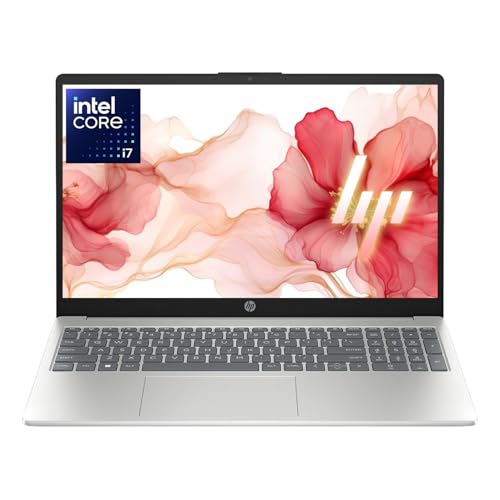
HP Pavilion 15 Ryzen 7 — Storage Strategist
Begin with the number that needs an asterisk, because this guide prints asterisks in full sentences. The Pavilion’s listing title states 1TB of storage, and states — in the same breath — that the terabyte is composed of a 512GB internal SSD plus a 500GB external drive in the box. That is not a 1TB SSD, and anyone who tells you otherwise has not read the title. Read generously, though, the arrangement has a logic: the internal 512GB SSD is the fast home for Windows, applications and active projects, while the bundled external drive becomes the archive — photo libraries, finished work, the backup copy every expert begs you to keep. Two drives also means your backup lives on separate hardware from your system, which is how data safety is supposed to work.
The computer wrapped around that storage is thoroughly grown-up. The listing specifies an 8-core AMD Ryzen 7 with 16GB of memory, a pairing that shrugs at the everyday extremes — forty browser tabs, a spreadsheet with ambitions, a video call running over all of it — and keeps its composure in the way only generous memory allows. Windows 11 Pro is fitted rather than Home, which brings business-grade security and remote tools that home users may never open but small-business buyers will value immediately, and the listing mentions an included Office suite and a numeric keypad, the unglamorous details that decide whether a laptop suits an invoicing life.
The screen is a 15.6 inch Full HD IPS panel — the correct specification for this class, with viewing angles that survive a shared glance and resolution that keeps text crisp at arm’s length. Pavilion build quality at this level is honest polycarbonate-and-metal work: not a flagship’s machined sculpture, but rigid, repairable, and designed to be opened by owners who upgrade rather than replaced by owners who cannot. For a machine expected to serve a household or a small office for years, that serviceability is a feature with a longer shadow than thinness.
Who should pause before buying? Anyone whose storage life is one giant working set — video editors with a single sprawling project library, gamers with a dozen large titles in rotation — because half this machine’s capacity lives outside the chassis, on a cable, at external-drive speeds. For them, the Vivobook below, with its true internal terabyte, is the cleaner answer. For everyone else, the Pavilion’s split is a workable, even thoughtful, arrangement — provided you buy it with your eyes open, which is exactly what this paragraph exists to ensure.
Daily life with the Pavilion settles into a comfortable rhythm quickly. It wakes fast, the keypad earns its keep at tax time and in every spreadsheet session, the Copilot-ready positioning in the listing reflects a machine aimed at the current Windows era rather than the last one, and the whole package carries the reassuring plainness of a tool bought to work. In a guide full of machines making one loud claim, the Pavilion’s claim is breadth — nothing it does is the best here, and almost everything it does is good enough to forget about, which is its own kind of excellence at this budget.
A month into ownership, the Pavilion’s owners tend to report the same discovery: the external drive stops being a caveat and becomes the household archive, the place finished projects and camera dumps retire to, while the internal SSD stays lean and quick. Habits form around good storage the way they form around good shelving. Buyers willing to adopt that one habit get a two-drive system for the price of an asterisk — and buyers who know they never will should simply choose the Vivobook and pay the idea no more rent.
- Display: 15.6 inch FHD IPS, per the verified listing title
- Processor: AMD Ryzen 7, 8 cores
- Memory: 16GB RAM
- Storage: 1TB total as listed — 512GB internal SSD plus 500GB external drive
- System: Windows 11 Pro, numeric keypad, Office suite noted in the listing
Strengths
- 16GB of memory and 8 cores cover heavy everyday multitasking
- Split storage doubles as a ready-made backup arrangement
- Windows 11 Pro and a numeric keypad suit small-business work
Trade-offs
- Half the headline storage is an external drive, not internal SSD
- IPS panel is correct rather than exciting
- Plastic-forward build lacks flagship polish
Best for: households and small offices that will use the external drive as their archive.
Not suited for: editors and gamers whose working files must all live internally.

Lenovo IdeaPad Slim 3 15.6 — Touch Value
The IdeaPad Slim 3 is the pick that makes the fewest speeches and keeps the most promises. Its verified listing describes a 15.6 inch Full HD touchscreen driven by an AMD Ryzen 7 5825U — an eight-core processor from a mature, efficient family — with Radeon integrated graphics, 16GB of DDR4 memory, and a 512GB SSD. Every figure in that sentence is the figure a sensible buyer would choose on purpose, and the combination has a coherence that spec-sheet roulette rarely produces: nothing is oversized to impress, nothing is undersized to save, and the machine’s balance shows in how unremarkable its competence feels after a month of ownership.
The touchscreen deserves more than its usual one-line mention, because at 15.6 inches touch changes how a laptop gets used around a home. Signing documents with a fingertip, tapping through recipes, zooming a map with a pinch, handing the machine to a child who expects every screen to respond — these small interactions accumulate into a different relationship with the computer. The panel is a proper 1920 by 1080 IPS-class touchscreen, so the touch layer costs nothing in clarity, and the Slim 3’s hinge and lid are built to take the poking that touch invites.
Radeon integrated graphics give this Lenovo a quiet second talent. Without a discrete GPU it will never be a gaming machine, but the 5825U’s graphics handle light gaming, photo editing, and hardware-accelerated everything — video calls, streaming, browser rendering — with an ease that older integrated graphics could not approach. Students who game modestly, families whose children live in creative sandbox titles, and anyone who edits photographs as a hobby will find the ceiling higher than the price class suggests. Wi-Fi 6 and Bluetooth 5.2 in the listing keep the wireless side current.
The tier’s compromises are at least honest ones. The webcam is a 720p unit — serviceable for calls, visibly softer than the 1080p cameras on pricier machines — and the chassis, while slim and tidy, is a polymer construction that will not be mistaken for aluminium. Battery life is a full working day of mixed use rather than a marathon. None of these will surprise anyone who has read this far, and none of them undermines the central proposition: this is the most completely rounded specification in the guide, bought without a single caveat that needs a paragraph to explain.
Ownership support tilts the argument further. Lenovo’s IdeaPad line is sold in enormous numbers, which means parts, guides, and community knowledge are everywhere when something needs attention in year three, and the Slim 3’s standard layout — no exotic ports, no proprietary oddities — makes it the easiest machine here to live with and to repair. If the Pavilion is the strategist’s pick and the Vivobook is the gambler’s, the Slim 3 is the recommendation you hand to a friend who asked you to just tell them which one to buy.
Travel with the Slim 3 makes a further quiet case for it. The chassis shrugs at backpack life, the charger is undemanding, and the machine’s efficiency means a café socket is a convenience rather than a rescue. Add a battery that treats a train journey as a warm-up and a screen that stays readable under station lighting, and the Lenovo becomes the pick that owners describe with the most dangerous word in laptop reviews: fine — fine every day, in every place, without a single story to tell about it.
- Display: 15.6 inch FHD 1920 x 1080 touchscreen, per the verified listing title
- Processor: AMD Ryzen 7 5825U, 8 cores, Radeon graphics
- Memory and storage: 16GB DDR4 with a 512GB SSD
- Wireless: Wi-Fi 6 and Bluetooth 5.2
- Camera: 720p HD webcam; Windows 11 Home
Strengths
- The most balanced specification in the guide, with no weak line
- Touchscreen adds genuine household versatility
- Radeon graphics stretch to light gaming and photo work
Trade-offs
- 720p webcam is the visible budget cut
- Polymer chassis feels ordinary beside metal rivals
- 512GB storage is adequate rather than generous
Best for: families and students after one honest machine for absolutely everything at home.
Not suited for: video-call professionals with a daily need for a sharp 1080p camera.
ASUS Vivobook 15 i9 — Power Outlier
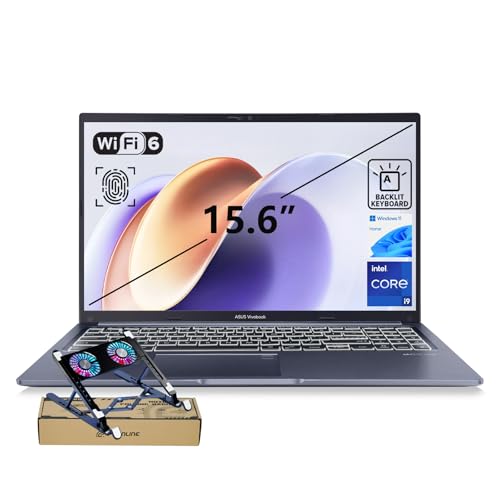
Somewhere in ASUS’s product planning, a meeting ended with a decision this guide is grateful for: take the ordinary, sensible Vivobook 15 — a machine designed for students, offices and kitchen tables — and fit it with an Intel Core i9-13900H. That processor belongs to the tier manufacturers usually reserve for mobile workstations and gaming flagships, a many-core, high-clock chip built for compiling, rendering and crunching. In the verified listing it arrives with 16GB of memory and a full 1TB SSD, a true internal terabyte, inside a 15.6 inch Full HD everyday laptop with a backlit keyboard and a fingerprint reader. The result is the strangest and most compelling value proposition in this guide: workstation muscle wearing a cardigan.
What the i9 changes in daily life is not the easy tasks — every pick here browses and writes beautifully — but the heavy ones that lesser machines schedule around. Large spreadsheets recalculate without the pause. Photo libraries export in a fraction of the time. Code compiles while you are still reading the error message from the last run. A student who discovers video editing, a home user who takes up 3D printing design, an analyst whose datasets keep growing month after month — the Vivobook simply does not ask any of them to buy a second computer when their ambitions expand beyond the original plan. Headroom is the product, and this machine has more of it than anything else at the budget.
The supporting specification reads like ASUS remembered the audience while indulging the processor. The physical webcam shield answers the privacy question with a sliding piece of plastic rather than a settings menu. The fingerprint reader makes sign-in a touch instead of a password typed twelve times a day. Wi-Fi 6 keeps networking current, and the 1TB SSD — internal, singular, unasterisked — swallows game libraries, media collections and project archives without the cable-and-external-drive choreography the Pavilion asks for. The listing’s blue finish and bundled positioning mark it as a consumer machine that happens to bench like a professional one.
Honesty requires the counterweight, and it is thermal and electrical rather than digital. A Core i9 under sustained load is a warm, thirsty chip; in a slim consumer chassis it will spin its fans audibly during long renders and draw its battery down far faster than the Ryzen machines here when pushed. Used as the everyday laptop it appears to be — documents, browsing, calls, streaming — it is quiet and efficient enough. Used as the workstation it secretly is, it wants its charger and a desk. Buyers who need the muscle occasionally will love the arrangement; buyers who need it constantly, away from sockets, should look at thicker machines built around the same silicon.
Longevity argues for the outlier too, and argues loudly. Processors age out of software support and everyday speed expectations more slowly at the top of the range; an i9 bought in this budget class is still a respectable chip deep into the machine’s life, long after the screen and battery have become the reasons to upgrade. Paired with the terabyte drive, the Vivobook is the pick most likely to still feel fast in year five — the true measure of value at any price, and a remarkable one at this one.
There is a resale and hand-me-down angle to the Vivobook that budget guides rarely mention. Machines with top-tier processors and big drives age into excellent second laptops — the teenager’s school machine, the spare for guests, the home server of small tasks — because their ceilings stay above everyday software for years. The i9 Vivobook bought today is plausibly the family hand-me-down champion of 2030, still quick when its contemporaries have retired, and that second life belongs in any honest value calculation.
- Display: 15.6 inch FHD, per the verified listing title
- Processor: Intel Core i9-13900H
- Memory and storage: 16GB RAM with a 1TB SSD (internal)
- Privacy and sign-in: physical webcam shield, fingerprint reader
- Keyboard: backlit; Wi-Fi 6; Windows 11 Home; Blue finish
Strengths
- Core i9 power is unmatched anywhere near this budget
- A true internal 1TB SSD, no split-storage asterisk
- Webcam shield and fingerprint reader are thoughtful everyday touches
Trade-offs
- Fans and battery drain show under sustained heavy loads
- FHD panel is ordinary beside the processor’s drama
- Slim chassis limits how long peak performance can be held
Best for: buyers whose hobbies or studies might grow into heavy workloads.
Not suited for: render-farm workloads far from a power socket.
Dell Inspiron 15 — Prose Pick
The Inspiron 15 is less a laptop than a landscape — a range so broad, sold in so many configurations over so many years, that the name alone tells you the size and almost nothing else. That breadth is exactly why it sits in prose: Dell has shipped Inspiron 15s with everything from entry Celeron-class chips to capable Ryzen and Core processors, with memory and storage spanning the full ladder, and a link from this guide could land you on any of them. What the family guarantees is a formula refined by enormous volume — a 15.6 inch screen, a full keyboard usually with a numeric pad, sensible ports, and a chassis designed to be manufactured, serviced and repaired at global scale.
Shopped correctly, the Inspiron 15 is one of the safest purchases on this page. Dell’s support infrastructure is vast, spare parts and teardown guides are everywhere, and the machine’s popularity means any competent repair shop has seen a hundred of them. The configurations to hunt mirror the linked picks above: a recent Ryzen 5 or 7, or Core i5 or i7, with 16GB of memory and at least 512GB of SSD storage, behind a Full HD IPS-class panel. A listing that states those figures in its title is a listing worth your money; a listing that hides them behind the family name is asking you to gamble, and the correct response to a gamble at this budget is to keep scrolling.
The ownership experience of a well-chosen Inspiron is deliberately uneventful. It does not turn heads, it does not pioneer features, and it does not surprise its owner in year three with an exotic failure. For offices buying several machines, for parents buying a student’s first real laptop, and for anyone whose highest priority is that the computer simply works and can be fixed anywhere, that uneventfulness is the luxury good. Excitement is available elsewhere in this guide; the Inspiron sells certainty.
Two cautions complete the picture. First, the family’s lower configurations — 8GB of memory, small drives, dim HD panels — wear the same name as the good ones, and they are the listings most aggressively promoted in sales. Second, build feel varies across the range’s price steps more than the branding admits. Neither caution is a reason to avoid the Inspiron; both are reasons to buy it the way this guide keeps insisting — by the title’s numbers, never by the name’s reputation.
Fleet buyers add one more consideration that favours Dell: consistency. Ordering the same Inspiron configuration for a whole team means one image to maintain, one set of parts to stock, one behaviour for the support desk to learn. The consumer version of that logic — buy the configuration your household already knows — explains the Inspiron’s endurance better than any single feature. Familiarity is a specification too, and Dell has been shipping it by the million.
- Screen class: 15.6 inch, Full HD IPS-class on the configurations worth buying
- Processor range: from entry chips to Ryzen 7 / Core i7 class — verify in the title
- Memory guidance: choose 16GB configurations; treat 8GB as a compromise
- Ownership: Dell’s service network and parts availability are the family’s real spec
- Buying check: every figure must come from the listing title, not the family name
Strengths
- Unmatched service reach and repair knowledge worldwide
- Well-chosen configurations are safe, balanced value
- Full-size keyboard layouts suit number-heavy work
Trade-offs
- The name spans excellent and poor machines alike
- Base configurations are promoted hardest and serve worst
- Design is anonymous beside flashier rivals
Best for: cautious buyers and small offices that value repairability over flair.
Not suited for: shoppers who buy by brand name without reading configurations.
Acer Aspire 5 15.6 — Prose Pick
Acer’s Aspire 5 has spent years as the answer to a specific question: how much specification can be bought before the money runs out? The family’s talent is allocation — Acer habitually fits a stronger processor, more memory, or a bigger drive than rivals manage at the same shelf position, accepting plainer materials and quieter design in exchange. In its 15.6 inch form the Aspire 5 has appeared with Ryzen and Intel chips across several generations, Full HD IPS panels as the sensible target, and configurations that regularly embarrass better-known names on a pure spreadsheet comparison. It is covered in prose for the same reason as the Inspiron: the name covers multitudes, and the title is the truth.
The Aspire’s personality is that of the diligent underbidder. Keyboards are comfortable, port selections are generous for the class — Acer has historically kept the full-size connectors that thinner rivals delete — and the machines are straightforward to open and upgrade, a trait that extends their useful life for owners willing to add memory or storage later. For a student or a home office, an Aspire 5 chosen at the right configuration delivers the daily experience of a machine a class above, which is the entire trick of value engineering performed honestly.
Where the savings show is in the senses rather than the statistics. Panels on some configurations run dimmer and less colour-rich than the Lenovo above; speakers are functional; the chassis flexes a little where metal machines do not. None of these flaws appear in a specification table, and all of them appear in the first week of ownership — which is why this guide places the Aspire as a deliberate choice for buyers who prioritise processing and capacity over screen beauty, rather than as a default. Know which buyer you are, and the Aspire either delights you or politely excuses itself.
Configuration discipline, one final time: target a recent Ryzen 5 or 7 or Core i5 or i7, 16GB of memory, 512GB or more of SSD, and a Full HD IPS panel, each stated in the listing. Aspire 5 listings that lead with those figures are the family’s honourable mainstream. Listings that lead with the price and bury the panel resolution are the ones that give value lines a bad name, and they are avoidable in ten seconds of reading.
Acer’s ownership community is an underrated asset of the Aspire line. Because the family sells in such volume to technically confident buyers, upgrade guides, battery replacements and troubleshooting threads exist for nearly every configuration ever shipped. The first-time owner who wants to add memory in year two will find the Aspire’s path documented step by step by strangers who enjoyed doing it. Machines that invite their owners to maintain them tend to be maintained — and maintained machines are the ones still running in year six.
- Screen class: 15.6 inch, target Full HD IPS configurations
- Family talent: strongest paper specification at a given shelf position
- Ports: historically generous full-size selection for the class
- Upgrade path: owner-friendly internals extend the machine’s life
- Buying check: panel brightness and resolution vary — read the title closely
Strengths
- Specification-per-coin is the family’s career achievement
- Good keyboards and port selections for everyday work
- Upgradeable designs reward long ownership
Trade-offs
- Some panels are dimmer than rivals at the same size
- Materials and speakers are where the money was saved
- Configuration spread demands careful reading
Best for: spreadsheet-minded shoppers ranking power and capacity above all.
Not suited for: screen-first viewers who notice dim, narrow-colour panels.
HP Envy x360 15.6 — Prose Pick
The Envy x360 15.6 is what happens when the Pavilion’s sensible formula is given a larger wardrobe budget. HP’s Envy line sits a rung above its mainstream machines — aluminium bodywork, tighter tolerances, better screens, and a 360-degree hinge that folds the 15.6 inch display into tent and tablet postures. In a guide about value, the Envy earns its prose place by answering a different question: not how little a good laptop can cost, but how much of the premium experience can be captured before the budget line is crossed. For buyers who handle their laptop all day and feel build quality in their fingertips, that question is the right one.
The convertible hinge changes the machine’s social life. Tent mode props the screen on a kitchen counter for recipes and calls; tablet mode turns a 15.6 inch display into a very large, very readable slate for documents and media; the keyboard disappears when it is not wanted. Paired with the Envy line’s typically strong speakers and bright panels — verify the exact panel per listing, as configurations range from good IPS to genuinely lovely OLED in some generations — the x360 becomes the most versatile object in this guide, the one laptop equally at home presenting to a client and streaming to a sofa.
That versatility is why no link appears here. Envy x360 15.6 configurations span processor families, memory sizes, and panel technologies wide enough that a single linked listing would misrepresent the family in both directions — underselling the best versions, overselling the rest. Shop it as you would the XPS’s smaller cousin: by full configuration, panel named in the title, memory at 16GB, storage at 512GB or beyond. Bought that way, the Envy is the pick for buyers who found the linked three capable but cold, and who are willing to trade a little paper specification for a machine that feels like an upgrade every time it opens.
The costs are weight and money. A 15.6 inch convertible is a substantial tablet and a noticeable lap presence, and Envy pricing leans towards the top of this guide’s budget theme, squeezing the specification you can afford inside it. If your work never bends, the hinge is dead weight; if your rooms and routines are flexible, it is the feature you will use daily and miss forever after. The Envy asks you to know your own habits — and rewards the self-knowledge generously.
Presentation work is where the Envy’s hinge stops being a lifestyle feature and starts earning money. A consultant flipping the screen towards a client, a teacher sharing a diagram across a desk, a salesperson running a demo without a projector — the x360 turns a laptop into a two-person tool, and no linked pick in this guide can do that trick at any configuration. If your work involves showing things to people sitting opposite you, weight that paragraph heavily; it may outweigh every specification table in this article.
- Screen class: 15.6 inch touchscreen, panel technology per configuration
- Form: 360-degree convertible in an aluminium body
- Position: HP’s premium rung above the Pavilion line
- Audio and build: historically a step above mainstream HP machines
- Buying check: chip, memory and panel must all be confirmed in the title
Strengths
- Premium build and hinge versatility the linked picks cannot match
- Strong panels on the configurations worth choosing
- Feels like an upgrade in daily handling
Trade-offs
- Convertible weight is real at this screen size
- Premium pricing squeezes the specification inside the budget
- Specification spread across listings is wide
Best for: hands-on owners feeling build quality daily, using tent or tablet modes.
Not suited for: desk-bound users paying for a hinge they will never fold.
Comparison
| Pick | Proven specification | Storage story | Character |
|---|---|---|---|
| HP Pavilion 15 Ryzen 7 | Ryzen 7 8-core, 16GB, 15.6 inch FHD IPS, Windows 11 Pro | 512GB internal SSD plus a bundled 500GB external drive | The breadth pick — keypad, Pro Windows, office-ready |
| Lenovo IdeaPad Slim 3 15.6 | Ryzen 7 5825U, 16GB DDR4, FHD touchscreen, Radeon graphics | 512GB internal SSD | The balance pick — touch, efficiency, no weak line |
| ASUS Vivobook 15 i9 | Core i9-13900H, 16GB, 15.6 inch FHD, fingerprint reader | 1TB internal SSD | The headroom pick — workstation chip, everyday clothes |
| Dell Inspiron 15 | Configuration family — target Ryzen 7 / Core i7 class with 16GB | Configuration family — target 512GB SSD or more | The certainty pick — service network above all |
| Acer Aspire 5 15.6 | Configuration family — strongest paper spec at its shelf position | Configuration family — often larger drives for the money | The allocation pick — power first, polish second |
| HP Envy x360 15.6 | Configuration family — aluminium convertible, panel per listing | Configuration family — target 512GB SSD or more | The feel pick — premium build and a folding hinge |
Where does the money actually go in a laptop at this level?
Understanding the anatomy of the budget explains every pick above. The processor and memory consume the largest share, which is why the Vivobook’s i9 is such an anomaly — ASUS spent the budget where rivals buy thinner metal. The display takes the next slice, and its cost curve is steep: the jump from a dim HD panel to a good Full HD IPS screen is small and worth it, while the jump from good IPS to OLED is large and is precisely the jump this budget class mostly refuses. Storage is comparatively cheap, which is why a terabyte appears here at all — and why the Pavilion’s split arrangement, half SSD and half external drive, should be read as a design choice rather than a scandal.
The invisible spending matters as much. Keyboards, hinges, cooling, and quality control divide machines that feel identical on a spreadsheet. A hinge engineered for a decade of openings costs more than one engineered for a warranty period; a cooling system that stays quiet under load costs more than one that merely survives it. The prose families — Inspiron, Aspire, Envy — differ largely in how they split this invisible budget, which is why two laptops with matching specifications can feel a class apart in the hand. Spend your attention where the spreadsheet cannot see, and this price tier rewards you out of proportion.
Finally, the budget buys time. A machine with 16GB of memory and a modern 8-core processor is not just faster today; it crosses the finish line of software’s rising demands years later than an 8GB machine with a weaker chip. Divided across the extra years of service, the sensible configuration is cheaper per year than the false economy below it — the single most useful calculation a buyer in this class can perform, and the one that turns a budget from a ceiling into a strategy: fix the years you demand from the machine first, then let the specification follow from the years, rather than letting a shelf price quietly decide both for you.
How do you check a listing before you buy?
Read the title like a contract, because it is one. Every figure that matters — processor model, memory size, storage size and type, panel resolution and technology — should appear in the listing title or the manufacturer’s specification block, and any figure you cannot find there should be treated as the worst plausible version. The Pavilion in this guide is the standing example: its title honestly discloses that its terabyte is split between an SSD and an external drive, but only for readers who read. Ten seconds with the title is the highest-value ten seconds in the whole purchase.
Then check the three silent specifications. Panel brightness, given in nits, decides whether the screen survives a bright room; webcam resolution decides whether your calls look professional; and the memory’s upgradeability — soldered or socketed — decides whether the machine can grow. Sellers advertise what flatters and omit what does not, so absence is information. A listing silent on brightness is rarely hiding a bright panel.
Close with the ownership paperwork. Confirm the warranty’s length and who honours it, the return window, and whether the operating system edition matches your needs — the Pavilion’s Windows 11 Pro, for instance, is a genuine plus for business buyers that a careless comparison would score as identical to Home. Screenshots of the exact configuration page, saved at purchase, settle any dispute about what was promised. It is unglamorous diligence, and it is the entire difference between this guide’s readers and the review sections full of regret.
Which of these six suits a student, a home office, and a family?
Students should weight battery, weight and durability in that order, which pushes the IdeaPad Slim 3 to the front of this guide for campus life: its Ryzen processor sips power through a lecture day, its touchscreen serves cramped desks and library tables, and Lenovo’s service reach matters when the nearest repair option is a campus IT desk. The Vivobook tempts students in technical subjects — engineering, computing, media — because its processor will still be smiling at final-year software, and its terabyte swallows four years of coursework, footage and ill-advised game installs without a purge.
Home offices run on calls, documents and spreadsheets, and should read this guide through that lens. The Pavilion’s numeric keypad and Windows 11 Pro fit an invoicing, bookkeeping life; its split storage gives a home business an archive drive from day one. The Inspiron, at a strong configuration, is the office manager’s version of the same answer — unglamorous, repairable, identical units across a small team. Webcam quality is the one figure to interrogate hardest here, because a home office laptop is a face before it is anything else, and the Slim 3’s 720p camera is the linked picks’ weakest professional feature.
Families buy differently again: the machine will be shared, dropped, borrowed and inherited, so toughness, storage and parental sanity dominate. The Pavilion’s two-drive arrangement quietly suits a household archive — photos on the external drive, system on the SSD. The Aspire 5, at a strong configuration, is the family’s value play, provided its panel suits the room where it will sit. And the Envy x360 is the family’s treat: the machine that folds for a film on the sofa and presents at a school open evening with equal ease. Match the pick to the household’s actual centre of gravity and the budget stops feeling like a constraint at all.
What should you upgrade first if the budget stretches?
Stretch in a fixed order, because the upgrades are not equal. Memory comes first if you are looking at an 8GB configuration of any family in this guide — the jump to 16GB transforms longevity more than any other single change, and on soldered machines it can only be bought at the start. Storage comes second: the step from 256GB to 512GB ends the weekly file shuffle, and the step to a terabyte, as the Vivobook shows, ends storage management altogether. A better panel comes third — brighter, wider colour — because you will look at it for every minute of the machine’s life.
What not to stretch for is equally instructive. A fancier processor in an 8GB machine is money spent waiting at a bottleneck. Extended warranties from third-party sellers rarely match the value of the manufacturer’s own cover bought selectively. And cosmetic upgrades — finishes, engraved anything — compete with the memory and storage that decide whether the laptop is still pleasant in year four. The discipline of this budget tier is that every coin has an opportunity cost with a spec sheet attached; spend where the years are.
One exception deserves naming: if the laptop is a work tool whose downtime costs money, support is an upgrade, not an accessory. The Inspiron’s service network and the manufacturers’ own next-business-day options exist precisely for buyers whose laptop is their livelihood. Everyone else can self-insure with a backup habit — which, conveniently, the Pavilion’s bundled external drive makes nearly automatic.
Common Mistakes
Headline storage is the trap with the most victims. A big round capacity figure can describe an internal SSD, a split arrangement like the Pavilion’s, or — on lesser listings — a small SSD padded by cloud trials and memory cards. The fix costs nothing: read how the capacity is composed before admiring its size. Buyers who skip that sentence are not unlucky; they are unread.
Skimping on memory to afford a fancier processor badge runs second. A strong chip paired with 8GB of memory spends its life waiting for the drive to swap data, while a mid-range chip with 16GB feels quicker at everything a normal day contains. At this budget the balanced machine beats the lopsided one so reliably that it should be treated as a law rather than a preference.
Two quieter errors complete the set. Buying the previous generation at a tiny discount forfeits years of efficiency and support for savings that evaporate across the machine’s life. And choosing by the single specification you understand — usually screen size — while ignoring panel quality, keyboard and webcam, produces a laptop that disappoints in a different small way every day. This tier forgives many things; it does not forgive inattention.
Final Recommendation
For most buyers reading this guide tonight, start with the Lenovo IdeaPad Slim 3. Its specification has no weak line, its touchscreen earns its place in family life, and its Ryzen efficiency suits the way a home laptop is actually used — bursts of work, hours of browsing, evenings of video. It is the machine this guide would hand to a relative with the fewest instructions attached to the box.
One closing thought on timing: this tier refreshes constantly, and a configuration that is the guide’s pick today will be succeeded within the year. That is not a reason to wait — the machine you need this semester is worth more than a marginally better one next semester — but it is a reason to buy the specification rather than the moment. A 16GB, 8-core, half-terabyte configuration bought with confidence today will not be embarrassed by next year’s shelves, because its fundamentals were never the fashionable part.
Choose the ASUS Vivobook 15 instead if your ambitions are heavier than your budget: the Core i9 and the true internal terabyte make it the only pick here that grows into editing, compiling, and serious creative work without a second purchase. Choose the HP Pavilion 15 if your life runs on spreadsheets and archives — its keypad, Pro Windows, and split storage with a ready-made backup drive fit that life precisely, asterisk and all. And if feel matters more than figures, shop the Envy x360’s configurations with this guide’s checklist in hand. Under this budget line, those four paths cover nearly everyone — pick the one that sounds like your house, read its listing title once more with fresh eyes, and buy it by its title.
Frequently Asked Questions
Is 16GB of memory really necessary at this budget?
For a machine you intend to keep, yes. Eight gigabytes runs today’s software adequately and tomorrow’s reluctantly; browsers, calls and office suites each grow heavier every year. All three linked picks here carry 16GB, and that single figure does more for a laptop’s fourth-year speed than any processor upgrade in the class. Buy memory like you are buying years, because you are.
What does the Pavilion’s split storage mean in practice?
Its listing states 1TB composed of a 512GB internal SSD and a 500GB external drive. Windows, applications and active files live on the fast internal SSD; the external drive suits archives, media libraries and backups. The arrangement works well for organised users and frustrates anyone who needs a single huge internal workspace — video editors and big game libraries should choose the Vivobook’s internal terabyte instead.
Can these laptops play games?
Lightly, and honestly. The IdeaPad’s Radeon integrated graphics handle esports titles and older games at sensible settings; the Vivobook’s i9 is powerful but pairs with integrated graphics too, so its gaming ceiling is set by graphics rather than processing. None of the six is a gaming laptop — buyers whose priority is play should spend this budget on a machine with a discrete graphics card and accept its weight and noise.
Should I buy last year’s model to save money?
Only when the saving is large and the specification is equal. Processor generations bring efficiency as well as speed, and support windows — driver updates, operating system features, security fixes — run from the generation, not the purchase date. A small discount for an older generation is usually a poor trade measured across a five-year ownership.
Is a touchscreen worth having on a 15 inch laptop?
It depends on the household. The IdeaPad Slim 3 shows the case for it: documents signed with a fingertip, children who expect screens to respond, quick taps instead of trackpad journeys. Desk-bound workers who never touch a screen will not miss it. Unlike memory or storage, touch is a preference rather than a performance figure — buy it if your hands already reach for screens.
How long should one of these laptops last?
Four to six years of good service is a fair expectation for the linked picks, with the battery the likeliest first replacement and memory headroom the main thing protecting year-five speed. The Vivobook’s processor gives it the longest runway; the prose families, chosen at strong configurations, match it. Treat the machine gently, keep its vents clear, and this budget buys half a decade. Buyers who plan for that horizon should also do two cheap things at the start: photograph the configuration page from the listing as proof of what was promised, and set up the backup routine — external drive, cloud, or both — in the first week, while the machine is still a novelty worth configuring carefully.
Related Guides
Budget settled but screen size still open? The film-first shortlist in the best 15 laptops for movies shows which of these panels earn a dark room, the premium tier in the best 15 laptops under 2k reveals what doubling the budget actually buys, and the brand deep-dive in the best 15 lenovo laptops maps Lenovo’s whole 15 inch range from IdeaPad to Legion.