Our Top Picks



What's inside
- RJ9, RJ10, RJ22, and the naming confusion
- The signal chain, piece by piece
- Compatibility with major desk phone families
- Headset styles for desk phone work
- Call center realities
- Setting up an RJ9 headset, step by step
- Troubleshooting by symptom
- Volume, hearing care, and long shifts
- Buying decisions, in the right order
- Wired RJ9 versus the alternatives
- Care, cleaning, and storage
- Frequently asked questions
- Who should skip RJ9 headsets
- Rolling headsets out across a team
- Inside the four wires
- Inline controls and daily ergonomics
- Reception desks and high-transfer roles
- Home offices with a desk phone
- Specifying for procurement, without tears
- Environmental and accessibility considerations
- Check prices on Amazon
- Final guidance
As an Amazon Associate I earn from qualifying purchases. This post may contain affiliate links at no extra cost to you.
A desk phone can ring all morning and still leave its owner tethered by a curly handset cord, shoulder raised, neck aching, notes half written. As an Amazon Associate we earn from qualifying purchases. An RJ9 headset breaks that posture, but only when its plug, wiring, and any amplifier or cable between headset and phone match the exact telephone sitting on the desk.
RJ9 describes a small modular plug and jack with four positions and four contacts, widely called 4P4C. On most office desk phones that jack appears twice in spirit: the handset connects through one, and on many models a dedicated headset jack of the same physical size sits nearby. The similarity is both the convenience and the trap. A plug that fits tells you nothing about whether the microphone and speaker wires land on the pins your phone expects, whether the phone can drive the headset directly, or whether an amplifier must sit in between. Successful RJ9 headset selection is therefore a compatibility exercise first and a comfort exercise second, and reversing that order explains most returns.
This guide works through the whole chain in the order a signal travels: the phone and its jack, the cable or amplifier, the quick disconnect joint that most professional headsets use, and finally the headset itself with its earpieces, microphone, and controls. Along the way it separates physical fit from electrical fit, explains why one headset can sound superb on a Poly phone and muffled on a Cisco model through the same size jack, and gives a setup and troubleshooting sequence that isolates faults without swapping parts at random.
RJ9, RJ10, RJ22, and the naming confusion
The registered jack names in this family cause endless muddle because sellers, phone makers, and headset makers use them loosely. Strictly, RJ9, RJ10, and RJ22 all refer to 4P4C modular connections used for handsets and headsets, with the designations historically tied to particular wiring arrangements rather than different plug shapes. In everyday commerce the three names are often treated as interchangeable labels for the same small plug, and a listing that says RJ22 headset usually means a 4P4C headset plug, not a distinct connector you must match by name. What matters is not which of those labels a seller printed, but the pin assignment and the device list the cable or headset was built for.
Contrast that with plugs that genuinely differ. RJ11 uses a wider six-position plug, commonly with two or four contacts, and serves telephone line cords and some older or specialized equipment; it will not fit an RJ9 jack properly and should never be forced. RJ45 is the still wider eight-position plug of network cabling and appears on the back of an IP phone for the network connection, not for a headset. USB and 3.5 mm connections belong to different device worlds entirely. If a headset purchase begins with a photograph of the plug held beside the phone jack, half the common ordering errors die on the spot.
Handset port versus dedicated headset port
Many desk phones offer two routes to a headset, and they are not equivalent. A dedicated headset jack is designed for the purpose: the phone’s headset button routes calls there, the handset can stay cradled, and the port’s audio levels are intended for a headset’s microphone and receiver. A handset port can also serve a headset through an amplifier or a suitable cable, with the handset unplugged or shared through a switch, but the phone may behave as if the handset is in use, and lifting or replacing the handset can become part of answering and ending calls unless a lifter or electronic hookswitch arrangement is added.
Read your phone’s own documentation for which route its maker recommends, because port behavior differs even within one brand’s range. Some models drive certain headsets directly from the headset jack with nothing more than the correct bottom cable. Others expect an amplifier for acceptable microphone level. A few route headset audio through the handset port by design. The model number on the phone’s underside label, not the family name on its display bezel, is the identifier that compatibility tables are built around, so copy it exactly before shopping or asking for advice.
The signal chain, piece by piece
The bottom cable
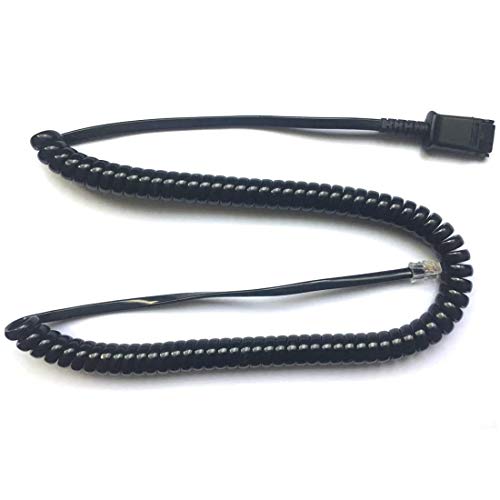
Between a professional headset and the phone there is almost always a bottom cable: a coiled or straight cord with the headset maker’s quick disconnect plug on one end and the RJ9 plug on the other. This unglamorous cord is where compatibility lives. Different bottom cables arrange the four wires differently, set different microphone paths, and suit different phone families. Headset makers publish cable compatibility guides keyed to phone models for this reason. Two cables can look identical on a desk, coil for coil, yet be wired for different telephones, which is why unlabeled spare cables in a drawer are a recurring source of one-way audio in offices.
Label every bottom cable when it is installed, with the phone model it serves written on a small tag near the plug. That ten-second habit prevents the classic reorganization failure in which headsets, cables, and phones are separated during an office move and recombined at random on the new desks. It also turns troubleshooting into substitution: a known-good labeled cable for that phone model either cures the fault or clears the cable of suspicion.
Quick disconnect, the joint in the middle
Most corded professional headsets end not in an RJ9 plug but in a quick disconnect, universally shortened to QD. The QD joint lets a wearer unplug the headset from the bottom cable in one motion, leaving the cable attached to the phone, so a supervisor can step away, a headset can move between shifts, or a training partner can connect through an adapter. Each major headset family uses its own QD shape and pin arrangement, and QD systems are not cross-compatible between brands without specific adapters. A Plantronics-style QD, a Jabra-style QD, and other proprietary joints may look like cousins; they are not mates.
Choose the headset family and the phone cable as one system. If your office already owns bottom cables and amplifiers for one QD family, new headsets from that family drop in without further spending, while a bargain headset from another family quietly requires new cables at every desk. QD joints also wear: a joint that crackles when flexed, loses one ear, or needs to be held at an angle has reached the end of its service, and cleaning its contacts with a dry cloth is the only home remedy worth attempting before replacement.
Amplifiers and processors
An amplifier, often called a headset processor or base, sits between phone and headset when the phone cannot drive the headset suitably on its own or when the user needs independent volume and microphone controls at the desk. Classic universal amplifiers connect to the phone’s handset port, include a switch to select among several wiring configurations, run from batteries or a mains adapter, and provide transmit and receive adjustment plus a mute. Their configuration switch exists precisely because handset port wiring varies; the setup ritual of choosing a switch position while a colleague listens on the other end is a normal part of installation, not a sign of a defective unit.
Newer phones with capable headset ports often need no amplifier at all, just the correct direct-connect bottom cable, which keeps desks simpler and removes batteries from the maintenance list. The decision rule is specific, not ideological: consult the compatibility guidance for your exact phone and headset pairing. If a direct cable is listed, use it. If an amplifier is specified, fit one and set it up carefully. Guessing in either direction produces the signature failures of this category: microphone levels too faint to use, sidetone that makes your own voice boom in your ear, or distortion that callers describe as shouting through a tunnel.
Compatibility with major desk phone families
Cisco phones
Cisco desk phones span several generations, from long-serving unified communications models to current Webex-era desk devices, and headset behavior follows the generation. Many Cisco models provide a dedicated headset jack and work with a direct-connect cable specified for that series, while others integrate with electronic hookswitch control so calls can be answered and ended from the headset itself when paired with a suitable wireless base or adapter. Wired RJ9 users should confirm two separate things that are often conflated: audio compatibility, meaning the correct bottom cable for intelligible two-way sound, and call control, meaning any remote answer feature, which wired RJ9 connections generally do not provide beyond the phone’s own headset button.
Cisco’s own documentation and headset makers’ compatibility databases both key their answers to the full model designation. A cable validated for one Cisco series should not be assumed correct for another merely because both phones carry the same logo and the same size jack. In multi-site organizations, recording the cable part used at each phone model, once proven, saves repeating the research at every new hire’s desk.
Poly phones
Poly desk phones, including the long-running VVX and SoundPoint lineages and newer Edge and Trio-adjacent desk models, are staples of open-standard SIP deployments. Many provide a dedicated RJ9 headset port and a documented headset menu in their settings, and some models also offer a 3.5 mm or USB option that should not be confused with the RJ9 route. Poly publishes headset compatibility notes, and the major headset makers maintain corresponding cable recommendations; where both agree, installation is usually a matter of connecting the specified cable and selecting the headset in the phone’s audio settings where the model requires it.
A recurring Poly-specific snag is assuming the headset port is active when the phone’s configuration has routed audio elsewhere or when an administrator has locked settings. If a correctly cabled headset is silent, check the phone’s own audio preferences and headset volume before condemning hardware, and involve the voice administrator early in managed deployments, since provisioning templates can override local choices overnight.
Avaya phones
Avaya desk phones, from the widely deployed 9600 series to the current J series and K series devices, have their own headset traditions, including models where the headset jack and its behavior are tied closely to the phone’s firmware and call-server configuration. Many Avaya installations were built as complete systems by resellers, with headsets, cables, and amplifiers supplied as a matched bundle; in those estates, the wisest purchasing move is to identify the existing bundle’s cable and QD family and extend it, rather than introducing a second ecosystem. Standalone buyers should verify the exact Avaya model against the headset maker’s current guide, paying attention to whether an amplifier or a direct cable is specified, because Avaya models differ on that point more than a casual glance suggests.
Yealink, Grandstream, Fanvil, and other SIP phones
The broad SIP market adds models at many feature levels, most with an RJ9 headset jack on midrange and higher devices. Compatibility here leans heavily on the headset makers’ databases, which cover popular models thoroughly and obscure ones thinly. For a phone absent from every database, a universal amplifier with a configuration switch is often the pragmatic route, because its adjustability covers wiring variation that a fixed direct cable cannot. Receptionists and call-heavy roles on these phones benefit from confirming headset button behavior and ring notification through the headset, since support for features like a ring alert in the earpiece varies by model and firmware.
Headset styles for desk phone work
Monaural versus binaural
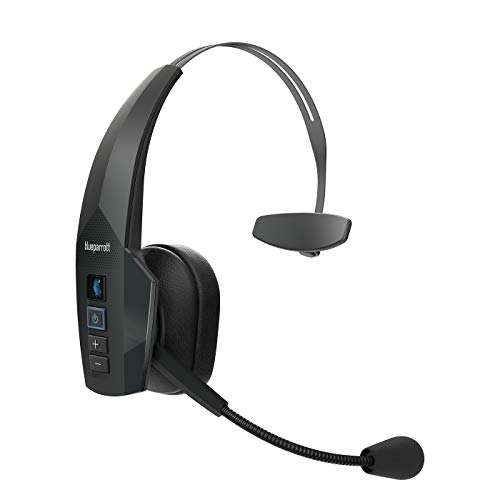
A monaural headset covers one ear and leaves the other open to the room. It suits office workers who field calls intermittently, need to hear colleagues, and dislike the isolation of full coverage. A binaural headset covers both ears and suits call center agents and anyone working in a noisy room, because covering the second ear improves concentration and makes callers easier to understand without raising volume. Neither is universally better; the honest test is the acoustic reality of the desk and the share of the day spent on calls. Staff who move from occasional calls to full shifts usually migrate to binaural designs within months, and buyers equipping a team should expect that pattern rather than fighting it.
Over-the-ear, headband, and convertible wearing styles
Headband designs distribute weight across the head and hold microphone position most consistently, which is why they dominate professional ranges. Over-the-ear hooks reduce headband pressure and suit wearers who dislike anything across their hair, at some cost in stability during animated conversation. Convertible models that swap between headband and ear hook give uncertain buyers a way to learn their preference, and give shared-desk operations flexibility. Whichever style is chosen, the microphone boom must reach a position two finger-widths from the corner of the mouth without pressing the cheek; a boom that cannot get there will never deliver its best sound, however good its capsule.
Microphones and noise handling
Desk phone headsets use noise-cancelling microphone designs that favor voice arriving from the mouth’s direction over room sound arriving from everywhere. In a quiet private office, the difference between a basic voice tube or standard microphone and a strong noise-cancelling boom is modest. In an open floor with neighboring conversations, it is the difference between a caller hearing you and a caller hearing the room with you somewhere inside it. Ultra-noise-cancelling booms narrow the pickup further and reward consistent boom placement; a wearer who lets the boom drift will sound distant on any design. Acoustic protection circuits that limit sudden loud peaks are worth seeking for full-shift wearers, protecting hearing during line faults, misdials into fax tones, and other telephony surprises.
For readers comparing wired desk options against computer-based audio used elsewhere in the building, background on general fit and microphone behavior in guides such as best 3 5 mm headsets can sharpen expectations, but remember that the RJ9 chain adds the phone and its cable as variables no computer headset faces.
Call center realities
Call centers expose every weakness in a headset system at scale. Headsets are worn for entire shifts, shared or personally assigned under hygiene policies, plugged and unplugged at QD joints dozens of times a week, and expected to sound identical from seat to seat so that quality monitoring compares agents rather than equipment. Operations that thrive standardize ruthlessly: one headset model, one QD family, one cable per phone model, spare stock at the team leader’s desk, and a simple fault ticket vocabulary that distinguishes no audio, one-way audio, crackle, and low microphone level. Standardization also makes training adapters practical, since every seat can accept the same supervisor Y-cord or listen-in arrangement.
Durability features that look like marketing on a single purchase reveal their value here: reinforced QD strain reliefs, braided or heavily jacketed cords, replaceable ear cushions and voice tubes, and booms built for repeated flexing. Hygiene is an operational topic, not an afterthought. Personally assigned headsets with replaceable cushions, a cleaning routine that uses only maker-approved wipes on plastics and foams, and a stock of spare cushions keep a fleet presentable and safe. Foam cushions are consumables; budgeting them as such ends the slow degradation in comfort and seal that agents otherwise endure silently.
Training, supervision, and call recording setups
Training adapters split the headset connection so a trainee and a trainer can both listen, with the trainer’s microphone muted until they choose to speak. These Y arrangements depend on the same QD ecosystem as the headsets themselves, so they must be sourced within the family in use. Supervisors who monitor calls need arrangements that do not degrade the agent’s audio; a crackling training cord undermines both the call and the coaching. Where calls are recorded through the phone system, headset choice rarely affects recording legality or quality directly, but consistent microphone levels across seats make recordings uniformly intelligible, which compliance teams appreciate during retrieval.
Setting up an RJ9 headset, step by step
Begin with the phone idle and the handset cradled. Identify the headset jack from the phone’s diagram rather than by feel; on many phones the handset and headset jacks sit close together and accept the same plug, so a confident push into the wrong socket is the most common first error. If your arrangement uses the handset port through an amplifier, follow that amplifier’s diagram instead, which typically places the amplifier between phone and handset as well as headset.
- Connect the bottom cable’s RJ9 plug to the chosen phone jack until its latch clicks, and route the cable so it cannot be trapped by the phone’s tilt stand or a desk drawer.
- Join the headset’s QD to the cable’s QD with a firm push, confirming the joint is fully seated and aligned as its keying intends.
- If an amplifier is in the chain, connect it per its diagram, fit its power source, and set its configuration switch to the starting position its guide recommends for your phone family.
- Put the headset on, position the boom, and press the phone’s headset button or lift the handset as your arrangement requires to obtain dial tone in the earpiece.
- Call a cooperative colleague or a known echo service, speak at normal volume, and adjust microphone level on the amplifier or phone until your voice is clear without background emphasis.
- Adjust receive volume to a comfortable level for that caller’s normal voice, then place a second call to a different person, because one caller’s loudness is a poor universal reference.
- Make a note of the final switch position, cable identity, and any phone menu setting you changed, and tape that note inside a desk drawer for the next person who inherits the seat.
Allow a full working day before judging comfort or making final level decisions. Ears adapt, headbands settle, and the true test of a boom position is whether it survives a day of natural movement without drifting. Small adjustments on day two, made one at a time, converge faster than a wholesale rearrangement after the first call.
Troubleshooting by symptom
No sound in the earpiece
Check the obvious sequence first: headset mode engaged on the phone, QD fully seated, cable in the intended jack rather than its neighbor, amplifier powered and switched to headset rather than handset. Substitute a known-good headset on the same cable, then a known-good cable under the same headset. The substitution that restores sound names the faulty layer, and in office practice the cable and QD joint fail far more often than phone jacks. A jack that has hosted a plug forced at an angle can lose contact tension; if every known-good chain fails on one phone, the phone itself becomes the suspect and belongs in the voice team’s queue.
Callers cannot hear you, or hear you faintly
Microphone faults begin with position: boom drifted outward, capsule openings facing away, or a voice tube blocked by debris in older designs. Next suspect the chain’s microphone path: wrong bottom cable for the phone, amplifier transmit level low, amplifier configuration switch between positions, or a mute engaged at an inline control the wearer forgot. Speak while gently flexing the cord along its length; a microphone that cuts in and out with movement identifies a conductor failing inside the cord or at the QD, and that part should be replaced rather than nursed.
You hear callers, but they hear themselves echo
Echo on desk phone calls often originates in level mismatches and hybrid behavior in the wider phone system, but the headset chain can contribute when microphone level is set very high and the earpiece volume is also high, letting the microphone hear the receiver. Reduce one level at a time, starting with microphone transmit, and retest with the same caller. Persistent echo across many callers and phones is a system matter for the voice administrator; echo that follows one headset or amplifier from desk to desk is a local matter, and substitution will prove which.
Crackle, buzz, and intermittent cutting out
Crackle that follows cord movement points to conductors or QD contacts. A steady buzz suggests grounding or power issues around an amplifier, a failing mains adapter, or a cable routed alongside a noisy power supply. Try the amplifier on battery power if it supports it, move its adapter to a different outlet, and reroute cords away from monitor power bricks and fluorescent fittings. Intermittency that appears only when the wearer turns their head is almost always mechanical, in the cord, the QD, or the boom’s internal wiring, and no phone setting will cure it.
Your own voice sounds too loud or too quiet in your ear
Sidetone is the portion of your voice fed back into your earpiece, and it regulates how loudly you speak. Too little sidetone makes wearers shout without realizing; too much makes every word boom and distracts. Some phones and amplifiers expose a sidetone or microphone level adjustment, others fix it by design. This is one reason the same headset can feel right on one phone and wrong on another, and why piloting a headset on the actual phone fleet matters more than showroom impressions gathered elsewhere, a lesson that echoes broader buying comparisons such as best 10 headsets where context decides rankings.
Volume, hearing care, and long shifts
Set receive volume for the quietest regular caller, not the loudest, and then resist raising it for every call. A headset that must run near maximum to make ordinary callers intelligible has a chain problem worth fixing, because headroom is also hearing protection when a loud signal arrives. Acoustic limiting in professional headsets caps sudden peaks, yet wearers still control average exposure across a shift. Breaks matter as well: even a comfortable headset concentrates sound at the ear for hours, and short pauses between call blocks are part of sustainable call work, not indulgence.
Fit influences both comfort and hearing. A binaural headset with a good cushion seal achieves clarity at lower volume than a loose monaural piece in a noisy room, which is a genuine safety argument for binaural designs in loud environments. Managers specifying for teams should treat cushion condition as part of volume policy: flattened, torn cushions leak sound, invite higher volume, and quietly undo the protection the original design provided.
Buying decisions, in the right order
Start with the phone inventory, not the headset catalog. List every phone model in service, note which have dedicated headset jacks, and record any existing amplifiers and QD cables already owned. That inventory usually narrows the headset field dramatically, because the correct bottom cable or amplifier must exist for each phone model in your chosen QD family. Next decide wearing style and ear coverage by role: reception and shared desks differ from full-shift agents, and a single fleet-wide choice often serves the majority while a documented exception serves the rest.
Then weigh the ownership details that determine satisfaction after the first week. Are ear cushions, QD cables, and booms replaceable and obtainable? Does the maker publish a compatibility database you can consult without telephoning anyone? Can a wearer mute and adjust volume without hunting for the phone? Is the cord long enough to reach a keyboard tray and a note pad without tension, yet not so long it pools under chair casters? Chair casters, incidentally, end more headset cords than any electrical fault; routing cords clear of wheels is a buying and installation consideration in one.
Budget conversations belong at the system level. A headset’s own tag is only part of a seat’s equipment: bottom cable, possible amplifier, spare cushions, and eventual cord replacement complete the picture. Comparing complete seat setups, rather than headline headset figures, produces fairer decisions and fewer surprises during rollout. Broad market surveys like best 100 headsets can orient expectations about feature tiers, but a desk-phone deployment succeeds on compatibility paperwork, not on feature counts.
New, refurbished, and surplus considerations
Professional headsets circulate widely on secondary markets because call operations refresh fleets regularly. Surplus units can serve well if their QD family matches your cables and their wear items are renewed, yet cushions, foam windscreens, and voice tubes should be replaced on hygiene grounds without exception, and cords of unknown history deserve skepticism. Verify the exact variant, since a model name may cover several QD or plug configurations produced over years. A headset that arrives with the wrong factory termination is not a bargain at any figure; it is a different product wearing a familiar name.
Wired RJ9 versus the alternatives
Wireless desk headsets using a base station still connect to the phone, often through the same RJ9 handset or headset path plus a lifter or electronic hookswitch cable for remote answer. They free the wearer to fetch documents mid-call and dominate executive and reception roles where movement matters. Their costs are batteries that age, radios that need pairing discipline, and bases that occupy desk space. Corded RJ9 headsets answer with silence on all three counts: no charging, no pairing, no interference, and a purchase that keeps working for years. For fixed seats with long call hours, corded remains the rational default in many operations.
USB headsets belong to computers and softphones. If your organization is migrating from desk phones to softphone clients, headset strategy should follow that migration rather than precede it; buying RJ9 equipment for phones scheduled for removal wastes money, while abandoning reliable desk phones solely to justify USB headsets wastes working infrastructure. Hybrid workers who use both a desk phone and a computer may genuinely need two audio paths, and some amplifier and base designs bridge both. Map the actual call paths in your building before assuming one device must cover every scenario, in the same spirit that tier comparisons like best 120 dollar headsets separate genuine capability steps from decorative ones.
Care, cleaning, and storage
Unplug by the QD for breaks rather than by yanking cords, coil cords loosely without tight kinks, and hang headsets on a hook or stand instead of leaving them under paperwork or monitors. Clean ear cushions and housings with maker-approved methods only; solvents that feel harmless can attack foams and finishes, and moisture driven into a microphone opening during enthusiastic cleaning creates the very muffling the cleaner hoped to cure. Replace cushions when they flatten or crack, replace windscreens when they thin, and retire cords whose jackets split near the QD or plug, since exposed conductors progress quickly from intermittent to dead.
Storage between shifts shapes fleet life. A drawer tangles cords and bends booms; a simple hook per seat, or a labeled locker slot for personally assigned units, pays for itself in avoided replacements. Shared headsets deserve a documented cleaning handoff between users, with cushions treated as personal items wherever policy allows. None of this is glamorous, and all of it is cheaper than the alternative, which is a rolling program of unexplained failures and emergency purchases.
Frequently asked questions
Will any RJ9 headset work on any desk phone?
No. The plug fits many phones, but wiring, microphone level, and the need for an amplifier vary by phone model. Match the headset’s QD family to a bottom cable or amplifier validated for your exact phone, and treat a seller’s blanket promise of universal fit as a prompt to ask harder questions, not as reassurance.
What is the difference between RJ9 and RJ22?
In practical shopping, very little: both labels are used for the same 4P4C handset and headset plug family, with the formal designations rooted in wiring definitions. Judge a product by its stated phone compatibility and pin configuration rather than by which of these labels appears in its title.
Do I need an amplifier?
Only if your phone and headset pairing calls for one. Many modern phones drive a headset directly through the correct cable; others need an amplifier for proper microphone level and desk controls. The compatibility guide for your exact pairing decides, and guessing produces faint microphones or booming sidetone.
Can I answer calls away from the desk with a corded RJ9 headset?
No. Corded headsets answer at the phone, using its headset button or handset as the arrangement requires. Remote answer belongs to wireless systems with a lifter or electronic hookswitch support for that phone model. If walking to a printer mid-call is essential to the role, that requirement should drive a wireless decision from the start.
Why does my headset work on one phone and not another in the same office?
Because the office’s phones are probably not identical, or their cables are not. Different models, firmware settings, and bottom cables produce different results under the same headset. Label cables by phone model, compare settings between a working and a silent desk, and the discrepancy usually identifies itself.
How long should a professional corded headset last?
With replaceable cushions and a sound cord, the headset itself can serve for years of daily use. Cords and QD joints are the wear frontier and may need renewal sooner, especially in call centers. Longevity claims mean little without parts availability, so favor product families whose cables and cushions remain obtainable.
Who should skip RJ9 headsets
Skip them if your calls have already moved entirely to a computer softphone, if your phone model lacks any headset path and is due for replacement, or if the role genuinely requires moving around a large space while talking. Also skip them if nobody in the organization will own compatibility records; an unmanaged mixture of QD families and unlabeled cables degrades into daily friction that a simpler, standardized alternative would avoid. In those cases the honest answer is to fix the telephony plan first and choose headsets as its final step.
Rolling headsets out across a team
A small pilot beats a building-wide guess. Equip one desk of each phone model in service, let those wearers work real shifts for a week, and record every adjustment, complaint, and cable change. The pilot will surface the phone whose headset menu hides a necessary setting, the desk whose chair destroys cords, and the role whose noise level demands binaural coverage, all while the stakes are a handful of seats. Only then order for the floor, with spare cables and cushions included in the same shipment so the first month’s inevitable mishaps do not wait on a second delivery.
Accompany the hardware with a one-page seat card: which jack, which button answers, where mute lives, what to check before calling for help, and whom to contact when checks fail. Most support tickets in the first fortnight are answered by that card. Supervisors should also agree on how headsets are assigned, cleaned, and replaced, in writing, before the boxes arrive; policies invented after the first hygiene dispute satisfy nobody and tend to be enforced unevenly.
Records worth keeping
Maintain a simple register linking each seat to its phone model, headset model, QD family, bottom cable identity, amplifier presence and switch position, and installation date. This register is the difference between a five-minute fix and an afternoon of archaeology when a desk goes silent six months later. It also disciplines purchasing: any proposed new headset can be checked against the register’s QD families and cable stock before money moves, preventing the slow drift into incompatible islands that makes support staff quietly despair.
Inside the four wires
Four contacts carry everything an RJ9 headset exchange requires: two wires serve the earpiece, two serve the microphone, and the order in which those pairs meet the phone’s pins is the wiring variation that bottom cables exist to manage. One phone family may expect the microphone pair on the inner contacts and the receiver pair on the outer, while another arranges them differently or treats polarity in a way that leaves a mismatched cable faint, distorted, or silent in one direction. This is why one-way audio is the signature symptom of a wrong cable: one pair landed correctly while the other did not, so half the conversation travels perfectly and the other half vanishes.
Understanding that picture protects buyers from two seductive errors. The first is the passive adapter sold as a universal cure, a short dongle that rearranges nothing and merely extends a plug; if the wiring order is wrong, lengthening it changes nothing. The second is rewiring by guesswork, cutting a cord and swapping conductors by trial. Desk phone audio levels and microphone bias voltages are not standardized enough for improvisation to be safe, and a miswired microphone circuit can damage a phone port or a headset capsule. The professional route is always a cable built and documented for the pairing, or an amplifier whose configuration switch was engineered to cover the variations.
Direct-connect cables versus amplified chains, heard side by side
When both routes are legitimate options for a phone, their character differs in ways wearers notice. A direct cable is transparent and maintenance-free, with volume governed by the phone and no batteries to expire mid-shift. An amplifier adds desk-level control that many agents prefer, a mute within thumb’s reach, and the ability to fine-tune microphone level for a soft-spoken or loud-voiced wearer without touching phone menus. It also adds a box, a power dependency, and settings that colleagues can disturb. Neither character is superior in the abstract; a quiet back office with capable phones leans direct, while a heterogeneous call floor with shared phones leans amplified, and mixed estates often run both, documented seat by seat in the register described earlier.
Inline controls and daily ergonomics
Many corded headsets place a small control on the cord or QD housing: volume wheel or buttons, a mute switch, sometimes a clothing clip that anchors the control where a hand expects it. These details decide whether a wearer actually uses mute during a cough or a side conversation, which callers experience as professionalism. A mute that requires hunting down the cord to the desk is a mute that goes unused. Evaluate controls by touch with eyes on a screen, because that is how they will be used; a control distinguishable by feel, with a definite detent or click, outperforms a smooth slider that leaves its state ambiguous.
Ergonomics extends beyond the ears. A headset that fits well but drags its cord across the keyboard tray will annoy within a day. Route the cord to the side of the dominant writing hand where possible, give it a service loop that allows leaning back without tension, and anchor it with the provided clip so head movement does not tug the earpiece. Wearers who share desks across shifts should agree on a default routing and control position, resetting the seat for the next person as part of handover, much as drivers adjust mirrors rather than inheriting a predecessor’s angles.
Glasses, hearing aids, and other real-world fit notes
Glasses wearers should pilot headband pressure over a full shift, because a headset that feels fine for ten minutes can press spectacle arms painfully by afternoon. Binaural models with softer, well-spaced cushions and moderate clamping force usually serve this group best, and some wearers prefer ear-hook styles that bypass the temple area entirely. Hearing aid users face a more individual puzzle: behind-ear devices can conflict with over-ear cushions and can pick up interference from some phone electronics, so a genuine trial on the actual phone, with the user’s own aids, is essential rather than optional. Telecoil-equipped environments and specialist adapters exist, and occupational health staff should be involved early for staff who need them.
Reception desks and high-transfer roles
Receptionists handle calls differently from agents: bursts of short calls, frequent transfers, callers placed on hold, and constant alternation between phone and face-to-face conversation. For these desks, a monaural headset that allows instant awareness of a visitor’s arrival often beats immersive binaural coverage, and a QD joint earns its keep many times a day as the receptionist steps away between calls. Attendant console software and busy lamp fields live on the computer and phone respectively, so headset choice should focus on rapid donning and removal, a boom that returns to position without fuss, and a cord that survives being swept aside by keyboards, sign-in sheets, and deliveries.
Multi-line handling also exposes sidetone and volume habits. A receptionist who sets volume for a soft-spoken caller will be startled by the next loud one unless the headset’s acoustic limiting is competent. During a pilot at a reception desk, deliberately include peak periods rather than judging the setup during a quiet hour, because call density changes posture, patience, and the acoustic environment all at once.
Home offices with a desk phone
Remote and hybrid workers who keep a company desk phone at home inherit office compatibility questions without office support nearby. For them, simplicity wins arguments: a direct-connect cable where the phone allows it, a headset whose cushions and cords are replaceable by post, and a written record of the exact cable fitted, photographed before the packaging is discarded. Home acoustic conditions differ too; a spare bedroom is quiet enough that an ordinary microphone may outperform expectations, while a kitchen-table workspace near appliances rewards a stronger noise-cancelling boom. Pets, doorbells, and household conversation are part of the honest specification, and a binaural headset that helps the wearer focus may matter more at home than it ever did in a managed office.
Power and cabling discipline matter in homes because amplifiers with mains adapters compete for outlets with chargers and lamps. Battery-capable amplifiers give flexibility, at the price of remembering batteries. Whichever route is chosen, the home worker should keep the spare cable or batteries in the same drawer as the headset’s spare cushions, creating a small self-sufficiency kit that prevents a minor failure from becoming a day of handset calls while parts travel.
Specifying for procurement, without tears
A purchase specification that names only a headset model invites substitutions and variants. A robust specification names the complete seat: phone models in scope, headset model and wearing style, QD family, bottom cable identity per phone model, amplifier model and power arrangement where used, spare cushions and windscreens per seat, and one spare cable per defined number of seats. It also states acceptance plainly: each seat must complete a two-way call on its assigned phone with levels set and recorded, and any seat that cannot is not accepted until the chain is corrected. Vendors who know this category recognize such a specification as the mark of a buyer who has done this before, and their quotations improve in precision accordingly.
Include lifecycle questions in the same document. How long will the maker supply cables and cushions for this family? What is the warranty process for a cord failure, and does it require returning the whole headset? Can cushions be ordered in bulk without retail packaging waste? Answers to these questions separate product families designed for institutional life from consumer lines wearing professional styling. Over a five-year horizon, parts continuity routinely outweighs small differences in initial specification, because a fleet that can be maintained stays uniform, and uniformity is what keeps support fast and training simple.
A note on firmware and phone updates
Modern desk phones receive firmware updates that occasionally alter audio behavior, headset menu options, or default levels. A fleet that worked in January can develop a quirk after a scheduled update, and the first suspicion should fall on changed settings rather than simultaneous hardware failure at many desks. Voice administrators who announce updates, and support staff who re-verify one pilot seat immediately afterward, catch these shifts while they are still a settings note in the register. Recording the firmware version alongside the seat’s proven configuration gives troubleshooting a fixed point to return to, and it costs nothing beyond the discipline of writing it down.
Environmental and accessibility considerations
Corded headsets are among the more sustainable pieces of office electronics: they contain no batteries to cycle and discard, their wear parts are small and replaceable, and their service life stretches when parts remain available. Procurement teams pursuing waste reduction can reasonably favor families with published spare parts and repair-friendly construction, and can establish a return route for failed cords and cushions rather than binning whole headsets for a single worn component. At end of life, headsets should follow the organization’s electronics recycling stream, with personal cushions removed and disposed of separately on hygiene grounds.
Accessibility deserves the same deliberate attention. Staff with one-sided hearing loss may need a binaural headset that can sum audio to a single ear, a feature some models and amplifiers offer and others do not; discovering this after purchase helps nobody. Staff with limited hand mobility may find one QD joint stiff and another manageable, and may prefer inline controls with larger, more definite switches. Including affected staff in the pilot, with authority to reject a model that does not work for them, is both decent practice and practical procurement, since an unusable headset is a total loss regardless of its specification sheet.
One more scenario deserves mention because it arises in nearly every long-lived office: the inherited desk. A new employee sits down at a phone and headset assembled by predecessors, with no labels, no register entry, and a cable whose other end disappears behind the phone. The fastest dignified recovery is not to unplug everything, but to photograph the existing connections, complete one reference call to learn what already works, and only then label each part in place. If audio is good, the inheritance is an asset: record it in the register exactly as found, including the amplifier switch position, and resist tidying the routing until a quiet moment allows one change at a time with a call after each. If audio is poor, the photographs preserve a return path while you work the troubleshooting sequence, and the seat joins the register with its corrected configuration rather than its mystery. Offices that treat inherited desks this way stop losing hard-won compatibility knowledge every time someone changes roles, which, over years, is where much of the real value in a standardized headset fleet quietly accumulates.
Keep one known-good reference chain assembled and untouched in the support cupboard: a headset, a cable for each phone model in service, and an amplifier with its adapter, each labeled and reserved for diagnosis rather than daily use. When a desk reports trouble, that reference chain converts arguments into evidence within minutes, because substituting trusted parts one layer at a time leaves no room for doubt about which layer failed. Replenish the reference kit immediately whenever a part is borrowed permanently, since a reference kit quietly raided for spares is no longer a reference at all.
Check prices on Amazon
Live listings for the shortlist in this guide are pulled from Amazon below, so prices and availability are always current at the moment you look.


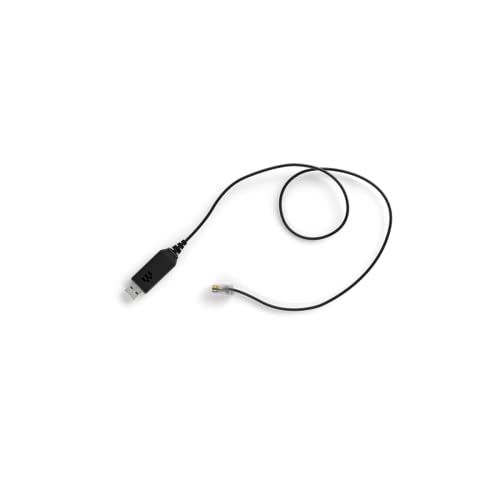
Cisco Headset 530 Series Cable RJ-9 to Quick Disconnect - Spare – Charcoal, 2-Year Limited Liability (CP-HS-W-RJ=)


Final guidance
Treat an RJ9 headset as a chain, not a gadget. Identify the phone by its full model, choose the route its maker intends, match a QD family to a validated cable or amplifier, and only then indulge preferences about ear coverage, wearing style, and boom design. Set levels with a real caller, label every cable, pilot before a rollout, and keep spares for the parts that flex and wear. Followed in that order, the result is unremarkable in the best way: calls that sound clear, necks that stay level, and a handset that finally gets to rest in its cradle while the conversation carries on without it.